• Photography
  • Interviews
  • Business
  • Reviews

Tiffinbox

Inspiring Photographers

  • Home
  • About
  • Blog
  • Contact

File Naming Conventions For Photographers

January 24, 2011 by Leon Sandoval

This is a guest blog post by Leon Sandoval, Colorati's CEO. While he may be a tad bit too modest to say so, based in Carlsbad, CA Leon and his team provide the very best post production services in the business and help make for some very happy photographers.

Greetings, Tiffinbox community!

When Seshu and I had a conversation about content for a video tutorial I knew without a doubt we had to talk about file naming. Clearly, it's one of the workflow elements that seems to cause photographers the most trouble. There are no standards or guidelines and we all seem to have learned by trial and error.

What I've seen is that people either abandon file naming altogether or get too fancy. And sometimes we see a combination of naming conventions within one event that simply do more harm than good.

Good file naming will help you do the following:

a) Sort your files by file name in any software on any computer and see the timeline as it took place in real life.

b) Easily find the files you are looking for. Speed and efficiency are key here, so having unique “tags” can help.

c) Achieve more consistent results in regards to White Balance, Exposure, Contrast and other aspects of your visual editing.

Will this tutorial answer all of your questions and solve all of your problems? Unlikely. My hope is that it gets you thinking. Hopefully you'll walk away with a couple of tips that set you on the right path to a creating a system that works well for you.

Enjoy this exclusive Tiffinbox video tutorial from your friends at Colorati!

Filed Under: Photo Technology, Photography, Photography Workflow Tagged With: colorati, file naming, file naming convention, file naming conventions, naming conventions, photographer, Photographers, sandoval, suggestions, video tutorial, Wedding Photography

3 Simple Techniques To Elevate Your Photography

January 20, 2011 by Trevor Rideout

This is a guest blog post by Trevor Dean Rideout, a lifestyle and family photographer based in central Newfoundland.

So you’ve conquered exposure, you confident in your ability to shoot in manual or priority modes and your getting some great feedback on your photography. What next? Well here are three things to apply to your craft, that don't cost money, you can apply in-camera, and will improve your photography overnight!

These techniques are simple in theory but take time to become second nature. Don't fret and as the saying goes, “practice makes perfect”.

1. Focus On The Eyes

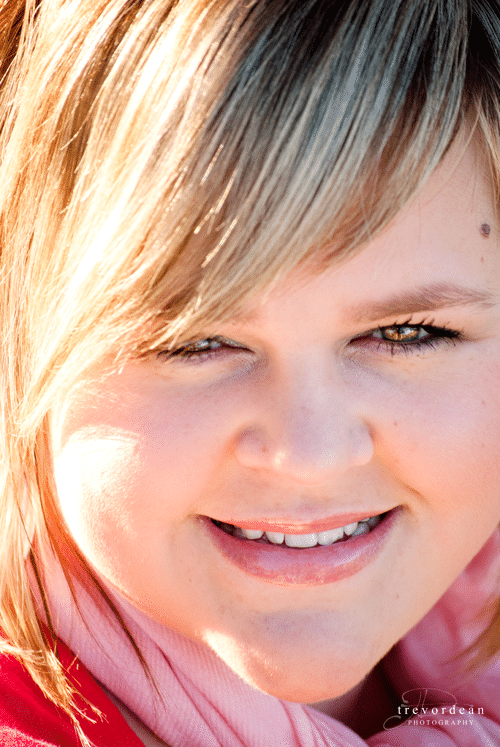
You've probably heard this expression more than once and may be wondering to yourself, “well what does that mean?”. The concept is simple. Set your focus mode to center focus. Most if not all camera's today have the ability to move your focus zone around between those little squares in your camera, but for now let's just focus on the very center. When shooting portraits, it is usually the most ascetically pleasing to shoot with a wider aperture. This helps to separate your subject from the background and gives you nice creamy backdrops. The biggest issue here, is that the result of opening your aperture nice and wide, decreases you “depth of field” (DOF). Wherever you zone in that focus point, is where your subject will be most in focus. To guarantee the best results you need to focus on the eyes. As humans, our first instinct when viewing a photograph is to look at what's in focus, and in portraiture, the most important element is the eyes.

So, have a look through your viewfinder, line up that little square right over the eye that is closest to you and press your shutter half way down. This will lock in that focal area and give you nice sharp results on the eye that you've chosen. Whatever else falls outside of the DOF at this point is irrelevant. Sometimes, you may not be able to frame the scene exactly the way you want it, if you just focus and shoot in the one spot. This is where locking in your focus (half press of the shutter) and then recomposing your shot, comes in to play. As long as you do not move the camera forward and backward, you will stay within your focal plane, and the chosen point will stay in focus. This is absolutely essential when shooting at anything wider than f5.6 but should become common practice whenever your photographing people.

Trevor Rideout

Trevor Rideout - Focus On The Eyes

2. Watch Your Crop!

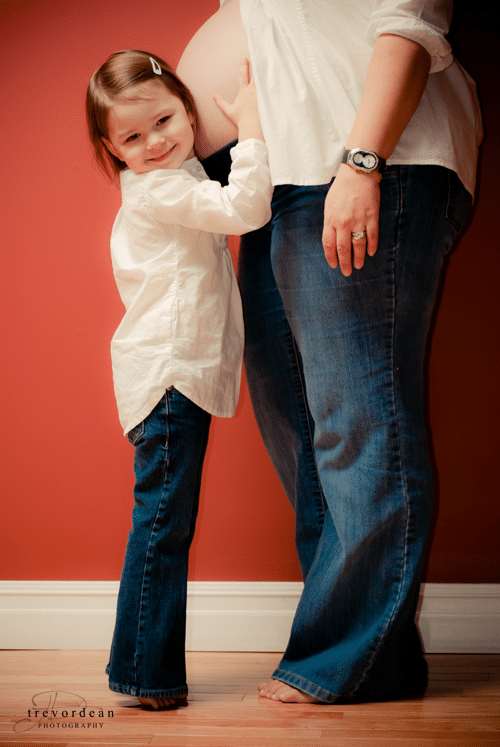
I see this mistake made probably more than any other when photographing people. If you're not careful about where you frame your subject, you may end up cutting off fingers, toes, limbs, etc. While this is probably something you may have never noticed, it is commonly accepted rule in Art. There are though, what we call “crop points”. The general rule you need to remember, is don't crop at anything that bends. Most commonly you will see fingers cropped at the edges of the frame. Standard crop could include about midway down the bicep, above the waist (midway between the sternum and waistline) and about midway between the waist line and knees. When you crop at other sections of the body it tends to make the subject look amputated and is not considered ascetically pleasing.

Trevor Rideout - Watch Your Crop!

Trevor Rideout - Watch Your Crop!

3. Watch Your Backgrounds

This is also one of those things that you need to become completely aware of when photographing people. It requires what you might refer to as “situational awareness”. When you’re composing your photo you may want to include some of the background to help better portray the story you’re trying to tell. What you need to watch for is objects passing through your main subject. Commonly it would end up being power lines, tree branches and other architectural features; although I have seen some instances that involve much more hilarity. You have to keep in mind that we see in 3 dimensions, but our camera's only have the ability to convert that scene into 2 dimensions. This means that you may see your subject in front of a very compelling backdrop with lots of people and things behind them, but your camera may tell a different story. Deeper in the frame, objects tend to shrink, in relation to your subject. This could mean that although you see a person walking down the street, once compressed, that person could be walking right into your subjects ear (as a less likely, but more comical example). So keep your eyes open and make a habit of scanning the entire viewfinder area. When we're first starting out, we tend to focus on one thing … whatever the main subject we're trying to photograph. Try to make a conscious effort, whenever you’re composing your shot, to take a quick scan around the entire area of the viewfinder. This will also help to better express your vision. Think about what you want to include in the frame and what you don't. Even though our higher resolution sensors allow us to do some pretty heavy cropping in post, it is always better to nail it, in camera, and have the ability to work with the entire resolution of the photo.

Trevor Rideout - Watch Your Background

So there you have it! Three simple techniques that you can apply right now. They don't cost any money, don't require any special software but they will take time to perfect and make second nature. Practice these techniques daily and before you know, you won't even know you're thinking about it!

Since this blog is all about learning and sharing, how about dropping a link to one of your images (use Flickr if you have to) that uses one or possibly all that Trevor has talked about in this post? Don't spam the comment box. One entry per person please. So, what are you waiting for? Let's see some of your images! If you do post anonymously, I reserve the right to delete your comment.

Filed Under: Uncategorized Tagged With: aperture, camera, cameras, depth of field, digital single lens reflex camera, elevate, elevated, optics, Photography, point and shoot camera, science of photography, shutter, techniques, trevor dean, trevor dean rideout, viewfinder

Learn 25 Kick Ass Lighting Scenarios

January 19, 2011 by Seshu | Editor & Publisher

I am a huge fan of photographers who can teach. Ones that do it with clarity and wit are a minority, however. Jason Groupp is one among them.

The first time I met Jason was at a photography convention where he patiently looked over my sample wedding albums, and played mentor for about an hour. It was a memorable discussion and we soon stayed in touch, especially as I attended workshops that his New York City studio hosted. More recently we have been in touch via Twitter. While we go back and forth about the Jets and Patriots (he is a Jets fan for some unknown reason – Ha!), he let it slip that he was producing a DVD about off-camera lighting. Now, if you have followed this blog along for some time you already know how crazy I am about learning to light – people, objects, scenes, whatever. I was intrigued but Jason kept a tight lip about it, until recently.

25! from Jason Groupp on Vimeo.

From Jason Groupp's website about his DVD called “25 Kick Ass Lighting Scenarios”:

“In this DVD, I will demonstrate 25 easy to remember, simple to complex, lighting setups on a LIVE SHOOT! Did I mention it will all be done with equipment that won't break your budget?

Have you ever struggled to take great portraits of your clients because you don't have decent light to shoot them in and are not comfortable with off camera lighting?

I will break down these 25 easy to use lighting setups that you can adapt and call your own. This DVD isn't about fancy hard to understand ETTL techniques, I'll show you my easy to use “shoestring TTL” techniques and how you can create your own “no excuses bag”.

Here is another clip from the DVD:

#12 – “25” DVD || Setup: “St Marks” (low res) from Jason Groupp on Vimeo.

Well, today happens to be Jason Groupp‘s birthday. He won't tell me how young he is, but he did say he would offer Tiffinbox readers a great deal on his new DVD.

How would you like 50% off? Here is the code you need to use: “imaging2011” to buy 25 Kick Ass Lighting Scenarios TODAY! The deal saves you 50%. Original price: $150. Your price: $75.

It lasts through 12 midnight tonight, that's EST. So hurry!

(Want the deadline extended? Jason has this challenge for me. If at least 10 people buy the DVD today – leave a comment below saying you did and I'll verify with him – then he will have the code available to us for at least one more day. But the catch is, 10 people need to step up and buy the DVD today! Personally, I think this is a terrific deal.)

Still not convinced? (You gotta be kidding me! LOL!) Jason is offering this exclusive viewing of another episode for you to check out:

Please let me know if you purchased this DVD. I do not make a red cent off of the sale. I just think it is valuable, useful information you can put to use right away in your photography. If you did buy it and watched it, please comment below with your thoughts. I'll try and get Jason to respond to them. Thank you!

Filed Under: Literary Events, PhotoBlog, Photojournalism, Uncategorized

Photographers, Be Found Locally

January 18, 2011 by J Simoneau

This guest post is by John Simoneau the founder of “The Directory of Specialized Photographers” at LocalPhotographyGuides.com. He says, “I am a proud husband and dad to 2 Disney Princesses and love to chat about photography.

Photographers. What if I was to tell you that search engine optimization (SEO) simply doesn't matter anymore? Don't worry about it! Stop link building, stop forcing keywords in your blog titles, don't worry about what “meta tags” are or even what Google's new “Caffeine” search index is. Just kick your feet up and relax. Use all that spare time to spend with your family or being creative as a photographer.

Well, unfortunately I'm not here to tell you that. Search engine optimization is the most practical way to gain new photography clients at this time. The reason why is that it is a “direct” marketing approach rather then a “creative” one such as print ads in magazines and coupon books. It's quite simple really. We live in a time that people use Google for anything and everything. When someone uses Google for the term “photographers,” they are looking for a photographer. When they purchase a magazine, see your vehicle graphics, or view some Google adwords, they are not looking for a photographer. Only problem with SEO is that it's so time consuming and that it's been figured out. Sometimes a couple hundred photographers in each city are all competing daily for the 1st page of 10 results that search engines provide. It's really quite stressful and something photographers shouldn't have to worry about!

Then we have Social Media. In 2009-2010 studies showed that 78% of people trust peer-to-peer recommendations rather than ads. Not only that but social media networks is a step ahead of SEO in the sense that you can actually attract new clients in BEFORE they are even looking for a photographer. They notice and remember your photography from a friend sharing on Facebook and other social networks. It's free “creative” advertising with no-telling how many thousands of impressions your branded portraits are getting. Social media sharing is also a quick way to get your photography noticed worldwide for traveling photographers. Search engines can be quite weak in some of these areas.

Coming from the photography industry myself, I really wanted to research, analyze, and embrace the very best method to combine as much of this as possible and build the very best resource on the planet for connecting photography clients with quality photographers. I wanted to create a system that could eventually take some of this unnecessary technical marketing weight off of our photographer's shoulders. The problem was that the photography industry is so riddled with websites trying to make photographers feel as though they have such a miracle solution that it was going to be a really tough sell.

Our team finally came to the realization that the strongest offering was going to be to build a photographer directory. The sound of it almost made me cringe after seeing so many others online who focus on ads, affiliates, selling links, giving links, etc. None of them seemed to be focusing on connecting clients to photographers and most of them had very poor quality of photographers listed. It was quite a mess and a scary idea to start but seemed like the only solution that could force this much needed and entirely new direct marketing approach into the photography industry. So “The Directory of Specialized Photographers” was born.

From our launch we had support from several very popular and highly talented photographers including Baby As Art, Daniela Degrassi, Ashley McNamara, Nicole Goddard and many more! We have even featured some of these photographers on our homepage in a very unique way by quoting their styles which helps in setting our theme. We've created profiles to highly complement any styles of photography that may be needed in the future. Our social media sharing buttons have brought many thousands of visitors to our website alone and has been a huge hit! We are search engine friendly and offer no ads to any vendor outside our own featured photographer banners. We have finally created a virtual photographer phonebook for clients to utilize that focuses 100% on showcasing each and every one of our featured photographer's talents!

Please join us in pioneering this new amazing photography product that is beginning to bypass photography clients from utilizing search engines entirely. Visit “The Directory of Specialized Photographers” at LocalPhotographyGuides.com (link) and request a free or featured listing anywhere in the United States! Some of our guides have just recently been released so if this is your 1st time visiting then you be sure to visit one of our more filled listing pages such as our Los Angeles Wedding Photographers or San Diego Newborn Photographers.

Some time in the future I'd love to speak a little about our brand new international community and how it integrates with our directory offering but until then please visit our forums to register and post an introduction. Your account will be upgraded to 6 Months of Pro Access FREE for the next week! I look forward to working with you!

What are you doing to be found locally? Please sound off in the comments section below.

Filed Under: Marketing, Photography Tagged With: directory listing, google, john simoneau, locally, Marketing, photographer, photographers directories, Photography, photography guide, photography photographer, search engine optimization, search engines, visual arts, Wedding Photography

How To Create Blog Montages Using Storyboard

January 12, 2011 by David Macvicar

This guest post is by David Macvicar. He and Sean McGrath are wedding photographers based in Nova Scotia, Canada. Storyboard is their bright idea.

Have you ever wanted layout photos like in the image below, but were absolutely defeated by the number of steps and amount of time required to make this happen?

Storyboard Example 1

I think the process goes something like this: Create a new image at the right size, open up each image, resize, drag, resize again, nudge image, etc. etc. Even with an action, you are still doing a number of steps that slow down your blogging workflow. Wouldn't it be fantastic if this process was completely automated and worked at the touch of a button, or a simple run of an action?

That's why we created a photoshop script called Storyboard. It makes blogging diptychs and multiple image layouts as easy as selecting the images and clicking a button. We built this tool for ourselves, because we didn't have time to do layouts the traditional way, but just loved the impact they have on a blog post.

So what exactly is Storyboard?

Storyboard is designed for photographers who blog their work and love to show numerous images which provide a sense of storytelling. Diptychs, triptychs and other combinations of images are perfect for telling a story from a wedding or a portrait session. It works with any blog size & color, any number of images, any combination of aspect ratios, and best of all it was designed with speed in mind. We wanted it to be as fast as possible to build image layouts for your blog.

Why use Storyboard?

We have heard from photographers who have resorted to a tonne of different ways to handle this situation – create actions that still require a lot of user input, photographers who have created InDesign documents with predefined layouts (who wants to jump between different applications!?) and a few other situations which were less than ideal. Other blogging actions often lock you into pre-determined blog sizes (900px, 750px, 600px to name a few) … what if your blog is a different size? What if your blog background features a different color? It's much better to have options than it is to be pigeon-holed into some other photographer's idea of how to blog. Since creating these layouts is a challenge and the brands and blogs of photographers all vary, we thought it was time to solve this problem and provide the best solution for blogtographers! With Storyboard it is possible to create an entire blog post worth of images in just a few minutes.

What does a storyboard look like?

Here is a basic example:

Storyboard Example 2

And here is something a bit more complex:

Storyboard Example 3

How can I configure Storyboard to work with my blog and workflow?

Storyboard is a simple script, but has a powerful configuration panel. Within a minute you can have it working specifically for your blog. Here are the parameters you can change to work with your blog:

– Set your blog width
– Set the space size between your images
– Change the background color to match your blog brand
– Run actions before your Storyboard saves (perfect for running web sharpening actions)
– Save your Storyboard's automatically and have them close out for quick workflow speed
– Choose your destination/save folder and filename
– Handy archive to folder feature moves images you have already used into a folder of your choice
– Visual re-ordering of your images in your Storyboard by seeing thumbnail order of your images (get the most visual impact by choosing the image order)
– Loop Mode: Storyboard will prompt you to keep making boards – the fastest way to create a blog post

Check out this video on how to configure Storyboard for your blog:

Availability

Storyboard is available at an introductory price of $54.99. Get your copy here and to learn more about Storyboard visit us on the web at http://www.storyboardrocks.com/

Win! Storyboard is generously offering ONE free license to a Tiffinbox subscriber. Here is how you may be able to win this awesome Photoshop Script.

1) Subscribe to the bi-monthly Tiffinbox newsletter

2) Tweet the following:

I just learned about an amazing new Photoshop Script for blogging @Storyboardrocks on @PicSeshu’s Tiffinbox.org Please RT!

IMPORTANT: Don’t forget to mention your Twitter handle so that I can make sure you have done both. I need to see a minimum of 50 real, honest, entries before I can give this away on January 20, 2011.

David and Sean also want to mention that anyone can enter this contest. If you have previously purchased Storyboard, you can still enter and they will just refund you.

Filed Under: PhotoBlog, Photography, Weblogs, Weddings Tagged With: aspect ratios, blogging, combinations, david macvicar, image resize, images, layout photos, montages, nova scotia canada, Photographers, photoshop script, portrait session, sean mcgrath, storyboard, storytelling, triptychs

Web Design & Usability Essentials For Photographers

January 11, 2011 by Zach Prez

Today's guest blog post is by Zach Prez. He says: “I'm a dad and social cyclist who loves to talk marketing over a cup of Lipton tea. I write about SEO, email marketing, social media, and web design for photographers over at http://photographywebmarketing.com”

Last week I was walking through the dreaded mall with my family. As I browsed the storefronts and window displays I realized marketing at play. I’m carrying what feels like 200 pounds of shopping bags, pushing a stroller and am in no mood to browse. I take about 5 seconds to glance at each store’s design and promotions and decide with my subliminal consciousness if I skip it or take a closer look. I peek through the window as I shove some more goldfish crackers into my toddlers’ mouths. Do I have time to go in? Anything in there I need to buy?

I often think about the amount of marketing that goes into those windows; hooks and promotions used to get me in the door. Then there’s the marketing inside the store to turn me from a person browsing to a new customer. Many things at play move me toward a purchase: clear navigation, lack of clutter, style, social proof, no wait time, product placement, and marketing messages. The same 7 concepts apply to your website and become critical in converting the window shoppers to paying customers. The first item, clear navigation, is discussed below and you can pick up details on the other 6 in my Photography Web Marketing Guide.

Create Clear Navigation

Start with navigation because edits are fast, easy, and you need to move your customers toward a decision as quickly as possible without losing their interest.

A homepage is the most visited and most important page of the site. Many new visitors (potential clients) begin here. In looking at your homepage, is it clear what you want them to do?

If I were to offer you a potential client right now and send them to your homepage, what do you want them to do? Think about exactly what you want them to read or click. My guess is you want them to contact you and book an appointment immediately more than you want them to read your blog or mobile website.

Plan out specific goals for the page and the importance of each goal on a scale of 1 to 5. For example:

  • Contact me to schedule an appointment – 5
  • View my photo gallery – 5
  • Subscribe to something (Email, Facebook, Twitter, RSS) – 3
  • View my photography blog – 1
  • View informational text or other important pages (About me, Pricing, etc) – 1

In this case, your homepage should look like this

View My Photo Gallery Contact Me to Schedule an Appointment
Subscribe for great information: Email | Facebook | Twitter | RSS
View my blog
Text about me
Links to important pages

Notice how each section has clear text that tells the user what to do (View… Contact… Subscribe…) and the least important information is smallest and at the bottom of the page. The same can be said for top navigation on a site or blog.

As a new user to your website I want:

  • examples of photos (Galleries)
  • information about the photographer (About)
  • pricing information (Pricing)
  • contact information (Contact)

Those should be the first links in your navigation. Don’t confuse people with clever names like Investment. Does that mean pricing? As a user I’m not sure and might not click it. Remove any unnecessary links like Client Proofing since that has no relevance to new customers.

Effective navigation can be easily obtained by reducing the amount of choices given to a user. If you have kids you know what I mean. Offer them 10 different candy bars and you’ll be in a decision stalemate for eternity. Offer 1 or 2 and they’ll choose quickly. Focus your user’s attention on the most important actions by removing clutter.

Want to learn more from Zach Prez? Buy his new e-book, “Photography Web Marketing Guide” that takes on a whole lot of topics that will be of interest to working photographers who want to excel in their online marketing efforts.

If you liked the post, or have a perspective you think might help us understand this topic better, please post your comments below.

Filed Under: Business, Photo Biz, Photography, Web/Tech

Will You Be The One To Cure Sonia?

January 1, 2011 by Seshu | Editor & Publisher

This post has little to do with photography – tips or tutorials. It has everything to do about stepping up and helping a complete stranger because their life depends on it. And, yes, you … YOU … can do something about it … NOW!

A couple of days back I received the following letter from Shilpa Nanduri:

I am writing to you because a friend of mine, Sonia Rai, who is just 24 years old, was just diagnosed with Acute Myelogenous Leukemia (AML) and is in urgent need of a bone marrow transplant.

I am requesting you to please help spread the word about Sonia and her family's effort to save her life.

They are currently organizing many bone marrow drives over the next few weeks in several cities. Visit www.curesonia.org for more information. Please keep checking back, because more cities will be added.

“Team Sonia – Sonia’s brother Sumit Rai, family and friends are organizing drives today and in the next few weeks. Please take the time to help spread the word about the drives and join the National Marrow Donor Program registry if you have not already done so.”

From Sepia Mutiny:

“As you may be aware from our previous posts on the topic, the National Bone Marrow Registry (NMDP) is in dire need of more ethnic donors. South Asians, as well as any minority, and especially people of mixed ethnicity are needed. Sonia is currently receiving excellent care at Massachusetts General Hospital in Boston, but in order to survive beyond the next few months, she requires a bone marrow transplant. Most matches occur within ethnicity and increasing the number of South Asians registered as potential bone marrow donors will help Sonia as well as many others who are searching.”

Please direct people to www.curesonia.org to find out how they can help. They can help by attending a drive and thus registering with the National Bone Marrow Donor program and / or by hosting their own drives (which is much easier than you would think, all the necessary support will be provided).

All new registrants added to the national registry might help not only Sonia, but also many others searching for a bone marrow match.

So, as we start the New Year today, allow me to ask you: Will you be the one to step up and register? Will you be the one to save Sonia's life or for that matter anyone else's life?

As you embrace the New Year, I also ask that you embrace this cause. This isn't the first time I am asking you to do so. Back in 2007, I appealed to you to help my cousin Vinay Chakravarthy. His friends and family rallied to have more than 50,000 people register. Yet, we are still short on finding matches for people like Sonia.

If you are the type to make every day count, shouldn't you jump in an register yourself with the National Bone Marrow Program registry today? Please remember that people's lives depend on it. Maybe even yours.

Welcome to a day filled with one's. It's 1/1/11. A very Happy New Year to you all.

Filed Under: Call To Action, Desi, Personal, Volunteer

“Going Amateur”

December 29, 2010 by Stuart Sipahigil

This is a guest post by Stuart Sipahigil. He is an amateur photographer in the traditional sense of the word; that is, he does it for the love of the craft. His photographs have won awards, appeared in publications, and have made their way into homes and businesses around the country. Stuart also teaches workshops to help other amateur photographers find great photographs close to home. Stuart’s work can be found at TheLightWithout.com.

So, you're “just” an amateur photographer… but you've discovered that you have a love for making photographs and you seem to be pretty good at it. Your friends and family are telling you they love your photographs and several have said you are “good enough to be a professional.” Maybe you've entered a local photography contest or two, and you've done pretty well. Or perhaps you've even sold a few prints of your photographs to the local coffee shop or restaurant.

Now you're thinking to yourself, “maybe I could be a professional photographer,” and then, “how would I do that?” So you check out a couple of books about being a pro photographer — David duChemin's VisionMongers: Making a Life and a Living in Photography or Dane Sanders' Fast Track Photographer, for example — and discover that it's actually quite a bit of hard work. You already have a career right now and well, it's paying the bills and you're doing okay, even in this economy. Shifting gears to becoming a pro is a big change and would disrupt your life quite a bit. It might be doable, but it would be painful, and you're just not sure it would be worth it.

So now what do you do?

Traditionally, there were the only two paths available to you: turn pro, with all of the responsibilities that entails and the costs associated with it. Or remain an enthusiastic amateur, occasionally selling a print or two at your local art fair, or maybe shooting your cousin's wedding for a few hundred bucks (and thus, pissing off an entire group of professionals—but that's another story). However, I think there are several other choices you can make; several other paths you can trod that don't involve becoming a traditional “pro” to find satisfaction as a talented amateur photographer.

The Internet has changed everything. You have many more outlets for your work now than ever before. Traditionally, if you wanted to get your photographic work out into the public eye you had only a few choices; magazines, gallery showings, or stock photography, for example. Today, you can sign up for a blogging service and start your own photography blog, publishing your work to a worldwide audience in about five minutes. If you're a little more ambitious, you can self-publish your own “coffee table” book of your photographs using services like Blurb or Inkubook. Or publish a photography ebook, either on your own or through a publisher like Craft & Vision. All of these things were prohibitively expensive and perhaps even impossible to do on your own only five years ago.

There used to be an old saying, “Those who can, do. Those who can't, teach.” That's simply not true these days (and it never really was). Many professional photographers like Joe McNally, David duChemin, and Zack Arias — all terrific photographers — offer workshops and seminars about the vision, the craft, and the business of photography. But not everyone is ready for (or can afford) workshops with these big names.This can create an opportunity for you to step up and use your skills to help others that are as passionate about this craft as you are. Is there a local arts center in your town? This can be a great place to start and to hone your teaching skills. If you don't have that opportunity, why not just try leading a few photo walks, either on your own or in concert with Scott Kelby's Worldwide Photo Walk in July? Signing up to be a walk leader is easy and can get you started on the path to becoming a photographic instructor.

Are you good at talking about photographic tips and techniques? Do you think you can interview other photographers? Maybe you should start a photography podcast. In a few minutes, you can set one up in Apple's iTunes and publish it to a worldwide audience on a regular basis. The folks at Faded & Blurred have done just that, combining it with their own regular photo walks and a lively online community to create a terrific resource for passionate photographers.

If you are currently a professional photographer, you too can benefit from “going amateur.” I don't mean that you should give up your business and find something else to do, but to try to carve out a little time in your life to do some work for yourself. Personal projects are your connection back to why you started in the field to begin with: your love of photography, the feel of the camera in your hands, and the joy of seeing something that moved you appear on film or in the LCD. There is enormous value in removing the pressures of running a successful photography business and just do it for yourself.

Maybe there are other opportunities that you could use to expand your business (and reputation) as well. Matt Brandon, a professional travel and humanitarian photographer, publishes regular interviews with other pros like Ami Vitale, Gary S. Chapman, and Chris Orwig on his Depth of Field podcast. David duChemin created the Craft & Vision eBook publishing business by starting with a few of his own ideas about photography. Chase Jarvis has added The Best Camera, a best-selling book and phone app, as well as the Creative Live educational video series to his successful endeavors. Many other pros are adding to their repertoire of services by taking advantage of these new avenues.

And if your photography business isn't very successful, why not step back and take a fresh look? Is it just a production job for you now: prepare, shoot, post-process, deliver? Have you lost that love for the art that you used to make? Perhaps it's time to re-think photography as a professional career. That may seem a bit harsh, but I'm simply saying your photographic life might be more rewarding without the pressures of trying to make a living at it. Or perhaps you just need to shift gears and, like some of these other pros, add some new roles to your career, such as broadcaster or teacher. There may be opportunities available to you that you just haven't considered.

There are great rewards to becoming a professional photographer if you're willing and able to put in the time and effort it requires, but there is no shame in trying to be a great amateur photographer. Making money with photography doesn't always equate to making exceptional photography. If you love photography and want to do more than just make slideshows for your friends and family, there are more opportunities now than ever before. Overcome your doubt and hesitation, step out and see what you can accomplish as “just” an amateur.

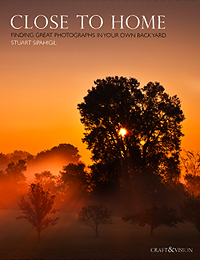
Please support this site and buy Stuart's awesome e-book, Close To Home, through the Craft & Vision website. [affiliate link]

Filed Under: Photo Books, Photo Exhibit, PhotoBlog, Photography Tagged With: amateur, amateur photographer, david duchemin, event photographer society, fast track, photographer, Photography, photography contests, Photojournalism, professional photographers, stock photography, stuart sipahigil, Wedding Photography

5 Reasons You Should Attend The Mystic Seminars

December 28, 2010 by Seshu | Editor & Publisher

The Mystic Seminars run from January 6-9 and yes, that's in Mystic, Connecticut. Not terribly far from the famed aquarium, so you could really hit two birds with one stone, if fish is your thing. I assure you, that both will be fascinating, but the former will actually inspire your photography and may just make you more money in 2011.

So, my question to you is a simple one: are you attending the annual Mystic Seminars?

Here is the complete lineup of speakers:

Yervant, Jennifer Hudson, Jesh De Rox, Cliff Mautner, David Beckstead, Justine Ungaro, Michael Greenberg, Joseph Victor Stefanchik (JVS), Todd Laffler, Davina + Daniel, Chuck Arlund, Matt Mendelsohn, Sergio, Sean & Melanie McClellan, Angela Carson, John Edgar, Doug Gordon, Andrew “Fundy” Funderburg, Richard Esposito and of course Mystic Seminars' founder, Walter Van Dusen.

It's going to be quite a show. Some are well known names in the business. All of them have been around the block and know what's what in the industry. A few photographers on that list offer workshops and I have attended them (yes, on my own dime). Some, I can even claim to call my friends. But it isn't some freakish form of nepotism that makes me ask the question again: are you attending the annual Mystic Seminars?

If you have the usual gremlins asking, no, doubting your intentions for going to the Mystic Seminars this year, here are 5 reasons why you should attend this annual event:

1) You'll be inspired by what other photographers are doing – craft, vision and business.

2) If you consider yourself even a wee-bit shy, the seminar is a great place to break the ice and connect with other photographers. Think networking for referrals or 2nd shooter opportunities.

3) It will put the “social” back in social media. Do you follow some of the speakers I mentioned above on Twitter or Facebook? Well, there is no better opportunity than the seminars to step up and introduce yourself.

“Social media shouldn't replace being social in person. It should enhance it. Nothing beats face to face.” – Scott Stratten

4) Giving yourself the time to get out of the home-studio/cubicle for a few days to recharge your batteries is the sanest thing you will do for yourself and ultimately your business

5) It's at the very beginning of the year. What you are doing now and in the early part of the year for your business can make or break it.

If you are a wedding photographer or a portrait photographer, it just makes sense to register for this event. This year, the presentations will run over four days at the Mystic Marriott. Each of the photographers mentioned brings a completely different aesthetic to their approach. The diversity is intentional and I applaud Walter for bringing us a very well organized event year after year.

The cost for early-birds like me was $400. If you want to go now, it will be $600 and I say it's still worth it. If you can't make all 4 days, don't fret. Walter is offering day passes at a very reasonable $200, until TODAY or whenever they get sold out.

Yes, the event is in January. Brrr! Right? Well, thankfully the presentations are all going to be indoors. And I really have no excuse to miss it since this takes place right in my back yard (well, close to it).

So, who will I see at this year's Mystic Seminars? Sound off below. If I hear from a bunch of you, perhaps we can plan on doing dinner together? Let me know. I know it will be fun to connect with you all. Let's take this opportunity in early January to reinvigorate ourselves for what will be an incredible 2011 wedding and portrait season.

Filed Under: Conferences, Photography, Portraits, Weddings Tagged With: connecticut, jennifer hudson, mystic, mystic marriott, new london county, photographer, Photographers, portrait photography, seminars, walter van dusen, Wedding Photography

Growing Tiffinbox In 2011 With Your Support

December 27, 2010 by Seshu | Editor & Publisher

Tiffinbox, at its core, is about providing solutions and resources for photographers, by building a community of “go-givers.”

Will you join me in making this happen?

For 2011 and beyond I am looking to grow Tiffinbox into something much bigger. As the diversity of guest blogs have shown in 2010, I know that a group effort is much more interesting for all.

7 Things You Can Expect From Tiffinbox In 2011?

1) Video Interviews with photographers

2) Tips on how you can use social media to grow your photography business

3) Portfolios from emerging photographers that will inspire you

4) Reviews of the following:
– popular Photoshop Actions and Lightroom Presets
– photography equipment
– workshop DVDs, seminars and conventions
– online solutions to streamline your studio workflow

5) More fun contests and giveaways of products you will actually use

6) Opinion-editorials on a variety of topics (some even controversial because we still need to discuss them!)

7) A brand new design that will make it easier to find and share information and connect with other photographers

Seeking Your Support

So, if you are just starting out, or, you've been in the photography industry, for a while, I would love to hear from you. If you have any questions, suggestions, tips or heck, even strong opinions about one topic or another, please feel free to email me at – seshu at tiffinbox dot org.

I might be able to answer your question(s) or someone who has guest blogged here might jump in. Or, even better, someone who hasn't written for Tiffinbox before might offer an answer in the form of a quick article.

a) Guest Blogging For Tiffinbox

My heartfelt thank you's to ALL the 2010 guest bloggers here on Tiffinbox.

If you are interested or even ready to guest blog for Tiffinbox, feel free to submit your ideas now. I am scheduling guest posts for 2011 and will publish them in the order they are received. The sooner you send me your pitch, the sooner your post will show up on the site.

If you have been following my Twitter stream @PicSeshu, you'll know that I am pretty good about promoting the articles you see here on Tiffinbox.

The benefits of guest blogging can be summarized by these three points:

1) Helps you take the first steps in establishing yourself as a credible authority
2) Link back to your site from mine (happens to be a PR5 site)
3) Gain a loyal following of your own if you publish regularly here

b) Tiffinbox began as a labor of love. It will remain so for the most part, but I do have expenses to deal with. If you find the content here valuable, please consider the following 7 ways to support this site:

1) Express yourself. Write a guest blog post.

2) Make a small monthly donation of $1 or more (my PayPal address is – fei8ht at gmail dot com)

3) Buy the e-books you see on the right hand side of this site. I wouldn't recommend anything if I didn't think it was of value. Yes, I make a small commission off of each sale.

4) Buy all your camera equipment from Adorama using this affiliate link: http://www.adorama.com/?kbid=66174. Their prices are competitive and their customer service is awesome!

5) If you are into blogging yourself, consider using WordPress and the Thesis Theme (great for SEO) and Hostgator for your hosting needs. Go on click on those affiliate links and sign up.

6) Help Me Spread the word! Tell your friends, blog about Tiffinbox, Tweet or use Facebook to mention a specific blog post.

7) Sponsor a series of posts in a particular month. Contact me for details on ways that I can help publicize your company in exchange as well.

The end goal at Tiffinbox is to create a community of passionate photographers who are looking to openly learn from each other, elevate their craft and thrive in their businesses together.

Thoughts, reactions, responses, suggestions or opinions? Sound off below in the comments. I would love to hear from you, especially if it is constructive. [grin]

Happy New Year To You All!

Filed Under: Photography, Tiffinbox Tagged With: 2011, blog, blogging, blogs for photographers, guest, internet, opinion editorial, photographer, Photography Business, photography equipment, photoshop action, support, technology, Tiffinbox

  • « Previous Page
  • 1
  • …
  • 50
  • 51
  • 52
  • 53
  • 54
  • …
  • 198
  • Next Page »

Subscribe To Tiffibox Treats!

Looking for a well-curated email newsletter that will leave you inspired and motivated about your photography business? Sign up below!

About Seshu

Seshu creates relaxed portraits of families and high school seniors in Avon, Connecticut. He also leads a successful headshot photography studio in Connecticut, helping professionals from a variety of disciplines project the very best versions of themselves. He created Tiffinbox as a way of inspiring photographers, to create better images and successful businesses. [Read More]

Email Templates For Headshot Photographers

Email Templates for Headshot Photographers

Recent Posts

  • How Capture One Changed My Event Photography
  • 10 Steps To Stay Positive In Times Of Great Stress
  • Why You Need To Read “Personal Branding For Photographers” Now
  • How To Master Your Website Content Step By Step?
  • Tony Taafe’s TNT Method For Headshot Photographers

Recent Comments

  • Stephen Davison on Are You A Business Owner Who Is Smart, But Stuck?
  • Ben A. on Don Giannatti Clinches The 8th Annual Tiffinbox Award
  • Dan on Don Giannatti Clinches The 8th Annual Tiffinbox Award
  • Donald Giannatti on Don Giannatti Clinches The 8th Annual Tiffinbox Award
  • Stephen Davison on G.E. Masana’s 6 Strategies For Wedding Photography Success
  • Naveen Kumar on Weddings In India Are More Than Being At The Right Place And At The Right Time
  • kartick on Weddings In India Are More Than Being At The Right Place And At The Right Time
  • Leonid Farbman on 6 Uncommon Trends To Grow Your Photography Business
  • Willow and Finch Wedding Photography on 11 Reception Tips To Help Your Wedding Photography
  • Web Designer Malaysia on How To Optimize Your Squarespace Website For Search Engines
  • Creastan on An Interview With Photojournalist G.M.B. Akash
  • Cindy Brown | Atlanta on An Open Letter To A Local Photographer

Become a Patron!

Copyright © 2026 · Tiffinbox · Site Design by Heather Mackan Creative · Built on Genesis