• Photography
  • Interviews
  • Business
  • Reviews

Tiffinbox

Inspiring Photographers

  • Home
  • About
  • Blog
  • Contact

Visiting With Mr. Rai

March 14, 2011 by Seshu | Editor & Publisher

Raghu Rai is India's most famous photojournalist. A retrospective of his work opened at Aicon Gallery, in New York City on February 18 and wraps up on March 19.

This is an invitation for you to join me and a small group of image makers interested or curious about India. Meet us on the 19th (this Saturday) at the gallery at 10.30 am, to take in the body of work Mr. Rai has created over the last 40 years. We will also meet up for a cup of chai or coffee afterwards. It's essentially a very loosely structured networking event that I want to start doing more often either in New York, Hartford (where I live) or in Boston. If you are interested in photojournalism or documentary photography, you might find kindred spirits among us to trade stories, referrals or more.

Raghu Rai Portrait

Shreeya Sinha, a multimedia journalist and producer, will also join us as well. Having lived and worked in India, for Undesired, I felt she might provide us the right perspective on Raghu Rai's own mostly domestic work.

Aicon Gallery is located at 35 Great Jones Street, New York, NY 10012. If you are lost, please call 212-725-6092. Take the #6 Subway line to Bleecker Street and walk North on Lafayette Street for two blocks, then a right onto Great Jones Street. Aicon Gallery should be on your right hand side.

Meanwhile, check out the recent podcast SAJA hosted with Mr. Rai. Also view his work on the Magnum website. If you are inclined to buy one of Raghu Rai's books, I recommend Raghu Rai's India: Reflections in Colour. [aff]

So, tell me … are you already a fan of Raghu Rai's work? What can you tell me/us about him? Although I am familiar with some of his work, I know little about the man so I am interested in seeing this exhibit in hopes that it will reveal something about him.

I hope to see many of you there. It would be great to know of a headcount before hand so that there are no surprises. Would you please comment below if you are able to make it? Thank you!

If anyone knows who photographed Mr. Rai in the above photograph, please let me know. I would like to credit the image, if it is still ok to display the image.
Filed Under: Photo Exhibit, Photojournalism Tagged With: aicon gallery, arts, gallery, human interest, image maker, magnum photos, New York, new york city, nyc, photojournalist, raghu, raghu rai, rai, retrospective, visual arts

The New Wedding Guest

March 14, 2011 by Richard Esposito

This guest blog is by a good friend and fellow Connecticut wedding photographer, Richard Esposito. In addition to being a photographer, RE as he is known, is also called upon to teach efficient workflow systems to other photography studios. To some lucky ones, he plays mentor. His Emmy (yes, that EMMY) not withstanding, RE is starting to reconnect with his video side and bringing true fusion to discerning clients getting married all over the world.

Needless to say, a lot has changed in the world of photography over the last 5 or so years. Remember film? Using the same camera for more than 3 years? Just about every professional photographer is using a digital camera that gets replaced with a newer, better, version after one year of use. It's become a rather expensive hobby for amateur's and a financial burden for some professionals. With technology getting better and especially cheaper, we've all seen a new type of photographer emerge. Call them what you will, uncle Bob, cousin Carl, or “I have a friend that took a photography class in college.” This is the new competition. And they are getting cheaper than the cost of the camera. I've heard of a number of professionals that have sold everything they had and closed their doors for good. We can't compete with free, or “I'll shoot your wedding and hand you a disc for $500. I know I seem to be getting off topic, but it's leading to our newest issue. You are not the only photographer at a wedding anymore.

© Photographer RE

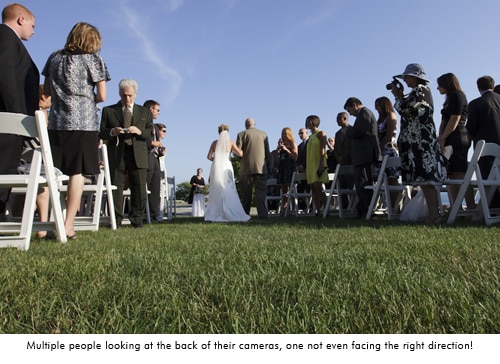
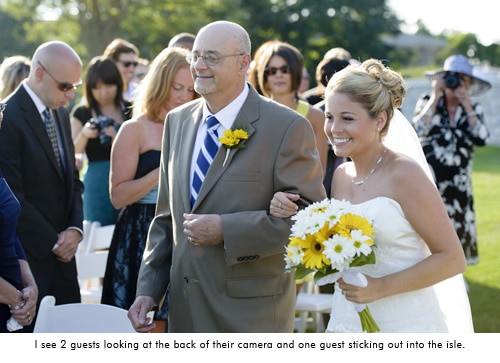
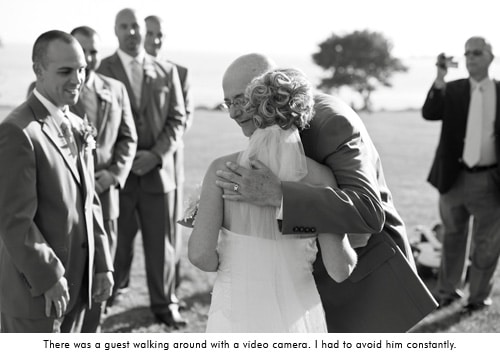
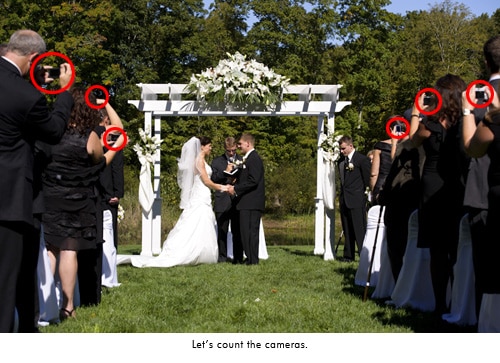
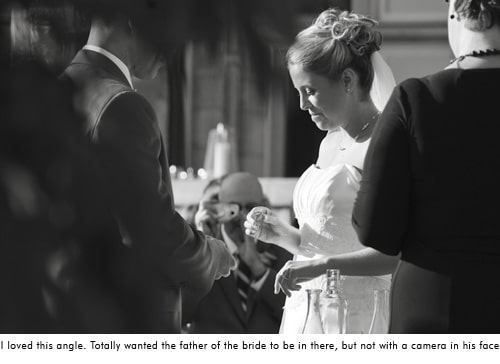
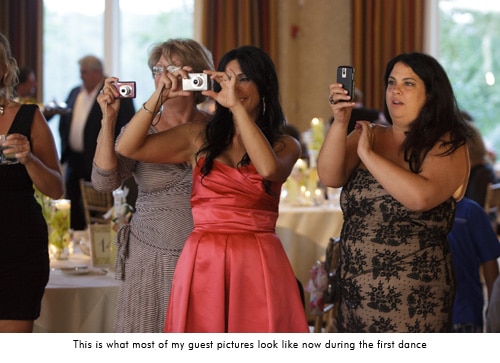
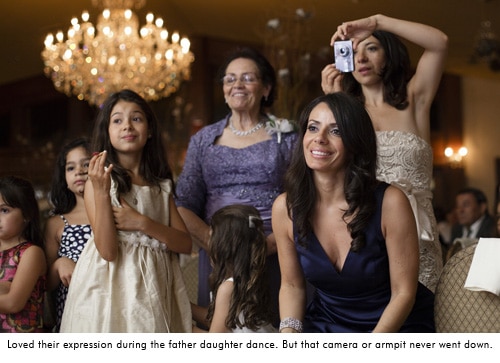
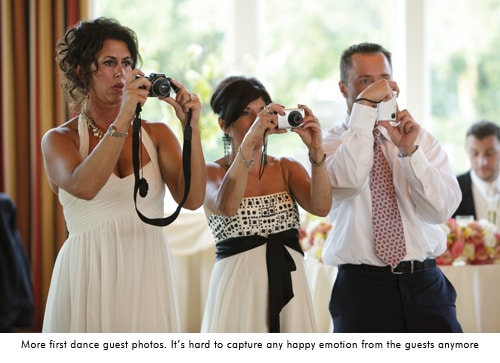
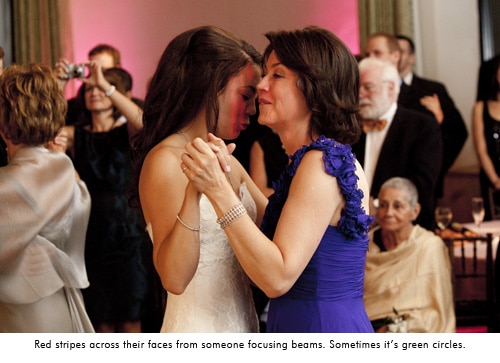
Gone are the days of capturing a sea of guests with genuine emotion on their faces. Now you have to give an elbow to Aunt Clair who's blocking the aisle with her Digital Rebel in hand as the bride makes her grand entrance. I used to love capturing guests emotion during the first dance, parent dance, even the toasts. But now my subjects are a handful of guests with point and shoots held up blocking their faces, or the tops of everyones head because they are looking down at the back of the camera to check the photo they just took. My favorite moment so far was a photo of the bride going down the aisle from behind. Everyone in front of the bride has their cameras up, everyone that the bride has past is still facing the back of the church with the heads down looking at the back of their camera. Very few people stopped to enjoy the moment of a father walking his daughter down the aisle on her wedding day. I did have a beautiful photo of a bride coming down the aisle with great emotion on her fathers face. However there were hues of red and green across them both thanks to all of the focusing beams from guests cameras. That's an instant black and white! The cake cutting has become my favorite time now that I have no room to move around thanks to the crowd of people and cameras. It's amateur suffocation.

You are not the only photographer at a wedding anymore.

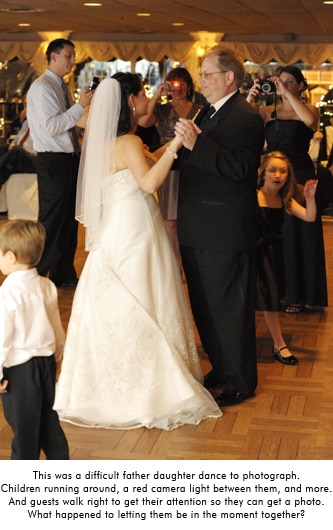
Just when you feel good that you are getting the job done, you're in the zone, there's a tap tap tap on your shoulder. It's Aunt Clair again, Rebel in hand, suggesting “that’s a nice photo of the flower girl over there. Look she’s spinning around! Hey girls look over here!” Well Claire, if you didn't just interrupt me I would be photographing that, but now i missed it so you can talk to me about it. While trying to capture an emotional father daughter dance, someone will walk up close to them and say “Hey, over here!”, completely interrupting the moment just so they can get a photo with their faces smiling at their camera. They completely missed the point. Welcome to a world where lighting, composition, creativity, and emotion don't matter to a wedding guest. All you need is a persons face looking at the camera.

© Photographer RE

© Photographer RE

© Photographer RE

© Photographer RE

© Photographer RE

© Photographer RE

© Photographer RE

© Photographer RE

© Photographer RE

Many of us put out a little slideshow of images at the wedding reception. It's been a great way to show guests your work and generate some business, especially with the reception venue. It also satisfies the instant gratification generation of guests. I've gotten home from a wedding and checked a clients Facebook page to see that she has already been tagged in photos that Uncle Bob took at the wedding. I can't compete with that. I hand out event cards at the reception with the website and password to see the photos “approximately 8 weeks after the wedding.” One night, after seeing the slideshow at the reception, the grooms step father comes up to me with his iPhone and has my online viewing website loaded. He said he couldn't get the wedding. Hello! I'm still photographing it! Really?! Many times I have guests say “Great! I'll check them out tomorrow.” Tomorrow? Let me hand you a few thousand photos, have you review and edit them and see how fast you get them all up. Let’s factor in that it's the end of the wedding season and you've just done 2 weddings per weekend for the last 8 weeks.

It's no wonder that professional Photographers are having a hard time competing with amateurs. We get in their way, we don't know what we’re doing, it takes forever to get your images, and we really expensive! If you think it's expensive to hire a professional photographer for one day, the emotional cost of hiring an amateur lasts forever.

The Price We Pay

So how do we convince an engaged couple to spend $3-10k with a professional? According to Market Watch, wedding photographers are the most overpaid jobs in America, saying “Total work for each wedding is generally a sit-down consultation combined with a single day spent following the happy couple. While equipment costs and film development must be covered, thanks to digital technology such costs have been heavily reduced. Unfortunately for the consumer, photographers do not offer any reduction in price for missed photos, amateur shots, or other mediocre work product.”

So let’s talk briefly about what it costs to be a professional wedding photographer. My second photographer here was looking to buy his own equipment. Just to start off with the basics he was up to $8,000. Imagine the cost of what I carry. Oh, and I have to insure all of it. Then there’s vehicle expenses, commissions for running credit cards, equipment repairs, I spent $1200 on postage this year (postage!!!), continuing education, computer and software upgrades, hard drives, hard drives, hard drives, it costs to make albums, some of us pay staff… I really could go on. Oh wait! providing for my family? Putting food on our table and the discount outlet clothes on our back? A professional photographer doesn’t have a “real job” during the week so we have to pay our own health care for our family, save for retirement, and hope for a weeks vacation that comes out of our pocket. I did 25 weddings this year and my expenses were double the average 2 person family income in Connecticut (according to census.gov).

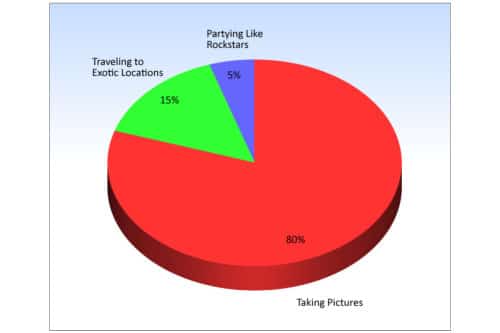
For the other side of the story, the International Society of Professional Wedding Photographers did an awesome survey of photographers recently. I know when I started my business, everyone I knew thought I just worked weekends and did nothing during the week. We have a great lifestyle of taking photos, traveling, and partying.

The Perception Of A Working Photographer

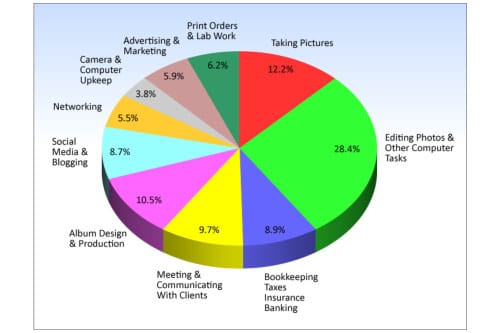
Here’s reality: 70 hours a week through our 6-7 month season and 40 hours a week off season. There is no mention in here regarding time with family, charity work, and taking any time off. Only 12.2% off our time during business hours is spent taking pictures.

The Reality Of  a Working Photographer

If I didn’t have the expenses that I have, or spend this much time getting everything done, I’d be out of business. I’d have to get a full time job and just do photography on the weekend. I’d be your Uncle Bob.

Update from Seshu: Since publishing this blog post above, there have been other similar posts out in the interwebs:

Filed Under: Business, Most Popular Posts, Photography, Weddings Tagged With: camera, competitive world, connecticut wedding photographer, cousin carl, Culture, digital rebel, discerning clients, esposito, first dance, genuine emotion, grand entrance, photographer, photographer richard, Photography, photography class, photography studios, professional photographer, professional wedding photographer, uncle bob, Wedding, wedding guest, wedding music, Wedding Photography, workflow systems

Gary Vaynerchuk’s The Thank You Economy

March 11, 2011 by Seshu | Editor & Publisher

When my friends Rebecca Mead and Kathy Hokunson mentioned Gary Vaynerchuk‘s stop at R.J. Julia's Bookstore in Madison, CT, I jumped at the chance to go see and hear him yesterday evening.

First impression – this dude is the real deal. Down to earth, even if he has made millions of dollars selling wine in his family business or starting Vayner Media, a marketing consulting company. Just check out the way he presents wine on his extremely popular Wine Library TV. When we met he was approachable and extremely generous with his time.

He was obviously at the bookstore to chat about his second book, The Thank You Economy. I had just received it through Amazon yesterday and had not had a chance to read it yet. His first book, Crush It!: Why NOW Is the Time to Cash In on Your Passion, made a phenomenal impact on me. I recommend you get that book as well if you are just starting to explore social media.

The synopsis of his new book is this – our economy is changing to a point where we better become a whole lot more customer-centric, if we want to survive in the business we are in. Once I have read the book, I promise to post an online review. If you want to know more about it, check out The Thank You Economy.

As I said, Gary was extremely gracious when I asked him if he would spare two minutes to speak to you, my fellow photographers, about how the message in his book pertains to what you are now doing in your business. His is a terrific message and I welcome you to watch the video below. Then post your thoughts about what he said. Are you going to be making changes to the way you run your photography business? Share your thoughts with other photographers here.

Thank you, Gary, for your time and for launching this new feature on Tiffinbox called 2 Minutes WIth Tiffinbox. I welcome other authors, artists, photographers to contact me about being featured here as well.

UPDATE: For a quick review read my friend Scott Wyden's review of The Thank You Economy.

Filed Under: Books, Business Tagged With: book launch, books, bookstores, Crush It, Economy, gary, gary vaynerchuk, human interest, new books, selling wine, The Thank You Economy, wine library

56 Rocking Fusion Photoshop Actions

March 6, 2011 by Seshu | Editor & Publisher

When it comes to Photoshop actions, I have a short stack of them that I depend on for retouching my portrait and wedding photography images. I go to these almost all the time, for all my images. We'll talk about which one of those actions made the cut, in a subsequent blog post. So please do remind me.

Jodi Friedman of MCP Actions sent me an email asking me to test a new set of Photoshop actions that she was launching called MCP Fusion Photoshop Actions. So, let me at the outset tell you that I received them gratis for the expressed purpose of reviewing and writing about them here.

The MCP Fusion Photoshop action set combines the most versatile and user-friendly workflow actions with beautiful color and black and white conversions, bringing you an action set with infinite possibilities.

It makes sense to review actions only when you have some really good examples. The image below is from a headshot portrait session I recently completed for my client Carole M.

Straight out of camera, otherwise known as SOOC:

MCP Fusion Photoshop Actions © Seshu Photography

Enhanced using the Liquify filter in Photoshop + MCP Actions' Eye Doctor and The Dentist:

MCP Fusion Photoshop Actions © Seshu Photography

Enclosed action:

MCP Fusion Photoshop Actions © Seshu Photography

Beach House action:

MCP Fusion Photoshop Actions © Seshu Photography

Sentimental action:

MCP Fusion Photoshop Actions © Seshu Photography

Pendulum action:

MCP Fusion Photoshop Actions © Seshu Photography

Color Fusion Mix-n-Match action – Peachy/Rustic/Sentimental/Shades Of Gray:

MCP Fusion Photoshop Actions © Seshu Photography

In addition to the usual actions to enhance color images, this set includes ways in which you can convert images to black & white. Most of the black & white actions I've seen online have been pretty heavy handed at this, but the Black & White Fusion Mix-n-Match is particularly useful because like its Color counterpart, you are allowed to turn on and off layers and of course dial in the opacity for those layers just to get your desired effect. I really enjoyed this level of control to consistently produce images.

Black & White Fusion Mix-n-Match action – One Click Black & White/Highlight Helper:

MCP Fusion Photoshop Actions © Seshu Photography

See more sample images on Jodi's site and check out this video to show you how you would set these actions up in Photoshop (18 minutes):

The Review:

I'll make this short and sweet. I had a lot of fun exploring these actions. Like any other set of Photoshop actions, I am likely to pick and use only the ones that feel natural to me and for what I want to deliver to my clients. In this regard, to each her/his own. There are several among the MCP Fusion Photoshop Actions have just been added to my short stack. Some of those actions you have just seen above. As I promised at the beginning of this post, I'll have a new article describing those to you in greater detail soon.

I almost never use any action at full throttle, that is the opacity is set to less than 100%. What is that magic number? It's very hard to pin down and kinda silly to even divulge because your images and tastes are different than mine. And these actions by MCP are no different. I toned it down several notches to meet my artistic sensibilities.

The mix-n-match actions were great, but even on a fast iMac, they took about 20 seconds to run. This isn't a shortfall of the action set, but I have to admit it did surprise me a bit. And as Jodi put it, that's 20 actions all running at the same time. If you are trying to get something done quickly, try then the individual actions that come bundled within this set. The mix-n-match is much too comprehensive and may be overkill for what you want to achieve. That said, I liked the multiple options the actions gave me. In my opinion, Photoshops actions are as perfect as you want them to be for your own workflow, sense of style or approach to photography.

Jodi's Photoshop actions are well-known in the industry for a reason – she consistently provides a quality product and her level of support via video tutorials, or in my case a quick email response to a quick question, was always greatly appreciated. If you are open to gaining some control back into how your images should look, you will want to get this Photoshop actions set.

Unsolicited words of advice:

1) Have a vision for how you want to retouch your images. What you present to the world says a lot about who you are as a photographer and an artist. Adding actions willy-nilly is no way to correct a badly exposed image. So start there first. No idea what I am talking about? Try this book by David duChemin. Figure out what the end product needs to be, how it will be applied and who your target audience is. Those answers will direct you into the appropriate use of these or any other Photoshop actions.

2) Make sure your monitor is calibrated. If you want WYSIWYG, this is one of the first steps you should take.

3) Use these actions on un-cropped, high-resolution images first. Then resize and sharpen at the very end of your workflow. The MCP Fusion Photoshop Actions include two nifty actions that will do just this for you, so rest easy.

4) Uncle Ben said it best: “With great power, comes great responsibility.” Just because you can use actions and mix-n-match them up, does not give you license to do so. Well, you could, but then your images are going to make your audience gag a bit.

5) Be aware that as you start adding more actions and you mix-n-match them as you can, your file size is going to inflate and your computer is liable to slow down to a crawl. So have lots of RAM and have a scratch disk for Photoshop to play nice.

6) Have fun. If you aren't having fun when using these or any other actions, that means you are just going through the motions of creating art for your clients and ultimately yourself. So, pace yourself, experiment and stick to the plan (ie. see number 1)

7) You are going to be naturally drawn to some actions over others. Let your gut instinct guide you. You'll know when you have crossed the line, or your friends or even clients may let you know pretty directly. Learn from these trials and move on. Don't cling to an action as the be-all and end-all of all your images. Keep making images and you will find Photoshop actions that are best used to enhance those specific frames. It is a learning process, so don't force it.

If you've enjoyed this post and want more like it, please let me know in the comments below. Also, please support this site by buying the e-books you see here. They have each been reviewed for quality and value and I am sure you will find them just as useful as I have for my photography business.

Filed Under: Photoshop Actions Tagged With: action color, action set, Actions, adobe creative suite, adobe photoshop, application software, black white, enhancing, fusion, graphic design, images, Photography, photoshop, photoshop action, photoshop actions, photoshop plugin, retouching, Workflow

Creating a Tilt ‘n Shift Effect with Lightroom 3

March 1, 2011 by Stuart Little

Stuart Little, is a Photographer, Writer, Blogger and Photoshop Educator with over 18 years experience in the field. Stuart has been teaching both Amateur & Professional Photographers since 1998 and he is based in the Scottish Coastal Town of Ayr in the West of Scotland. Visit Stuart’s website http://www.alittlephotoshop.com. Read his first post about creating rounded corners in Lightroom 3.

Thanks once again to Seshu for inviting me to create another LIghtroom video tutorial for your viewing pleasure. Today I am going to show you how to fake a Tilt n Shift lens effect directly within LIghtroom 3. Now I am not going to bore you with the history of this very popular style of image processing but needless to say there are 3 ways you go do this effect.

1. In Camera
2. In Photoshop
3. In Lightroom – Which is the way we are going to do it today.

There are two main reasons for doing this effect in Lightroom and Photoshop. 1) Shallow Depth of Field and 2) If you have an image taken from a high vantage point, then you can make it look like a miniature model partly because of the shallow depth of field blur and partly because of the subject and angle of the image.

In this video tutorial I show you how to create the effect from a shallow depth of field point of view which is how I mainly use the technique in Lightroom. If you want to go down the faking a miniature model look, then in my view you are better doing it in Photoshop. I have that very video tutorial over at alittlephotoshop.com if thats of interest to you.

Learn more about Tilt Shift Photography.

If you have examples of tilt ‘n shift work, please share them as links in the comments section. We'd love to see how you have used Stuart Little's technique, or your own.

Filed Under: Photo Technology, Photography Tagged With: adobe photoshop, adobe photoshop lightroom, application software, computing, creating a, depth of field, effect, effects, graphics software, lightroom, perspective control lens, photographic lens, photoshop, photoshop educator, professional photographers, science of photography, shift, shift lens, stuart, stuart little, tilt, tilt shift photography, video tutorials

Creating Round Borders In Lightroom 3

February 15, 2011 by Stuart Little

Stuart Little, our next guest blogger, is a Photographer, Writer, Blogger and Photoshop Educator with over 18 years experience in the field. Stuart has been teaching both Amateur & Professional Photographers since 1998 and he is based in the Scottish Coastal Town of Ayr in the West of Scotland. Visit Stuart's website http://www.alittlephotoshop.com.

Thanks to Seshu for giving me the opportunity to share with you a really cool and utterly simple technique for creating a rounded border from within Lightroom 3.

When Adobe brought out Lightroom 3 they added 2 new features to the post crop vignette that made creating vignettes even better than before. So much so that the older paint overlay style has kind of been forgotten until now.

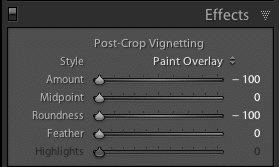
Lightroom Effects Panel SettingsYou can watch the video for all the juicy know-how but for those of you who just want to get stuck in via your RSS reader then slide all the post-crop vignetting sliders to the left for a black rounded border, job done, nuff said. Yep! its that simple But here is the another cool thing. If you want a white border then just take the amount slider all the way to the right.

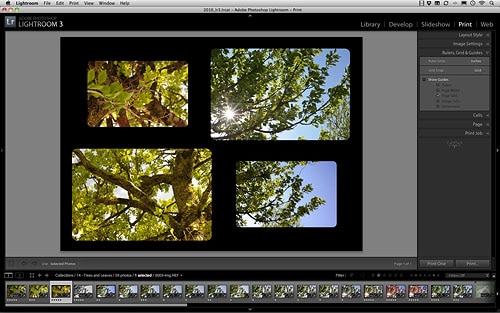
Rounded Corners In Lightroom 3

Best thing of all. You can save the whole lot as a simple preset so that one click will take care of it all in future. Fire up the print module and set the background colour to compliment the border colour. Make sure you are using custom layout and then you can drag n drop the round images directly onto a layout ready for printing. Although if you are going down the inkjet route I would go for a white border and save yourself some ink. Enjoy the video tutorial and dont forget to swing but alittlephotoshop.com for more Lightroom 3 training and free workflow actions for Photoshop.

Stuart has offered to send me another blog post, this time about creating a tilt-n-shift effect in Lightroom 3. Here's the deal, though, for that to happen I need to see at least 20 comments from you. Ask questions or suggest an alternative way of creating round corners. But I do need to hear from you. So, will you chime in? If you liked this post by Stuart, I think you will enjoy the next one too.

Filed Under: Photography, Tutorials, Web/Tech Tagged With: adobe photoshop, adobe photoshop lightroom, adobe systems, application software, blogger, bloggers, borders, computing, creating, graphics software, inkjet printer, lightroom, photoshop, photoshop educator, professional photographers, raster graphics editors, stuart little, Teaching, Video, video tutorials, vignetting

Using Negative Space When Designing Albums

February 8, 2011 by Justine Ungaro

Based in Los Angeles and Washington DC, Justine Ungaro has been photographing weddings and portraits in her own clean, classic style since 2003. This is her first guest blog post on Tiffinbox.

“The pictures are so small on the page and there is too much white space”.

Every time I receive one of these emails, I die a little bit inside. You know the ones I'm talking about because you all get them too. Usually from the mother of the bride or groom about her album design that you labored over for hours. Sometimes even from the bride or groom themselves. And as much as it just drives me crazy it's really not their fault. As photographers we are highly visual people. We notice the tiniest nuances and subtleties of light. We stare at compositions and dissect how we coulda, shoulda done it better. We are very hard on ourselves.

But sometimes we need to remember that our clients (usually) are just not as visually sophisticated as we are. Sometimes we need to educate them, try to change their minds, show them that we know what is best for them. And sometimes it's better to just give in. It is their album after all. But rarely do I give in without a little bit of a fight. I want my white space. But whether or not I win or lose any particular album battle is beside the point. It brings up a very good question. Why is negative space important?

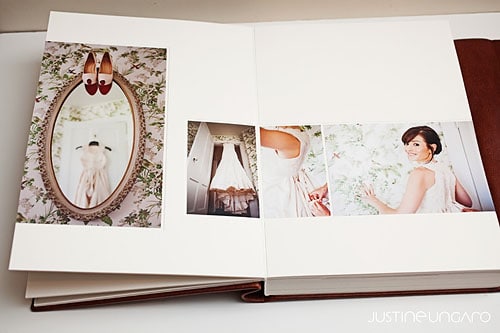
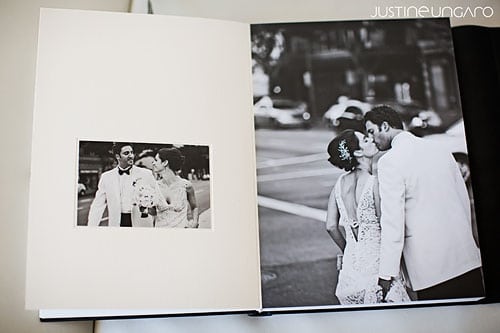
Now although I do design albums, I don't consider myself a designer. Still, despite being a non-designer I do try to incorporate what little I do know about good design into my albums…and that is balance, tension and flow. I want to lead my viewer across the page in a way that makes sense. I also want to make them work for it just a little bit and I want the pages to feel nice and balanced. Generally this is not accomplished by just cramming tons of images onto a page. Simple and clean is elegant, sophisticated and classic.

Queenberry Musee Album by Justine Ungaro

Queenberry Musee Album by Justine Ungaro

(Both images above are of Queensberry‘s newest album offering, the Musee)

Why else is negative space important to us? If you look around at advertisements for various products, you can tell immediately which ones are cheap, mainstream or just unabashedly pedestrian. They are the ads that are full of stuff: pictures, clunky logos, too many fonts & colors; they look messy. If you look at advertisements for luxury products or services, they are almost always clean and simple and full of what? That's right, negative space.

So I know that we're all in different positions in our various markets. Not everyone serves a high-end market. But if you do or if you're a social climber, consider the types of visual stimulus that appeals to your ideal clients. Speak to them non-verbablly through your branding and through your albums. If you want to reach a wealthier clientele, consider whether or not you're using the power of negative space to your advantage.

Filed Under: Album Design, Design & Illustration, Weddings

Introducing Fisheye Connect

February 2, 2011 by Kristy Dickerson

This is a guest post by Kristy Dickerson, an Atlanta, Georgia based photographer and entrepreneur.

I figured I would start a give you a brief background on myself. My degree is in business finance and I met the love of my life while working at a bank. Yep, he was one of my customers. I fell in love with photography at my own wedding, and after having my first son Roman, I was determined not to go back to the corporate world, but rather pursue my passion photography. Read more about my story here.

Photography to me was a way to still be a mom, pursue my passion and also incorporate the business practices that I love. While searching for educational resources on the web all I could find were local photography schools here in Atlanta. Little did I know, there was this whole world of workshops and tours by photography instructors where a lot of them came to my backyard.
 
The more I got immersed into the photography industry, the more I realized that different organizations and companies promoted instructors. However, I noticed there wasn’t a way for the aspiring photographer to see all the available quality workshops in one location. So I created Fisheye Connect, to help these new emerging photographers like myself get the education that we need in both business and technical aspects.

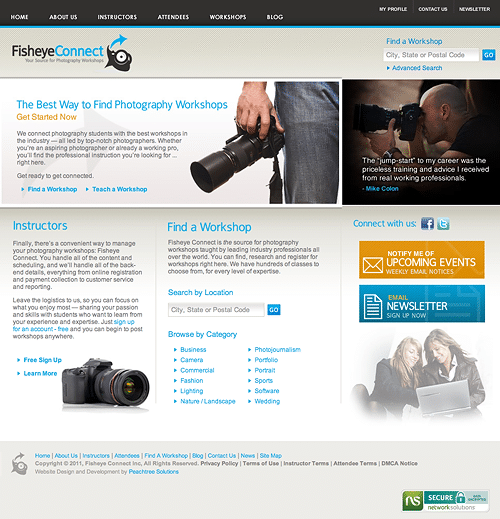
Fisheye Connect Website

Coming very soon, Fisheye Connect is having a huge launch! I figured I would share it with you guys and give you a little preview. Did you ever wish there was one “social” website that you could go and connect with other photographers like yourself? Or, search for photogs in your local area? Or, have a forum to ask questions? Do you now have a place to discuss past workshops or share the awesome blogs you follow?  Or how about finding resources like this awesome blog? Stayed tuned for more information! We are hoping to launch prior to WPPI!

Did you ever feel overwhelmed by all the workshop choices you have? Would you use a service like Fisheye Connect to get a better sense of what that photography workshop may offer you? Lend us your thoughts below!

Filed Under: Photography, Workshops Tagged With: atlanta, dickerson, entrepreneur, kristy, launch, News, photographer, Photography, photography schools, Workshops

A Sales Tip For Photographers

February 1, 2011 by Seshu | Editor & Publisher

Photo consultant Selina Maitreya discusses a rarely used approach in client sales meetings. Check it out in the video below.

Did you like Selina's business tip for photographers? Want to get more of these tips and for FREE? Selina offers a free 5 day video course, “Building the Ideal Professional Photography Business.”

In addition to that, Selina and 13 other experts will be presenting a FREE two-day online event on February 11 and 12, called Clarion Call. [aff] You do need to register to get access to these awesome speakers. Remember, it is FREE, so why wouldn't you sign up?

If you miss the live event, you can still order the recordings, which garner you a bunch of very cool bonuses.

What sales tip could you/would you share here with your peers? Please comment!

Filed Under: Business, Education, Marketing, Photography Tagged With: business tips, client, effective sales, maitreya, messianism, photographer, Photographers, sales, sales meetings, sales tips, selina, Selina Maitreya, Tips, Video

So, Who Wants To Go To WPPI 2011 In Las Vegas?

January 25, 2011 by Seshu | Editor & Publisher

Going to a trade show and conference like WPPI, in Las Vegas, is no gamble. Take my word for it. I have been and it's truly an awesome experience. It's a great opportunity to meet friends whom you have only “met” online, or vendors whose new products you want to check out first-hand. But, yes, it can get expensive, and that's where Tiffinbox is hoping to help you.

Thanks to Fundy SOS, two lucky readers of Tiffinbox will receive passes to go to WPPI 2011. The mega conference for photographers runs from February 17 – 24, 2011.

Will that be YOU? How badly do you want to go?

Here is how you could win one of two passes:

1) Tell us in the comments WHY you would want to win? What do you expect to get out of this awesome gathering of wedding and portrait photographer?

2) Tweet this: “I just posted a comment on Tiffinbox.org, for a chance to win a trip to @RFWPPI 2011. Thanks to @FundySOS + @PicSeshu! Please RT”

3) Tag @Fundy SOS in Facebook when you post a little blurb about this contest on your own wall

That's IT.

Now, the rules:

If you win, you should be able to go. Obvious, right? So, if you can't go, please let us know right away.

What you are going to win is a full registration pass ($199-259 value). The only stipulations are that MASTER Classes are NOT included and that you have to stay at the MGM Grand Hotel. Read this description of what is included in your WPPI registration pass.

Airfare, gambling chips, food and other entertainment expenses are NOT included. All that is on you. Cool?

Now, let's play. Get those comments coming. Andrew Funderburg of Fundy SOS will pick a winner among those who have left a comment and Tweeted the message on February 1.

Filed Under: Conferences, Contests & Grants, Photography Tagged With: Contest, Fundy SOS, Las Vegas, Passes, Photography, Registration, Tiffinbox, WPPI

  • « Previous Page
  • 1
  • …
  • 49
  • 50
  • 51
  • 52
  • 53
  • …
  • 198
  • Next Page »

Subscribe To Tiffibox Treats!

Looking for a well-curated email newsletter that will leave you inspired and motivated about your photography business? Sign up below!

About Seshu

Seshu creates relaxed portraits of families and high school seniors in Avon, Connecticut. He also leads a successful headshot photography studio in Connecticut, helping professionals from a variety of disciplines project the very best versions of themselves. He created Tiffinbox as a way of inspiring photographers, to create better images and successful businesses. [Read More]

Email Templates For Headshot Photographers

Email Templates for Headshot Photographers

Recent Posts

  • How Capture One Changed My Event Photography
  • 10 Steps To Stay Positive In Times Of Great Stress
  • Why You Need To Read “Personal Branding For Photographers” Now
  • How To Master Your Website Content Step By Step?
  • Tony Taafe’s TNT Method For Headshot Photographers

Recent Comments

  • Stephen Davison on Are You A Business Owner Who Is Smart, But Stuck?
  • Ben A. on Don Giannatti Clinches The 8th Annual Tiffinbox Award
  • Dan on Don Giannatti Clinches The 8th Annual Tiffinbox Award
  • Donald Giannatti on Don Giannatti Clinches The 8th Annual Tiffinbox Award
  • Stephen Davison on G.E. Masana’s 6 Strategies For Wedding Photography Success
  • Naveen Kumar on Weddings In India Are More Than Being At The Right Place And At The Right Time
  • kartick on Weddings In India Are More Than Being At The Right Place And At The Right Time
  • Leonid Farbman on 6 Uncommon Trends To Grow Your Photography Business
  • Willow and Finch Wedding Photography on 11 Reception Tips To Help Your Wedding Photography
  • Web Designer Malaysia on How To Optimize Your Squarespace Website For Search Engines
  • Creastan on An Interview With Photojournalist G.M.B. Akash
  • Cindy Brown | Atlanta on An Open Letter To A Local Photographer

Become a Patron!

Copyright © 2026 · Tiffinbox · Site Design by Heather Mackan Creative · Built on Genesis