• Photography
  • Interviews
  • Business
  • Reviews

Tiffinbox

Inspiring Photographers

  • Home
  • About
  • Blog
  • Contact

Has Kevin Kubota Gone Absolutely Nuts?

April 11, 2012 by Seshu | Editor & Publisher

As a photographer – whether you are just starting out or you are a seasoned pro – you can be easily overwhelmed by the dizzying array of Photoshop actions available in the market. I have used Kevin Kubota's actions for a very long time and for good reason. Here is why I LOVE Kevin's actions: they evolve.

Most other Photoshop action producers are quite happy churning out actions and then they stop making them better. No, not Kevin and his incredible team at Kubota Tools. Every photography convention I have met them, they are sure to show me how they have evolved their actions – made it beter and more efficient to run with the newest operating system or the latest version of Photoshop. And they constantly innovate too, bringing to us such options as a Dashboard for their actions, to make it easy for us to find, select and apply these actions. For this alone, I applaud them.

Now you are probably wondering what the headline is all about, right? Well, I just got an email from Kevin's team today saying they were temporarily dropping the price on some of their products, until the end of April. Yeah, totally nuts because they are easily three or four times their value IF you use them on a regular basis like I do. The Dashboard, for instance, allows me to use not only Kevin's actions but others as well.

Those who know me and know Tiffinbox also know that I typically don't promote products that I haven't personally owned or used extensively in my own photography business. Yes, as an affiliate, I do make a small commission. But I would be remiss if I did not at least alert you to this special sale going on only through the end of April.

Feel free to click on any of the product images below to order your own Kevin Kubota Photoshop action sets or the Dashboard, I've mentioned above. It's all good!

These artistic and production tools have saved me oodles of time:

These are also some of the products I highly recommend:

So, if you do buy one or more of the products listed, above, would you please come back here and tell us (1) why you bought it and (2) if you have used it for a couple of weeks, what your feedback would be for these products? Your opinion matters!

Filed Under: Photoshop Actions, Sales

The Importance Of Having A Photographic Style

May 17, 2011 by Glyn Dewis

I am honored to have Glyn Dewis as this week's first guest blogger. He is a UK based Photographer, Workshop Instructor and Adobe Community Professional specialising in Conceptual Portraits both location and studio based. An avid blogger, Glyn thrives on sharing his photography and editing techniques through his Workshops, YouTube Video Page and Blog. Follow him on Twitter.

When I was approached about writing a post for Tiffinbox I have to admit that at first I was a little stumped as to what I should cover. I changed my mind more times than I care to remember but that being said I always came back to the same starting point …‘Style’ and by that I mean ‘the unique, defining look to your photography’.

But when it come to style how do you get it? How do you develop you a look that makes you stand out from the seemingly saturated market of photographers?

Glyn Dewis - Shopping Cart

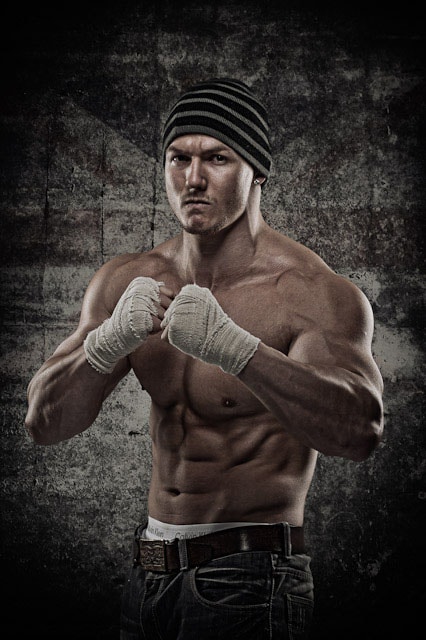
Glyn Dewis - Ultimate Fighter

I have my own blog that I update several times each week covering such topics as recent photo shoots, editing techniques, latest news plus hints and tips. In addition to that each month I interview prominent photographers from around the world; such names as Tim Wallace, David E Jackson and Matt Kloskowski to name but a few, and post the content of the conversation in full on the blog.

One question that I always ask is “How does someone develop a style?” and the answers always intrigue me:

Tim Wallace says “Your style is influenced by your life experiences and every time you press the shutter, in a way your photographing yourself.”

David E Jackson says “You don’t find a style…your style finds you.”

Trying to make your name as a photographer and have a style that is recognizable as unique to you is no easy task that’s for sure but one thing that is, is that the process is alot harder if you’re not picking up your camera on a daily basis.

Glyn Dewis - Model

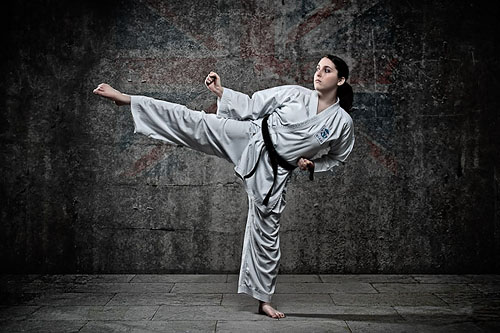
Glyn Dewis - Karate Kid

So what do I mean by “having a style”? How do you define it or more to the point, how do you get a photographic ‘style’ ?

In today’s current climate where photography has become so much more accessible and people are setting themselves up as photographers almost as soon as they’ve unboxed their new DSLR, the need to separate yourself from the crowd and get noticed is more important than it ever was!

Now just to clarify, what I’m not saying here is that I believe your ‘style’ is set in stone, but what I do believe is that the more you use your camera, each and every day getting out and shooting something…anything, then your photographic style will evolve.

Up until a few years ago I used to compete in Bodybuilding Shows. For the life of me I can’t recall who it was said this to me but it rang so true …

“Photography and your ‘style’ is like your bodybuilding. You can’t expect to go to the gym just occasionally if you want to develop your physique to a level where you can compete. It takes dedication … training hard every day, putting in the hours and even when you’ve built your physique, continuing to train.”

Copying someones style is financial suicide.

Much like photography, it takes practice, constant practice to get good and even when you’re at the top of your game you still keep practicing. Look at Joe McNally, for example. He is without doubt amongst the best in the world but again someone who continues to practice, day after day and even attends workshops!

We’re all individual and we will all develop our own unique style. Going back to the bodybuiliding analogy, we could all start training doing exactly the same exercises, with the same weights, eat the same, get the same amount of sleep but still our physiques would look different; just as our styles will be different in photography.

Of course there are those that try to ‘copy’ to the letter other people’s styles. I remember a year or so ago when I was looking for a company to build my new website. Sure they seemed to do a great job with the design and functionality but what really shocked me was that in their ‘samples’ section, there were a large number of sites, all with slightly different designs but what seemed like all the same photos. Clearly there were/are a large number of people ‘cloning’ a style from photography training they’d received in the UK but weren’t putting their own ‘style’ into it.

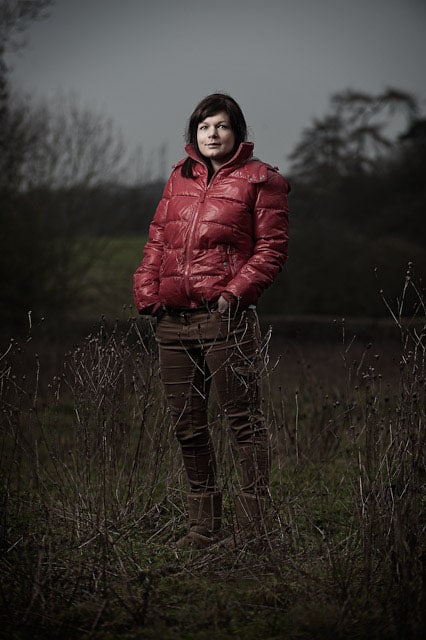
Glyn Dewis - Portrait In A Field

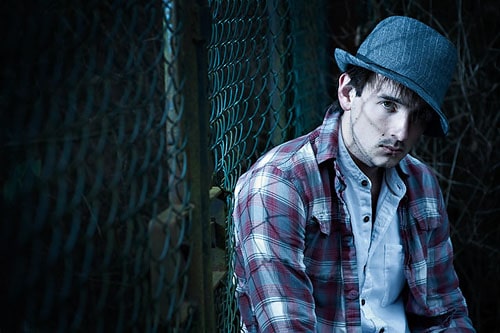
Glyn Dewis - Man In A Hat

Copying someones style is financial suicide. Our goal should be to attract clients that want us for our ‘style’ and quality of work but ‘copying’ a style will only lead to getting clients on a cost basis i.e. everyone is doing the same, so who is cheapest? Does that make sense?

Style is vital if we are to stand out from the crowd and attract clients, but don’t stress over it. Just get out and shoot more and more often and let your style find you. But the less you’re out shooting, the longer it’ll take and the more you’ll feel frustrated.

Talking of getting out and shooting more, some might say they would do but they have no one to photograph. Well in that case dare I say it, shoot for free! Get people in front of the camera on a time for prints basis; i.e they give their time and you give them a disc of edited images. This is something I did to build up a portfolio and is something I continue to do.

The big advantage here is that you can choose what you shoot and how you shoot it and those images can be used in your portfolio so you then start to get more of the same type of clients but who will pay you!

Just to finish off, this topic came up yesterday when I met up with a friend who mentioned something valid:

Your style won’t show itself until the technical side of shooting is second nature. Know your camera controls inside and out to the point you can change settings, and know why you’re changing them, without really looking at what you’re doing.

Do you feel like you have a defined style? If so, what is it? If you are struggling with it, do you think the steps Glyn has outlined here will help you? Chime in below in the comments section.

Filed Under: Photography, Photoshop Actions, Tutorials

56 Rocking Fusion Photoshop Actions

March 6, 2011 by Seshu | Editor & Publisher

When it comes to Photoshop actions, I have a short stack of them that I depend on for retouching my portrait and wedding photography images. I go to these almost all the time, for all my images. We'll talk about which one of those actions made the cut, in a subsequent blog post. So please do remind me.

Jodi Friedman of MCP Actions sent me an email asking me to test a new set of Photoshop actions that she was launching called MCP Fusion Photoshop Actions. So, let me at the outset tell you that I received them gratis for the expressed purpose of reviewing and writing about them here.

The MCP Fusion Photoshop action set combines the most versatile and user-friendly workflow actions with beautiful color and black and white conversions, bringing you an action set with infinite possibilities.

It makes sense to review actions only when you have some really good examples. The image below is from a headshot portrait session I recently completed for my client Carole M.

Straight out of camera, otherwise known as SOOC:

MCP Fusion Photoshop Actions © Seshu Photography

Enhanced using the Liquify filter in Photoshop + MCP Actions' Eye Doctor and The Dentist:

MCP Fusion Photoshop Actions © Seshu Photography

Enclosed action:

MCP Fusion Photoshop Actions © Seshu Photography

Beach House action:

MCP Fusion Photoshop Actions © Seshu Photography

Sentimental action:

MCP Fusion Photoshop Actions © Seshu Photography

Pendulum action:

MCP Fusion Photoshop Actions © Seshu Photography

Color Fusion Mix-n-Match action – Peachy/Rustic/Sentimental/Shades Of Gray:

MCP Fusion Photoshop Actions © Seshu Photography

In addition to the usual actions to enhance color images, this set includes ways in which you can convert images to black & white. Most of the black & white actions I've seen online have been pretty heavy handed at this, but the Black & White Fusion Mix-n-Match is particularly useful because like its Color counterpart, you are allowed to turn on and off layers and of course dial in the opacity for those layers just to get your desired effect. I really enjoyed this level of control to consistently produce images.

Black & White Fusion Mix-n-Match action – One Click Black & White/Highlight Helper:

MCP Fusion Photoshop Actions © Seshu Photography

See more sample images on Jodi's site and check out this video to show you how you would set these actions up in Photoshop (18 minutes):

The Review:

I'll make this short and sweet. I had a lot of fun exploring these actions. Like any other set of Photoshop actions, I am likely to pick and use only the ones that feel natural to me and for what I want to deliver to my clients. In this regard, to each her/his own. There are several among the MCP Fusion Photoshop Actions have just been added to my short stack. Some of those actions you have just seen above. As I promised at the beginning of this post, I'll have a new article describing those to you in greater detail soon.

I almost never use any action at full throttle, that is the opacity is set to less than 100%. What is that magic number? It's very hard to pin down and kinda silly to even divulge because your images and tastes are different than mine. And these actions by MCP are no different. I toned it down several notches to meet my artistic sensibilities.

The mix-n-match actions were great, but even on a fast iMac, they took about 20 seconds to run. This isn't a shortfall of the action set, but I have to admit it did surprise me a bit. And as Jodi put it, that's 20 actions all running at the same time. If you are trying to get something done quickly, try then the individual actions that come bundled within this set. The mix-n-match is much too comprehensive and may be overkill for what you want to achieve. That said, I liked the multiple options the actions gave me. In my opinion, Photoshops actions are as perfect as you want them to be for your own workflow, sense of style or approach to photography.

Jodi's Photoshop actions are well-known in the industry for a reason – she consistently provides a quality product and her level of support via video tutorials, or in my case a quick email response to a quick question, was always greatly appreciated. If you are open to gaining some control back into how your images should look, you will want to get this Photoshop actions set.

Unsolicited words of advice:

1) Have a vision for how you want to retouch your images. What you present to the world says a lot about who you are as a photographer and an artist. Adding actions willy-nilly is no way to correct a badly exposed image. So start there first. No idea what I am talking about? Try this book by David duChemin. Figure out what the end product needs to be, how it will be applied and who your target audience is. Those answers will direct you into the appropriate use of these or any other Photoshop actions.

2) Make sure your monitor is calibrated. If you want WYSIWYG, this is one of the first steps you should take.

3) Use these actions on un-cropped, high-resolution images first. Then resize and sharpen at the very end of your workflow. The MCP Fusion Photoshop Actions include two nifty actions that will do just this for you, so rest easy.

4) Uncle Ben said it best: “With great power, comes great responsibility.” Just because you can use actions and mix-n-match them up, does not give you license to do so. Well, you could, but then your images are going to make your audience gag a bit.

5) Be aware that as you start adding more actions and you mix-n-match them as you can, your file size is going to inflate and your computer is liable to slow down to a crawl. So have lots of RAM and have a scratch disk for Photoshop to play nice.

6) Have fun. If you aren't having fun when using these or any other actions, that means you are just going through the motions of creating art for your clients and ultimately yourself. So, pace yourself, experiment and stick to the plan (ie. see number 1)

7) You are going to be naturally drawn to some actions over others. Let your gut instinct guide you. You'll know when you have crossed the line, or your friends or even clients may let you know pretty directly. Learn from these trials and move on. Don't cling to an action as the be-all and end-all of all your images. Keep making images and you will find Photoshop actions that are best used to enhance those specific frames. It is a learning process, so don't force it.

If you've enjoyed this post and want more like it, please let me know in the comments below. Also, please support this site by buying the e-books you see here. They have each been reviewed for quality and value and I am sure you will find them just as useful as I have for my photography business.

Filed Under: Photoshop Actions Tagged With: action color, action set, Actions, adobe creative suite, adobe photoshop, application software, black white, enhancing, fusion, graphic design, images, Photography, photoshop, photoshop action, photoshop actions, photoshop plugin, retouching, Workflow

The NAPP Has Come Knocking On My Door

November 16, 2010 by Seshu | Editor & Publisher

I can't remember when I first joined the National Association Of Photoshop Professionals (NAPP). I do vividly recall thumbing through the slick, glossy Photoshop User magazine and drooling over the step-by-step tutorials, the featured artist and the succinct product reviews. The magazine was and is designed to inspire. There is no doubt about that. Each month, I look forward to the new issue, almost always wrapped in a plastic cover. And yes, I will confess to being a geek – I do read it cover to cover. Being an even bigger geek, I will also confess to still having every single issue of the magazine since I first joined the organization. For Photoshop and Lightroom information, the NAPP cannot be beat. It is THE place to go to first.

The Benefits Of Becoming A Member Of The NAPP

When I was starting in the photography business, the benefits of being a member counted where it mattered most – my wallet. As a photographer who occasionally bought camera equipment from B&H Photo Video, I shuddered every time shipping charges were levied to my final bill. Even though I live in Connecticut, the UPS shipment was almost in the neighborhood of $25 to $30. Well, with my NAPP membership, the same UPS ground shipping was $0. That's right. Four purchases in a year just about paid for my NAPP annual dues ($99). It was a no-brainer for me. Not only was I getting a valuable resource in a magazine that was chalk-full of great examples, I was also able to get my gear delivered to me at no extra charge. That shipping “discount” is also offered by Adorama.

What's Better Than A Ginzu Knife

But wait, there is more. Yes, lots more. Over the course of the next few months, I will present all of the other benefits and features for becoming a member of a community of creative people, including a whole bunch of photographers. The big announcement I alluded to on Twitter is this – The NAPP has tapped me to be one of their ambassadors. I am truly honored to serve in that capacity.

The Bonus

For a limited time, when you become a member of the NAPP and use this promotional code – “PicSeshu” – you will receive Matt Kloskowski's Lightroom 3 Power Session DVD (a $69.99 value), absolutely free PLUS get $10 off your annual membership fee.

My Promise To You

If you are a loyal subscriber you already know that I diligently apply the “credibility-test” before promoting products, services or vendors. Tiffinbox remains a no-shill zone. I promise to be transparent with you and will let you know if I directly or indirectly benefit from any transactions that I am asking you to embark on. In some, if not all, cases I will try the product, service or vendor before I will ask you to buy it. And in most cases, I pay for it by myself. When it is a gift, I will let you know.

In this case, let me candidly tell you that about a month back, I renewed my NAPP membership through 2014. This was before I was approached to become an ambassador. I paid for the renewal myself. When I did that, I received a couple of DVDs, including the one mentioned above. Having found it useful, I figured you would too when you sign up to become a member.

I want it also known that being an ambassador may present opportunities to get involved with Photoshop World or access to Kelby Training's online courses. If and when those things do happen and I happen to blog about them, I will be sure to let you know in advance.

So, I hope that my relationship with the NAPP is as clear as a sunny f/16 day.

If you have any questions, suggestions, opinions or otherwise friendly banter, pen your thoughts below in the comments section. I do want to hear from you. You voice is heard here. If you do decide to become a member of the NAPP, please let me know. “Welcome,” in advance!

Filed Under: Blogging, Photography, Photoshop Actions, Tiffinbox Tagged With: adobe photoshop, adobe photoshop lightroom, computer graphics, lightroom, magazines, napp, national association, national association of photoshop professionals, photoshop, photoshop professional, photoshop user magazine, product reviews, professionals, shipping charges

Subscribe To Tiffibox Treats!

Looking for a well-curated email newsletter that will leave you inspired and motivated about your photography business? Sign up below!

About Seshu

Seshu creates relaxed portraits of families and high school seniors in Avon, Connecticut. He also leads a successful headshot photography studio in Connecticut, helping professionals from a variety of disciplines project the very best versions of themselves. He created Tiffinbox as a way of inspiring photographers, to create better images and successful businesses. [Read More]

Email Templates For Headshot Photographers

Email Templates for Headshot Photographers

Recent Posts

  • How Capture One Changed My Event Photography
  • 10 Steps To Stay Positive In Times Of Great Stress
  • Why You Need To Read “Personal Branding For Photographers” Now
  • How To Master Your Website Content Step By Step?
  • Tony Taafe’s TNT Method For Headshot Photographers

Recent Comments

  • Stephen Davison on Are You A Business Owner Who Is Smart, But Stuck?
  • Ben A. on Don Giannatti Clinches The 8th Annual Tiffinbox Award
  • Dan on Don Giannatti Clinches The 8th Annual Tiffinbox Award
  • Donald Giannatti on Don Giannatti Clinches The 8th Annual Tiffinbox Award
  • Stephen Davison on G.E. Masana’s 6 Strategies For Wedding Photography Success
  • Naveen Kumar on Weddings In India Are More Than Being At The Right Place And At The Right Time
  • kartick on Weddings In India Are More Than Being At The Right Place And At The Right Time
  • Leonid Farbman on 6 Uncommon Trends To Grow Your Photography Business
  • Willow and Finch Wedding Photography on 11 Reception Tips To Help Your Wedding Photography
  • Web Designer Malaysia on How To Optimize Your Squarespace Website For Search Engines
  • Creastan on An Interview With Photojournalist G.M.B. Akash
  • Cindy Brown | Atlanta on An Open Letter To A Local Photographer

Become a Patron!

Copyright © 2026 · Tiffinbox · Site Design by Heather Mackan Creative · Built on Genesis