• Photography
  • Interviews
  • Business
  • Reviews

Tiffinbox

Inspiring Photographers

  • Home
  • About
  • Blog
  • Contact

Blogging Brilliantly For Your Photography Business

July 16, 2015 by Seshu | Editor & Publisher

She doesn't have much of a southern drawl, but Christine Tremoulet is a business coach based in Houston, Texas.

Christine is ideally positioned to teach you about blogging and it's not because she coined the word “WordPress.” She is intimately involved in helping business owners like you make a mark online; with well defined intentions, purpose, clarity and focus. She has been blogging for nearly 15 years now!

Blogging Brilliantly is 30 days of pro advice from blogging & business expert, Christine Tremoulet. Learn what to write, how to write it, and ways to automate your blog for better results. Say hello to more time, more clients, and less stress.

Listen to her talk about her new course, Blogging Brilliantly –

As she says, Blogging Brilliantly, is a course that you can follow along for free or buy for only $27.

This is Christine's promise to you:

“You'll also receive an ebook of the course material, a guide on creating an editorial calendar, and 4 value packed worksheets that will be integral tools in growing your business via blogging.”

Blogging Brilliantly by Christine Tremoulet

If you have ever felt nervous about starting a blog and sustaining a blog over the long haul, sign up for Christine's 30-day course just to see if it is worthwhile. I bet you will dig into it and see results right away. Of course, when you buy the whole bundle at one shot, you don't have to wait the whole 30 days plus you get a whole lot more that will level up your game.

Want to make your mark in the world? Start blogging brilliantly today.
Filed Under: Business, Interviews, Marketing, Photography Tagged With: blog, Blog Business, blog software, business coach, Business Expert, Business Owners, Christine Tremoulet, Growing Your Business, Help Business Owners, Photography Business, wordpress

3 Big Reasons To Use CoSchedule For Your Social Media Marketing

August 14, 2014 by Seshu | Editor & Publisher

Google+, Twitter, Tumblr, YouTube, Facebook, LinkedIn, Instagram, Pinterest, Orkut … oh, forget about Orkut, that doesn't exist anymore. Phew!

But still, can you imagine posting to every single social media platform out there? When do you find time to photograph? Or, spend time with your family? You can drive yourself batty trying to be everywhere all the time. (Here is Gary Vaynerchuk's advice to master the four big platforms)

It's true, my wife thinks I am also married to my iMac and I am always sitting in front of it posting to these social media platforms at all hours of the day and night. At some point I experienced burn out. And you will too. It's a sense that all of this “work” you are doing online is really a huge waste of time.

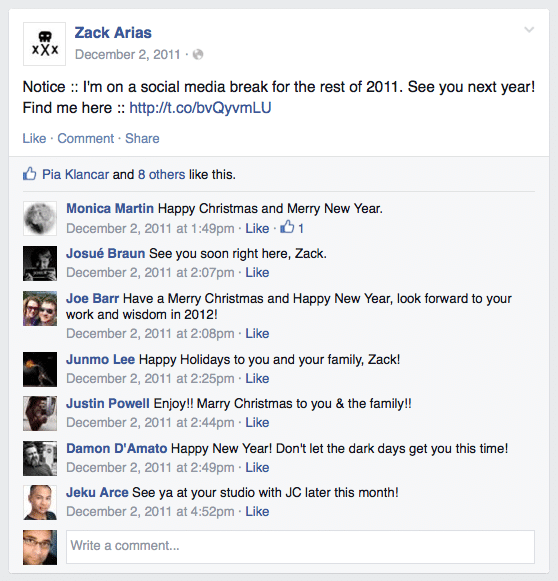
That's just your tired brain aching for a break. And you should step away from it all. Heck Zack Arias gives himself a whole month each year (I believe it is December) when he opts out of all social media circles. And good for him. As the new year approaches, he is ready to give it a big push and has the energy for it too.

Zack Arias Announces His Annual Social Media Break

As I said, whenever I have done it, it has always felt great. But is it always necessary to give yourself a time-out? While I really haven't missed any of the platforms, there is still a very tiny portion of me that wonders if I could still be engaging with my audience and driving traffic to my site, while I am on that well-deserved break.

The easy way out when it comes to blogging, and several other well-known bloggers have already suggested it, is to simply schedule your new posts in WordPress ahead of time. This very post you are reading was written several days ago.

But that only takes care of the blogging side of the equation. What about social media? I use an application called Buffer with some success, but it requires you to load your articles and links up ahead of time and then have them appear at different times of the day on different platforms.

However, I really wanted a tool that would be in sync with my blog – posting blog posts to different platforms, at different times from the very same WordPress dashboard I was using to write and edit my content.

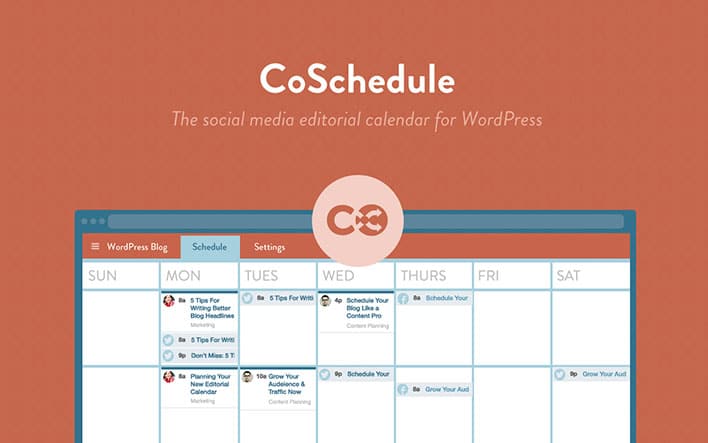
Thanks to Kim Doyal, I discovered that tool to be CoSchedule. I've now used it for over four weeks now and I can tell you the very reason I am posting this review is because I couldn't do without it. It's a plugin that sits below your content editing area (see screenshot below) and out of the way. It springs into action the minute you want to “Create Your First Message”. The tool is smart enough to pull in your blog post's url and set it up in a way that all you have to do is simply add your own out-going message. Interestingly, when I wrote a message that was longer than 140 characters, the system smartly told me that it couldn't send it to my Twitter feed because it was longer than Twitter allowed.

CoSchedule connects to Facebook, Twitter, LinkedIn, Pinterest and Tumblr. Once you register your account, you are able to create as many messages as you want and thereby schedule the same post to appear a day, three days, seven days or even a month after it publishes, so that your audience will always see it front-and-center.

So, what are the three big reasons why you should use CoSchedule for your social media marketing?

1) Being Consistent

In any business, appearing consistent adds to your credibility and speaks of your reliability. When your posts consistently and frequently appears on all the platforms, your audience (aka. your potential clients) are going to be reassured that doing business with you is going to be a-ok. In CoSchedule, you set it up once and you just move on to the next blog post. You really don't have to do much more than that.

2) Drive Traffic

I don't have to tell you how traffic from Facebook has dropped significantly. The only way more number of people are going to see your blog posts on Facebook is if you make it a point to share your links at different times of the day, allowing for a greater number of people to visit your site. CoSchedule makes this happen very easily.

3) Encourage Engagement

Whether is Twitter, Facebook or even Google+, if your audience only retweets, likes or 1+'s your posts, you aren't going to go very far. What you need is for your audience to engage with your content and in the end, engage directly with you. CoSchedule‘s interface allows you to add your own flavor to the posts, making it possible for you to ask questions or displaying a call-to-action that will help you see results.

Want to know more? Check out this two-minute video overview:

CoSchedule

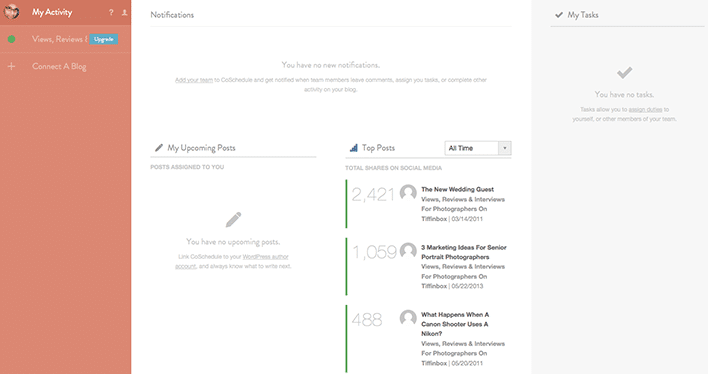
CoSchedule Activity Screen

So, do you believe you will use an editorial calendar like CoSchedule for your blogging and social media marketing efforts? Sound-off below to share your opinions with me. I trust CoSchedule will save you time and make you more efficient. It does for me. That's a win-win in my book!

Filed Under: Blogging, Home Middle Right, Marketing Tagged With: blog, facebook, Kim Doyal, Marketing Efforts, Media Marketing, Media Platform, Photographers Blog, pinterest, social media, Twitter, Zack Arias

Zack Arias Launches DEDPXL And OneLight v2.0

March 4, 2014 by Seshu | Editor & Publisher

As a photographer, Zack Arias is a name you must know. He is a photographer, teacher and author who is known for his candid take on the state of this industry that we all love. Every time I have come across him – as a public speaker at a conference or randomly on the streets of a city – I am always left in awe of his humility and his generosity towards photographers.

zack-arias-portraitSeveral years back when Zack was on the road, visiting city after city teaching his simple approach to off-camera lighting to photographers who were either confused or scared of their strobes, I managed to attend first his workshop in Boston and then later in New York City. These were the famous OneLight Workshops that I may have referred to here on this blog from time to time. I can honestly say that Zach was one of the first people to demystify off-camera lighting for me. If you went to his workshops let hear a collective “Amen” below in the comments because I think only you folks know what I am talking about.

Instead of dreading my Nikon SB-900's, I embrace them, play with them and treat them as toys. I keep making creative mistakes and learn from them. It's really the very foundation of Zack's teaching, I believe. Now, my memory is fading so forgive me if I get my facts all tangled up. Either the workshops came first or his OneLight DVD came first, but having experienced both, I felt I was in lighting heaven. Again, if you attended a workshop and own version 1.0 of the OneLight DVD, please comment below. I want to know who you are.

Zack just announced a new project called DEDPXL that I want you to look at if you are serious about embracing off-camera lighting.

Zack also announced OneLight 2.0 (though this time it will only be available as a download). Check out the intro video below for it. From what I can tell, DEDPXL is both a store and a school. The first assignment and all those that will focus not so much on technique but in guiding you to see better. If you are serious about constantly improving your photography, I would take Zack up on this monthly assignment and join the Flickr group to post your images.

Zack Arias' OneLight 2.0 On DEDPXL

The video is 7 hours long! I thought version 1.0 of the OneLight DVD was exceptionally produced and I am willing to bet this new version is going to rock your socks off. [I do not make a dime for saying so … just passing on a resource you shouldn't miss.]

Right now, OneLight 2.0 is available for pre-order at the crazy low price of $50. I recall the original DVD costing $150 or so and was still a great deal. So, if you are looking for a great resource to learn off-camera lighting, THIS IS IT. The full video download will be available on March 31st or soon after.

So, you are probably wondering if I am going to buy the new version of OneLight. Is that your question? You bet I will because with me, the learning never stops. How about you?

Filed Under: Home Middle Right, Lighting, Photography Tagged With: blog, Dedpxl, Lighting, OneLight 2.0, store, Zack Arias

3 Marketing Ideas For Senior Portrait Photographers

May 22, 2013 by Jen Basford

Jen Basford is the owner of Seniors Ignite, an organization dedicated to providing next-level senior portrait photography education to photographers to help them grow their business. She also owns 3 girls photography in Edmond, Oklahoma. She is best known for fashion-inspired high school senior portraits and the annual must-see fashion show she puts on for upcoming seniors each spring. Jen is one of the top senior portrait photographers in the Midwest largely due to her out-of-the-box approach to marketing and client relationships. Follow Jen on Twitter.

3 Girls Senior Models | Jen Basford

Let's face it – things have CHANGED in the senior portrait industry. It wasn't all that long ago that you could gather some cool images, pair them with a great special, give out your number and the phone would start ringing. Your senior season would be half full before you knew it, with clients booking out months in advance.

But that doesn't work anymore. That's right, I said it. THAT DOESN'T WORK ANYMORE.

So you've got two choices here – you can either get mad and argue with me about that fact, or you can change your tactics and put together a marketing plan aimed at your target market. In order to move forward you must first change your OUTLOOK before you can change the OUTCOME. And if you're not ready to do that then stop reading right here. You can come back to this post when you're ready to move forward with a positive attitude.

When the phone stops ringing, and when your books aren't full, it's tempting to panic and react immediately by trying to push your services onto the market. “50% off sale!” “Book now!” “Discount sessions available!” But this only confuses your client base and hurts your brand. It is also a turn-off to your audience.

So what SHOULD you do then? You need clients in order to get sales, so how do you get the phone to ring?

1) Go Backwards Instead Of Forwards

This sounds counterintuitive, but it actually works. If you haven't already done so, sign up for an account with Sticky Albums – these custom mobile apps are one of the best and least expensive marketing tools on the planet. Then make a list of all your best senior clients (and by ‘best' I mean those that love you and love what you do, regardless of what they spent).

Create a Sticky Album with the images from their session – customized with your studio branding – and put a value-added time-sensitive call to action at the end of the album. Send these custom apps to your senior clients and let them know they can share them with all of their friends. Do this with your upcoming senior models as well.

Create value-added incentives for your clients to share these apps, and watch the marketing go viral. This is a great non-pushy way to get in front of your target market and give them a reason to book!

3 Girls Senior Models | Jen Basford

2) Blog

Update your blog with images of your current work. But be careful – it's tempting to post images of everyone and everything, but this is where you can separate yourself from the competition. Show only your best work, and show only the types of images you want to shoot. If you don't particularly like shooting sessions outdoors, then don't show outdoor images.

Create a blog schedule and post regularly on your blog, and talk about the sessions, the people, and the experiences that make you different. Include some posts about businesses in your community where you recommend your clients shop, and then send an email to those businesses with a link to your blog post.

Extend your reach, and create a relationship with your target clients. People want to be associated with success, and this can help make you look busy and in demand while establishing you as the senior portrait expert in your community.

3 Girls Senior Models | Jen Basford

3) Get Out And Be Seen

Attend all of the events at your target high schools – sporting events, drama productions, auctions, charity fundraisers, performances, etc. Bring your camera and take candid photographs of the kids having fun (with permission from the school or organizers, of course). Pass out cards with your blog or facebook page URL, and let everyone know that you will post the images online for them to see, share, and tag themselves. Build your name and a relationship with your target market and you will increase trust with your audience. This gives you a platform with which to market your senior business in a way that is real and genuine.

Want more ideas for low cost marketing that will grow your senior business? Check out this FREE guide from Seniors Ignite and let us help you book more clients year round.

3 Girls Senior Models | Jen Basford

Filed Under: Marketing, Photography, Photography Business Tagged With: blog, jen basford, portrait photography, School Seniors, Senior Models, Senior Portrait, Senior Portrait Photographers, Senior Portrait Photography

How To Make SEO Part of Your Everyday Workflow

January 15, 2013 by Feuza Reis

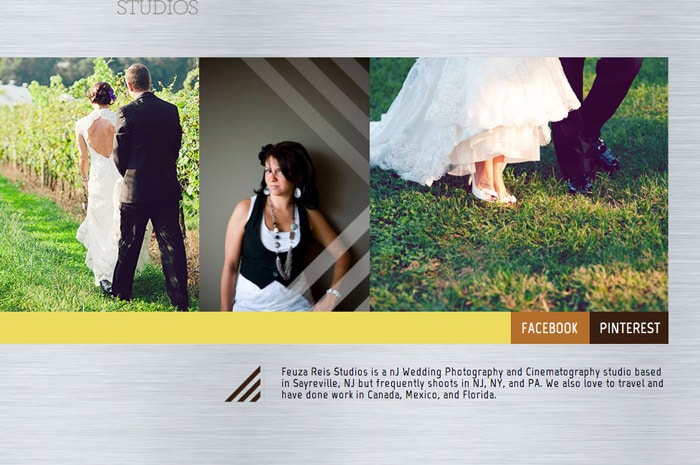
This guest post is by Feuza Reis, a NJ Wedding Photographer, founder of the Un-Jersey Bride Blog and helps photographers and artists Get Found Online. You can follow Feuza on Twitter.

For many photographers January is the month to take care of business. We have to worry about doing our taxes, updating website images, blogging previous posts we missed, and strategizing for the new year. I think January is the perfect time to work on optimizing websites and blogs for SEO. The biggest hurdle to overcome with putting SEO into practice is lack of information, time and its complexity. SEO for some is a strange buzz word, and for others it is this painful complicated process full of difficult words and terms.

I prefer to view SEO as a practical method I can put into my workflow so that it does not control me. With that being said, it will be hard to make it part of one’s workflow if he/she does not lay out the basic principles for getting found online. Before covering how a photographer can make SEO part of their daily routine, here are 3 tips on laying the foundation to get optimized.

Follow These 4 Steps To Lay The Foundation

1) Add Text To Your Website Pages.

The easiest thing one can do right now is add a text on every page of your website with the city you city and state you live in and also which areas you are willing to service. If one visits 10 photographer’s websites, more than half leave out where their location. This makes the hunt for a photographer nearby to be rather difficult, much like finding a needle in a haystack.

Google is crazy about the local search and will give results based on where the person searching is located while they search for a photographer. Google wants to show the searcher who is available to work near their area.

So how will they know if you match that query? TEXT. Text is the main component of SEO, so be sure to add your town, state or region on your website. The actual text to add will depend on how local folks might search in that state or area: examples are the greater Atlanta area, South Jersey, NYC, Manhattan, and so forth.

Since I don’t have a studio I don’t put an actual address but for photographers who have a retail commercial space, then add your full address.

My example is as follows:

Feuza Reis New Jersey Wedding Photographer

Adding a text like this may not be so appealing, but it is vital if you want to get found online. Make it small enough but not transparent. You can get black listed by Google if you do things like transparent text. If you have a fear of committing to one particular location, just add the main city you serve and that you also do destination weddings. Since Google loves text and local search, it is extremely important you add where you provide your services on your website. You can also do this on
your blog as much as possible.

2) Install The All In One Plugin Pack

Many photographers I speak to already know about this plugin BUT many have not updated their settings nor are they updating the All in One SEO box at end of their blog posts. Here are steps to install and use this great SEO wordpress plugin.

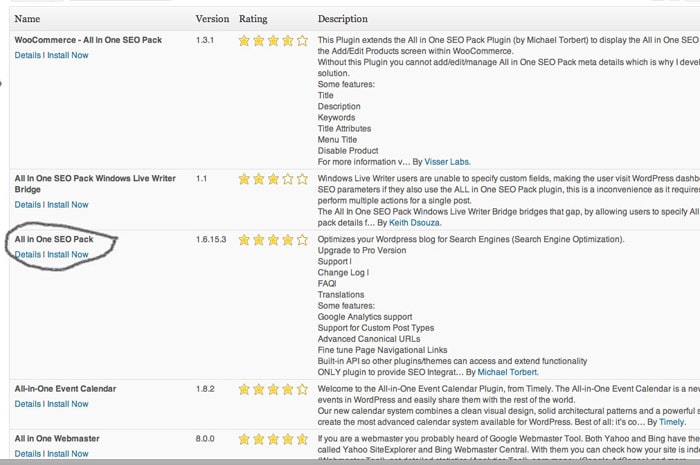
A) Install Plugin All In One SEO Pack And Enable It

All In One SEO Pack

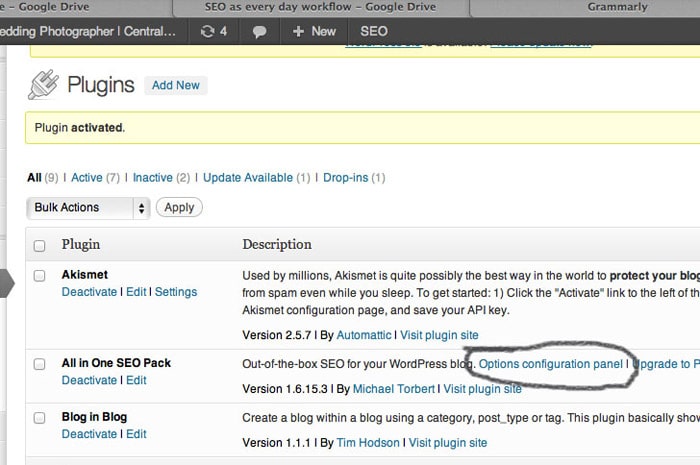
B) Next Go to: All In One SEO (Options Configuration Panel)

All In One SEO Pack

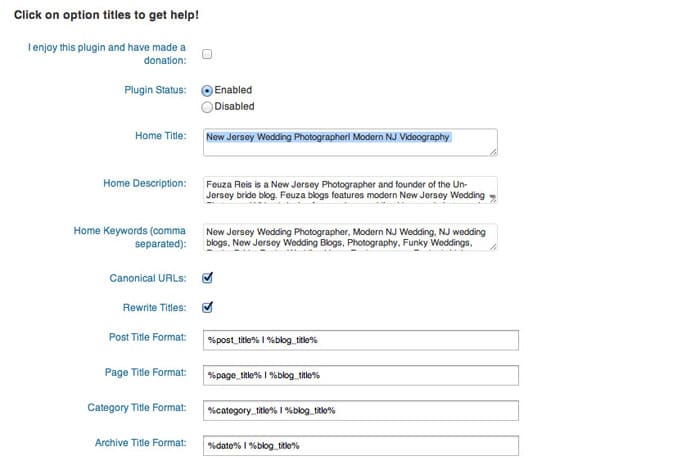
C) Fill Out The Title, Description and Tag Words.

All In One SEO Pack Options

Be sure to update the options at the end of the page and save.

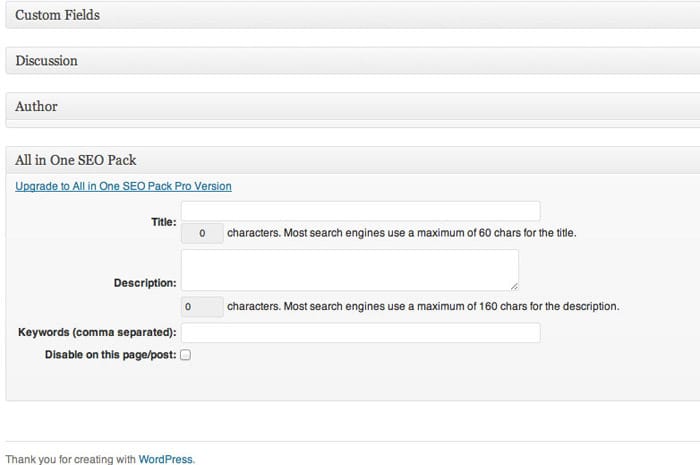
D) Many photographers think this is the last step, but it is not. At the end of every blog post, there is a section named ‘ALL IN ONE SEO.’ This section can be found all the way at the bottom past the text and photo box. Here, you can also add a title, description and some key words and you definitely should. (You should continue reading the article for more information).

All In One SEO Pack Custom Fields

3) Create A Keyword list.

Start a keyword list and save it as an excel file on google drive, or your desktop. This list will help you organize ideas for blog posts and pages on your website that you may want to add for SEO purposes. The biggest mistake photographers make is that they think like a photographer and not in the perspective of the client. Avoid trying to rank for words like session, e-session, and your studio name. The purpose of SEO is to get found by new clients and get booked. Most clients are new to hiring photographers and won’t know what any of these photography key terms even mean. Think more in generic terms like photos, pictures, pics, professional.

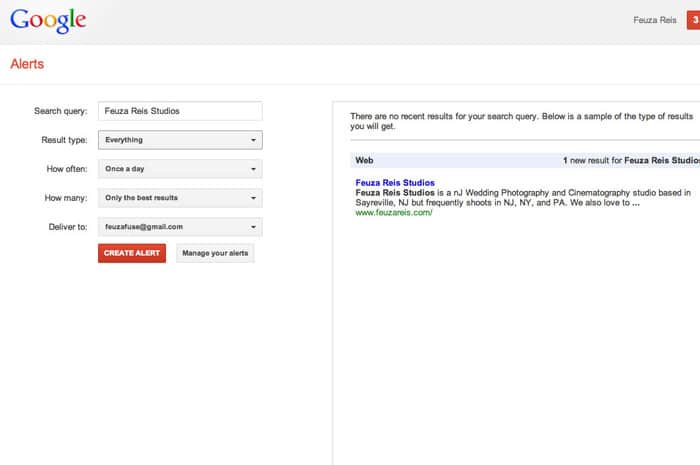
4) Set Up Google Alerts.

Google Alerts is a free tool by google and it helps you find out if anyone is talking about you and your business on the web. I set up a Google Alert for my name, my studio name and once in awhile a keyword name so that I can see who is being ranked for that keyword.

Google Alerts

For more information on Google Alerts, go HERE.

SEO Every Day.

Now that you have laid the foundation for your SEO work, it is time to automate it as much as possible. SEO is ALL about text, and the best thing you can do is blog. However, you don’t need to blog as much as you may think. You do on the other hand need to optimize your blog post and promote it well.

Here is my SEO workflow:

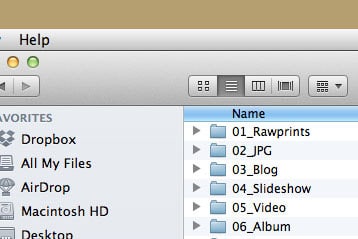
1) Create a sample folder on my desktop which will be used to copy and paste for every shoot.

Feuza Reis' Workflow

This folder has 6 subfolders: (I have changed it to include blog and slideshow together now)

2) Copy and paste the main folder for every shoot, rename it by date and name of client.
3) Backup photos onto external hard drives.
4) Import photos into Lightroom.
5) Cull the photos, choosing the keepers etc
6) Edit the images as desired.
7) Star rate #5 the images that may be used for blog post and slideshow (I clump these together because I usually choose too many and only decide which ones I am using while I am actually blogging.)
8) Filter the 5 star rated photos, which for me is usually between 60-80.
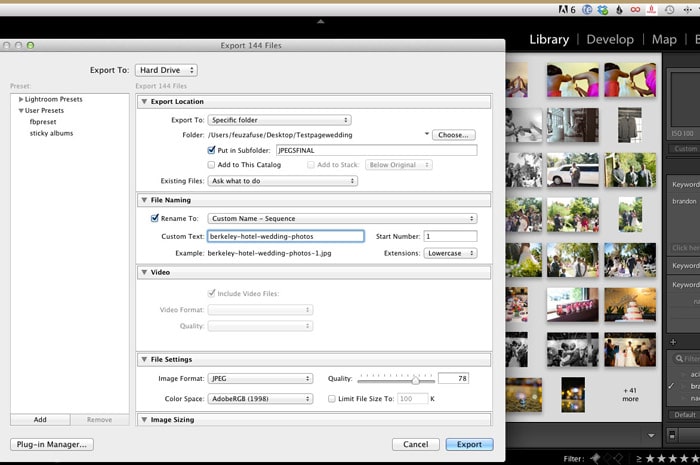
9) Rename the photos with the one main keyword I want to blog about.

Lightroom Renaming Files

Here are some examples for different keywords you can do for other types of photography:

Weddings – I like to pick the name of the venue: plaza-hotel-wedding-photos

Engagement Sessions – Either choose a state, city or name of place where you took the photos for your main keyword.

NJ-engagement-photos
NJ-engagement-photographer
Engagement-photo-ideas or pictures-of-engagement-photos (remember to think like a client and not like a photographer!)

Portraits – You can use the type of session or your city/location:

Newborn-photographer-in-NJ
NJ-newborn-photos
kids-photographer
kids-professional-photos
maternity-photographer-in-nj

Boudoir – Use more common words clients who have never had a boudoir session would use.

Sexy-pictures-NJ
NJ-boudoir photographer

Now onto Blogging:

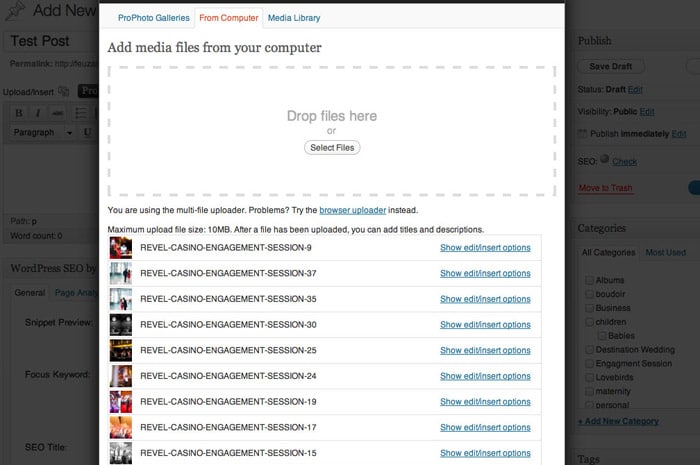
1) Upload all the photos you want to use for your blog post.

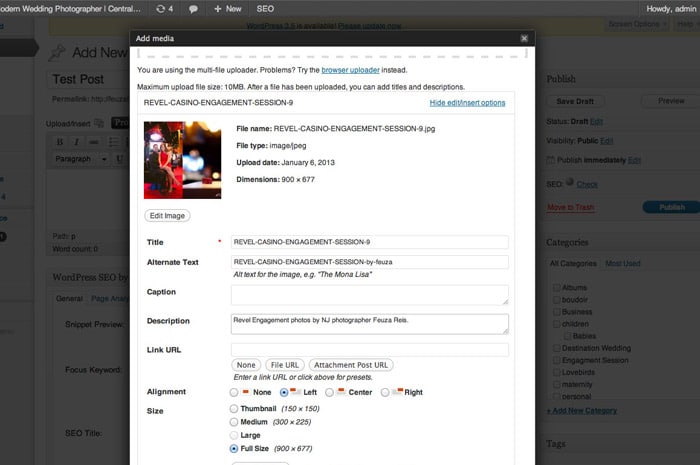
WordPress Image Uploader

2) Rename Title (Since we have done this in LR already skip this step)

If you use Blogstomp to watermark your photos make sure in settings, you change it to leave name of photo as is instead of the date which is default.

3) If you copy the title and paste in alt-text and or add a variation like by your photography name or town/state.

WordPress Image Uploader Options

Many times, I leave this as is due to lack of time and it still works. Remember I like to keep it simple and practical. The ideal would be to be more specific and have more variation.

4) Copy this in description, but add nj photographer or add something like “photos by Feuza Reis.” as seen in example above.

5) Add a few tags, not that many because they don’t have as much weight as you think.

6) Don’t mix keywords. For example, if it’s a family shoot don’t put that you are also a wedding photographer.

7) Blog 2-3 times a month, optimizing and promoting it well. Promoting is a different topic in itself to address.

8) Last but not least, track your results. What is the poingt of doing the work if you are not measuring your efforts? Start a document and state which page of Google you are appearing for some keywords you want for yourself. Also have a tab for how many blog visitors you are having a week or month.

Track your results with statcounter.com or Google analytics. I prefer using the plugin, Google analyticator, which shows me a summary of which keywords are gettings hits on my blog right in my WordPress Dashboard.

Overall the most difficult work of SEO is laying down the foundation and installing what you need to install, but then it is done! Yes, it may be annoying to do and to keep up with, but if you are tired of not getting found online and Google not recognizing you as a photographer, taking these actions is extremely important, so don’t postpone it!

Tell us if you make content marketing and search engine optimization a natural part of your everyday workflow. If so, how?

Filed Under: Photography, Web/Tech Tagged With: being found, blog, blogging, Blogging For Seo, content marketing, Feuza Reis, google, Marketing, online, Photographers, search engine optimization, seo, web analytics, Workflow

  • 1
  • 2
  • 3
  • Next Page »

Subscribe To Tiffibox Treats!

Looking for a well-curated email newsletter that will leave you inspired and motivated about your photography business? Sign up below!

About Seshu

Seshu creates relaxed portraits of families and high school seniors in Avon, Connecticut. He also leads a successful headshot photography studio in Connecticut, helping professionals from a variety of disciplines project the very best versions of themselves. He created Tiffinbox as a way of inspiring photographers, to create better images and successful businesses. [Read More]

Email Templates For Headshot Photographers

Email Templates for Headshot Photographers

Recent Posts

  • How Capture One Changed My Event Photography
  • 10 Steps To Stay Positive In Times Of Great Stress
  • Why You Need To Read “Personal Branding For Photographers” Now
  • How To Master Your Website Content Step By Step?
  • Tony Taafe’s TNT Method For Headshot Photographers

Recent Comments

  • Stephen Davison on Are You A Business Owner Who Is Smart, But Stuck?
  • Ben A. on Don Giannatti Clinches The 8th Annual Tiffinbox Award
  • Dan on Don Giannatti Clinches The 8th Annual Tiffinbox Award
  • Donald Giannatti on Don Giannatti Clinches The 8th Annual Tiffinbox Award
  • Stephen Davison on G.E. Masana’s 6 Strategies For Wedding Photography Success
  • Naveen Kumar on Weddings In India Are More Than Being At The Right Place And At The Right Time
  • kartick on Weddings In India Are More Than Being At The Right Place And At The Right Time
  • Leonid Farbman on 6 Uncommon Trends To Grow Your Photography Business
  • Willow and Finch Wedding Photography on 11 Reception Tips To Help Your Wedding Photography
  • Web Designer Malaysia on How To Optimize Your Squarespace Website For Search Engines
  • Creastan on An Interview With Photojournalist G.M.B. Akash
  • Cindy Brown | Atlanta on An Open Letter To A Local Photographer

Become a Patron!

Copyright © 2026 · Tiffinbox · Site Design by Heather Mackan Creative · Built on Genesis