• Photography
  • Interviews
  • Business
  • Reviews

Tiffinbox

Inspiring Photographers

  • Home
  • About
  • Blog
  • Contact

What is Bounce Rate, And Should Photographers Care?

November 12, 2013 by Zach Prez

If you have been using Google Analytics for any length of time to measure your photography website’s performance, then first of all, congratulations. Google Analytics is a free metrics tool and the industry standard for measuring how visitors use your website including how many people come, how often, and to what pages. You may have noticed a data point called bounce rate, and gently ignored it (no offense bounce rate).
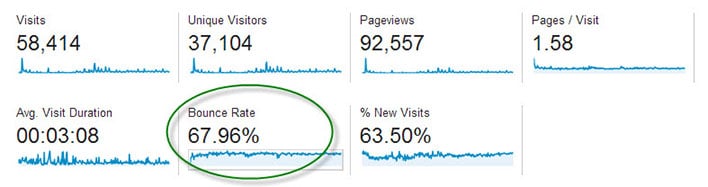
Bounce Rate

The main dashboard of Google Analytics shows the average bounce rate for your whole site.

Bounce Rate is the percentage of single-page visits (i.e. visits in which the person left your site from the entrance page without interacting with the page).

Should Bounce Rate Be High or Low?

Bounce rate should be as low as possible, indicating potential customers are viewing multiple pages of your site and therefore more likely to hire you.

It’s hard to quantify what is a high bounce rate since that depends on many factors including the type of page, how users came to that page, and what is on the page. If you’re only sharing your page with family and friends, you may have a low 25% bounce rate but are not really growing your business. You may have a high 90% bounce rate, but are getting nationwide press and converting a lot of sales from those visitors. Thus, it boils down to relative bounce rate. How does the bounce rate of your homepage compare to that of your pricing page or an individual blog post? What actions can you take to improve one page to increase the click through that your other pages are getting?

Bounce Rate for Individual Pages

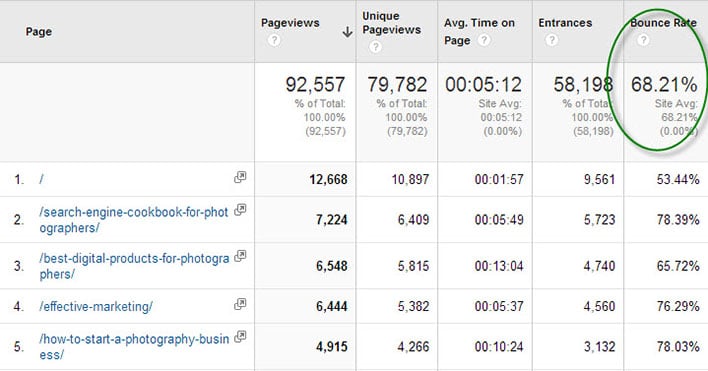
Google Analytics displays bounce rate data for every page of your site. Find this report in the left navigation under Behavior > Site Content > All Pages.
Bounce Rate Pages

The Pages report in Google Analytics shows bounce rate data.

In the above report for my business articles blog we see that the homepage has a 53.44% bounce rate. That means over half of my audience reaches my homepage but does not click on an article. This bounce rate is lower that the site average of 68.21% bounce.

Item #2 in the above list is a product page and has a higher bounce rate than Item #3, an article containing lots of links. I may conclude that adding more links to my product page can help retain customers.

What Influences Bounce Rate?

Traffic comes to your website in three ways:

• Direct – 99% of direct traffic is from email, 1% is from bookmarks
• Referral – links from other sites on the Internet including social media
• Search Engines

Each of these ways can influence how visitors use your site, and if they will view multiple pages. If you have a large percentage of traffic from an email newsletter, then your bounce rate may be high. This is because people click on a link in your email, they see what they expected (like a recent photo session), then leave the page without clicking anything. This is not necessarily a bad thing.

Sites with a lot of traffic from Pinterest may have a high bounce rate since the user is simply browsing (perhaps for newborn poses) and might not even be in your target market or geographic location. I would not expect those people to click around to other pages of your site. Sites with a lot of blog posts ranking in search engines, the average visitor may check out the article they were searching for (like backyard wedding photo ideas) and then leave right away. Again, your webpage served its purpose.

How to Reduce Bounce Rate

Here’s the key to getting people to stick around your website, and click across multiple pages without bouncing off your site:

Give visitors additional links to click on every webpage

Here’s a little experiment to help you figure out what links to place across your site. Write down the top 3 pages of your site you want users to visit most. It may be a blog post you wrote exceptionally well, perhaps an important photo gallery that showcases your work wonderfully, and certainly it will be your contact and/or pricing page.

Now pick a random page from your website. How easy is it for users to get from that random page to one of your top 3 pages? Place links to these hot spots from the top, middle and bottom of the page.

Homepage – Many photography homepages have almost no text, and a single link to a gallery site or a blog site. That simply dumps users into a bunch of content, often times your most recent work and not necessarily your best work. Instead, display individual links to your most important blog posts right on the homepage. With this approach, users have a clear path to the best pages and are more likely to click.

Blog Post – Visitors find blog posts through many sources, especially search engines and social media. Since these potential clients didn’t navigate through the homepage, photographers need to reiterate important information like contact information and links to relevant pages. Orchard Cove Photography hired me to create a SEO-friendly blog post and you’ll see how I included tons of links at the end (and at the beginning) in order to keep interested customers from bouncing.
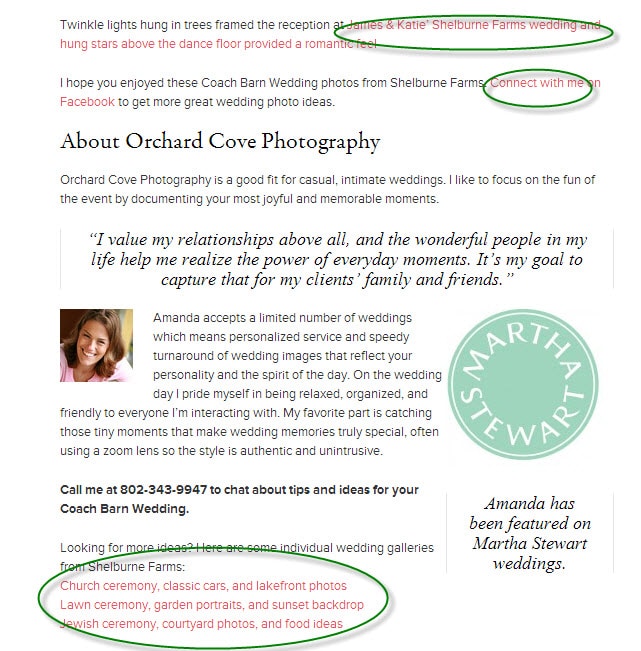
Sample Post

Does Bounce Rate Matter?

The very important question that comes out of all this is whether or not photographers should measure, monitor, and care about reducing bounce rate. I don’t ever look at my bounce rate.

The goal is to define clear customer paths from each and every page of your site. Start with your five top traffic pages. Pretend each page is the starting point for your potential customer because they came from Google or Facebook. Figure out what you want them to do next and make that a clear navigation point on the page. If you want them to hire you then add a big graphic that says “Book a Session Now” and link it to your contact page.

After making changes to your five top traffic pages, wait a week and see if the bounce rate declined. I hope you will be pleasantly surprised.

Filed Under: Home Middle Right, Photography, Web/Tech Tagged With: bounce rate, Business, google, google analytics, photography websites, search engine optimization, seo, web visitors

5 SEO Myths Photographers Should Debunk

May 7, 2013 by Feuza Reis

Feuza Reis is a wedding photographer, blogger and founder of SEO for Photographer’s Bootcamp “Get Found With Fuse”. This is Feuza's second guest blog post. Read her first one as well. Follow Feuza on Twitter.

In the last few weeks, some photographers in the community have imparted SEO advice that has made me want to cringe and hide. Not only were there some major mistakes taught, some things mentioned were irresponsible and can get photographers in trouble with Google.

Here are 5 SEO myths photographers should consider reviewing:

1) Wanting To Only Rank (meaning to be on the first page of Google) For A City and/or Kind Of Photography Service You Offer

For example: NY Wedding Photographer, Los Angeles Newborn photographer, Chicago kids Photographer and so forth.

You should be including the town you live in and the towns you serve in your SEO efforts but it should not be your main SEO or only SEO goal.

Why?

Number one is, I call this the gladiator arena, everyone is bidding on adwords for this term and paying big bucks for it, this in turn will make it harder to rank. This also indicates a high competition in the organic results realm because business owners don’t understand how people actually search or how Google works.

Google is smart enough to know where the person searching is actually located and it knows how to filter it’s results accordingly. Do brides who get married in NY, Chicago or LA really live in that town? Or, do they live in surrounding towns but want to get married in the big city? I don’t have an exact answer for this but I know you can use Google’s Keyword Tool to discover the search traffic results to find out. What I do know is that Google is wise and knows what it is doing so when I hear photographers say they don’t or should not list surrounding towns, it's comical and sad.

You are missing out on organic traffic because you are underestimating Google’s algorithms. Why fight where everyone is fighting instead of going after alternative keywords, venues, wedding types, surrounding cities, and actually words and phrases clients really use like pictures of engagement photos, kids, children and not words like lifestyle, portrait, and industry related words?

Competitive keywords don’t always mean more traffic so be very careful.

2) Use The Same 2-3 Keyword Phrase On Every Single Blog Post And On All Pages Of Your Website

Although SEO is all about text and yes you should have as much text as possible and even be repetitive, variety matters.

For an engagement photo session gallery page, your page titles and description should be related to engagement photography and variations of that and not have words like Family or San Diego Wedding Photographer.

Yes Google knows that those when two things are relatable like wedding and engagement but making the page as concise and specific as possible will help the search engines navigate better and know where to go within your website. This also matters when choosing what to name your links within your pages in your category dropdowns and sub categories. Don’t use cute names for sessions but use more day to day words clients will know.

The other problem with using the same keyword all over is that it will be considered duplicate content and your pages will compete with each other and you sure don’t want that because the Google bots will leave. Remember its not your over all domain url that gets ranked per say but it is your pages and one page can be much stronger than the other and get better results. So if a search engine comes into your website and all the pages are “Seattle Wedding Photographer” it will get stuck and not know how to navigate and this will cause higher bounce rates so change your page titles, change your descriptions. Being too repetitive is also called keyword stuffing which Google has been frowning upon over and over. It can get you short term results but the long term can get you banned from Google and most of us can’t risk grey hat practices because lets face it we don’t have the bucks to pay some technician to go fix the problem if we magically disappear from google one day.

How to know if you are keyword stuffing? Optimize for humans! Make it sound natural and if it looks odd then take it out. We can optimize for the search engines all day long but at the end of the day it is humans that book us so keep your clients in mind.

3) Clients Don’t Type More Than Two or Three Keyword Phrases In Their Search

(insert jaw drop)

Longer phrase words are called “long tail” and yes there may be less traffic but if you nail a long tail keyword, Google will love you and give you priority with ranking!

As Photographer's SEO put it:

“A great thing about knowing how to choose long tail keywords is that even though the search volume for that particular keyword phrase may be lower you’ll find that there is less competition for it there for you’ll have a much better chance of breaking higher for them very quickly.”

Statics state that 20% of what has been searched in Google in the last 90 days has NEVER which indicates we humans have a lot to say and alot has not been said yet. SEO MOZ’s long term graph shows:

“It's wonderful to deal with keywords that have 5,000 searches a day, or even 500 searches a day, but in reality, these “popular” search terms actually make up less than 30% of the searches performed on the web. The remaining 70% lie in what's called the “long tail” of search. The long tail contains hundreds of millions of unique searches that might be conducted a few times in any given day, but, when taken together, they comprise the majority of the world's demand for information through search engines.”

Long Tail GraphAnother point I want to state in regards to using long tail phrases is that for the most types of photography services offered, it is more women than men doing the actual search: think of brides, moms, secretaries, teens etc. Of course men search too. In fact, I have a lot of grooms calling me but I believe men do more the paying and showing up and women do more the searching online. So if it's women mostly searching for my service (of course this is my opinion and there are many exceptions) and women speak on average 10,000 words a day vs men who generally speak 3,000 words a day, do you really think women while searching will want to save on vocabulary? Is is true that we live in a fast paced society and people can save some words because they are in a rush but the words saved based on what you see on Google keyword tool result are prepositions. When searching for something new and an unfamiliar topic like hiring a photographer for an event, wedding, portrait session, we will use more words to describe what we are looking for because for most of our clients this is something new to them completely.
I had to recently search about pulling teeth since my eight year son’s teeth are growing in before falling out and they were very loose too. Do you think I searched 2 word phrases like tooth pulling or a full sentence? I actually searched something like: “how do you when to pull a child’s tooth? How to safely pull a tooth? Is it safe to pull your child’s teeth and so forth?”

Brides, moms and people for the most part when searching online for a topic they are not used to will elaborate using their words. Things like “where to find? what is? who is the best?,” and so forth.

So, don’t ignore longer keyword phrases especially when blogging.

4) Creating Dummy Pages

Cringe and cringe. How could I call creating content pages for my clients, the ones who book me, pay for my services dummy pages? Or worse, create fake urls to link back to my website? This can be done if you are an expert but you have to know what you are doing so just be aware of possible consequences in doing so.

So you ask: “Feuza, you have never purchased an url with keywords?” Of course I have and will in a heartbeat if a keyword is available. But I am a huge fan of creating content pages on your actual website and even blog because it can be huge for SEO. Perhaps do a redirect or forward the URL once but not a dozen times and create fake websites. And please don’t purchase any backlinks on fiverr!

At the end of the day, I don’t care if you are getting business from referrals only, from Facebook only or from online only the number one tip to book new clients is BE A RESOURCE. One of the things I teach for blogging is think of every customer service question you have ever had and do a blog post to answer it for present clients and future clients.

When you help someone find a place to buy something, to photograph at a venue, they will remember you and be your fan. That is the power of social media sometimes. You will get your return-on-investment, or ROI, later and it can be hard to tell the true source of that booking. But by providing valuable information to your end user, you will see results.

Be genuine about your content pages and optimize for humans especially since Google has been coming down on these kinds of methods more and more. You should try and have variety in content you do provide. You can also break down your frequently asked questions and have a page for each question. However, remember not to write the exact same thing on blog content page that you do on your website content page because it can be viewed as duplicate content.

5) “I Can’t Be In Google Places Because I Work From Home”

Some of you don’t want strangers to have your home address. I get that. But, as service providers many of us do work from home and some of our work, like boudoir photography, is more of a private service.

While you do indeed need to provide your real address, you can mask the address in your Google Places listing by providing many cities you do serve. Yelp does something similar.

As per Google’s guidelines:

“Address (required): The address should look exactly the way you'd write it on a standard mailing envelope. If you are a service-area business, you'll be able to hide your address in a few steps. We recommend listing suite numbers in Address Line 2.”

To view the rest of the guidelines visit HERE!

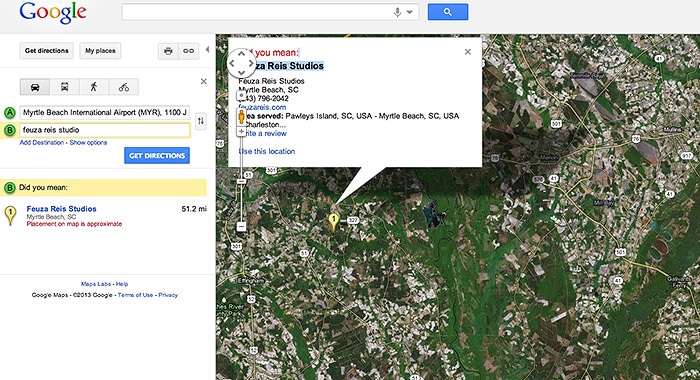
So don’t hesitate in getting your Google listings as local SEO gets more and more powerful. Another good tip is to Google yourself under Google Maps to see what comes up and to see if you are listed or Google has wrong information about your business.

As you can see my listing does not have my actual address but just the town I live in:

Google Map | Feuza Reis | South Carolina

In summary it is up to each business to do due diligence and be compliant. Some may disagree with my views on some things but there are some facts that can not be ignored. I suggest white hat practices especially if you don’t know what you are doing and don’t have an SEO support team to get found!

Filed Under: Marketing, Photography Business, Web/Tech Tagged With: google, Photographers, Photography Business, Search Engine Marketing, seo, Seo Myths

How To Make SEO Part of Your Everyday Workflow

January 15, 2013 by Feuza Reis

This guest post is by Feuza Reis, a NJ Wedding Photographer, founder of the Un-Jersey Bride Blog and helps photographers and artists Get Found Online. You can follow Feuza on Twitter.

For many photographers January is the month to take care of business. We have to worry about doing our taxes, updating website images, blogging previous posts we missed, and strategizing for the new year. I think January is the perfect time to work on optimizing websites and blogs for SEO. The biggest hurdle to overcome with putting SEO into practice is lack of information, time and its complexity. SEO for some is a strange buzz word, and for others it is this painful complicated process full of difficult words and terms.

I prefer to view SEO as a practical method I can put into my workflow so that it does not control me. With that being said, it will be hard to make it part of one’s workflow if he/she does not lay out the basic principles for getting found online. Before covering how a photographer can make SEO part of their daily routine, here are 3 tips on laying the foundation to get optimized.

Follow These 4 Steps To Lay The Foundation

1) Add Text To Your Website Pages.

The easiest thing one can do right now is add a text on every page of your website with the city you city and state you live in and also which areas you are willing to service. If one visits 10 photographer’s websites, more than half leave out where their location. This makes the hunt for a photographer nearby to be rather difficult, much like finding a needle in a haystack.

Google is crazy about the local search and will give results based on where the person searching is located while they search for a photographer. Google wants to show the searcher who is available to work near their area.

So how will they know if you match that query? TEXT. Text is the main component of SEO, so be sure to add your town, state or region on your website. The actual text to add will depend on how local folks might search in that state or area: examples are the greater Atlanta area, South Jersey, NYC, Manhattan, and so forth.

Since I don’t have a studio I don’t put an actual address but for photographers who have a retail commercial space, then add your full address.

My example is as follows:

Feuza Reis New Jersey Wedding Photographer

Adding a text like this may not be so appealing, but it is vital if you want to get found online. Make it small enough but not transparent. You can get black listed by Google if you do things like transparent text. If you have a fear of committing to one particular location, just add the main city you serve and that you also do destination weddings. Since Google loves text and local search, it is extremely important you add where you provide your services on your website. You can also do this on
your blog as much as possible.

2) Install The All In One Plugin Pack

Many photographers I speak to already know about this plugin BUT many have not updated their settings nor are they updating the All in One SEO box at end of their blog posts. Here are steps to install and use this great SEO wordpress plugin.

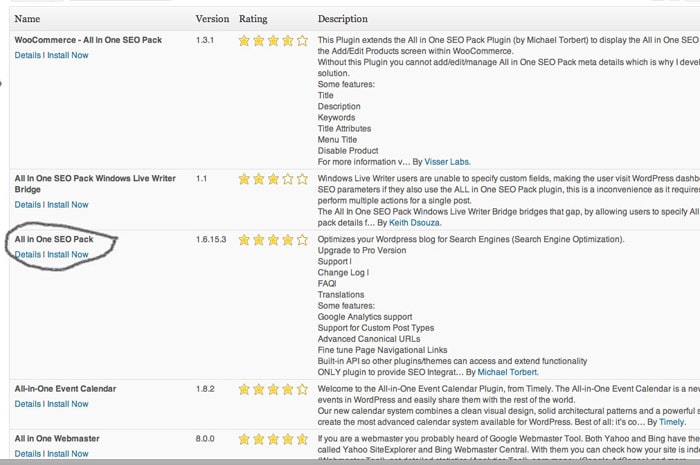
A) Install Plugin All In One SEO Pack And Enable It

All In One SEO Pack

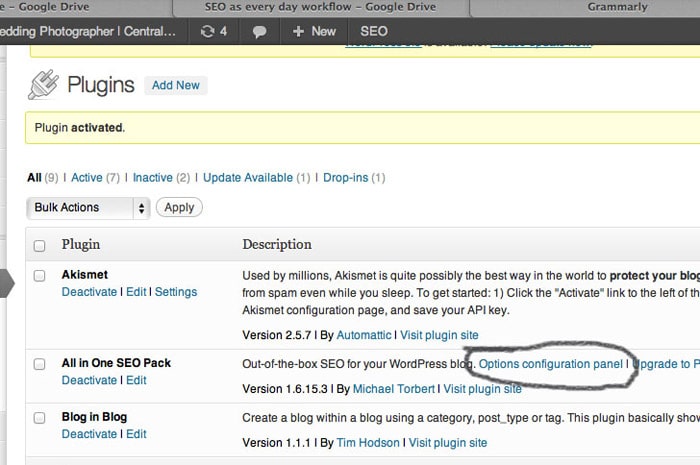
B) Next Go to: All In One SEO (Options Configuration Panel)

All In One SEO Pack

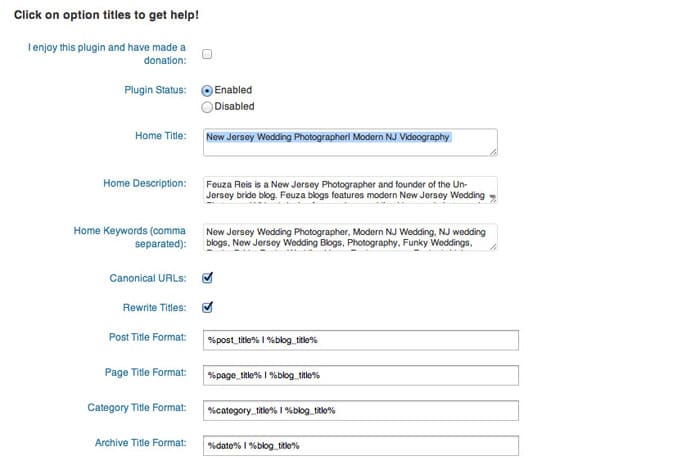
C) Fill Out The Title, Description and Tag Words.

All In One SEO Pack Options

Be sure to update the options at the end of the page and save.

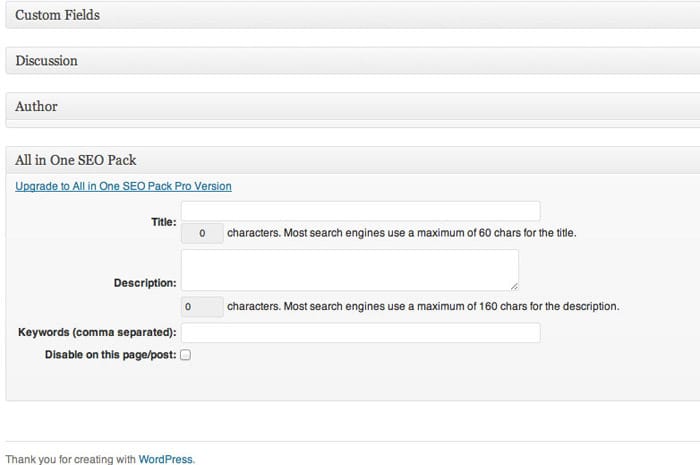
D) Many photographers think this is the last step, but it is not. At the end of every blog post, there is a section named ‘ALL IN ONE SEO.’ This section can be found all the way at the bottom past the text and photo box. Here, you can also add a title, description and some key words and you definitely should. (You should continue reading the article for more information).

All In One SEO Pack Custom Fields

3) Create A Keyword list.

Start a keyword list and save it as an excel file on google drive, or your desktop. This list will help you organize ideas for blog posts and pages on your website that you may want to add for SEO purposes. The biggest mistake photographers make is that they think like a photographer and not in the perspective of the client. Avoid trying to rank for words like session, e-session, and your studio name. The purpose of SEO is to get found by new clients and get booked. Most clients are new to hiring photographers and won’t know what any of these photography key terms even mean. Think more in generic terms like photos, pictures, pics, professional.

4) Set Up Google Alerts.

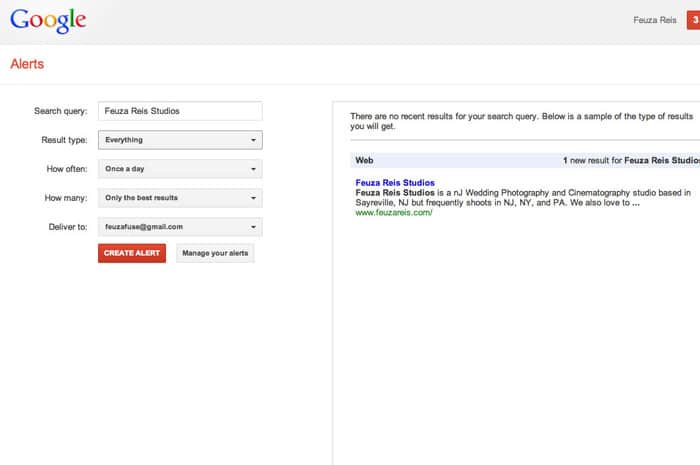
Google Alerts is a free tool by google and it helps you find out if anyone is talking about you and your business on the web. I set up a Google Alert for my name, my studio name and once in awhile a keyword name so that I can see who is being ranked for that keyword.

Google Alerts

For more information on Google Alerts, go HERE.

SEO Every Day.

Now that you have laid the foundation for your SEO work, it is time to automate it as much as possible. SEO is ALL about text, and the best thing you can do is blog. However, you don’t need to blog as much as you may think. You do on the other hand need to optimize your blog post and promote it well.

Here is my SEO workflow:

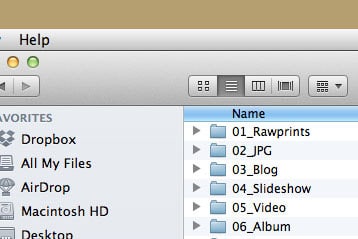
1) Create a sample folder on my desktop which will be used to copy and paste for every shoot.

Feuza Reis' Workflow

This folder has 6 subfolders: (I have changed it to include blog and slideshow together now)

2) Copy and paste the main folder for every shoot, rename it by date and name of client.
3) Backup photos onto external hard drives.
4) Import photos into Lightroom.
5) Cull the photos, choosing the keepers etc
6) Edit the images as desired.
7) Star rate #5 the images that may be used for blog post and slideshow (I clump these together because I usually choose too many and only decide which ones I am using while I am actually blogging.)
8) Filter the 5 star rated photos, which for me is usually between 60-80.
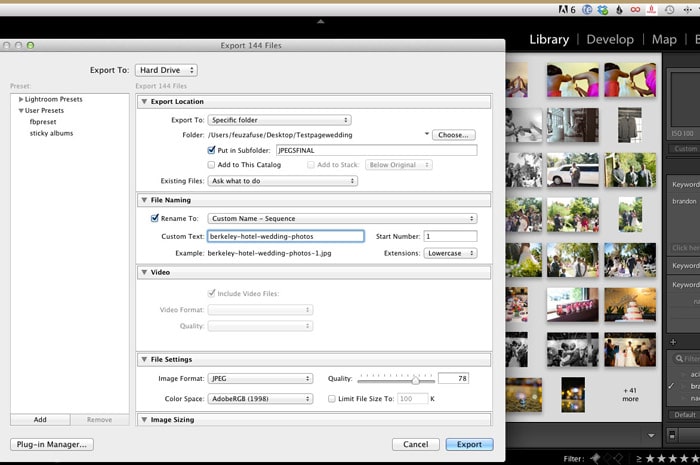
9) Rename the photos with the one main keyword I want to blog about.

Lightroom Renaming Files

Here are some examples for different keywords you can do for other types of photography:

Weddings – I like to pick the name of the venue: plaza-hotel-wedding-photos

Engagement Sessions – Either choose a state, city or name of place where you took the photos for your main keyword.

NJ-engagement-photos
NJ-engagement-photographer
Engagement-photo-ideas or pictures-of-engagement-photos (remember to think like a client and not like a photographer!)

Portraits – You can use the type of session or your city/location:

Newborn-photographer-in-NJ
NJ-newborn-photos
kids-photographer
kids-professional-photos
maternity-photographer-in-nj

Boudoir – Use more common words clients who have never had a boudoir session would use.

Sexy-pictures-NJ
NJ-boudoir photographer

Now onto Blogging:

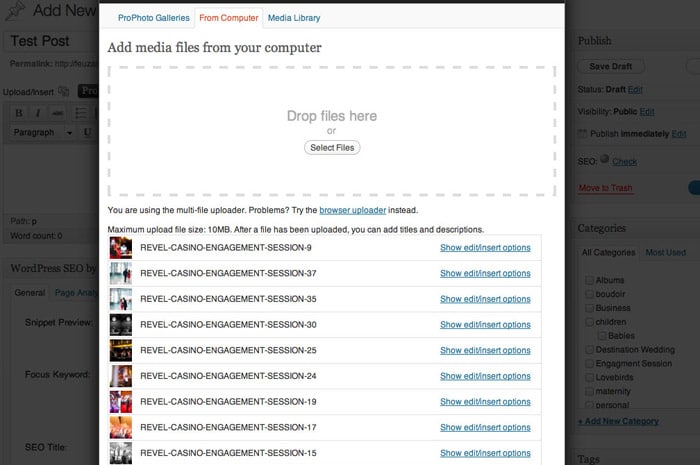
1) Upload all the photos you want to use for your blog post.

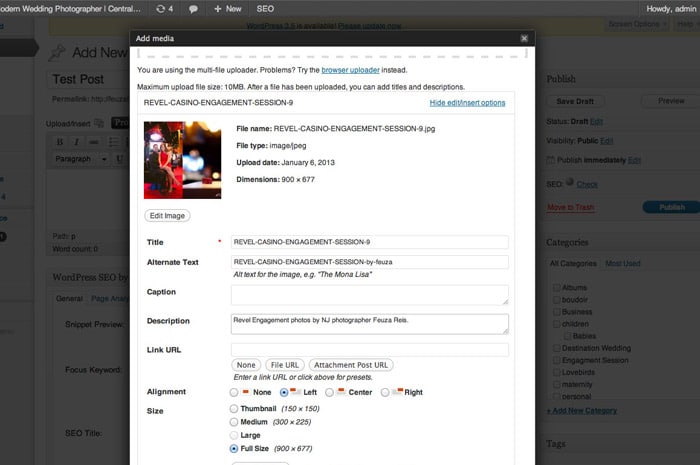
WordPress Image Uploader

2) Rename Title (Since we have done this in LR already skip this step)

If you use Blogstomp to watermark your photos make sure in settings, you change it to leave name of photo as is instead of the date which is default.

3) If you copy the title and paste in alt-text and or add a variation like by your photography name or town/state.

WordPress Image Uploader Options

Many times, I leave this as is due to lack of time and it still works. Remember I like to keep it simple and practical. The ideal would be to be more specific and have more variation.

4) Copy this in description, but add nj photographer or add something like “photos by Feuza Reis.” as seen in example above.

5) Add a few tags, not that many because they don’t have as much weight as you think.

6) Don’t mix keywords. For example, if it’s a family shoot don’t put that you are also a wedding photographer.

7) Blog 2-3 times a month, optimizing and promoting it well. Promoting is a different topic in itself to address.

8) Last but not least, track your results. What is the poingt of doing the work if you are not measuring your efforts? Start a document and state which page of Google you are appearing for some keywords you want for yourself. Also have a tab for how many blog visitors you are having a week or month.

Track your results with statcounter.com or Google analytics. I prefer using the plugin, Google analyticator, which shows me a summary of which keywords are gettings hits on my blog right in my WordPress Dashboard.

Overall the most difficult work of SEO is laying down the foundation and installing what you need to install, but then it is done! Yes, it may be annoying to do and to keep up with, but if you are tired of not getting found online and Google not recognizing you as a photographer, taking these actions is extremely important, so don’t postpone it!

Tell us if you make content marketing and search engine optimization a natural part of your everyday workflow. If so, how?

Filed Under: Photography, Web/Tech Tagged With: being found, blog, blogging, Blogging For Seo, content marketing, Feuza Reis, google, Marketing, online, Photographers, search engine optimization, seo, web analytics, Workflow

How Photographers Can Copyright, Manage & Protect Their Images

April 9, 2012 by A.J. Wood

An Adobe Community Professional, you can find A.J. posting video tutorials & reviews on his website, when he’s not creating content for Layers Magazine or GeekBeat.TV. This is his second guest blog post for Tiffinbox. Read his first post as well. Then follow him on Twitter.

First, I want to thank Seshu for having me back on his blog. My schedule is such that I really try to make time for these guest articles; it's truly a privilege to contribute to the community.

For today's post I wanted to discuss copyright, and what you're not doing about it. I'm constantly surprised at the number of photographers who don't register their image copyrights. If you consider yourself a professional photographer, act professionally for the sake of your business and register your images. It's easy and affordable ($35), especially when compared to the insane amount of money you spend on your equipment. It can also be done online through the Electronic Copyright Office (eCO).

As I re-read the above paragraph, I can see how I'm coming off a bit harsh. Not my intention, it's just lately I've come across more photographers who have seen their work used by someone else. It's easy for you to register, it's even easier for someone to grab your image and use it. Consider this recent example in which Will King Photography was blatantly ripped off by 367 Media. What I find interesting is the folks that stole Will's images are located in the same geographic area. Usually, when I hear of these cases, they occur in other countries or different states.

In a previous post Seshu suggests you secure your images, and provides a link to David Riecks security page. Those are all good suggestions for discouraging infringement.

Registering your copyright is going to be your go-to solution if infringement happens.

Copyright is a civil matter handled in federal court. Without proper copyright registration you may be entitled to actual damages, e.g., standard licensing fees, profits received from infringement, and little else. You will not receive any statutory damages without proper registration. Considering most photographers reading this are using some sort of DAM (digital asset management) for organizing photos adding registration to your digital workflow wouldn't be too hard. For Lightroom & Photoshop enthusiasts I've recorded two videos on adding metadata to your images. Not only is this a good idea for SEO purposes, it's also a great way to ensure your copyright info is embed in every image you post. Did I mention most thieves are lazy? Yup, you shouldn't be surprised how many times your image is reposted as is, without even a name change, metadata intact.

Lightroom SEO

Photoshop SEO

Here are some additional resources to learn more about copyright registration:

1. The PPA helps photographers educate their customers on why copyright is important.

2. Ken Kaminesky interviews Carolyn Wright aka The Photo Attorney who answers photographers burning copyright questions.

3. Jack Reznicki & Ed Greenberg produced the Photographers Legal Guide on DVD, which you can purchase through Kelby Training.

DISCLAIMER – I am not an attorney, nor is this article to be considered professional legal advice.

Do you copyright your images? Tell us about your process down below! You may want to consider a company like MyOWS to help you copyright and then manage and protect your images.

Filed Under: Business, Photography Tagged With: adobe lightroom, adobe photoshop, copyright, copyright law, digital asset management, images, library and information science, manage, photographer, professional photographers, property, protect, protect image, seo, Tutorials, united states copyright law, united states copyright office, videos

Get Better Seo By Finding & Using Long Tail Keywords

August 31, 2010 by Guest

Zach Prez, Avatar

This is a guest post by Zach Prez who offers 1-on-1 coaching and SEO workshops. Follow him on Twitter and Facebook.

Everyone knows choosing the right keywords begins the SEO process (or at least you know now). After all, search engine optimization means optimizing keywords so you can rank for them. In this post I’ll refer to keywords as a phrase you want to rank for, and demonstrate how to find longer keywords where competition is less extreme. Even a new site or beginner can rank quickly.

Knowing Keywords is a Critical First Step

Without a keyword list it’s easy to optimize for the wrong words, repeat words, words nobody searches for, and words that don’t create new business. All of these take time away from your true talent (hint: not SEO) and are doomed for failure. Let me demonstrate some examples of what not to do. Feel free to bang your head against a desk for having fallen victim to one of SEO’s classic blunders such as:

1. Wrong words: optimizing for wedding binders won’t make you crazy cash like a successful rank for wedding albums. Go with words people actually use.

2. Repeat words: No need to put Los Angeles wedding photographer in all your blog titles and images. Do you really expect every one of them to rank for that phrase? A homepage will outrank a blog post for a main/primary phrase. Target one page per phrase please.

3. Words nobody searches for: Cool, you rank #1 for Arizona ocean photography but nobody has yet to search that in Google. Don’t waste time optimizing for that.

4. Words that don’t create new business: A #1 rank for celebrity photographer may build your online rep to Ashton Kutcher levels, but if you’re based in Minnesota and not willing to travel it probably won’t deliver new clients. Avoid the above by doing a little up front keyword research to find the most searched terms. We’ll put those terms into a list and map it to a content timeline.

How Longer Phrases Can Help SEO

Before you go picking the top 10 most difficult keywords in your niche, let me explain how Google works.
1. A user types a phrase into Google
2. Google looks for a page about that phrase
3. Google finds lots of pages about that phrase and ranks the page with the most authority at #1 (authority is mostly determined by the number of links pointing to the page or site)

Thus, Google looks for keywords on the page (in the title, then URL, then body copy and images). A phrase like Los Angeles wedding photographer appears on 3.5 million pages.

Los Angeles Wedding Photographer Google Results

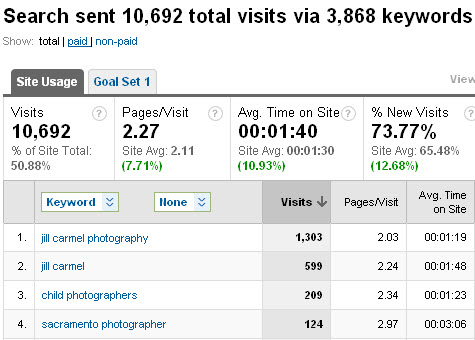
Rather than try to compete on authority for that phrase (or in addition to), find phrases like Hollywood Indian wedding photography ideas. No pages exist with that phrase, so if you optimize a blog post then you will easily rank very high. Plus you might even rank for different keyword combinations such as Hollywood Indian wedding, Hollywood photography ideas, etc. Even if only a handful of people search for that every month, that blog post provides exactly what they are looking for. Specific phrase + little competition = new client. Multiply the number of posts optimized for specific phrases and the traffic becomes significant. Look at this Google Analytics snapshot from a Sacramento Photographer. The main phrase Sacramento photographer was just 1 of 3,868 keywords that she ranked for and contributed to less than 1% of total traffic. Most of the few thousand phrases are very specific searches you would never imagine people would type.

Jill Carmel Analytics

Long-tail SEO is a strategy to find and capture search presence for the thousands of long phrases users will type to find you. Here’s how to locate and organize them.

Keyword List Worksheet

Start with a 4 column list on paper or spreadsheet using the following column headings

Adjectives: Indian best
Locations: Los Angeles Hollywood
Niches:  wedding photography
Nouns:  ideas

As the columns fill out, use various keyword combinations to develop the best phrases for your business.
1. Indian Hollywood wedding ideas
2. Best Los Angeles Indian wedding photography

Put the most important phrase at the top of the list. Next time you write a page or a post, take a look at the list and see if you can incorporate one of the phrases into your post idea. Or you can proactively start writing posts about each of your phrases. This week write about item 1, next week item 2, etc. Cross them off your list so that you don’t optimize for the same phrase twice.

Idea! Create a “best-of” post using content you already have written elsewhere. Take a paragraph here, and image there, and using old posts you can quickly create a new and optimized post.

How to Find Great Keywords

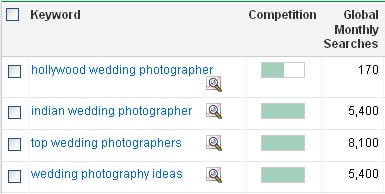
Two of my favorite 10 SEO Tools for Photography Keywords are free Google Keyword Tool and Traffic Travis PC software. Most everyone knows about the Google Keyword Tool for keyword research, but may be confused on how to get great ideas. I searched Los Angeles wedding photographer has 170 broad searches per month, meaning those 3 words were somewhere in the search criteria. Notice other keywords that users type as a part of their search phrase: Indian, top, ideas, photography. Add these to the keyword list worksheet for future use.

Indian Wedding Photographer Ideas

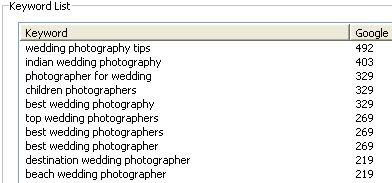
Yes, it is that simple. Looking up Hollywood Indian wedding photography ideas would not show any search volume, but we can see that users do search with those words in different combinations. If people are searching top wedding photographers, then they would also search for top in local searches as well. You don’t need 1,000 visits to grow your business. Rank high for something that 5 people search for each month and you can snag all of those clients ASAP. Traffic Travis just offers a second opinion. Another search uncovers more great keywords. I add the following keywords to my list: tips, best, destination, beach.

Hollywood Wedding Photographer Travis Results

My next post might be something like “10 Photographer Tips for the Best Beach Wedding in Los Angeles” and capture users searching for beach wedding tips, best photographer tips, Los Angeles beach wedding, etc. The power of long-tail SEO gains a little traffic from a number of phrases.

Compare Two Keywords

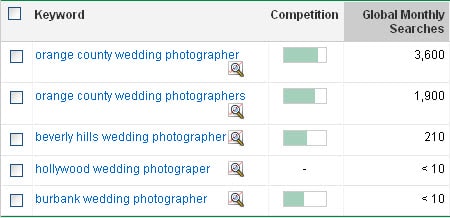
The other time a keyword tool comes in handy is when comparing the search volume of two or more keyword phrases. If I’m a wedding photographer in Southern California it would help to know which cities have the most searches. After typing a few phrases (at the same time) into the Google Keyword Tool I find that Orange County is very highly searched. Optimizing for that location has a lot more potential than Beverly Hills, while Hollywood and Burbank have very few searches. The keyword list should reflect this priority with the majority of phrases going after Orange County and maybe only 1 or 2 for the other locations.

Compare Two Keywords

For the creative and visual learners out there this video speaks to some of the tactics above.

Take Keywords to the Next Level

”Blog

Keywords are a small portion of search engine optimization strategy. My Photographers SEO Book and Blog SEO Zen ebook are quickly becoming the standard do-it-yourself guides for ranking photo and wedding businesses. Learn about site structure, link strategy, and tools with no technical knowledge needed.

Filed Under: Marketing, Photo Biz Tagged With: celebrity photographers, google, google search, index term, information retrieval, internet search engines, keyword, keyword list, keyword optimization, keyword research, keyword tracking, keywords, long tail, los angeles, los angeles wedding photographers, Marketing, optimize keyword, people search, Photographers, search engine optimization, seo, web search engine, wedding albums, world wide web

Subscribe To Tiffibox Treats!

Looking for a well-curated email newsletter that will leave you inspired and motivated about your photography business? Sign up below!

About Seshu

Seshu creates relaxed portraits of families and high school seniors in Avon, Connecticut. He also leads a successful headshot photography studio in Connecticut, helping professionals from a variety of disciplines project the very best versions of themselves. He created Tiffinbox as a way of inspiring photographers, to create better images and successful businesses. [Read More]

Email Templates For Headshot Photographers

Email Templates for Headshot Photographers

Recent Posts

  • How Capture One Changed My Event Photography
  • 10 Steps To Stay Positive In Times Of Great Stress
  • Why You Need To Read “Personal Branding For Photographers” Now
  • How To Master Your Website Content Step By Step?
  • Tony Taafe’s TNT Method For Headshot Photographers

Recent Comments

  • Stephen Davison on Are You A Business Owner Who Is Smart, But Stuck?
  • Ben A. on Don Giannatti Clinches The 8th Annual Tiffinbox Award
  • Dan on Don Giannatti Clinches The 8th Annual Tiffinbox Award
  • Donald Giannatti on Don Giannatti Clinches The 8th Annual Tiffinbox Award
  • Stephen Davison on G.E. Masana’s 6 Strategies For Wedding Photography Success
  • Naveen Kumar on Weddings In India Are More Than Being At The Right Place And At The Right Time
  • kartick on Weddings In India Are More Than Being At The Right Place And At The Right Time
  • Leonid Farbman on 6 Uncommon Trends To Grow Your Photography Business
  • Willow and Finch Wedding Photography on 11 Reception Tips To Help Your Wedding Photography
  • Web Designer Malaysia on How To Optimize Your Squarespace Website For Search Engines
  • Creastan on An Interview With Photojournalist G.M.B. Akash
  • Cindy Brown | Atlanta on An Open Letter To A Local Photographer

Become a Patron!

Copyright © 2026 · Tiffinbox · Site Design by Heather Mackan Creative · Built on Genesis