• Photography
  • Interviews
  • Business
  • Reviews

Tiffinbox

Inspiring Photographers

  • Home
  • About
  • Blog
  • Contact

How Photographers Can Copyright, Manage & Protect Their Images

April 9, 2012 by A.J. Wood

An Adobe Community Professional, you can find A.J. posting video tutorials & reviews on his website, when he’s not creating content for Layers Magazine or GeekBeat.TV. This is his second guest blog post for Tiffinbox. Read his first post as well. Then follow him on Twitter.

First, I want to thank Seshu for having me back on his blog. My schedule is such that I really try to make time for these guest articles; it's truly a privilege to contribute to the community.

For today's post I wanted to discuss copyright, and what you're not doing about it. I'm constantly surprised at the number of photographers who don't register their image copyrights. If you consider yourself a professional photographer, act professionally for the sake of your business and register your images. It's easy and affordable ($35), especially when compared to the insane amount of money you spend on your equipment. It can also be done online through the Electronic Copyright Office (eCO).

As I re-read the above paragraph, I can see how I'm coming off a bit harsh. Not my intention, it's just lately I've come across more photographers who have seen their work used by someone else. It's easy for you to register, it's even easier for someone to grab your image and use it. Consider this recent example in which Will King Photography was blatantly ripped off by 367 Media. What I find interesting is the folks that stole Will's images are located in the same geographic area. Usually, when I hear of these cases, they occur in other countries or different states.

In a previous post Seshu suggests you secure your images, and provides a link to David Riecks security page. Those are all good suggestions for discouraging infringement.

Registering your copyright is going to be your go-to solution if infringement happens.

Copyright is a civil matter handled in federal court. Without proper copyright registration you may be entitled to actual damages, e.g., standard licensing fees, profits received from infringement, and little else. You will not receive any statutory damages without proper registration. Considering most photographers reading this are using some sort of DAM (digital asset management) for organizing photos adding registration to your digital workflow wouldn't be too hard. For Lightroom & Photoshop enthusiasts I've recorded two videos on adding metadata to your images. Not only is this a good idea for SEO purposes, it's also a great way to ensure your copyright info is embed in every image you post. Did I mention most thieves are lazy? Yup, you shouldn't be surprised how many times your image is reposted as is, without even a name change, metadata intact.

Lightroom SEO

Photoshop SEO

Here are some additional resources to learn more about copyright registration:

1. The PPA helps photographers educate their customers on why copyright is important.

2. Ken Kaminesky interviews Carolyn Wright aka The Photo Attorney who answers photographers burning copyright questions.

3. Jack Reznicki & Ed Greenberg produced the Photographers Legal Guide on DVD, which you can purchase through Kelby Training.

DISCLAIMER – I am not an attorney, nor is this article to be considered professional legal advice.

Do you copyright your images? Tell us about your process down below! You may want to consider a company like MyOWS to help you copyright and then manage and protect your images.
Filed Under: Business, Photography Tagged With: adobe lightroom, adobe photoshop, copyright, copyright law, digital asset management, images, library and information science, manage, photographer, professional photographers, property, protect, protect image, seo, Tutorials, united states copyright law, united states copyright office, videos

Photographers, Does Google Have Your Back?

June 16, 2011 by Seshu | Editor & Publisher

A familiar lament among wedding and portrait photographers goes like this – “I found my images on another photographer's site and they are using them as their own.”

Thievery online isn't anything new. People have been, um, “borrowing” images for a long time. As one person erroneously told me, “If it's on the web, it's public domain.”

Yeah, right.

If you are a professional you'll want to protect your images. I recall Michael Grecco‘s tedious, but necessary workflow where he sends a batch of his images to the US Copyright Office ever time he wraps up a photo shoot. That takes some discipline, no doubt.

Registering your images at the US Copyright Office is the first step. But I have to wonder how many of us actively do it. When ownership of an image online does come into question, we've had TinEye for some time. You may have also used Myows (which claims to provide free online copyright protection).

Now Google wants to get into that sandbox too.

While Google doesn't offer to protect your images, it appears that this new service will help you search for them. So, if you were to have any question about where or how your images are being used, all it would take is popping them into the search engine and finding where it appears online. Given their larger database, I suspect this is going to be an important tool for photographers who are serious about their art.

Now, what else could you do to protect your images? Well, here is something that my friend Mark Higgins told me about. Instead of retaining your original file name, say, “DSC_3456.jpg,” rename it like so – “110616-smith-park-sb-001.jpg”

So, try and give each of your images a unique file name, if you can.

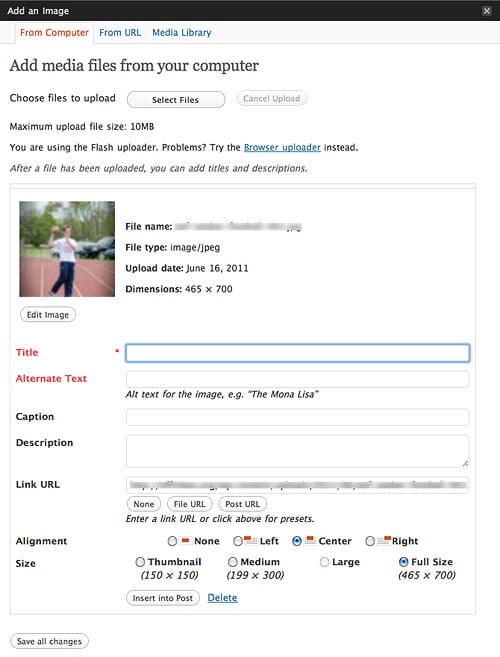
The other thing that might help is to use the “Alternate text” field to fill it in with text describing the image. This is easily done if you have a WordPress blog. As you upload an image, you'll be given a set of fields to fill out if you wish. The Title and Alternate Text fields (red in color in the screengrab below) are the most important as search engines count on these fields to understand and file away or index what it is they are looking at.

WordPress Image Uploader - Title and Alternate Text Fields In Red

If the description of the image matches the content of your blog post, then search engines are more likely to link the two and give it a higher priority.

When it comes time to ascertain whether you are indeed the owner of an image or a clutch of images, there would be no doubt in anyone's mind, based on the information that you have baked into the files before they go online, that you photographed them.

There is more to search engine optimization, of course, so take the time to learn about it from the best. I highly recommend Zach Prez's Web Marketing Guide + Photography Blog Success ebooks. Yes, they are both affiliate links but I promote them only because I have found it very beneficial to me and feel they may be of use to you as well.

So, will Google's new ‘Image Search' option give photographers some peace of mind that their images aren't being used or misused anywhere outside of their control?

To give credit where credit is due, this blog post was inspired by A Photo Editor.

Update: It's nice to see other photographers discuss this new Google service. Read my friend Scott Wyden's review.

Filed Under: Photography, Web/Tech Tagged With: blog, copyright, google, images, internet, internet search engines, misuses, photographer, photography online, search, search engine optimization, tineye, web search engine, world wide web

Subscribe To Tiffibox Treats!

Looking for a well-curated email newsletter that will leave you inspired and motivated about your photography business? Sign up below!

About Seshu

Seshu creates relaxed portraits of families and high school seniors in Avon, Connecticut. He also leads a successful headshot photography studio in Connecticut, helping professionals from a variety of disciplines project the very best versions of themselves. He created Tiffinbox as a way of inspiring photographers, to create better images and successful businesses. [Read More]

Email Templates For Headshot Photographers

Email Templates for Headshot Photographers

Recent Posts

  • How Capture One Changed My Event Photography
  • 10 Steps To Stay Positive In Times Of Great Stress
  • Why You Need To Read “Personal Branding For Photographers” Now
  • How To Master Your Website Content Step By Step?
  • Tony Taafe’s TNT Method For Headshot Photographers

Recent Comments

  • Stephen Davison on Are You A Business Owner Who Is Smart, But Stuck?
  • Ben A. on Don Giannatti Clinches The 8th Annual Tiffinbox Award
  • Dan on Don Giannatti Clinches The 8th Annual Tiffinbox Award
  • Donald Giannatti on Don Giannatti Clinches The 8th Annual Tiffinbox Award
  • Stephen Davison on G.E. Masana’s 6 Strategies For Wedding Photography Success
  • Naveen Kumar on Weddings In India Are More Than Being At The Right Place And At The Right Time
  • kartick on Weddings In India Are More Than Being At The Right Place And At The Right Time
  • Leonid Farbman on 6 Uncommon Trends To Grow Your Photography Business
  • Willow and Finch Wedding Photography on 11 Reception Tips To Help Your Wedding Photography
  • Web Designer Malaysia on How To Optimize Your Squarespace Website For Search Engines
  • Creastan on An Interview With Photojournalist G.M.B. Akash
  • Cindy Brown | Atlanta on An Open Letter To A Local Photographer

Become a Patron!

Copyright © 2026 · Tiffinbox · Site Design by Heather Mackan Creative · Built on Genesis