• Photography
  • Interviews
  • Business
  • Reviews

Tiffinbox

Inspiring Photographers

  • Home
  • About
  • Blog
  • Contact

SEO For Photographers, Corey Potter’s Effective Approach

October 27, 2019 by Seshu | Editor & Publisher

SEO for Photographers – How To Stand Out In A Crowded Field

Corey Potter is on a mission to teach photographers all about SEO.

His website, Fuel Your Photos, has gradually become the place to visit for the latest news about site analytics, keyword use, using YouTube, writing blog posts and so much more.

Now, he has just launched a course dedicated to SEO, or search engine optimization, for photographers.

That's where you come in, if you are carefully watching your Google analytics and you aren't moving the needle but want to in terms of attracting the right visitors to your website and converting them into paying clients.

3 Common SEO Myths

Photographers tend to believe three common SEO myths. Corey dispels them all in this interview.

I had the pleasure of speaking with Corey about SEO for Photographers about a week ago. Take a listen and let me know in the comments how you are paying attention to your metrics – bounce rates, site visits or your Google rank.

Corey is one of the most generous people I know. He and his friend Dylan Howell can be found on Facebook Live quite often discussing SEO topics with their followers.

Corey just told me that he was chosen to participate in a special event for web masters hosted at Google.

The Course

So, if you are considering SEO for Photographers, you are in good and secure company. I know for a fact that Corey is going to take good care of you and will not lead you astray. Search engine optimization is what he obsesses about and we are the better for it.

If you are one of the first 25 people to use the code – tiffinbox – when enrolling in SEO for Photographers, Corey has promised the following bonuses:

1. Personal 10-15 minute website review to help you figure out exactly where to start to make the most impact on rankings. $99 value.

2. Lifetime course community access. We do monthly live video chats and release other exclusive content inside the course community FB group. You get lifetime access instead of 1 year access. $99/yr value.

3. Free access to our upcoming blogging course when it is released. $200 value.

The Book

If SEO for Photographers isn't something you can invest in now, do consider Corey's book, “22 SEO Actions You Can Take Today“. Save $5 on the book when using the code – tiffinbox

So, what do you say? Do you pay attention to your search engine stats? Do you know your way around the back end of Google Analytics? Or, are you like me, a photographer who needs help figuring it all out. If you have read this far, you know where to find help. I trust you will consider SEO for Photographers.


Filed Under: Home Middle Right, Marketing, Photography, Web/Tech Tagged With: attracting clients, content marketing, Corey Potter, fining clients, Fuel Your Photos, google analytics, online marketing, search engine optimization, seo for photographers, understanding analytics

How To Optimize Your Squarespace Website For Search Engines

April 12, 2018 by Seshu | Editor & Publisher

The #1 Question Asked By Photographers

“How can potential clients find me online?”

Even in 2018, a lot of photographers believe that all one has to do is upload photographs to a website and their clients will miraculously find them.

Adding to that myth are these words, “oh, I have a website but I haven't updated it in eons.” Then they chuckle.

Imagine your business is a steam engine (remember those?). The content you add frequently and consistently is the fuel for your engine to go faster and farther.

Galen Mooney, SEO For PhotographersThese are both huge problems that Galen Mooney of PhotographySquares is committed to solving for photographers.

If you want to be found online, your website needs to be set up properly and you need to be posting online often, sending search engines like Google, Bing and Yahoo! (among many others) an alert that there is fresh content on your site.

Why Squarespace?

Right now I publish two other websites: Seshu Photography & Connecticut Headshots, both using the Squarespace platform.

While it was super easy to set them up initially, I kept hearing about how it was difficult to optimize Squarespace sites for search engines. Digging a little deeper, though, I found out that was not true at all.

Now, compared to WordPress websites that use plugins like Yoast SEO, there aren't any plugins or extensions for diving into SEO on the Squarespace platform. So, one has to set things up manually (but done once and checked often, you should be good to go).

I might have been poking around Google and Facebook when perhaps it was a targeted advertisement that presented Galen's 5-day SEO Challenge (going on right now, with tomorrow being day 5, so sign up now and you can watch the replays of days 1-4).

SEO For Photographers

This is Galen's promise:

SEO for Photographers is … “Made especially for Squarespace users! You'll learn how to optimize your image tags, how to tweak old pages and blog posts to get the results you want, and how to track your SEO success as you start seeing results.”

If you are considering a Squarespace website for your photography business or you already have a Squarespace site, you owe to yourself to at least check out Galen Mooney's 5-Day SEO Challenge first.

If you want to learn more, then sign up for her course, SEO for Photographers. She will be opening enrollment tomorrow with some special bonuses, after her one-hour special presentation in her Facebook group.

5-Day SEO Challenge

Go ahead and LIKE her page and you should see a notification for her 10 am presentation. Just as a teaser, here is Day 1 of her most recent SEO challenge:

Photography Squares Small Logo

Interviewing Galen

A few months back, I interviewed Galen. You'll learn in this short interview with why it's important for you to optimize your site and what she teaches in her course, SEO For Photographers:

Of the two websites that I own that are using the Squarespace platform, I have used what Galen Mooney has taught me through her course on Connecticut Headshots and have seen a great many more inquiries and bookings. These are subtle or drastic changes – something as simple as using a H1 tag on each page or using the right descriptions when uploading images.

While she doesn't say it, I will … it pays to sweat the details. And like I say in the interview above, you won't be breaking anything when making those changes. If you find yourself flustered, Galen's Facebook group is a wonderful place to visit and ask questions and compare notes.

If you have a Squarespace site, you would do well to start optimizing it using Galen's advice.

Filed Under: Featured Post of the Day!, Marketing, Photography Tagged With: clients finding the right photographer, content marketing, finding clients, learning seo, Marketing, Photographers, Photography Business, seo for photographers, seo optimization, setting up squarespace sites

How To Make SEO Part of Your Everyday Workflow

January 15, 2013 by Feuza Reis

This guest post is by Feuza Reis, a NJ Wedding Photographer, founder of the Un-Jersey Bride Blog and helps photographers and artists Get Found Online. You can follow Feuza on Twitter.

For many photographers January is the month to take care of business. We have to worry about doing our taxes, updating website images, blogging previous posts we missed, and strategizing for the new year. I think January is the perfect time to work on optimizing websites and blogs for SEO. The biggest hurdle to overcome with putting SEO into practice is lack of information, time and its complexity. SEO for some is a strange buzz word, and for others it is this painful complicated process full of difficult words and terms.

I prefer to view SEO as a practical method I can put into my workflow so that it does not control me. With that being said, it will be hard to make it part of one’s workflow if he/she does not lay out the basic principles for getting found online. Before covering how a photographer can make SEO part of their daily routine, here are 3 tips on laying the foundation to get optimized.

Follow These 4 Steps To Lay The Foundation

1) Add Text To Your Website Pages.

The easiest thing one can do right now is add a text on every page of your website with the city you city and state you live in and also which areas you are willing to service. If one visits 10 photographer’s websites, more than half leave out where their location. This makes the hunt for a photographer nearby to be rather difficult, much like finding a needle in a haystack.

Google is crazy about the local search and will give results based on where the person searching is located while they search for a photographer. Google wants to show the searcher who is available to work near their area.

So how will they know if you match that query? TEXT. Text is the main component of SEO, so be sure to add your town, state or region on your website. The actual text to add will depend on how local folks might search in that state or area: examples are the greater Atlanta area, South Jersey, NYC, Manhattan, and so forth.

Since I don’t have a studio I don’t put an actual address but for photographers who have a retail commercial space, then add your full address.

My example is as follows:

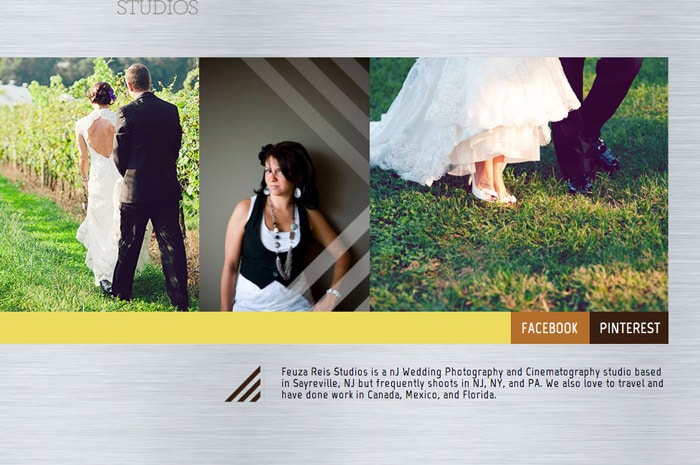
Feuza Reis New Jersey Wedding Photographer

Adding a text like this may not be so appealing, but it is vital if you want to get found online. Make it small enough but not transparent. You can get black listed by Google if you do things like transparent text. If you have a fear of committing to one particular location, just add the main city you serve and that you also do destination weddings. Since Google loves text and local search, it is extremely important you add where you provide your services on your website. You can also do this on
your blog as much as possible.

2) Install The All In One Plugin Pack

Many photographers I speak to already know about this plugin BUT many have not updated their settings nor are they updating the All in One SEO box at end of their blog posts. Here are steps to install and use this great SEO wordpress plugin.

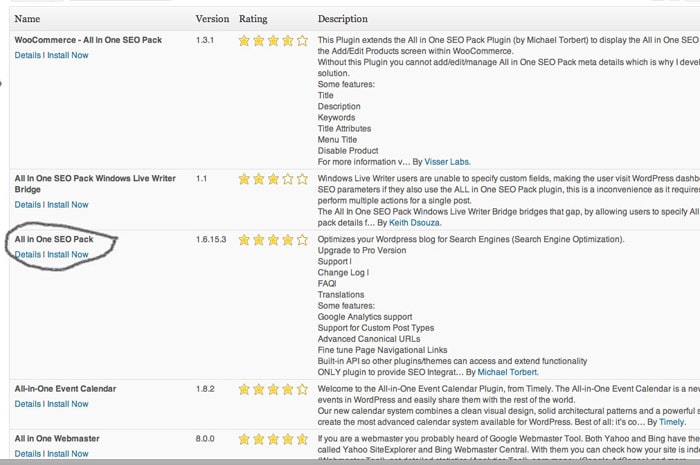
A) Install Plugin All In One SEO Pack And Enable It

All In One SEO Pack

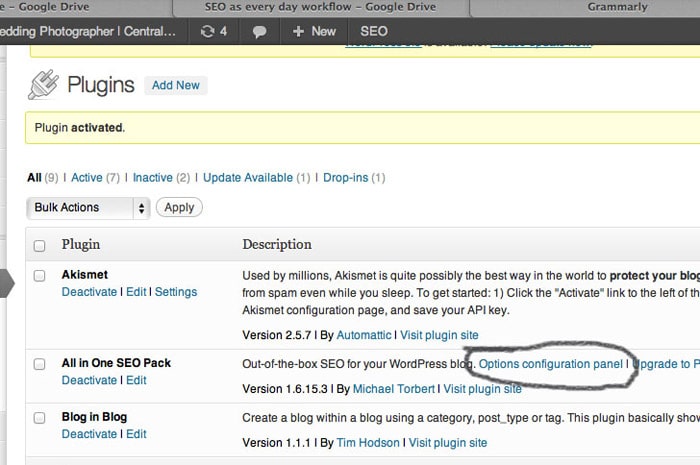
B) Next Go to: All In One SEO (Options Configuration Panel)

All In One SEO Pack

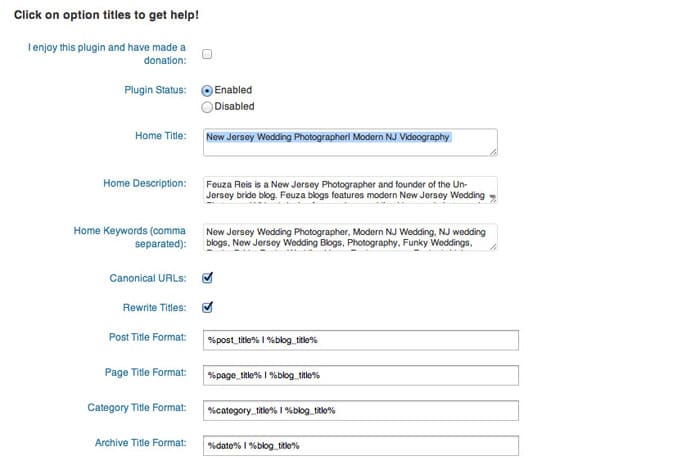
C) Fill Out The Title, Description and Tag Words.

All In One SEO Pack Options

Be sure to update the options at the end of the page and save.

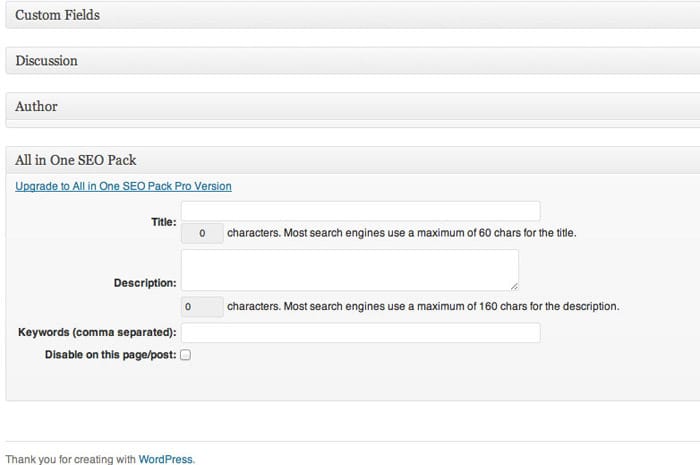
D) Many photographers think this is the last step, but it is not. At the end of every blog post, there is a section named ‘ALL IN ONE SEO.’ This section can be found all the way at the bottom past the text and photo box. Here, you can also add a title, description and some key words and you definitely should. (You should continue reading the article for more information).

All In One SEO Pack Custom Fields

3) Create A Keyword list.

Start a keyword list and save it as an excel file on google drive, or your desktop. This list will help you organize ideas for blog posts and pages on your website that you may want to add for SEO purposes. The biggest mistake photographers make is that they think like a photographer and not in the perspective of the client. Avoid trying to rank for words like session, e-session, and your studio name. The purpose of SEO is to get found by new clients and get booked. Most clients are new to hiring photographers and won’t know what any of these photography key terms even mean. Think more in generic terms like photos, pictures, pics, professional.

4) Set Up Google Alerts.

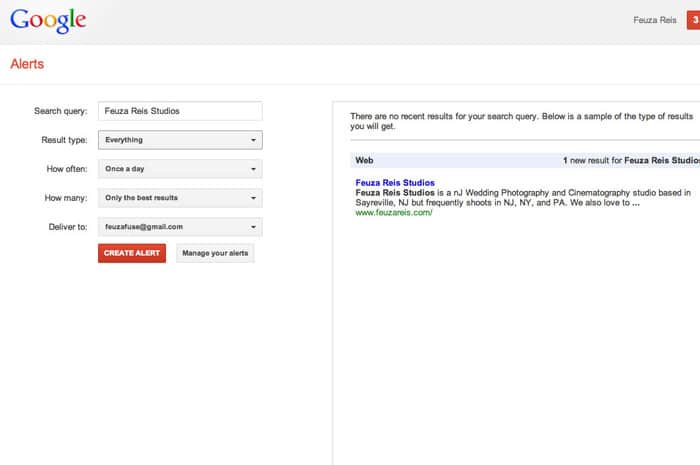
Google Alerts is a free tool by google and it helps you find out if anyone is talking about you and your business on the web. I set up a Google Alert for my name, my studio name and once in awhile a keyword name so that I can see who is being ranked for that keyword.

Google Alerts

For more information on Google Alerts, go HERE.

SEO Every Day.

Now that you have laid the foundation for your SEO work, it is time to automate it as much as possible. SEO is ALL about text, and the best thing you can do is blog. However, you don’t need to blog as much as you may think. You do on the other hand need to optimize your blog post and promote it well.

Here is my SEO workflow:

1) Create a sample folder on my desktop which will be used to copy and paste for every shoot.

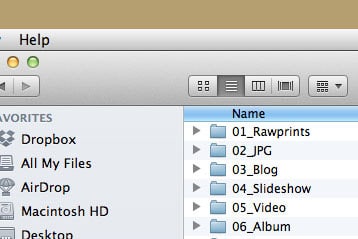
Feuza Reis' Workflow

This folder has 6 subfolders: (I have changed it to include blog and slideshow together now)

2) Copy and paste the main folder for every shoot, rename it by date and name of client.
3) Backup photos onto external hard drives.
4) Import photos into Lightroom.
5) Cull the photos, choosing the keepers etc
6) Edit the images as desired.
7) Star rate #5 the images that may be used for blog post and slideshow (I clump these together because I usually choose too many and only decide which ones I am using while I am actually blogging.)
8) Filter the 5 star rated photos, which for me is usually between 60-80.
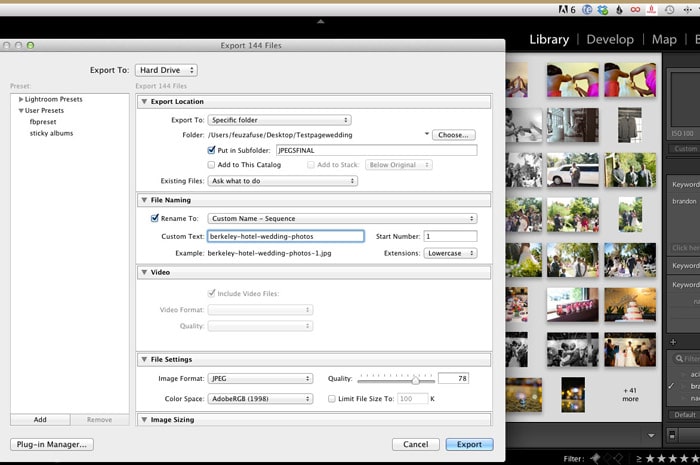
9) Rename the photos with the one main keyword I want to blog about.

Lightroom Renaming Files

Here are some examples for different keywords you can do for other types of photography:

Weddings – I like to pick the name of the venue: plaza-hotel-wedding-photos

Engagement Sessions – Either choose a state, city or name of place where you took the photos for your main keyword.

NJ-engagement-photos
NJ-engagement-photographer
Engagement-photo-ideas or pictures-of-engagement-photos (remember to think like a client and not like a photographer!)

Portraits – You can use the type of session or your city/location:

Newborn-photographer-in-NJ
NJ-newborn-photos
kids-photographer
kids-professional-photos
maternity-photographer-in-nj

Boudoir – Use more common words clients who have never had a boudoir session would use.

Sexy-pictures-NJ
NJ-boudoir photographer

Now onto Blogging:

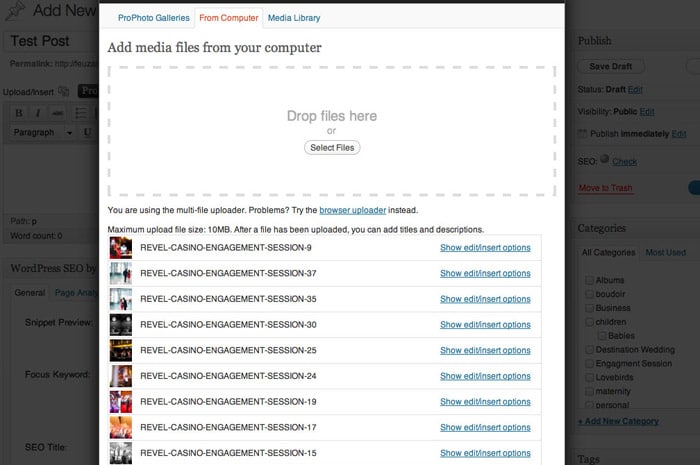
1) Upload all the photos you want to use for your blog post.

WordPress Image Uploader

2) Rename Title (Since we have done this in LR already skip this step)

If you use Blogstomp to watermark your photos make sure in settings, you change it to leave name of photo as is instead of the date which is default.

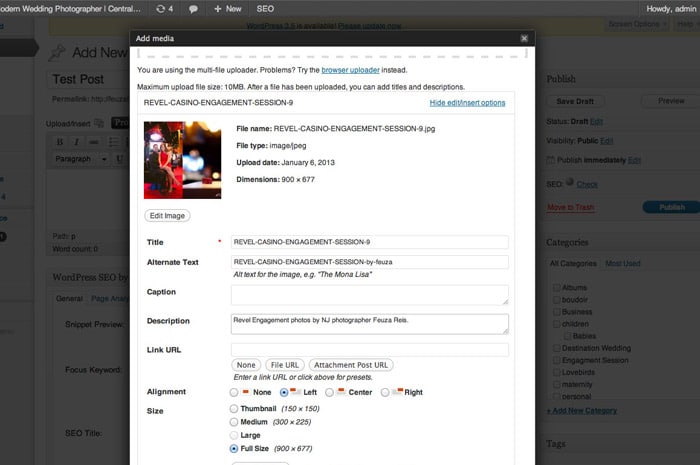
3) If you copy the title and paste in alt-text and or add a variation like by your photography name or town/state.

WordPress Image Uploader Options

Many times, I leave this as is due to lack of time and it still works. Remember I like to keep it simple and practical. The ideal would be to be more specific and have more variation.

4) Copy this in description, but add nj photographer or add something like “photos by Feuza Reis.” as seen in example above.

5) Add a few tags, not that many because they don’t have as much weight as you think.

6) Don’t mix keywords. For example, if it’s a family shoot don’t put that you are also a wedding photographer.

7) Blog 2-3 times a month, optimizing and promoting it well. Promoting is a different topic in itself to address.

8) Last but not least, track your results. What is the poingt of doing the work if you are not measuring your efforts? Start a document and state which page of Google you are appearing for some keywords you want for yourself. Also have a tab for how many blog visitors you are having a week or month.

Track your results with statcounter.com or Google analytics. I prefer using the plugin, Google analyticator, which shows me a summary of which keywords are gettings hits on my blog right in my WordPress Dashboard.

Overall the most difficult work of SEO is laying down the foundation and installing what you need to install, but then it is done! Yes, it may be annoying to do and to keep up with, but if you are tired of not getting found online and Google not recognizing you as a photographer, taking these actions is extremely important, so don’t postpone it!

Tell us if you make content marketing and search engine optimization a natural part of your everyday workflow. If so, how?

Filed Under: Photography, Web/Tech Tagged With: being found, blog, blogging, Blogging For Seo, content marketing, Feuza Reis, google, Marketing, online, Photographers, search engine optimization, seo, web analytics, Workflow

Tiffinbox Got Audited … By Danny Iny

October 13, 2012 by Seshu | Editor & Publisher

It's so appropriate that this blog post appears in October, the month Halloween is celebrated in the United States.

Danny Iny, is an author who quickly became known as The Freddy Krueger of blogging.

He is most recently the author of two seminal and free marketing e-books, Engagement from Scratch and Naked Marketing Manifesto.

Danny, as busy as he is on a variety of projects, agreed to audit my site, Tiffinbox based around these essential questions:

Who are you and what do you do? [01:15]

When did you start the site and how has it grown since? [02:05]

Can you give us a sense of what the numbers are like? [02:40]

Who is your target audience? What do you offer that is appealing to them? [03:20]

How are you getting the attention of your target audience? [04:55]

How does the site make money? What kind of things does the site promote? [08:15]

What is your conversion rate? [10:50]

How do you go about creating a cycle of commitment and reward, asking readers for an increasingly large commitment and in turn offering a bigger reward, and so on? [13:20]

If you could go back in time and give some advice to Seshu of 2003, what lesson would you give? [21:25]

Now, I know what you are thinking. You are saying to yourself, “Gee, this is all about Tiffinbox, what does it have to do about me and my business.”

Well, what you'll hear in the audio applies to you. Trust me. I learned a ton about how to approach my photography business from Danny, even though we were talking about this photographer's community.

[podcast]https://s3.amazonaws.com/nakedmarketing/nm_audit_seshu.mp3[/podcast]

For example, check out his advice on how to leverage Pinterest. Sure, that's something I could do for Tiffinbox, but it could very well apply to our collective marketing efforts for our own businesses.

Soon after I spoke with Danny, Angela Pointon and I collaborated on a webinar series (this is on going and you should totally sign up) with Tamara Lackey, Rosh Sillars and Skip Cohen as guests. Danny's suggestion of offering a FREE webinar was brilliant. Over 100 people registered for it.

This is a candid chat with a guy who knows his stuff. Not only does he ask some very poignant questions, but he gives me some very specific solutions too.

Give it a listen now and tell me one thing you learned from our chat that you will apply to your photography business. You can also read the transcript.

Filed Under: Blogging, Marketing Tagged With: audit, blogging, content marketing, danny iny, Guest Blogging, market your blog, Marketing, traffic, writing

Subscribe To Tiffibox Treats!

Looking for a well-curated email newsletter that will leave you inspired and motivated about your photography business? Sign up below!

About Seshu

Seshu creates relaxed portraits of families and high school seniors in Avon, Connecticut. He also leads a successful headshot photography studio in Connecticut, helping professionals from a variety of disciplines project the very best versions of themselves. He created Tiffinbox as a way of inspiring photographers, to create better images and successful businesses. [Read More]

Email Templates For Headshot Photographers

Email Templates for Headshot Photographers

Recent Posts

  • How Capture One Changed My Event Photography
  • 10 Steps To Stay Positive In Times Of Great Stress
  • Why You Need To Read “Personal Branding For Photographers” Now
  • How To Master Your Website Content Step By Step?
  • Tony Taafe’s TNT Method For Headshot Photographers

Recent Comments

  • Stephen Davison on Are You A Business Owner Who Is Smart, But Stuck?
  • Ben A. on Don Giannatti Clinches The 8th Annual Tiffinbox Award
  • Dan on Don Giannatti Clinches The 8th Annual Tiffinbox Award
  • Donald Giannatti on Don Giannatti Clinches The 8th Annual Tiffinbox Award
  • Stephen Davison on G.E. Masana’s 6 Strategies For Wedding Photography Success
  • Naveen Kumar on Weddings In India Are More Than Being At The Right Place And At The Right Time
  • kartick on Weddings In India Are More Than Being At The Right Place And At The Right Time
  • Leonid Farbman on 6 Uncommon Trends To Grow Your Photography Business
  • Willow and Finch Wedding Photography on 11 Reception Tips To Help Your Wedding Photography
  • Web Designer Malaysia on How To Optimize Your Squarespace Website For Search Engines
  • Creastan on An Interview With Photojournalist G.M.B. Akash
  • Cindy Brown | Atlanta on An Open Letter To A Local Photographer

Become a Patron!

Copyright © 2026 · Tiffinbox · Site Design by Heather Mackan Creative · Built on Genesis