• Photography
  • Interviews
  • Business
  • Reviews

Tiffinbox

Inspiring Photographers

  • Home
  • About
  • Blog
  • Contact

How Do You Plan To Dominate The World?

April 6, 2011 by A.J. Wood

As an Adobe Community Professional, A.J. has been an enthusiastic representative in the creative community for several years. It's not surprising he's been ranked the #1 Adobe Instructor WORLDWIDE more than once. Students enjoy his straightforward teaching style, and the ability to communicate ideas in the simplest of terms. An active NAPP Evangelist, A.J. posts Adobe tutorial videos each week on YouTube. Follow A.J. on Twitter, post your questions to his Facebook page, and catch the latest insights on his blog.

Catchy huh? Yeah, I'm not once to mince words although, I generally like to spin a tale or two. It's my pleasure to join you today, and I appreciate the invitation Seshu extended to me quite some time ago. He is a gracious & patient host, and I hope my thoughts leave you wanting… Wanting more like Charlie Sheen's 2nd performance in Chicago, not wanting to leave like the angry mob that caught him in Detroit. Where was I?

Oh yes, harnessing your talent, your desire, that passion which many of us find in photography. It's rather difficult to focus on that passion when you're bogged down with the day-to-day running your photography business isn't it? There's the marketing, the office paperwork, the website, dealing with clients, to Facebook or Twitter, the list goes on, and yet many of today's photographers seemingly do it all. Maybe you're just starting out, and you haven't thought about your business plan or the logistics of making money from photography. Perhaps you're a seasoned pro, and you're wondering how you'll stay on top of all the changing technology, and the wolves scratching at your door. It's a wonder you get to take any pictures at all. That's okay, I'm here to tell you:

To discover your talents you have to recognize & acknowledge when you suck.

It's a common philosophy I share with my students, and many interpret it as a direct statement about their passion. Like Simon Cowell, I'm somehow there to obliterate their dreams. Let me clarify the statement with some editorial tweaks:

To maximize your talents you have to recognize & acknowledge where you suck.

I know plenty of folks who at some point were caught in company downsizing, and ended up being one of the lucky ones who had more job responsibility for the same or less pay. Oddly enough, I see the same types of folks launch their businesses with DIY zeal only to suffer from burnout or stagnant growth after a year. Yes, you have grand ambitions, some talents, maybe a kickass plan or two, but you're just one person. What you need are minions … I mean a support group … umm … network –- You need to develop your network. Just like that lone crusader Batman had a sidekick, and spent some time with other superheroes in the Justice League of America. (Wait … what do you mean a comic book reference kills my credibility?) Focus–a network.

Leverage your strengths, outsource your weaknesses.

When I talk to photographers about networking events many of them mention social mixers based around getting clients or connecting with peers. Generating leads is a must, and mentoring other photographers or finding a mentor is a wonderful thing. However, those connections do not address the immediate issues of office management, marketing or managing your website. I highly recommend finding those people at the networking events they attend. Where do you start? Your local Chamber of Commerce is a good place. Another good place is Meetup.com. Any hobby, popular fad or obscure interest can be found listed at Meetup.com. The best part is meetup groups are specifically designed to get people together live and in-person. Now I know what you're thinking, “That's a good way to generate client leads!” Point to you dear reader, that's a takeaway bonus for hangin' out with me this long.

But let's stay focused. I don't want you networking without purpose. What you should be doing is building your network. Your team of professionals. The people that you can call to handle the portions of your business that are really best suited to be handled by someone other than you. If you suck at website design, then by all means hire someone to do your website. And if you're great at website design, why in the world are you spending your time as a photographer? My point is by building your network, you can focus your energy at the really important tasks. My good friend Glyn Dewis is a fine example. He had a hand in building his first website, and it wasn't bad. It got the job done. See for yourself. However, Glyn's passion for photography literally oozes into everything else he does, so a good website wasn't good enough. Now he probably could have spent the man-hours himself building & retooling his website, but he found someone better suited to the task. Scott Kublin is another fine example. You don't know Scott? He enjoys HDR photography. He's friends with another HDR guy–Trey Ratcliff. *heart pounding from sheer awesomeness* You can read the backstory on Scott's About Me page, but the summary is Scott wanted to learn HDR and Trey needed some top-notch SEO for his website.

Leverage your strengths, outsource your weaknesses.

Thank you for taking a moment to read this post. As a fellow-overachiever-one-man-band-DIY-caffeine-infused-control-freak, I know it's tough sharing some of the parental responsibility for your growing business. However, it's the best way to ensure your business does grow. I want to thank my partner in creative shenanigans, J Schuh for illustrating my thoughts in the opening cartoon. Feel free to buy a t-shirt if we've tickled your funny bone. Oh, and where are my manners?

Here's a quickie Photoshop tutorial for you:

Filed Under: Business, Photography Tagged With: A.J. Wood, adobe tutorials, business plans, dominate, meetup.com, networking, online social networking, passion, Photography, Photography Business, plan, planning, sustainable business, talent, technology, world

Business Writing For Photographers Is A Circus Act

April 1, 2011 by Seshu | Editor & Publisher

When it comes to business, Kristen Kalp doesn't clown around.

She is the author behind the outrageously astute BrandCamp Blog and also a photographer based in Philadelphia.

Front Cover Of Circus Circus by Kristen Kalp

Circus Circus, her new offering in the form of a PDF, tackles the sometimes difficult task of communicating with one's potential business clients. It's more a workshop than an e-book, so come prepared to roll up your sleeves and get some elbow grease.

Circus Circus isn't just a bunch of copy that I've written so you can paste it into your website and hope for the best. That's like buying brownies from the bakery and eating 'em right up – eating brownies doesn't get you any closer to creating brownies.

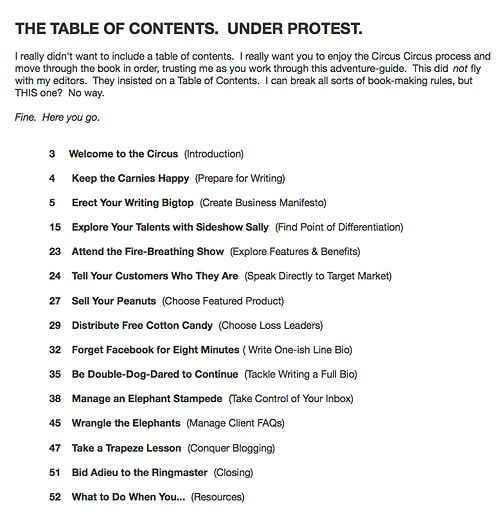
In the 52-page book, Kalp, takes several irreverent swipes at conventional business writing books by presenting her material in both a concise and witty manner. She is comfortable engaging her audience from the get go. Just take a look at the table of contents:

Table of Content - Circus Circus by Kristen Kalp

Now, I don't know of anyone looking at that table of contents who will not want to read right through in one sitting. I did that, knowing full well that there might be parts where I would be asked to stop, write things down and then reflect.

The first challenging part of the book was coming up with a manifesto. To be honest, I am still not done with mine. Kalp says she took nearly five hours to complete her manifesto. What's so important about a manifesto? Well, it “establishes the sound of YOUR voice on your website or in your brochures.” That, in my opinion, is reason enough to keep chipping at it. I promise to share my manifesto when I feel it is ready for public consumption. What helps is Kalp's five-step process to craft that manifesto, each with vivid examples and a worksheet to practice on your own.

The part of Kalp's e-book that I found most fascinating was the “Fire-Breathing Show,” where words are used to convey features and benefits to clients. I know I struggle with this in my own copy, but this guide book shows you how to arrive at these personal and business characteristics, to help sell YOU to your clients.

Kalp also talks about offering your clients incentives (she calls them cotton-candy to stick to the circus metaphor), creating a one-line bio, how to respond to e-mails, crafting an elegant e-mail signature, writing a FAQ email, negotiating price objections and expressing yourself in blog posts.

And you can see that Kalp practices what she preaches. Take a look at her own photography website – Essential Imagery. Just about every part of it is eager to connect with the visitor. “Let's Have An Adventure! What kind?,” is an invitation to join her in something mysterious, yet cool. Her website exudes her down-to-earth, yet fun personality.

If you are a photographer, you can no longer just post great images on your site and expect your potential clients to be able to connect with you. You do have to write and express yourself. If you struggle with the written word, Kristen Kalp's Circus Circus is must-buy. She'll take you step by step (and it isn't in the least bit easy mind you) through the various parts of your site where you may want to tighten up your writing and engage your reader.

It's priced at $149 (and I bought my copy, by the way) so it isn't inexpensive. If you are looking to persuade your clients that you are worth what you charge for your services, then the value this e-book/guidebook/workbook is truly immense. Full disclosure, I get no financial commission for suggesting this book to you. If Kristen reads this review and feels like sharing a special promo code with us, I'll update this post so you can order the book within a specific time frame. Does that sound good to you?

Sound off below if you have already bought Circus Circus. What did you think of it? How far along are you on your manifesto? What portions of it have you already put into play for your business? Start the dialogue here. Let's talk!

Well, Kristen did respond to my request for a special promotional code to be used towards Circus Circus. At check out use “SESHU” and get $50 off. This is good only through April 5, 2011, so bust a move. Your final price will be $99. Nice!

Filed Under: Business, Photography, Writing Tagged With: Business, business writing book, circus, circus circus, communicating with clients, e book, kristen kalp, Music, photographer, Photographers, Photography, workbook

Nope, Film Is Not Dead

March 18, 2011 by Seshu | Editor & Publisher

I've loved Utah-based Jonathan Canlas‘ wedding photography for quite some time. I must have come across his website quite randomly about four or five years ago. His images continue to inspire me. The moments are real and the processing is just right.

Little did I know back then that he was a wholly film-based photographer. Yes, film. Some of us may remember that medium. With digital being all the rage – I mean who isn't addicted to chimping, right? – why would a photographer eschew Photoshop actions (that can make your digital images look like they were shot on film) and other “bells and whistles.” The answer is simple. Because he can, he wants to be different and his clients love him for it.

So, take a moment to look at his work again.

Now that you are back, do you see anything different? Do the images just appear more tactile, or have more depth to them? Or, is it my imagination? I believe it is the former.

Whichever way your answer sways, if you are curious about how Jonathan Canlas photographs weddings or portrait sessions using film, you have three options to learn from him.

You see, in addition to being a successful photographer, Canlas is a wonderful teacher. For several years, Canlas has offered the Film Is Not Dead workshops for those photographers looking for a solid foundation in film photography.

Canlas has also very patiently answered questions via Formspring. You should follow him on Twitter where most of these responses show up.

The last option, is a resourceful guidebook called FIND (Film Is Not Dead). There is a dedicated website where you can order this truly comprehensive offering. Jonathan generously offered me a review copy and I just got done reading it. As a photographer who cut his teeth on Tri-X and TMAX 3200, a lot of what he had to say in the book was not new to me. As a mostly 35-mm film photographer, though, I learned a great deal about medium-format cameras. So much so that I am now actively looking for a used Yashica-Mat 124-G.

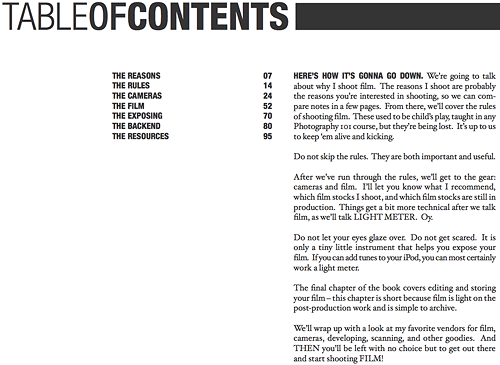
Here is a breakdown of the table of contents:

Jonathan Canlas' Film Is Not Dead PDF Table Of Contents

This is a 95-page e-book that is sprinkled with great wisdom and some jaw-dropping images. If you are clueless about working with film, because you simply never had the opportunity or were too intimidated, then you need to run out and get this hefty PDF. Unlike other PDFs that may discuss a particular type of digital technology that is sure to change over time, I feel what Jonathan Canlas has produced for us will be as timeless as his own work. Indeed, its his generous spirit that allows us to share his vast knowledge about a medium long thought of as “old,” or worse, “dead.”

Thanks to companies like Kodak and Ilford, who continue manufacturing film, Canlas feels strongly that he will be working in that medium for a very long time and now so can you.

Buy the Film Is Not Dead guidebook by using the code “SESHU” and receive $45 off the final price. All I ask in return is that you subscribe to the Tiffinbox newsletter. Goodies like this will only be available in the future for my newsletter subscribers so you may want to get a headstart.

Full disclosure – I received a review copy of this PDF, but I don't make a dime for mentioning it here on Tiffinbox. If you liked this review and bought the PDF, please come back here and post your comments. I'll try and have Jonathan swing by and answer any questions you may have.

Filed Under: Books, Film, Photography Tagged With: camera, dead, digital imaging, Film, film formats, film photography, jonathan, jonathan canlas, mass media, medium format, photographer, Photography, Portraits, resource guide, resource guides, used film, Wedding Photography, yashica

The New Wedding Guest

March 14, 2011 by Richard Esposito

This guest blog is by a good friend and fellow Connecticut wedding photographer, Richard Esposito. In addition to being a photographer, RE as he is known, is also called upon to teach efficient workflow systems to other photography studios. To some lucky ones, he plays mentor. His Emmy (yes, that EMMY) not withstanding, RE is starting to reconnect with his video side and bringing true fusion to discerning clients getting married all over the world.

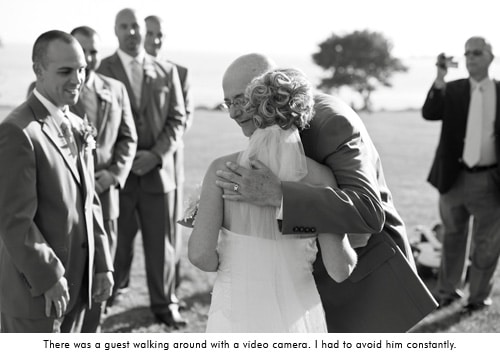
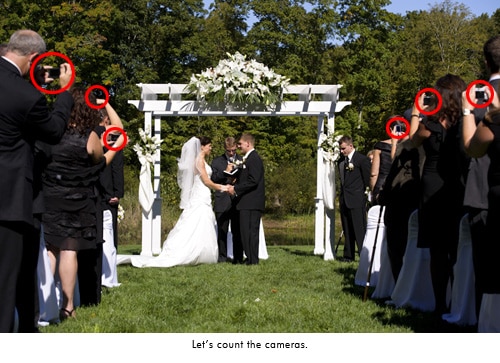
Needless to say, a lot has changed in the world of photography over the last 5 or so years. Remember film? Using the same camera for more than 3 years? Just about every professional photographer is using a digital camera that gets replaced with a newer, better, version after one year of use. It's become a rather expensive hobby for amateur's and a financial burden for some professionals. With technology getting better and especially cheaper, we've all seen a new type of photographer emerge. Call them what you will, uncle Bob, cousin Carl, or “I have a friend that took a photography class in college.” This is the new competition. And they are getting cheaper than the cost of the camera. I've heard of a number of professionals that have sold everything they had and closed their doors for good. We can't compete with free, or “I'll shoot your wedding and hand you a disc for $500. I know I seem to be getting off topic, but it's leading to our newest issue. You are not the only photographer at a wedding anymore.

© Photographer RE

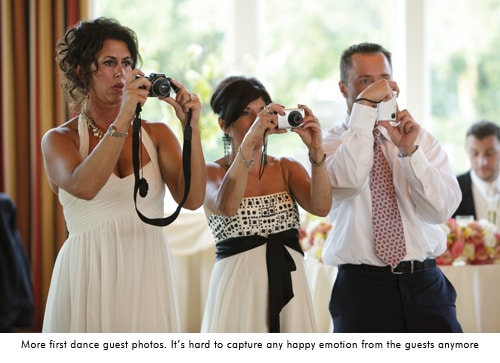
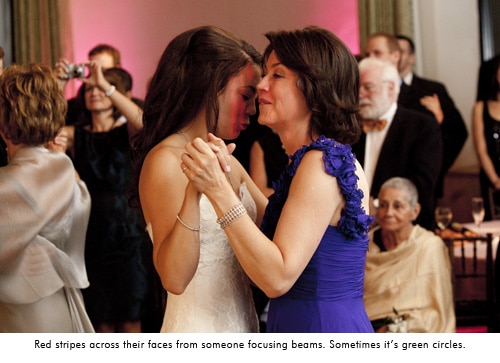
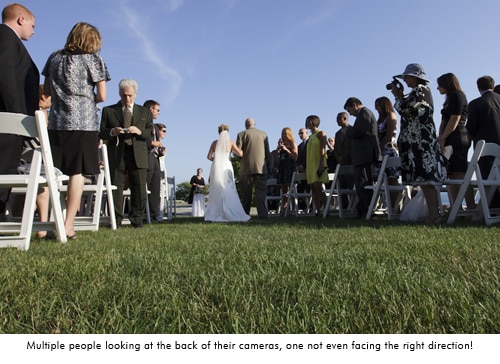
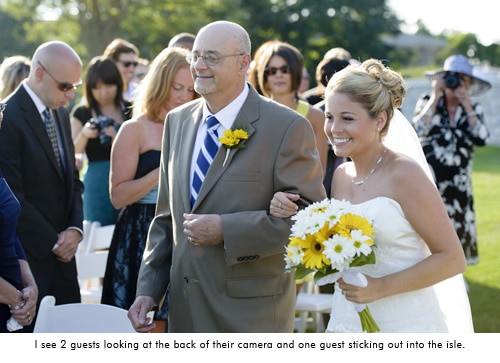
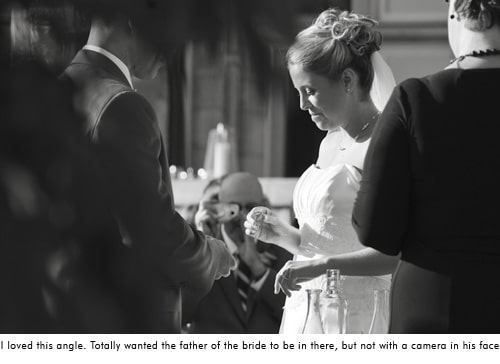
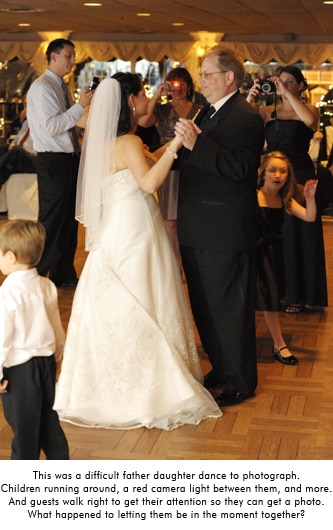
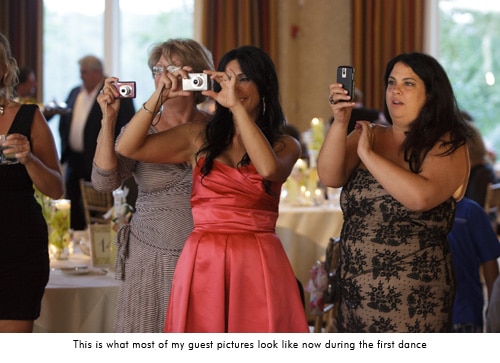
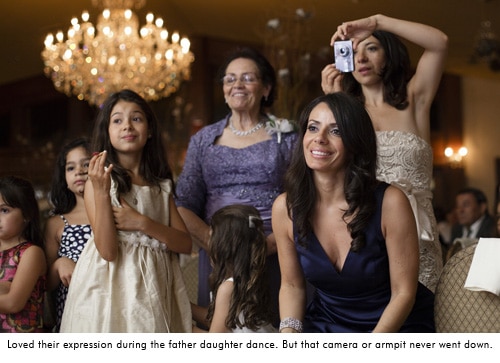
Gone are the days of capturing a sea of guests with genuine emotion on their faces. Now you have to give an elbow to Aunt Clair who's blocking the aisle with her Digital Rebel in hand as the bride makes her grand entrance. I used to love capturing guests emotion during the first dance, parent dance, even the toasts. But now my subjects are a handful of guests with point and shoots held up blocking their faces, or the tops of everyones head because they are looking down at the back of the camera to check the photo they just took. My favorite moment so far was a photo of the bride going down the aisle from behind. Everyone in front of the bride has their cameras up, everyone that the bride has past is still facing the back of the church with the heads down looking at the back of their camera. Very few people stopped to enjoy the moment of a father walking his daughter down the aisle on her wedding day. I did have a beautiful photo of a bride coming down the aisle with great emotion on her fathers face. However there were hues of red and green across them both thanks to all of the focusing beams from guests cameras. That's an instant black and white! The cake cutting has become my favorite time now that I have no room to move around thanks to the crowd of people and cameras. It's amateur suffocation.

You are not the only photographer at a wedding anymore.

Just when you feel good that you are getting the job done, you're in the zone, there's a tap tap tap on your shoulder. It's Aunt Clair again, Rebel in hand, suggesting “that’s a nice photo of the flower girl over there. Look she’s spinning around! Hey girls look over here!” Well Claire, if you didn't just interrupt me I would be photographing that, but now i missed it so you can talk to me about it. While trying to capture an emotional father daughter dance, someone will walk up close to them and say “Hey, over here!”, completely interrupting the moment just so they can get a photo with their faces smiling at their camera. They completely missed the point. Welcome to a world where lighting, composition, creativity, and emotion don't matter to a wedding guest. All you need is a persons face looking at the camera.

© Photographer RE

© Photographer RE

© Photographer RE

© Photographer RE

© Photographer RE

© Photographer RE

© Photographer RE

© Photographer RE

© Photographer RE

Many of us put out a little slideshow of images at the wedding reception. It's been a great way to show guests your work and generate some business, especially with the reception venue. It also satisfies the instant gratification generation of guests. I've gotten home from a wedding and checked a clients Facebook page to see that she has already been tagged in photos that Uncle Bob took at the wedding. I can't compete with that. I hand out event cards at the reception with the website and password to see the photos “approximately 8 weeks after the wedding.” One night, after seeing the slideshow at the reception, the grooms step father comes up to me with his iPhone and has my online viewing website loaded. He said he couldn't get the wedding. Hello! I'm still photographing it! Really?! Many times I have guests say “Great! I'll check them out tomorrow.” Tomorrow? Let me hand you a few thousand photos, have you review and edit them and see how fast you get them all up. Let’s factor in that it's the end of the wedding season and you've just done 2 weddings per weekend for the last 8 weeks.

It's no wonder that professional Photographers are having a hard time competing with amateurs. We get in their way, we don't know what we’re doing, it takes forever to get your images, and we really expensive! If you think it's expensive to hire a professional photographer for one day, the emotional cost of hiring an amateur lasts forever.

The Price We Pay

So how do we convince an engaged couple to spend $3-10k with a professional? According to Market Watch, wedding photographers are the most overpaid jobs in America, saying “Total work for each wedding is generally a sit-down consultation combined with a single day spent following the happy couple. While equipment costs and film development must be covered, thanks to digital technology such costs have been heavily reduced. Unfortunately for the consumer, photographers do not offer any reduction in price for missed photos, amateur shots, or other mediocre work product.”

So let’s talk briefly about what it costs to be a professional wedding photographer. My second photographer here was looking to buy his own equipment. Just to start off with the basics he was up to $8,000. Imagine the cost of what I carry. Oh, and I have to insure all of it. Then there’s vehicle expenses, commissions for running credit cards, equipment repairs, I spent $1200 on postage this year (postage!!!), continuing education, computer and software upgrades, hard drives, hard drives, hard drives, it costs to make albums, some of us pay staff… I really could go on. Oh wait! providing for my family? Putting food on our table and the discount outlet clothes on our back? A professional photographer doesn’t have a “real job” during the week so we have to pay our own health care for our family, save for retirement, and hope for a weeks vacation that comes out of our pocket. I did 25 weddings this year and my expenses were double the average 2 person family income in Connecticut (according to census.gov).

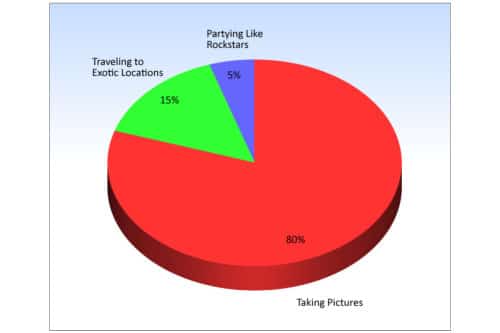
For the other side of the story, the International Society of Professional Wedding Photographers did an awesome survey of photographers recently. I know when I started my business, everyone I knew thought I just worked weekends and did nothing during the week. We have a great lifestyle of taking photos, traveling, and partying.

The Perception Of A Working Photographer

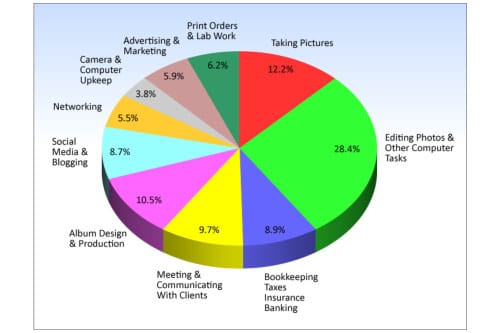
Here’s reality: 70 hours a week through our 6-7 month season and 40 hours a week off season. There is no mention in here regarding time with family, charity work, and taking any time off. Only 12.2% off our time during business hours is spent taking pictures.

The Reality Of  a Working Photographer

If I didn’t have the expenses that I have, or spend this much time getting everything done, I’d be out of business. I’d have to get a full time job and just do photography on the weekend. I’d be your Uncle Bob.

Update from Seshu: Since publishing this blog post above, there have been other similar posts out in the interwebs:

Filed Under: Business, Most Popular Posts, Photography, Weddings Tagged With: camera, competitive world, connecticut wedding photographer, cousin carl, Culture, digital rebel, discerning clients, esposito, first dance, genuine emotion, grand entrance, photographer, photographer richard, Photography, photography class, photography studios, professional photographer, professional wedding photographer, uncle bob, Wedding, wedding guest, wedding music, Wedding Photography, workflow systems

56 Rocking Fusion Photoshop Actions

March 6, 2011 by Seshu | Editor & Publisher

When it comes to Photoshop actions, I have a short stack of them that I depend on for retouching my portrait and wedding photography images. I go to these almost all the time, for all my images. We'll talk about which one of those actions made the cut, in a subsequent blog post. So please do remind me.

Jodi Friedman of MCP Actions sent me an email asking me to test a new set of Photoshop actions that she was launching called MCP Fusion Photoshop Actions. So, let me at the outset tell you that I received them gratis for the expressed purpose of reviewing and writing about them here.

The MCP Fusion Photoshop action set combines the most versatile and user-friendly workflow actions with beautiful color and black and white conversions, bringing you an action set with infinite possibilities.

It makes sense to review actions only when you have some really good examples. The image below is from a headshot portrait session I recently completed for my client Carole M.

Straight out of camera, otherwise known as SOOC:

MCP Fusion Photoshop Actions © Seshu Photography

Enhanced using the Liquify filter in Photoshop + MCP Actions' Eye Doctor and The Dentist:

MCP Fusion Photoshop Actions © Seshu Photography

Enclosed action:

MCP Fusion Photoshop Actions © Seshu Photography

Beach House action:

MCP Fusion Photoshop Actions © Seshu Photography

Sentimental action:

MCP Fusion Photoshop Actions © Seshu Photography

Pendulum action:

MCP Fusion Photoshop Actions © Seshu Photography

Color Fusion Mix-n-Match action – Peachy/Rustic/Sentimental/Shades Of Gray:

MCP Fusion Photoshop Actions © Seshu Photography

In addition to the usual actions to enhance color images, this set includes ways in which you can convert images to black & white. Most of the black & white actions I've seen online have been pretty heavy handed at this, but the Black & White Fusion Mix-n-Match is particularly useful because like its Color counterpart, you are allowed to turn on and off layers and of course dial in the opacity for those layers just to get your desired effect. I really enjoyed this level of control to consistently produce images.

Black & White Fusion Mix-n-Match action – One Click Black & White/Highlight Helper:

MCP Fusion Photoshop Actions © Seshu Photography

See more sample images on Jodi's site and check out this video to show you how you would set these actions up in Photoshop (18 minutes):

The Review:

I'll make this short and sweet. I had a lot of fun exploring these actions. Like any other set of Photoshop actions, I am likely to pick and use only the ones that feel natural to me and for what I want to deliver to my clients. In this regard, to each her/his own. There are several among the MCP Fusion Photoshop Actions have just been added to my short stack. Some of those actions you have just seen above. As I promised at the beginning of this post, I'll have a new article describing those to you in greater detail soon.

I almost never use any action at full throttle, that is the opacity is set to less than 100%. What is that magic number? It's very hard to pin down and kinda silly to even divulge because your images and tastes are different than mine. And these actions by MCP are no different. I toned it down several notches to meet my artistic sensibilities.

The mix-n-match actions were great, but even on a fast iMac, they took about 20 seconds to run. This isn't a shortfall of the action set, but I have to admit it did surprise me a bit. And as Jodi put it, that's 20 actions all running at the same time. If you are trying to get something done quickly, try then the individual actions that come bundled within this set. The mix-n-match is much too comprehensive and may be overkill for what you want to achieve. That said, I liked the multiple options the actions gave me. In my opinion, Photoshops actions are as perfect as you want them to be for your own workflow, sense of style or approach to photography.

Jodi's Photoshop actions are well-known in the industry for a reason – she consistently provides a quality product and her level of support via video tutorials, or in my case a quick email response to a quick question, was always greatly appreciated. If you are open to gaining some control back into how your images should look, you will want to get this Photoshop actions set.

Unsolicited words of advice:

1) Have a vision for how you want to retouch your images. What you present to the world says a lot about who you are as a photographer and an artist. Adding actions willy-nilly is no way to correct a badly exposed image. So start there first. No idea what I am talking about? Try this book by David duChemin. Figure out what the end product needs to be, how it will be applied and who your target audience is. Those answers will direct you into the appropriate use of these or any other Photoshop actions.

2) Make sure your monitor is calibrated. If you want WYSIWYG, this is one of the first steps you should take.

3) Use these actions on un-cropped, high-resolution images first. Then resize and sharpen at the very end of your workflow. The MCP Fusion Photoshop Actions include two nifty actions that will do just this for you, so rest easy.

4) Uncle Ben said it best: “With great power, comes great responsibility.” Just because you can use actions and mix-n-match them up, does not give you license to do so. Well, you could, but then your images are going to make your audience gag a bit.

5) Be aware that as you start adding more actions and you mix-n-match them as you can, your file size is going to inflate and your computer is liable to slow down to a crawl. So have lots of RAM and have a scratch disk for Photoshop to play nice.

6) Have fun. If you aren't having fun when using these or any other actions, that means you are just going through the motions of creating art for your clients and ultimately yourself. So, pace yourself, experiment and stick to the plan (ie. see number 1)

7) You are going to be naturally drawn to some actions over others. Let your gut instinct guide you. You'll know when you have crossed the line, or your friends or even clients may let you know pretty directly. Learn from these trials and move on. Don't cling to an action as the be-all and end-all of all your images. Keep making images and you will find Photoshop actions that are best used to enhance those specific frames. It is a learning process, so don't force it.

If you've enjoyed this post and want more like it, please let me know in the comments below. Also, please support this site by buying the e-books you see here. They have each been reviewed for quality and value and I am sure you will find them just as useful as I have for my photography business.

Filed Under: Photoshop Actions Tagged With: action color, action set, Actions, adobe creative suite, adobe photoshop, application software, black white, enhancing, fusion, graphic design, images, Photography, photoshop, photoshop action, photoshop actions, photoshop plugin, retouching, Workflow

  • « Previous Page
  • 1
  • …
  • 22
  • 23
  • 24
  • 25
  • 26
  • …
  • 34
  • Next Page »

Subscribe To Tiffibox Treats!

Looking for a well-curated email newsletter that will leave you inspired and motivated about your photography business? Sign up below!

About Seshu

Seshu creates relaxed portraits of families and high school seniors in Avon, Connecticut. He also leads a successful headshot photography studio in Connecticut, helping professionals from a variety of disciplines project the very best versions of themselves. He created Tiffinbox as a way of inspiring photographers, to create better images and successful businesses. [Read More]

Email Templates For Headshot Photographers

Email Templates for Headshot Photographers

Recent Posts

  • How Capture One Changed My Event Photography
  • 10 Steps To Stay Positive In Times Of Great Stress
  • Why You Need To Read “Personal Branding For Photographers” Now
  • How To Master Your Website Content Step By Step?
  • Tony Taafe’s TNT Method For Headshot Photographers

Recent Comments

  • Stephen Davison on Are You A Business Owner Who Is Smart, But Stuck?
  • Ben A. on Don Giannatti Clinches The 8th Annual Tiffinbox Award
  • Dan on Don Giannatti Clinches The 8th Annual Tiffinbox Award
  • Donald Giannatti on Don Giannatti Clinches The 8th Annual Tiffinbox Award
  • Stephen Davison on G.E. Masana’s 6 Strategies For Wedding Photography Success
  • Naveen Kumar on Weddings In India Are More Than Being At The Right Place And At The Right Time
  • kartick on Weddings In India Are More Than Being At The Right Place And At The Right Time
  • Leonid Farbman on 6 Uncommon Trends To Grow Your Photography Business
  • Willow and Finch Wedding Photography on 11 Reception Tips To Help Your Wedding Photography
  • Web Designer Malaysia on How To Optimize Your Squarespace Website For Search Engines
  • Creastan on An Interview With Photojournalist G.M.B. Akash
  • Cindy Brown | Atlanta on An Open Letter To A Local Photographer

Become a Patron!

Copyright © 2026 · Tiffinbox · Site Design by Heather Mackan Creative · Built on Genesis