• Photography
  • Interviews
  • Business
  • Reviews

Tiffinbox

Inspiring Photographers

  • Home
  • About
  • Blog
  • Contact

Business Planning Cookbook For Photographers

May 5, 2014 by Seshu | Editor & Publisher

In this world there are dreamers, planners and doers. For most of my life, I belonged to the first group. You can still find me spacing out. My kids sometimes have to come right up to me and shake me back into the present. Funny as that may be, I know I've lost a good amount of time producing work and growing a business.

While I have become better at planning and making to-do-lists, what stifled me in the past was not having a road map to run a photography business. What are steps one, two and three to get to step 10? I wasn't and am not now looking for any short cuts. I expect there to be a good amount of work involved but when things are fuzzy, most people tend to simply stop doing. This is perhaps the worst thing one can do for oneself, but starting and stopping and starting up again aren't anything new for me. It's how I've done things. Perhaps you are in the same situation?

What if there was the option to start and keep going? That's where the Business Planning Cookbook comes in. Angela Pointon of Steel Toe Images and Zach Prez of Photography Spark, two people I hold in high regard for their long history in helping photographers and business acumen, have teamed up to bring us a new and necessary resource for photographers who are serious about staying the course.

Business Planning Cookbook By Angela Pointon and Zach Prez

They begin with an exercise in defining your vision. Get the free PDF that walks you through your business vision statement. This resource also gives you an idea of what to expect in the Business Planning Cookbook; worksheets and videos to guide you every step of the way.

Here's what you receive when you buy Business Planning Cookbook:

  • Goal-setting guidance and direction for building targets for your business you’ll be motivated to hit
  • A crash course in writing a vision statement — one that challenges you to think bigger, reach higher, and achieve greater success
  • Serious focus to the business objectives and tasks that matter, reducing the distracting, ineffective stuff most photographers waste time on
  • A killer, proven formula for determining which marketing channels will work and inspiration for rocking your marketing and sales
  • A simple guide to financial goals and predictions that anyone can use to plan out their revenue and income, even if numbers aren’t your thing
  • Confused about how to run your business, stressed out about money or anxious about when the next client will come walking through the door? Consider buying the Business Planning Cookbook today.

    Special bonuses when you decide to invest in your business:

  • 12 videos to expand on key business topics
  • 10 worksheets to help you brainstorm, plan, and practice the lessons
  • Exclusive business planning community membership, led by Angela & Zach
  • It's on sale through May 20th for only $79. Isn't peace of mind worth that small price? Price bumps up to $99 after that date.
    Filed Under: Business, Most Popular Posts, Photography Tagged With: angela pointon, Business Objectives, Business Plan, business plans, Business Vision, Photography Businesses, planning, Road Maps

    How To Get “The Big Picture” Of Your Photography Business

    January 14, 2014 by Seshu | Editor & Publisher

    Mr. Farnsworth was a terrific music teacher. Affable, yet stern. He would tell me each time I would return to take drum lessons, “Seshu, failing to practice is practicing to fail.”

    It’s taken me nearly 30 years to absorb that. Sometimes, it would be obvious that getting my stuff done in time was beneficial and sometimes procrastination would get the better of me and I paid dearly. Still, creating a plan or a workflow and being organized simply has not come naturally to me.

    Is that how you feel at least a few times a year? Do you feel that being organized would create at least a semblance of efficiency? Have you struggled to keep track of your client contact information or sales tax deadlines? Are you sometimes delivering your client orders later than when you promised them?

    My friend Eric O’Connor, a wedding photographer in Chicago, tried to get me to think in about workflow. Several times. I remain in awe at how his allows him to photograph 30 weddings a year and be a father and a husband.

    “Creating a system,” he told me once, was the ticket to being stress-free and happy.

    I have a short stack of scratch paper filled with workflow ideas and what I would do the minute a potential client rang me. I had steps that I would follow after the portrait session was booked. But what would come after the shoot and in what order? Sadly, I had too many ideas and no action. This is mostly because having and maintaining a system requires clarity of thought and the “D” word … discipline.

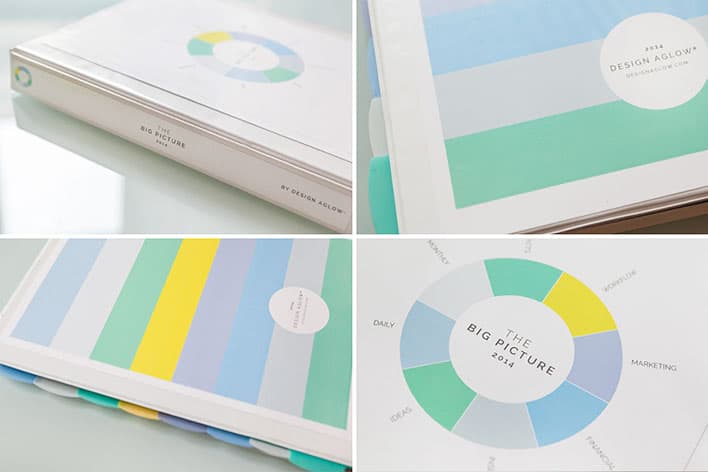
    Thankfully, Design Aglow is the photographer’s friend. I lean on the team there to provide me with ideas and templates. Just in time for the start of the new year, they launched a photographers’ studio planner called The Big Picture.

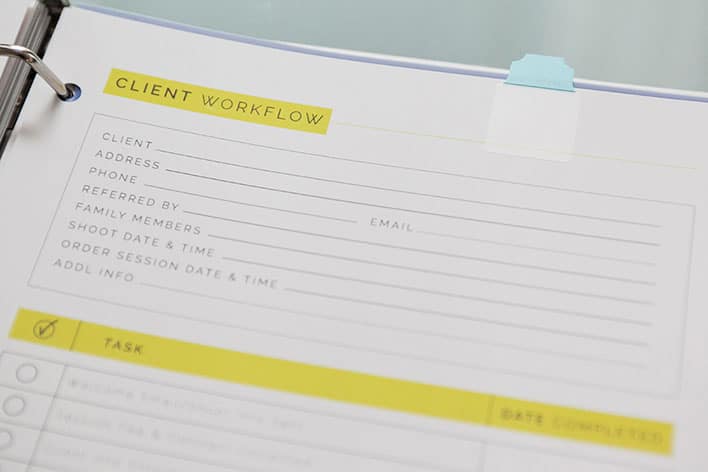
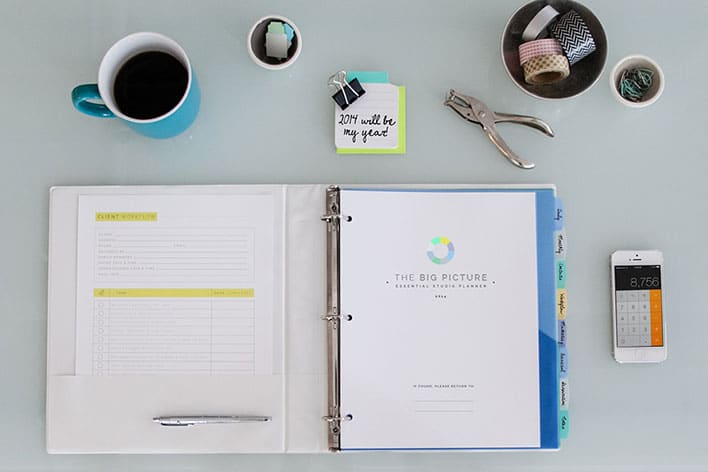
    The Big Picture: Essential Studio Planner

    The Big Picture: Essential Studio Planner

    The Big Picture: Essential Studio Planner

    Like all their templates, The Big Picture, does not disappoint when it comes to how it is presented. Minimalistic design meets elegance. The introductory section says, “it’s a repository for your hopes and dreams.” So true.

    The Big Picture guides you through a short writing exercise where you enunciate your goals. Then you are gently coaxed into breaking down your goals into actionable tasks. Huge win for me.

    There are templates for daily, weekly and monthly activities surrounding your studio. The exercise is in writing it all down and being able to refer back to it constantly. I think this is brilliant because it instills that sense of discipline and accountability to oneself that I mentioned above.

    Keeping track of clients, venues and vendors (mostly for wedding photographers) is now easy as 1-2-3. There is a questionnaire and a time table that helps you through your online and off-line (local) marketing.

    Want to track your website and blog statistics? Yes, there is a rather intricate table for that too. The Big Picture also includes income and expense reports that you fill out and also a mileage tracker (which I have usually forgot to log in the past).

    The Big Picture ends with a long list of recommended business books one should read to stay informed and inspired. There were quite a few in this list that I hadn’t even heard of before. So, Design Aglow, thanks for that too!

    I don’t think this team has missed any detail when it comes to putting this studio planner together. I know as I launch my new website and business this month, The Big Picture is going to help me stay focused and remain efficient through the year. It’ll be a binder that I take with me to client meetings and I’ll refer to it when I am trying to assess my business. It promises to provide me a macroscopic view of my business and will tell me about its health from month-to-month. I no longer have to fret about keeping tabs on my workflow or if my quarterly sales tax payments are late.

    Now, there are a couple of things I would have liked to have seen in The Big Picture download: 1) InDesign files to further customize the templates and 2) perhaps down the road, an electronic version that we can refer to while we are in the field, say an iPad application that could display all of these bits of information?

    [UPDATE: Both InDesign & Photoshop files are included! I had failed to open all of the folders that came as part of the zip'd download file! Sorry about the error!]

    That said, The Big Picture is a remarkable achievement because it so neatly brings so many elements of one’s business in an easily accessible folder or binder. I know there are several other options in the market but as a die-hard Design Aglow fan, I have to urge you to take a look at this product first.

    On January 15th (that’s tomorrow), the introductory pricing of $69 ends. Make this the first business expense you enter into The Big Picture for 2014!

    In other words, buy it now.

    Filed Under: Business, Most Popular Posts, Photography Tagged With: artists, Business, Clarity, efficiency, organization, photographer, Photographers, Photography, planning, productivity, Success, tracking progress

    How Photogs Can Work Smarter, Not Harder

    June 4, 2012 by Angela Pointon

    Angela Pointon loves creative people. She studied photography, but had a love affair with business and marketing in graduate school. She decided to combine all of it together when she started Steel Toe Images. She inspires photographers and other creative people to kick major butt through her consulting sessions, blog, emails, workshops and her first book (coming soon), called “A Swift Kick In The Pants: Business Smarts For Us Creative Types.” Angela resides just outside Philadelphia. She lives with her amazing architect husband and their two small boys. All of them are vegetarian (yay!), and they rock out to fantastically awesome music from time-to-time (especially on Friday nights).

    If your photography business is like most, there is seasonality to it. Meaning, when it rains it pours and when it’s dry it’s a desert.

    I know many of you are in your busy season now. Clients are calling, you’re spazzing, you need sleep, you’ve got too much to do.

    The great news is: you can bring sanity to every season – busy or slow. How?

    You need to create three lists.

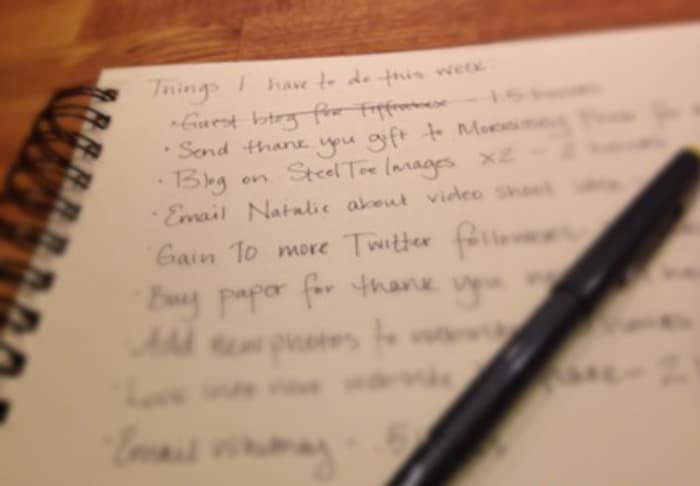
    Angela Pointon | Making Lists

    I don’t care if your lists are on a blackboard, a scratch pad or in a fancy color-coded excel file… but they have to be written down. This is important. Lists DON’T WORK if they’re in your head. As brilliantly creative as you are, you cannot keep an organized, separated set of three lists in that pretty little head of yours.

    So once you figure out where you’re gonna store these lists, you need to create them. The good news is it’s super quick to do.

    Listen up.

    List #1: What I have to accomplish this week.

    Every Monday morning you’re going to spend 15 minutes creating a list of what you HAVE to do that week. You’re going to write approximate time lengths next to each task so that you know how many hours of work you have ahead of you for that week. Add the hours up and make sure it isn’t going to kill you. If it is, see what makes sense to push to next week (or get some help… or a cloning machine).

    List #2: What I have to accomplish today.

    Each and every morning of the week you’re going to spend 5 minutes creating your list of what you HAVE to accomplish that day. In creating this daily list, you’re taking tasks off of your weekly list and you’re putting them on your to-do list for the day. Your weekly list is becoming shorter day-by-day. How delightful!

    List #3: What I have to accomplish when I’m slow.

    As you’re driving, in the shower, walking the aisles of the grocery store or talking to friends, you’re always coming up with “wouldn’t it be cool if” ideas of pure fabulousness. Don’t let these sparks of brilliance become dim and never see the light of day. Instead, put them on your “slow time” list so that you can refer to them as business is becoming slower. You can proactively plan to tackle these awesome ideas (using List #1 and List #2 in the same ways) when you have some spare time. Never again will you be waiting for the phone to ring, getting worried and depressed. Instead, you’ll be rocking out by creating something awesome that you thought of to improve your business, your brand, your photos, your service or whatever!

    Now look at you! What an awesomely organized and well-managed person you’ve become. All with three simple little lists.

    Filed Under: Business, Photography Tagged With: angela pointon, create listing, human interest, listing, management, organize, personal life, photographer, Photographers, planning, smart, stay organized, steel toe, time management, work

    3 Main Reasons For Using Lighting Diagrams

    August 5, 2011 by Olivier Lance

    This guest post is by Olivier Lance, who with Pierre-Jean Quilleré launched Sylights in 2009, a wonderful web and mobile application for photographers that helps them document their lighting setups. Olivier, a full time IT engineer from Paris, France, develops MacOS X software for a living. He's also a passionate photographer. Please follow Olivier on Twitter.

    Every now and then, when you post a photo to your blog or on a sharing platform, you get the common question: “how did you light it?”

    That's a tricky one! How do you go explaining to somebody a full setup of light modifiers, gobos, flash settings, angles, etc.?

    The short answer is: lighting diagrams.

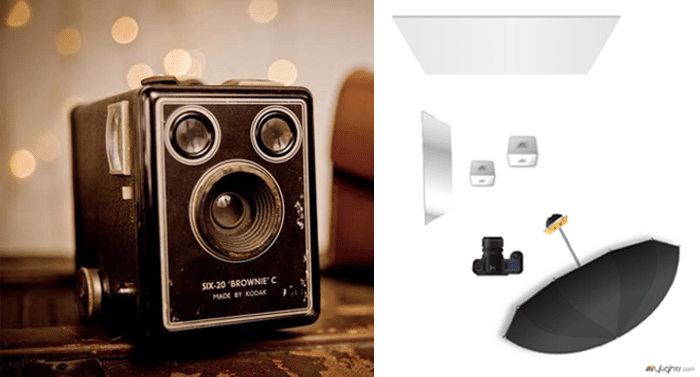
    Lighting Diagram

    Not everyone needs a lighting diagram to understand the lights behind a photography; experienced photographers can usually tell by looking at the shadows’ softness or shapes or at the catch light.

    However, I'm not one of them. At least, not yet! So what do lighting diagrams have that can help me? Let's state the obvious first: lighting diagrams show the gear used to light a scene and how many lights were used. They show where the lights were set and how they were directed, relative to the subject.

    “Relativity” is an important notion here. I think it's the key when working with lights. What I really see when I look at a lighting diagram is not “where” the main light is, but “how far” it is from the subject. And “how farther” (or closer, larger, etc.) the fill light has to be to do its job just as I see it in the resulting photo.

    The same principle applies to flash power. This is a second set of information that's usually provided on or along with lighting diagrams. To correctly reproduce lighting, one has to know how powerful each light was. But it's really “the relationship between the different light levels that is important”, David Hobby tells us in his article Strobe/Ambient balance: A Shorthand Way of Thinking.

    See, we're not used to describing amounts of light in an absolute manner. You'd rather say “this room is dark” – referring to what we usually consider a properly lit room – than “wow, it's barely 150 lux in here!”. Both are indicating a light level, but the former is relative whereas the latter is absolute. So a good lighting diagram could just use the main light as a reference and then say “this light is +1/3 of a stop, this other one -1 stop”.

    That's why a lighting diagram is such a wonderful document to any photograph. No matter the kind of flash I use and no matter how powerful they are. By using that basic information – relative distances, angles, relative light levels – I can reproduce the lighting over and over again.

    That's the main reason I see why photographers should use lighting diagrams: memory. Some photos are easy enough to remember; a lighting diagram will ensure the others are as easily reproducible. Besides the memory perspective, a document as complete as a lighting diagram is also a great way to share your knowledge … but more on that in a minute.

    Another very simple reason is that “a picture is worth a thousand words.” If you’re working with one or several assistants, you’d rather be drawing what you have in mind than explaining it at great length several times! This leads me to the second main reason I think photographers should get used to lighting diagrams: teaching. There are so many people learning artificial lighting nowadays: amateur photographers, photography students and pros as well, who want to improve their technique.? To any of them, lighting diagrams are an incredible educational tool! By putting together a photo and its diagram, one can understand the role and effects of each light in a setup. So if you document your photos by using lighting diagrams, you can actually teach other photographers your lighting techniques and help them figure out very easily how you lit your shoots. Diagrams are also a perfect way to keep track of the setups that worked while testing and learning.

    Brownie Camera Lighting Diagram

    Finally, lighting diagrams allow any photographer to prepare a shoot beforehand. Just as I’m using a draft paper to prepare this post, a lighting diagram can easily be drawn to throw ideas, get the ball rolling and have some setups ready before a session. This is the third advantage of lighting diagrams: planning. You can of course use any other technique to prepare a shoot, but the completeness of a lighting diagram and its close representation of a real setup makes it a good choice to start with, before you can actually try your setups and make arrangements.

    So, why should you use lighting diagrams as a photographer? Because it’s a great way to prepare your sessions, to document your photos afterwards and to keep track of your lighting setups as well as to share them with others and to teach beginners your techniques.

    All those reasons pushed me to create Sylights, a service to photographers I launched a year ago with my friend Pierre-Jean Quilleré. Our idea is to make lighting diagrams easy to use and to base a complete sharing platform on them. Sylights’ goal is to accompany every photographers on their learning path and to store their lighting diagrams for them. We already offer a large range of tools for that purpose: an online diagram editor with a lighting diagram gallery accessible to anyone, an iPhone and an iPad app for when you’re on the go. Many features revolve around those three apps.

    We’re still evolving and will gladly accept all your feedback to help us answer those three needs: memory, teaching and planning.

    We’d also like to know: how do you use lighting diagrams, and why?

    Food Photography Lighting Diagram

    Filed Under: Lighting, Photography Tagged With: create light, diagrams, Learning, light diagram, light levels, Lighting, lighting techniques, memory, photographer, Photography, planning, setup, Teaching, used lighting

    How Do You Plan To Dominate The World?

    April 6, 2011 by A.J. Wood

    As an Adobe Community Professional, A.J. has been an enthusiastic representative in the creative community for several years. It's not surprising he's been ranked the #1 Adobe Instructor WORLDWIDE more than once. Students enjoy his straightforward teaching style, and the ability to communicate ideas in the simplest of terms. An active NAPP Evangelist, A.J. posts Adobe tutorial videos each week on YouTube. Follow A.J. on Twitter, post your questions to his Facebook page, and catch the latest insights on his blog.

    Catchy huh? Yeah, I'm not once to mince words although, I generally like to spin a tale or two. It's my pleasure to join you today, and I appreciate the invitation Seshu extended to me quite some time ago. He is a gracious & patient host, and I hope my thoughts leave you wanting… Wanting more like Charlie Sheen's 2nd performance in Chicago, not wanting to leave like the angry mob that caught him in Detroit. Where was I?

    Oh yes, harnessing your talent, your desire, that passion which many of us find in photography. It's rather difficult to focus on that passion when you're bogged down with the day-to-day running your photography business isn't it? There's the marketing, the office paperwork, the website, dealing with clients, to Facebook or Twitter, the list goes on, and yet many of today's photographers seemingly do it all. Maybe you're just starting out, and you haven't thought about your business plan or the logistics of making money from photography. Perhaps you're a seasoned pro, and you're wondering how you'll stay on top of all the changing technology, and the wolves scratching at your door. It's a wonder you get to take any pictures at all. That's okay, I'm here to tell you:

    To discover your talents you have to recognize & acknowledge when you suck.

    It's a common philosophy I share with my students, and many interpret it as a direct statement about their passion. Like Simon Cowell, I'm somehow there to obliterate their dreams. Let me clarify the statement with some editorial tweaks:

    To maximize your talents you have to recognize & acknowledge where you suck.

    I know plenty of folks who at some point were caught in company downsizing, and ended up being one of the lucky ones who had more job responsibility for the same or less pay. Oddly enough, I see the same types of folks launch their businesses with DIY zeal only to suffer from burnout or stagnant growth after a year. Yes, you have grand ambitions, some talents, maybe a kickass plan or two, but you're just one person. What you need are minions … I mean a support group … umm … network –- You need to develop your network. Just like that lone crusader Batman had a sidekick, and spent some time with other superheroes in the Justice League of America. (Wait … what do you mean a comic book reference kills my credibility?) Focus–a network.

    Leverage your strengths, outsource your weaknesses.

    When I talk to photographers about networking events many of them mention social mixers based around getting clients or connecting with peers. Generating leads is a must, and mentoring other photographers or finding a mentor is a wonderful thing. However, those connections do not address the immediate issues of office management, marketing or managing your website. I highly recommend finding those people at the networking events they attend. Where do you start? Your local Chamber of Commerce is a good place. Another good place is Meetup.com. Any hobby, popular fad or obscure interest can be found listed at Meetup.com. The best part is meetup groups are specifically designed to get people together live and in-person. Now I know what you're thinking, “That's a good way to generate client leads!” Point to you dear reader, that's a takeaway bonus for hangin' out with me this long.

    But let's stay focused. I don't want you networking without purpose. What you should be doing is building your network. Your team of professionals. The people that you can call to handle the portions of your business that are really best suited to be handled by someone other than you. If you suck at website design, then by all means hire someone to do your website. And if you're great at website design, why in the world are you spending your time as a photographer? My point is by building your network, you can focus your energy at the really important tasks. My good friend Glyn Dewis is a fine example. He had a hand in building his first website, and it wasn't bad. It got the job done. See for yourself. However, Glyn's passion for photography literally oozes into everything else he does, so a good website wasn't good enough. Now he probably could have spent the man-hours himself building & retooling his website, but he found someone better suited to the task. Scott Kublin is another fine example. You don't know Scott? He enjoys HDR photography. He's friends with another HDR guy–Trey Ratcliff. *heart pounding from sheer awesomeness* You can read the backstory on Scott's About Me page, but the summary is Scott wanted to learn HDR and Trey needed some top-notch SEO for his website.

    Leverage your strengths, outsource your weaknesses.

    Thank you for taking a moment to read this post. As a fellow-overachiever-one-man-band-DIY-caffeine-infused-control-freak, I know it's tough sharing some of the parental responsibility for your growing business. However, it's the best way to ensure your business does grow. I want to thank my partner in creative shenanigans, J Schuh for illustrating my thoughts in the opening cartoon. Feel free to buy a t-shirt if we've tickled your funny bone. Oh, and where are my manners?

    Here's a quickie Photoshop tutorial for you:

    Filed Under: Business, Photography Tagged With: A.J. Wood, adobe tutorials, business plans, dominate, meetup.com, networking, online social networking, passion, Photography, Photography Business, plan, planning, sustainable business, talent, technology, world

    Subscribe To Tiffibox Treats!

    Looking for a well-curated email newsletter that will leave you inspired and motivated about your photography business? Sign up below!

    About Seshu

    Seshu creates relaxed portraits of families and high school seniors in Avon, Connecticut. He also leads a successful headshot photography studio in Connecticut, helping professionals from a variety of disciplines project the very best versions of themselves. He created Tiffinbox as a way of inspiring photographers, to create better images and successful businesses. [Read More]

    Email Templates For Headshot Photographers

    Email Templates for Headshot Photographers

    Recent Posts

    • How Capture One Changed My Event Photography
    • 10 Steps To Stay Positive In Times Of Great Stress
    • Why You Need To Read “Personal Branding For Photographers” Now
    • How To Master Your Website Content Step By Step?
    • Tony Taafe’s TNT Method For Headshot Photographers

    Recent Comments

    • Stephen Davison on Are You A Business Owner Who Is Smart, But Stuck?
    • Ben A. on Don Giannatti Clinches The 8th Annual Tiffinbox Award
    • Dan on Don Giannatti Clinches The 8th Annual Tiffinbox Award
    • Donald Giannatti on Don Giannatti Clinches The 8th Annual Tiffinbox Award
    • Stephen Davison on G.E. Masana’s 6 Strategies For Wedding Photography Success
    • Naveen Kumar on Weddings In India Are More Than Being At The Right Place And At The Right Time
    • kartick on Weddings In India Are More Than Being At The Right Place And At The Right Time
    • Leonid Farbman on 6 Uncommon Trends To Grow Your Photography Business
    • Willow and Finch Wedding Photography on 11 Reception Tips To Help Your Wedding Photography
    • Web Designer Malaysia on How To Optimize Your Squarespace Website For Search Engines
    • Creastan on An Interview With Photojournalist G.M.B. Akash
    • Cindy Brown | Atlanta on An Open Letter To A Local Photographer

    Become a Patron!

    Copyright © 2026 · Tiffinbox · Site Design by Heather Mackan Creative · Built on Genesis