• Photography
  • Interviews
  • Business
  • Reviews

Tiffinbox

Inspiring Photographers

  • Home
  • About
  • Blog
  • Contact

Creating a Tilt ‘n Shift Effect with Lightroom 3

March 1, 2011 by Stuart Little

Stuart Little, is a Photographer, Writer, Blogger and Photoshop Educator with over 18 years experience in the field. Stuart has been teaching both Amateur & Professional Photographers since 1998 and he is based in the Scottish Coastal Town of Ayr in the West of Scotland. Visit Stuart’s website http://www.alittlephotoshop.com. Read his first post about creating rounded corners in Lightroom 3.

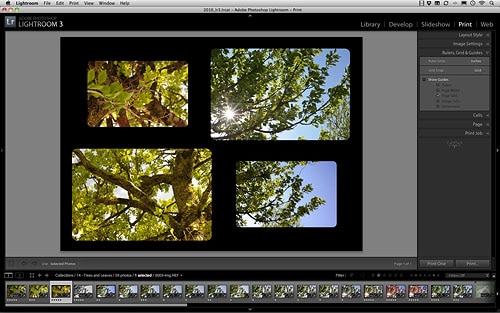
Thanks once again to Seshu for inviting me to create another LIghtroom video tutorial for your viewing pleasure. Today I am going to show you how to fake a Tilt n Shift lens effect directly within LIghtroom 3. Now I am not going to bore you with the history of this very popular style of image processing but needless to say there are 3 ways you go do this effect.

1. In Camera
2. In Photoshop
3. In Lightroom – Which is the way we are going to do it today.

There are two main reasons for doing this effect in Lightroom and Photoshop. 1) Shallow Depth of Field and 2) If you have an image taken from a high vantage point, then you can make it look like a miniature model partly because of the shallow depth of field blur and partly because of the subject and angle of the image.

In this video tutorial I show you how to create the effect from a shallow depth of field point of view which is how I mainly use the technique in Lightroom. If you want to go down the faking a miniature model look, then in my view you are better doing it in Photoshop. I have that very video tutorial over at alittlephotoshop.com if thats of interest to you.

Learn more about Tilt Shift Photography.

If you have examples of tilt ‘n shift work, please share them as links in the comments section. We'd love to see how you have used Stuart Little's technique, or your own.
Filed Under: Photo Technology, Photography Tagged With: adobe photoshop, adobe photoshop lightroom, application software, computing, creating a, depth of field, effect, effects, graphics software, lightroom, perspective control lens, photographic lens, photoshop, photoshop educator, professional photographers, science of photography, shift, shift lens, stuart, stuart little, tilt, tilt shift photography, video tutorials

Creating Round Borders In Lightroom 3

February 15, 2011 by Stuart Little

Stuart Little, our next guest blogger, is a Photographer, Writer, Blogger and Photoshop Educator with over 18 years experience in the field. Stuart has been teaching both Amateur & Professional Photographers since 1998 and he is based in the Scottish Coastal Town of Ayr in the West of Scotland. Visit Stuart's website http://www.alittlephotoshop.com.

Thanks to Seshu for giving me the opportunity to share with you a really cool and utterly simple technique for creating a rounded border from within Lightroom 3.

When Adobe brought out Lightroom 3 they added 2 new features to the post crop vignette that made creating vignettes even better than before. So much so that the older paint overlay style has kind of been forgotten until now.

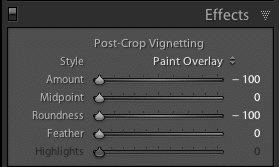
Lightroom Effects Panel SettingsYou can watch the video for all the juicy know-how but for those of you who just want to get stuck in via your RSS reader then slide all the post-crop vignetting sliders to the left for a black rounded border, job done, nuff said. Yep! its that simple But here is the another cool thing. If you want a white border then just take the amount slider all the way to the right.

Rounded Corners In Lightroom 3

Best thing of all. You can save the whole lot as a simple preset so that one click will take care of it all in future. Fire up the print module and set the background colour to compliment the border colour. Make sure you are using custom layout and then you can drag n drop the round images directly onto a layout ready for printing. Although if you are going down the inkjet route I would go for a white border and save yourself some ink. Enjoy the video tutorial and dont forget to swing but alittlephotoshop.com for more Lightroom 3 training and free workflow actions for Photoshop.

Stuart has offered to send me another blog post, this time about creating a tilt-n-shift effect in Lightroom 3. Here's the deal, though, for that to happen I need to see at least 20 comments from you. Ask questions or suggest an alternative way of creating round corners. But I do need to hear from you. So, will you chime in? If you liked this post by Stuart, I think you will enjoy the next one too.

Filed Under: Photography, Tutorials, Web/Tech Tagged With: adobe photoshop, adobe photoshop lightroom, adobe systems, application software, blogger, bloggers, borders, computing, creating, graphics software, inkjet printer, lightroom, photoshop, photoshop educator, professional photographers, raster graphics editors, stuart little, Teaching, Video, video tutorials, vignetting

“Going Amateur”

December 29, 2010 by Stuart Sipahigil

This is a guest post by Stuart Sipahigil. He is an amateur photographer in the traditional sense of the word; that is, he does it for the love of the craft. His photographs have won awards, appeared in publications, and have made their way into homes and businesses around the country. Stuart also teaches workshops to help other amateur photographers find great photographs close to home. Stuart’s work can be found at TheLightWithout.com.

So, you're “just” an amateur photographer… but you've discovered that you have a love for making photographs and you seem to be pretty good at it. Your friends and family are telling you they love your photographs and several have said you are “good enough to be a professional.” Maybe you've entered a local photography contest or two, and you've done pretty well. Or perhaps you've even sold a few prints of your photographs to the local coffee shop or restaurant.

Now you're thinking to yourself, “maybe I could be a professional photographer,” and then, “how would I do that?” So you check out a couple of books about being a pro photographer — David duChemin's VisionMongers: Making a Life and a Living in Photography or Dane Sanders' Fast Track Photographer, for example — and discover that it's actually quite a bit of hard work. You already have a career right now and well, it's paying the bills and you're doing okay, even in this economy. Shifting gears to becoming a pro is a big change and would disrupt your life quite a bit. It might be doable, but it would be painful, and you're just not sure it would be worth it.

So now what do you do?

Traditionally, there were the only two paths available to you: turn pro, with all of the responsibilities that entails and the costs associated with it. Or remain an enthusiastic amateur, occasionally selling a print or two at your local art fair, or maybe shooting your cousin's wedding for a few hundred bucks (and thus, pissing off an entire group of professionals—but that's another story). However, I think there are several other choices you can make; several other paths you can trod that don't involve becoming a traditional “pro” to find satisfaction as a talented amateur photographer.

The Internet has changed everything. You have many more outlets for your work now than ever before. Traditionally, if you wanted to get your photographic work out into the public eye you had only a few choices; magazines, gallery showings, or stock photography, for example. Today, you can sign up for a blogging service and start your own photography blog, publishing your work to a worldwide audience in about five minutes. If you're a little more ambitious, you can self-publish your own “coffee table” book of your photographs using services like Blurb or Inkubook. Or publish a photography ebook, either on your own or through a publisher like Craft & Vision. All of these things were prohibitively expensive and perhaps even impossible to do on your own only five years ago.

There used to be an old saying, “Those who can, do. Those who can't, teach.” That's simply not true these days (and it never really was). Many professional photographers like Joe McNally, David duChemin, and Zack Arias — all terrific photographers — offer workshops and seminars about the vision, the craft, and the business of photography. But not everyone is ready for (or can afford) workshops with these big names.This can create an opportunity for you to step up and use your skills to help others that are as passionate about this craft as you are. Is there a local arts center in your town? This can be a great place to start and to hone your teaching skills. If you don't have that opportunity, why not just try leading a few photo walks, either on your own or in concert with Scott Kelby's Worldwide Photo Walk in July? Signing up to be a walk leader is easy and can get you started on the path to becoming a photographic instructor.

Are you good at talking about photographic tips and techniques? Do you think you can interview other photographers? Maybe you should start a photography podcast. In a few minutes, you can set one up in Apple's iTunes and publish it to a worldwide audience on a regular basis. The folks at Faded & Blurred have done just that, combining it with their own regular photo walks and a lively online community to create a terrific resource for passionate photographers.

If you are currently a professional photographer, you too can benefit from “going amateur.” I don't mean that you should give up your business and find something else to do, but to try to carve out a little time in your life to do some work for yourself. Personal projects are your connection back to why you started in the field to begin with: your love of photography, the feel of the camera in your hands, and the joy of seeing something that moved you appear on film or in the LCD. There is enormous value in removing the pressures of running a successful photography business and just do it for yourself.

Maybe there are other opportunities that you could use to expand your business (and reputation) as well. Matt Brandon, a professional travel and humanitarian photographer, publishes regular interviews with other pros like Ami Vitale, Gary S. Chapman, and Chris Orwig on his Depth of Field podcast. David duChemin created the Craft & Vision eBook publishing business by starting with a few of his own ideas about photography. Chase Jarvis has added The Best Camera, a best-selling book and phone app, as well as the Creative Live educational video series to his successful endeavors. Many other pros are adding to their repertoire of services by taking advantage of these new avenues.

And if your photography business isn't very successful, why not step back and take a fresh look? Is it just a production job for you now: prepare, shoot, post-process, deliver? Have you lost that love for the art that you used to make? Perhaps it's time to re-think photography as a professional career. That may seem a bit harsh, but I'm simply saying your photographic life might be more rewarding without the pressures of trying to make a living at it. Or perhaps you just need to shift gears and, like some of these other pros, add some new roles to your career, such as broadcaster or teacher. There may be opportunities available to you that you just haven't considered.

There are great rewards to becoming a professional photographer if you're willing and able to put in the time and effort it requires, but there is no shame in trying to be a great amateur photographer. Making money with photography doesn't always equate to making exceptional photography. If you love photography and want to do more than just make slideshows for your friends and family, there are more opportunities now than ever before. Overcome your doubt and hesitation, step out and see what you can accomplish as “just” an amateur.

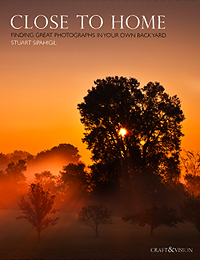
Please support this site and buy Stuart's awesome e-book, Close To Home, through the Craft & Vision website. [affiliate link]

Filed Under: Photo Books, Photo Exhibit, PhotoBlog, Photography Tagged With: amateur, amateur photographer, david duchemin, event photographer society, fast track, photographer, Photography, photography contests, Photojournalism, professional photographers, stock photography, stuart sipahigil, Wedding Photography

Hard Light, Soft Light For Photographers

December 1, 2010 by Guest

David Robertson, AvatarThis week, we'll have two blog posts from my friends from “down under.” Can you tell I've always wanted to use that expression? In all seriousness, though, this first one up is a guest post by David Robertson, a Canberra Wedding Photographer. Follow him on Twitter.

As photographers we’re fed this basic message that a bigger lens = better photos. Don’t get me wrong, I love shooting with good quality equipment but as soon as you replace a passion for knowledge with a passion for equipment you’ll find yourself frustrated when your photos aren’t improving and will get burnt out. As a young photographer I bought the gear that I had lusted after and spent thousands of dollars without even realizing that I can make some amazing photos when equipped with the right knowledge and understanding of light.

Lighting in photography is one of the most overlooked aspects by today’s photographers and even the ‘professional’ photographers. Amateurs and professionals alike are completely oblivious to the effects of light of the human body and how different lighting can reveal or hide things, tell a story and bring your subject to life. Through this article I’ll go over some very simple and basic natural lighting techniques that I use for 90% of the work I do.

David Robertson

David Robertson Bridal Party

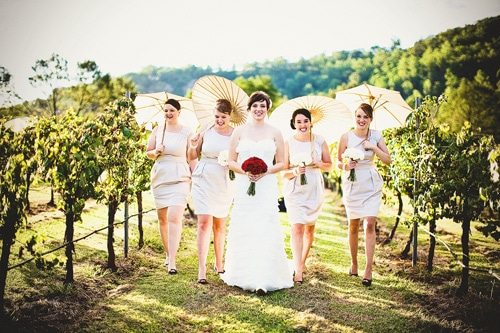
Many photographers over chop their images to try to make up for their lack of ability to understand light. We’ve all seen those ‘professional’ wedding photos that really just make you cringe and die a little inside. The aim of my work is to provide a very exclusive and high end photography experience, not just great images and being able to utilize the available light to the best measures is absolutely essential to that.

Amateurs and professionals alike are completely oblivious to the effects of light of the human body and how different lighting can reveal or hide things, tell a story and bring your subject to life.

There are a few different factors to consider when you’re lighting for portraits; size, diffusion (hard or soft), color and angle. Before I take a single photograph I analyze the scene and choose one of the below based on the factors above.

David Robertson

David Robertson

David Robertson

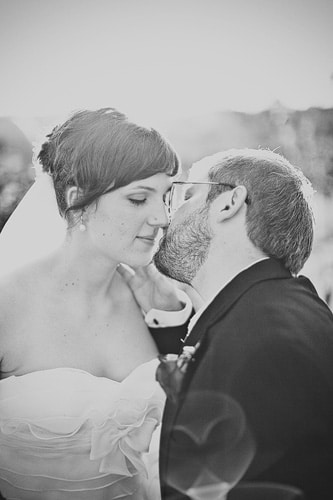
Hard light – shoot into the sun with the subject in front of you. This prevents squinting, gives a great wrap around light and if exposed correctly can give you amazing results. If possible try avoid shooting with midday sun. I always get a few wedding clients every season boasting about how they’ve planned to have the ceremony at midday and how good the light is then. Truth is that it’s very hard to avoid making people look likes pandas when the sun is at its apex.

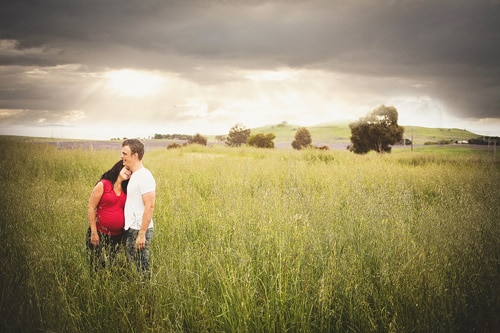
Soft Light – The easiest light to work with, there is usually no squinting of the eyes (important) and it gives really nice warm, soft skin tones. The clouds act as a massive softbox; it’s my preferred light to shoot with. Shoot with the subject facing the light source (sun behind clouds) to get the most of all the color in the eyes, catchlights from light source (sun) and the best skin tones.

Sounds too easy? Well, it kinda is really :)

I encourage you to buy a small mannequin or get a willing model and study the effects of light on the person in a room with a nice big window. Rotate around the model as you’re shooting and very carefully observe with your eyes all the subtle differences that occur when you change the angle of the light and position of yourself and the subject. You’ll soon find yourself being able to get familiar with the effects of light and in no time you’ll be a light connoisseur.

If I had known all the things I do now when I first started I could have saved myself a lot of stuffing around, I hope it helps you :)

Do you have a preference for hard or soft light? Sound off below and let us know. Tell us also why you like one over the other. What challenges do you face when photographing in different types of light.

Filed Under: Lighting, Photography, Weddings Tagged With: available light, david robertson, hard light, human interest, Lighting, lighting techniques, photographer, Photographers, photographic lighting, Photography, professional photographers, science of photography, soft light

Easy-To-Use WordPress Portfolio Websites

November 18, 2010 by Ellen Petty

This guest blog is by Ellen Petty, the Head Brandslinger at Identity Kitchen, a marketing and design studio specializing in photographers. She and her business partner Marty Thornley just launched a new line of affordable all-in-one WordPress portfolio sites designed specifically for professional photographers at PhotographyBlogSites.com.

Early in 2009, Marty Thornley and I sat down to discuss a more efficient way for photographers to display their work online. We had both, separately, been working with photographers, and discussed the idea of an all-in-one portfolio blogsite that looks and feels like a flash site, with all the SEO benefits of a WordPress blog. We made our wish list; social media integration, customization, easy-to-use backend, unlimited galleries, and integration of fantastic photography tools. After developing many, many custom blogsites for photographers, we saw our theories in action and set out to develop Photography Blogsites.

WE STARTED THINKING ABOUT WEB PRESENCE

Creating a web presence from scratch is simply too much work. You need a hosting account, a website, a blog, facebook, twitter, etc. etc… That's already 3 or 4 places to login and update. If you have a second or third branch of your business this could be multiplied over and over. Like any software, WordPress needs to be updated from time to time. While WordPress itself has become pretty easy to automatically upgrade, sometimes the theme and/or plugins you have been using are not up to date with the new version. So you go through the automatic upgrade and your site breaks. To do this correctly you would backup your database and all your files in case something goes wrong. The problem is, do you know how to backup a database and restore it when something goes wrong? And if you do, you know this process takes a while. Again multiply this by all of your sites. It's not fun.

Photography Blogsites Logo

We set out to make this faster, easier and less expensive, while still providing all the SEO benefits, the support, the security and backups, and the upgrades. All the difficult stuff becomes much easier because we are offering sites on a networked system. We can fix any problems, answer any questions and best of all, release exciting new features to everyone at once. You will always have the latest features immediately.

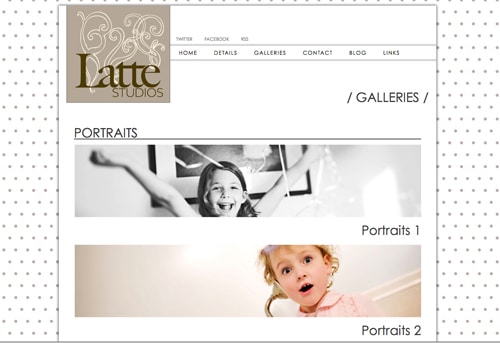
Photography Blogsites - Latte 2

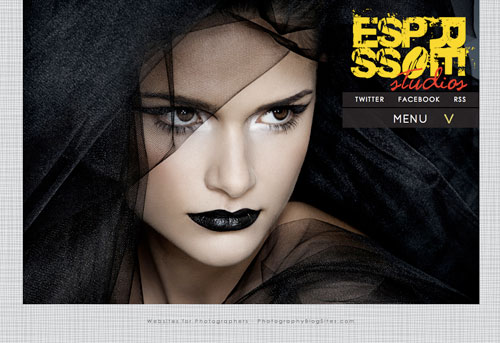
Photography Blogsites - Espresso

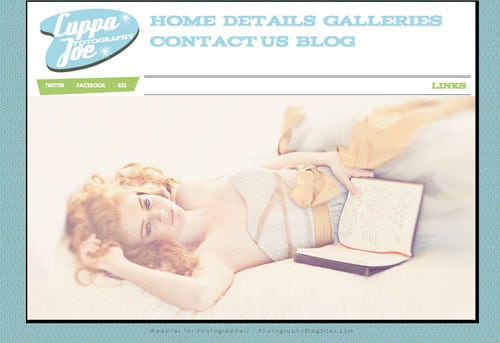
Photography Blogsites - Cuppajoe

THEN WE PERFECTED THE FEATURES

a) EASE OF USE

Our system is a networked installation, called WordPress Multisite. We backup everything twice daily and upgrade all of our plugins and themes, as well as the core WordPress files ourselves to make sure they are up to date and will continue working without a hitch. The process is totally seamless to site owners, who will never see the upgrade messages or worry about backups or upgrades or broken sites.

There is no need for hosting. No need for installation of anything. Ever. You don't even need to check your email for a confirmation link. The signup process takes about thirty seconds and your site is ready to start using. From there, our free trial period lasts 7 days. You won't even be asked for any payment information from us unless you decide to activate a subscription plan.

b) ALL IN ONE SITE

One login gives you access to the portfolio site, the galleries, and the blog. Everything is all one. We offer unlimited galleries, unlimited informational pages, your blog, plus a hub for your social media marketing efforts. One address, one place to maintain so you can get back to taking photos, your passion, and the reason you got into this in the first place.

Photography Blogsite - Galleries

c) SEO

Search Engine Optimization (SEO) is a huge, often misunderstood, topic. What it comes down to is making sure that your site is as visible and findable as possible. While search engines like Google are a big part of this, you also need to be found on Twitter and/or Facebook. You need to be visible to iPhones and mobile devices. This means that your site should built 100% using HTML, and not Flash. There are varying arguments in the whole Flash vs. HTML debate. The only way for Flash sites to compete in the SEO world is to have secondary version called mirror sites for search engines, and a third site for mobile devices. Not only do visitors potentially see three different sites but these are three different pieces of code to maintain and worry about upgrading. Add to that a separate blog, sometimes on a different domain that opens in a different window.

One more argument for a Flash-free portfolio site, just last week Google announced a new feature called Instant Preview, which adds a snapshot of your site to the right of your search results. Unless, your site is Flash, which previews as a grey box. This will revolutionize how potential clients will do their searching. You can find out more information on our blog.

WordPress takes care of 90% of the on page SEO. We have put in some extra features to help take care of the rest. All of the standard SEO plugins are installed automatically: All in One SEO PAck, SEO Friendly Images, XML sitemaps are automatically generated and sent to Google, Yahoo and Bing. We have also developed a plugin in house specifically for photographers called SEO Image Galleries. The only WordPress gallery that uses 100% HTML (no Flash) and automatically adds valuable ALT attributes to every images.

d) EASY TO CUSTOMIZE

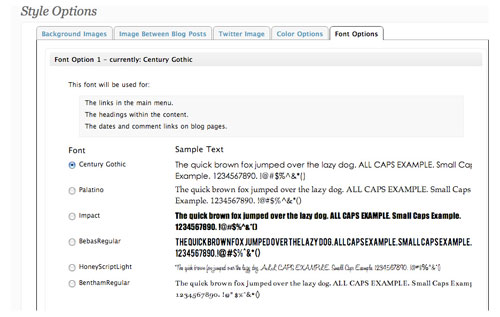
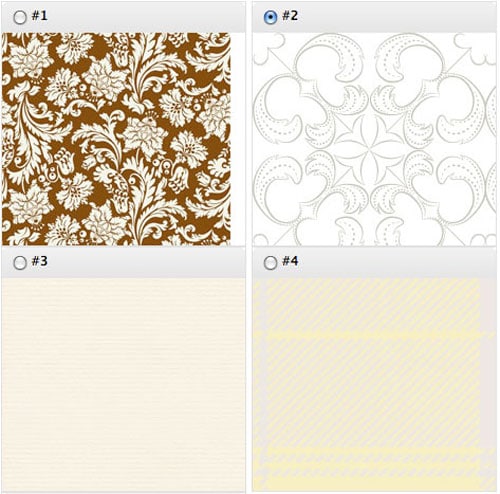
Out of the box, WordPress is not an automatic website/blog. You need to hire an outside programmer/designer to work a theme to your liking. That is where we come in. We created themes where just about every aspect can be easily customized by uploading patterns, logos, favicons, social media icons, blog post separators, your photos, or choosing from the options we have included in each theme. You can change the color or fonts on your menu, change the color the menu rollover the background. The possibilities are virtually endless.

Photography Blogsite - Font Options

Photography Blogsite - Backgrounds Latte

e) COST

These sites replace a portfolio site, a blog and any hosting you might need for both. Our lifetime plans are a one-time payment, nothing else to buy ever, no monthly fees ever. Our monthly or yearly plans include everything – your full site, built in blog and hosting. For anyone totally happy with their current website, we also have a blog only versions of all of our themes.

f) SUPPORT

We have put together a support site focused on our sites, but is also a great resource for anyone using WordPress. We have detailed documentation, tutorial videos and a forum. If you have a question or concern, we have a built in ticket system that can be accessed directly from your site.

g) SECURITY & BACKUPS

To help prevent problems, we have enlisted a number of plugins and settings to make sure spam is kept to a minimum and the security of the site is as solid as possible. In the worst-case scenario that something does happen, the best way to protect a site is to have a good backup plan. We backup our database twice a day and all of our content once a day. The backups are stored both locally on our server and remotely.

h) AND FINALLY WE LAUNCHED

We are proud to announce our first three themes in both blogsite and blog-only forms: Latte, Espresso and Cuppa Joe. Because we believe in our product so much, we offer a 7-day free trial. Take our sites for a spin. You can upload your work, writes some posts, link your Twitter and Facebook, and even seamlessly switch between all our themes.

We are offering an introductory lifetime membership for $499. That includes all our themes (now and forever), 4 GB of hosting on our screaming fast servers, our support, maintenance and much, much more. For a full list of features visit our features section. This offer will end on November 30, 2010.

We’d love to hear your thoughts as we will keep developing our sites to be the best they can be. As always, thank you so much for your support!

Win on BLACK FRIDAY 11/26/2010! Photography Blogsites is generously offering ONE LIFETIME MEMBERSHIP (Worth $499) to a Tiffinbox subscriber. Here is how you may be able to win:

1) Follow @photoblogsites on Twitter

2) Tweet the following:

“I just read about Affordable WordPress Portfolio Websites @Photoblogsites on @PicSeshu’s Tiffinbox. #photoblogsites Please RT!”

3) Comment below and tell me WHY you deserve to win. Don’t forget to mention your Twitter handle so that I can make sure you have done both. We need to see a minimum of 50 real, honest, entries before I can give this away on Black Friday 11/26/2010. So whatchawaitinfor?

Filed Under: Photography, Web/Tech, Weblogs Tagged With: blog, blog hosting services, blog software, content management systems, facebook, gallery, online social networking, photographer, Photographers, Photography, portfolio, portfolio site, portfolio website, professional photographers, search engine optimization, search engines, Twitter, websites, wordpress, wordpress blog, world wide web

  • « Previous Page
  • 1
  • 2
  • 3
  • 4
  • Next Page »

Subscribe To Tiffibox Treats!

Looking for a well-curated email newsletter that will leave you inspired and motivated about your photography business? Sign up below!

About Seshu

Seshu creates relaxed portraits of families and high school seniors in Avon, Connecticut. He also leads a successful headshot photography studio in Connecticut, helping professionals from a variety of disciplines project the very best versions of themselves. He created Tiffinbox as a way of inspiring photographers, to create better images and successful businesses. [Read More]

Email Templates For Headshot Photographers

Email Templates for Headshot Photographers

Recent Posts

  • How Capture One Changed My Event Photography
  • 10 Steps To Stay Positive In Times Of Great Stress
  • Why You Need To Read “Personal Branding For Photographers” Now
  • How To Master Your Website Content Step By Step?
  • Tony Taafe’s TNT Method For Headshot Photographers

Recent Comments

  • Stephen Davison on Are You A Business Owner Who Is Smart, But Stuck?
  • Ben A. on Don Giannatti Clinches The 8th Annual Tiffinbox Award
  • Dan on Don Giannatti Clinches The 8th Annual Tiffinbox Award
  • Donald Giannatti on Don Giannatti Clinches The 8th Annual Tiffinbox Award
  • Stephen Davison on G.E. Masana’s 6 Strategies For Wedding Photography Success
  • Naveen Kumar on Weddings In India Are More Than Being At The Right Place And At The Right Time
  • kartick on Weddings In India Are More Than Being At The Right Place And At The Right Time
  • Leonid Farbman on 6 Uncommon Trends To Grow Your Photography Business
  • Willow and Finch Wedding Photography on 11 Reception Tips To Help Your Wedding Photography
  • Web Designer Malaysia on How To Optimize Your Squarespace Website For Search Engines
  • Creastan on An Interview With Photojournalist G.M.B. Akash
  • Cindy Brown | Atlanta on An Open Letter To A Local Photographer

Become a Patron!

Copyright © 2026 · Tiffinbox · Site Design by Heather Mackan Creative · Built on Genesis