• Photography
  • Interviews
  • Business
  • Reviews

Tiffinbox

Inspiring Photographers

  • Home
  • About
  • Blog
  • Contact

What To Look For When Getting a Custom Website

June 15, 2014 by William Bay

The Web has become an infinitely complex place to bring your business to. A few years back, the WWW could have stood for Wild Wild West instead of World Wide Web. People easily put up Flash-based websites that did cool “things,” proper HTML was forsaken in the attempt to make sites pretty, but these attempts were workarounds and left the realm of solid web development.

Thankfully, albeit gradually, order came in form of thing like: Web Standards, CSS, Search Engine Optimization and Google Best Practices. And of course we can praise Steve Jobs for driving the last nail into Flash’s coffin with the creation of the iPhone and iPad.
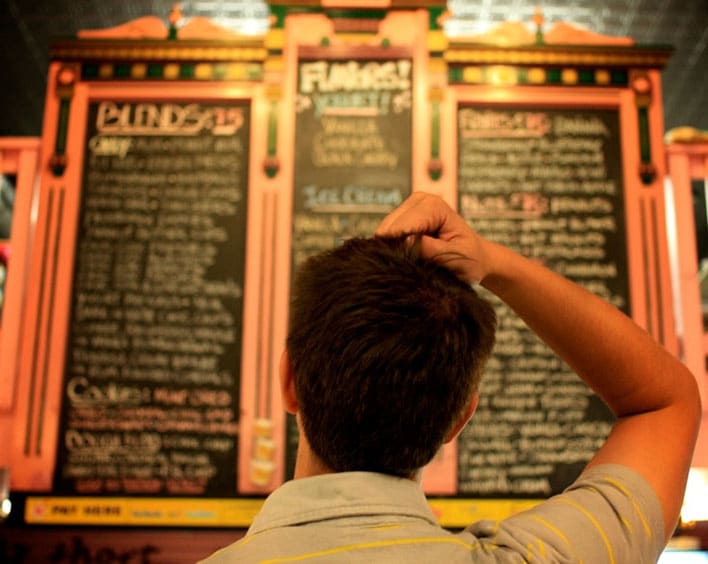
Confusing Array Of Options For Photographers

While many of the standards and practices above have made life easier for web users, the implementation of those standards can vex common business owners that just need to get their site up. It can be analogous to herding cats, and requires a broad range of skills to manage. Because of that, I highly recommend that when you do look for someone to build a custom site, you find a Web Developer instead of just a web designer. They will be skilled in the various areas (or have a team of people skilled in those areas). Here are a number of the skills required to put together a solid, custom website:

* General hosting server operations. The knowledge to move sites, and be able to handle Redirects, 404 errors, etc. is absolutely critical.
* PHP, HTML and CSS experience. These coding languages are the building blocks of the Web.
* SEO (Search Engine Optimization). Google's algorithms are constantly changing, and then every 9 months to a year there comes a big change that turns the SEO industry on its head. A good developer will keep up with this or have a person that they work with directly to stay up to date on these changes.
*  WordPress expertise. This is of course assuming you're using the best CMS out there. A developer knows how to use template files, Custom Post Types, and advanced plugins that enhance your custom website.
* Security. Having a secure website is a big deal. There have been a number of brute force attacks on sites that have rendered them completely useless. GoDaddy's entire infrastructure was down for a full day! A developer will know where you should host and what you should do to prevent these types of attacks.
* Mobile. Responsive website design “responds” to the size of the device you're on whether that's desktop, laptop, tablet, or phone (small device). There are very important things to consider when developing and designing for the various sizes. You definitely want someone well versed in that world.
* UX/UI. User Experience / User Interface. Your website is a tool to make sales for you. How efficient it is at doing that will depend on how well your Developer understands the process that people go through when entering a site. A good developer will suggest strong CTAs (Call To Actions) on home page, and wherever else a potential customer could be enticed into reaching out to you.
* Design. Of course, you want this thing to look pretty, right?!

Who To Hire?

Different developers have different strengths. Personally, I'm rock solid when it comes to SEO, HTML, CSS, UX/UI and WordPress, fairly strong when it comes to PHP, server functions, and security. I'm OK with design, but I still want my clients to have great designs. So I hire a great designer for our custom website builds.

Finding a developer that has these areas under control, either by himself or with a team, is a must in order to get the absolute best product. I've heard a lot of stories of people not getting what they expected. I even know a photographer that had a custom site performed, but was told to never update WordPress! This is a very critical step in preventing security problems, and an example of someone not familiar enough with WordPress to make the site work properly.

I also see beautifully designed sites that will never see the light of day if searched on Google because they failed to structure the site properly, and the SEO is poor. Do yourself a favor and interview the developers you have in mind and find out what their knowledge is in each area. Thoroughly test out the sites in their portfolio. Ask yourself if they have good designs (beware of the “I don’t like the paint on the walls” thing that people say on those HGTV shows). Pay attention to the level of design. Do elements on the page stick out, do they do a good job of balancing the needs of a website with the design, do the sites look like they were designed in the 90’s, does it appear that the designs get better with each and every website?

I'm happy to help you find the right person too. Even if Flaunt Your Site isn’t the right fit, I often help people figure out what the best path is for them. And we’re not always the answer. (I'll even pose as your web developer brother that works for Qualcomm and can't work on your project, if it helps you).

Weird Options For Photographers

Who Not To Hire

* First and foremost, avoid anyone that mentions the word Flash. That should elicit the response of you hanging up the phone, or pretending you don’t speak English. Even if they say it’s mobile friendly, you should still print their email out, and then light it on fire. (Cackling like a witch is totally optional.)
* Anyone spouting anything about HTML5 or CSS3 or other technical mumbo jumbo to influence you into working with them. First, websites are about people and their businesses. The developer’s job is to use the technology to accomplish your goals, not to use buzzwords as leverage to get you to hire them. (I’ll also add that HTML5 doesn’t mean what most people think it means).
* Someone without a portfolio, or a list of previous clients and links to their site. You really want to look at the websites they’ve worked on before.
* The guy that will do an “amazing full custom website” for $500…

Do you remember the last time a $500 wedding turned out “amazing?”  … Yeah, neither do I.

What Developers Cost

Cost is, of course, a huge factor to consider. Custom websites can vary from developer to developer. It will also vary depending on what functionality you want for your site. To give you a range, Flaunt Your Site does full custom sites from $3,000 to $5,000. We can do sites beyond that price point as well, but that tends to be the averages when it comes to our clients.

You will find developers that charge less than that, and you’ll find developers that charge more than that. My suggestion would be to interview more than one person for your project. Just as your clients have no doubt interviewed more than just you to find out who the right photographer.

Whether you hire someone for $1,000 or $10,000, your aim should be to have your new website be the type of investment that actually makes you money. If this isn’t on yours or your developer’s radar, you need to make it a priority quickly. If you’re doing it just to have a pretty site, then that is narcissism or “keeping up with the Joneses” getting in the way of running your business.

The only reason to spend money on a custom site is to increase your bottom line.

I have a personal goal that each website Flaunt Your Site does is directly responsible for our clients gaining 5-10 new clients in that first year.

Be sure to read William Bay's first article in this series.
Filed Under: Home Middle Left, Photography, Web/Tech Tagged With: blog software, content management systems, custom, Custom Designs, Custom Web Design, Custom Websites, Design, Design Website, Flash Based Websites, google, Html, Markup Languages, Photographers, Photography Businesses, php programming language, Pretty Websites, Responsive Website, search engine optimization, Secure Website, Web Development, web display, Website, Website Building, Website Design, Website Launch, websites, Websites Security, William Bay, wordpress

5 Tips For Photography Website Success

September 10, 2013 by Scott Wyden Kivowitz

As you might have guessed, having a website is essential to a photography business, so it is important to take necessary steps for photography website success. In this article, you are going to read five for photographers to achieve such a goal.

Hosting

The first step to achieve success, is to seek the best possible hosting for a photography business. There are many reason why WP Engine is a great choice for any photographer. First, is the expertise from every WP Engine employee. Another is their guaranteed uptime. At Photocrati, we pride ourselves on having the best possible support and understand how valuable it is to customers. So of course, I have to mention that their support is some of the best out there. Other awesome features from WP Engine are their time machine style backups, hack recovery and free migration services if you are transferring from another host.

I was originally hosted on Dreamhost, and then Liquid Web. Both were VPS servers which means that they're already more advanced and resourceful than shared hosting. However, my site kept going down when traffic spikes. Now on WP Engine my site really hasn't been down aside from a major power outage that was out of their control. With that said, WP Engine is my WordPress host of course.

If you're using a service that hosts your website for you, reach out to the company and find our about their downtime policy, website speeds and security measures.

Platform

The next thing to consider is the platform for which the website is built on. There are many content management systems available, but with over 16% percent of all websites on the Internet using WordPress, which is over 78 million WordPress installs, it is obvious what the best choice is. Now, some photographers do not want “the hassle” of managing a website host or WordPress application. Fortunately, WP Engine specializes in WordPress and customers do not have to worry about managing anything but three things:

  1. Update your WordPress theme
  2. Update your WordPress plugins
  3. Create your content

WordPress has its many advantages like having complete control over every aspect of your website. There is a massive community of other WordPress users willing to lend a hand and answer questions. There are tons of resources on the Internet to learn WordPress and find answers. WordPress is extremely flexible and can be a blog, a marketing page, a lead capturing tool, a full website, a CRM and many other things.

Theme

There are thousands of photo specific WordPress themes out there, and while we love our theme we also know that not everyone wants the same theme. With that, we have no problem recommending potential customers (or non customers) to theme's that are more of their personal taste. There are so many websites that list photo themes, so do so Google searching to find one that you like. Use keywords like full screen or grid layout.

Some things to consider for your photography WordPress theme are:

  • Gallery management
  • eCommerce
  • Image protection
  • Mobile friendly

The Photocrati theme is each of these and responsive capability is also coming in a future update.

Plugins

NextGEN Pro Plugin By Photocrati

Just like themes, there are thousands of plugins out there for photographers to use. They cover the full gamut of options, features and so on. Whether you are looking for an appointment plugin or a gallery plugin, there are many options. At Photocrati, we develop one of the most popular plugins called NextGEN Gallery (approaching 8 million downloads). We recently launched NextGEN Pro which includes enhanced gallery styles a Pro Lightbox with individual photo social sharing and commenting. Coming in future updates are eCommerce, proofing and lab integration. All of these amazing features can be used on any WordPress site running any WordPress theme.

However, we know some people prefer other gallery styles we currently do not offer. So with that, we have no problem recommending plugins like SlideDeck or FooBox which both integrate with NextGEN Gallery.

Also like themes, do Google searching for relevant keywords and WordPress listings will usually come up first. If you're looking for SEO or contact form plugins, check out WordPress SEO by Yoast and Gravity Forms.

Content

Of course, without content anything you do is practically useless. Content can be photographs, documents like a PDF guide for customers, blog articles or podcasts. Content is what attracts visits to your website. Spend some time and brainstorm ideas to create. If you are not a great writer, then hire someone who is. Make sure it is optimized for search engines, and see the traffic start to come in.

Don't be afraid to blog. Find your voice, be creative and write write write. Spend some time with your laptop or tablet outside or in a coffee shop. Different locations inspire creative writing. See what your competition is doing and then do it better.

Closing

Of course, there is much more to website success than this basic overview. Feel free to comment or contact me and I will do my best to answer your questions.

Filed Under: Featured Post of the Day!, Web/Tech Tagged With: content management systems, Photography Business, photography website, Photography Wordpress, Tips For Photography, Website Success, wordpress, Wp Engine

Want A Self-Hosted WordPress Website?

July 18, 2012 by Seshu | Editor & Publisher

A rather frazzled wedding photographer asked out aloud why her wordpress.com based blog/site was suddenly seeing advertisements that she hadn't approved. I quickly contacted her and let her know that because her site was (nameofherbusiness.wordpress.com) she was having WordPress dictate what goes on her site. What she has is a “managed” blog site. One easy solution would be to move to a self-hosted site.

Thankfully, there are ways to move your content over to a site that you have more control over. Also, if you are just starting out as a photographer and want to do it right, read on.

Full disclosure – not long ago, this site was hosted and managed by Typepad. In a future post, I'll go into more detail about why I moved from that managed option to a self-hosted solution.

I first came across this blog post: How To – Move From WordPress.com To WordPress.org. If that's a bit too geeky, check out the graphic below:

A Step-by-Step Guide to Creating Your Self-Hosted WordPress Website
Like this infographic? Get more WordPress and hosting tips from Synthesis.

And, if that doesn't do it for you, you may want to sign up for this FREE 9-part course called Site Set-Up Kit. Produced by Wendy Cholbi and Pamela Wilson, it's targeted towards beginners and they promise that it will be jargon-free. Even though I publish this and other blogs using the WordPress platform, I signed up to learn something new.

Tiffinbox, for example, is a self-hosted site. That means, I pay to host it on a server owned by BlueHost.com [affiliate] and I get to decide on what gets published, including advertisements. When, not if, you start considering where to host your blog or your website, I recommend BlueHost as an option. They routinely rank high among website hosting companies and I have always found their customer service to be very prompt.

So, if you have a website or blog hosted and managed by say, Blogger, Typepad or LiveJournal, where you really do not have a way of controlling all of the content you see on your site, you should be going the self-hosted WordPress route.

Yes, there is a little bit of work involved in setting it up. So, if you have any questions about that feel free to ask in the comments section below. I am happy to help as best as I can, or, I will direct you to a resource who will address your concerns.

I just stumbled upon another blog post about setting up a self-hosted WordPress website by Michael Hyatt. Check it out too!

Filed Under: Photography, Web/Tech Tagged With: akismet, blog hosting, blog hosting services, blog software, blogger, computing, content management systems, hosting company, hosting wordpress, hosts, livejournal, maintain control, matt mullenweg, Photographers, self hosting, typepad, website hosting companies, wordpress, wordpress platform, world wide web

Easy-To-Use WordPress Portfolio Websites

November 18, 2010 by Ellen Petty

This guest blog is by Ellen Petty, the Head Brandslinger at Identity Kitchen, a marketing and design studio specializing in photographers. She and her business partner Marty Thornley just launched a new line of affordable all-in-one WordPress portfolio sites designed specifically for professional photographers at PhotographyBlogSites.com.

Early in 2009, Marty Thornley and I sat down to discuss a more efficient way for photographers to display their work online. We had both, separately, been working with photographers, and discussed the idea of an all-in-one portfolio blogsite that looks and feels like a flash site, with all the SEO benefits of a WordPress blog. We made our wish list; social media integration, customization, easy-to-use backend, unlimited galleries, and integration of fantastic photography tools. After developing many, many custom blogsites for photographers, we saw our theories in action and set out to develop Photography Blogsites.

WE STARTED THINKING ABOUT WEB PRESENCE

Creating a web presence from scratch is simply too much work. You need a hosting account, a website, a blog, facebook, twitter, etc. etc… That's already 3 or 4 places to login and update. If you have a second or third branch of your business this could be multiplied over and over. Like any software, WordPress needs to be updated from time to time. While WordPress itself has become pretty easy to automatically upgrade, sometimes the theme and/or plugins you have been using are not up to date with the new version. So you go through the automatic upgrade and your site breaks. To do this correctly you would backup your database and all your files in case something goes wrong. The problem is, do you know how to backup a database and restore it when something goes wrong? And if you do, you know this process takes a while. Again multiply this by all of your sites. It's not fun.

Photography Blogsites Logo

We set out to make this faster, easier and less expensive, while still providing all the SEO benefits, the support, the security and backups, and the upgrades. All the difficult stuff becomes much easier because we are offering sites on a networked system. We can fix any problems, answer any questions and best of all, release exciting new features to everyone at once. You will always have the latest features immediately.

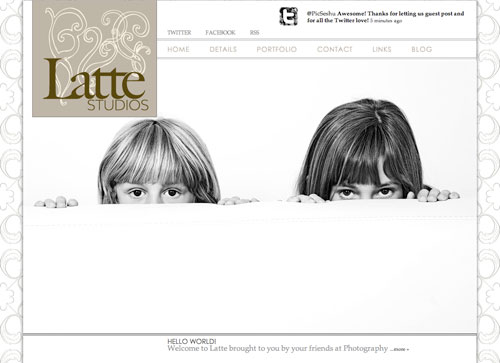
Photography Blogsites - Latte 2

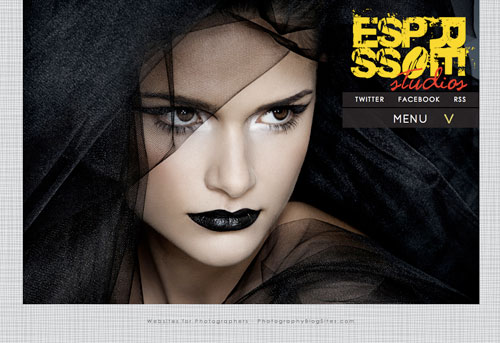
Photography Blogsites - Espresso

Photography Blogsites - Cuppajoe

THEN WE PERFECTED THE FEATURES

a) EASE OF USE

Our system is a networked installation, called WordPress Multisite. We backup everything twice daily and upgrade all of our plugins and themes, as well as the core WordPress files ourselves to make sure they are up to date and will continue working without a hitch. The process is totally seamless to site owners, who will never see the upgrade messages or worry about backups or upgrades or broken sites.

There is no need for hosting. No need for installation of anything. Ever. You don't even need to check your email for a confirmation link. The signup process takes about thirty seconds and your site is ready to start using. From there, our free trial period lasts 7 days. You won't even be asked for any payment information from us unless you decide to activate a subscription plan.

b) ALL IN ONE SITE

One login gives you access to the portfolio site, the galleries, and the blog. Everything is all one. We offer unlimited galleries, unlimited informational pages, your blog, plus a hub for your social media marketing efforts. One address, one place to maintain so you can get back to taking photos, your passion, and the reason you got into this in the first place.

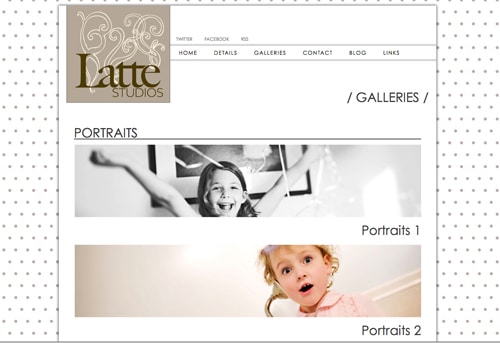
Photography Blogsite - Galleries

c) SEO

Search Engine Optimization (SEO) is a huge, often misunderstood, topic. What it comes down to is making sure that your site is as visible and findable as possible. While search engines like Google are a big part of this, you also need to be found on Twitter and/or Facebook. You need to be visible to iPhones and mobile devices. This means that your site should built 100% using HTML, and not Flash. There are varying arguments in the whole Flash vs. HTML debate. The only way for Flash sites to compete in the SEO world is to have secondary version called mirror sites for search engines, and a third site for mobile devices. Not only do visitors potentially see three different sites but these are three different pieces of code to maintain and worry about upgrading. Add to that a separate blog, sometimes on a different domain that opens in a different window.

One more argument for a Flash-free portfolio site, just last week Google announced a new feature called Instant Preview, which adds a snapshot of your site to the right of your search results. Unless, your site is Flash, which previews as a grey box. This will revolutionize how potential clients will do their searching. You can find out more information on our blog.

WordPress takes care of 90% of the on page SEO. We have put in some extra features to help take care of the rest. All of the standard SEO plugins are installed automatically: All in One SEO PAck, SEO Friendly Images, XML sitemaps are automatically generated and sent to Google, Yahoo and Bing. We have also developed a plugin in house specifically for photographers called SEO Image Galleries. The only WordPress gallery that uses 100% HTML (no Flash) and automatically adds valuable ALT attributes to every images.

d) EASY TO CUSTOMIZE

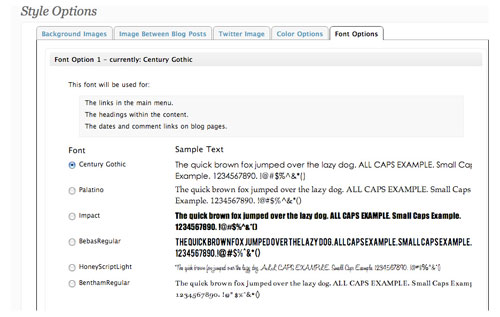
Out of the box, WordPress is not an automatic website/blog. You need to hire an outside programmer/designer to work a theme to your liking. That is where we come in. We created themes where just about every aspect can be easily customized by uploading patterns, logos, favicons, social media icons, blog post separators, your photos, or choosing from the options we have included in each theme. You can change the color or fonts on your menu, change the color the menu rollover the background. The possibilities are virtually endless.

Photography Blogsite - Font Options

Photography Blogsite - Backgrounds Latte

e) COST

These sites replace a portfolio site, a blog and any hosting you might need for both. Our lifetime plans are a one-time payment, nothing else to buy ever, no monthly fees ever. Our monthly or yearly plans include everything – your full site, built in blog and hosting. For anyone totally happy with their current website, we also have a blog only versions of all of our themes.

f) SUPPORT

We have put together a support site focused on our sites, but is also a great resource for anyone using WordPress. We have detailed documentation, tutorial videos and a forum. If you have a question or concern, we have a built in ticket system that can be accessed directly from your site.

g) SECURITY & BACKUPS

To help prevent problems, we have enlisted a number of plugins and settings to make sure spam is kept to a minimum and the security of the site is as solid as possible. In the worst-case scenario that something does happen, the best way to protect a site is to have a good backup plan. We backup our database twice a day and all of our content once a day. The backups are stored both locally on our server and remotely.

h) AND FINALLY WE LAUNCHED

We are proud to announce our first three themes in both blogsite and blog-only forms: Latte, Espresso and Cuppa Joe. Because we believe in our product so much, we offer a 7-day free trial. Take our sites for a spin. You can upload your work, writes some posts, link your Twitter and Facebook, and even seamlessly switch between all our themes.

We are offering an introductory lifetime membership for $499. That includes all our themes (now and forever), 4 GB of hosting on our screaming fast servers, our support, maintenance and much, much more. For a full list of features visit our features section. This offer will end on November 30, 2010.

We’d love to hear your thoughts as we will keep developing our sites to be the best they can be. As always, thank you so much for your support!

Win on BLACK FRIDAY 11/26/2010! Photography Blogsites is generously offering ONE LIFETIME MEMBERSHIP (Worth $499) to a Tiffinbox subscriber. Here is how you may be able to win:

1) Follow @photoblogsites on Twitter

2) Tweet the following:

“I just read about Affordable WordPress Portfolio Websites @Photoblogsites on @PicSeshu’s Tiffinbox. #photoblogsites Please RT!”

3) Comment below and tell me WHY you deserve to win. Don’t forget to mention your Twitter handle so that I can make sure you have done both. We need to see a minimum of 50 real, honest, entries before I can give this away on Black Friday 11/26/2010. So whatchawaitinfor?

Filed Under: Photography, Web/Tech, Weblogs Tagged With: blog, blog hosting services, blog software, content management systems, facebook, gallery, online social networking, photographer, Photographers, Photography, portfolio, portfolio site, portfolio website, professional photographers, search engine optimization, search engines, Twitter, websites, wordpress, wordpress blog, world wide web

Introducing ProofPress, A WordPress Photo Proofing Cart

September 24, 2010 by Guest

Iurie VlasovThis is a guest post by Iurie Vlasov, a Marketing professional at Vitriol Consult LLC specializing in SEO and Innovative web-marketing.

On August 23, the world of photographers was touched by a piece of news that created quite some buzz – a totally new and innovative proofing system was to be released in October – ProofPress. You may be wondering what is the point of another photo cart when there is a myriad of different other products for online proofing available out there. Read on and you will understand!

“Design is not just what it looks like and feels like. Design is how it works.” ~ Steve Jobs

The creators of ProofPress, two young dashing individuals from Florida with an extensive experience in web-development and who specialized for years in e-commerce systems have come with an idea to create something different for the photographer. There is nothing new when it comes to photo proofing systems, and most of them already out there are very similar in functionality, but different in quality and price. ProofPress on the other hand was created with the end user in mind. But there are two end-users to a photo cart system you will say. Indeed, there is the photographer on one end who has the task of managing the system and the customer on the other end. Many photographers today are just too busy to deal with all the “advanced” functionality their current photo proofing cart provides, and may give up on using one for the sake of saving time and use the old-school “on-the-phone” method to get their print orders from clients. So much for saving time.

Now back to those two guys in Florida. What they did is to have an idea that was revolutionary. Being developers and not photographers they got in touch with a few portrait and wedding photographers and spent time talking and understanding what their needs were and what is that they miss most in their current systems. After many hours and tens of pages of sketches and charts and mockups etc. they finally decided to give the modern photographer a system that would work directly out of their WordPress blogs. Not bad, because 85% of the photographers out there use WordPress for their photo blogs, because it's reliable, because it's easy to use, because it's safe, because it's constantly developing and updating, and yes because – Google loves WordPress.

Well, here we go, why not have a proofing system that will work as a plugin from your WordPress administration back end. No need to remember different passwords for different admin accounts, no need to have a multitude of admin urls to remember, but instead just one plain WordPress backend. And that is what ProofPress does, installs as a plugin in your WordPress and opens a whole new system in there. The guys jokingly call it, “a system inside a system.” But be aware that you need to have a self hosted blog on an actual domain that belongs to you and NOT one of those “johndoe.wordpress.com” blogs.

That is all good you will say, but what makes it so special? My answer is simple here, it will indeed offer what most of the systems out there do right now but will also be packed with other features:

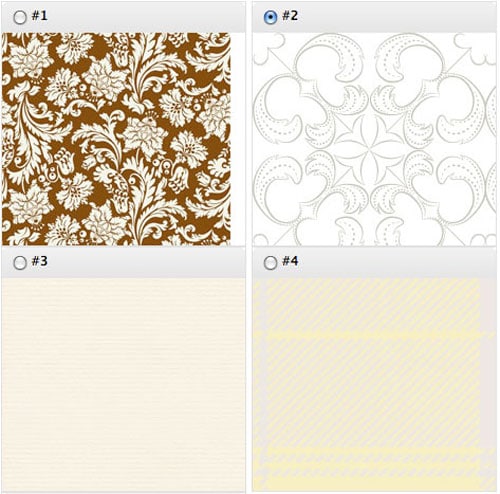
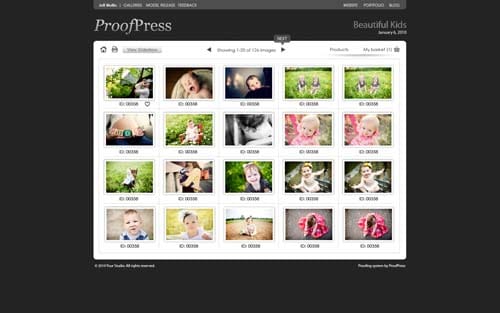
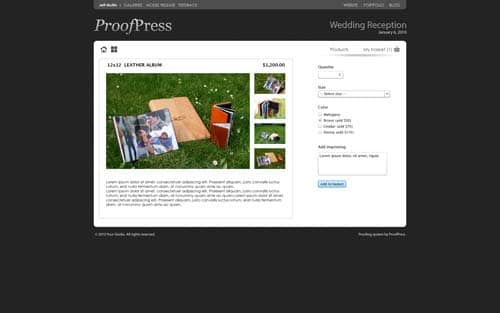
a) Full front end customization, you as a photographer will be able to customize your proofing site by editing a multitude of options, like changing your logo, background, fonts, colors you name it… and the system will also be compatible with custom created templates. Now you will be able to apply your branding and design and have a unique photo cart.

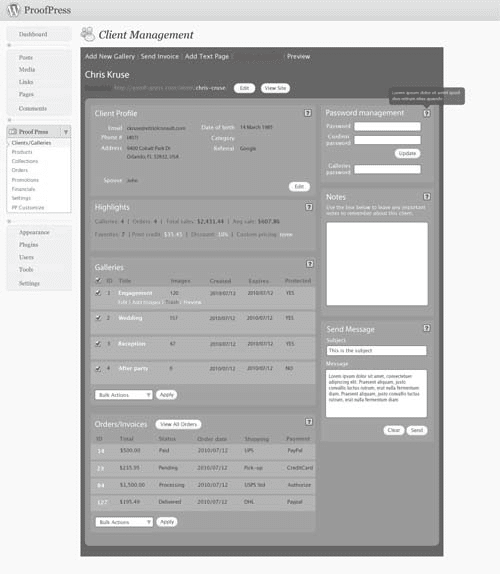
b) Per client management. No more gallery grids. Each of your customers will be provided with his own client site where he will see only his galleries and information that you provide, including a text page which you can edit the way you want by adding a model release form, or maybe some what-to-wear information

c) A revolutionized way of managing collections (packages). ProofPress will offer the most flexible way of creating a collection. Managing print credit, discounts etc has never been easier and you know what, you can even let your clients create their own custom collections.

d) You will also be able to manage your financials and send invoices directly from your administration panel which gives you some basic accounting features and you will always know the state of your expenses and profits. A great feature for beginners who don't really need a bookkeeping system like Freshbooks etc.

These are some of the many features that ProofPress will offer. Stay tuned for the official press release the guys will publish in the beginning of October. Meanwhile you can contact them via email at info@proof-press.com and sign-up for a 30% discount at ProofPress.

The Front End:

ProofPress Front End Gallery

ProofPress Front End Options

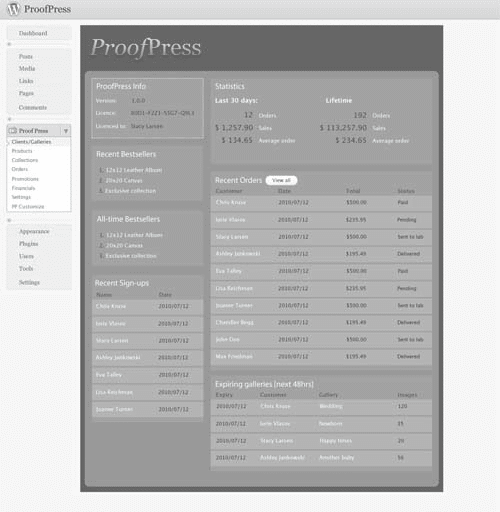
The Back End:

ProofPress Back End Dashboard

ProofPress Back End Single Client

Win on 10/10/10! ProofPress is generously offering ONE free license to a Tiffinbox subscriber. Here is how you may be able to win this WordPress plugin: First, Tweet the following: “I just learned about a very cool WordPress plugin called @ProofPress on @PicSeshu's Tiffinbox. #ProofPress Please RT!” Second, comment below and tell me WHY you deserve to win. Don't forget to mention your Twitter handle so that I can make sure you have done both. I need to see a minimum of 50 real, honest, entries before I can give this away on October 10, 2010. So whatchawaitinfor?

WINNER ANNOUNCED – Kate McKenna – from Medford, MA has won ONE license of ProofPress, the forthcoming WordPress Plugin. Follow her on Twitter. Congratulations Kate!

Filed Under: Photo Biz, Web/Tech, Weblogs Tagged With: blog software, cart, content management systems, photo, photo cart, photo proof, photographer, Photographers, php programming language, PickPic, plugin, professional photographers, proof test, proofing, proofing system, RedCart, system, wordpress

Subscribe To Tiffibox Treats!

Looking for a well-curated email newsletter that will leave you inspired and motivated about your photography business? Sign up below!

About Seshu

Seshu creates relaxed portraits of families and high school seniors in Avon, Connecticut. He also leads a successful headshot photography studio in Connecticut, helping professionals from a variety of disciplines project the very best versions of themselves. He created Tiffinbox as a way of inspiring photographers, to create better images and successful businesses. [Read More]

Email Templates For Headshot Photographers

Email Templates for Headshot Photographers

Recent Posts

  • How Capture One Changed My Event Photography
  • 10 Steps To Stay Positive In Times Of Great Stress
  • Why You Need To Read “Personal Branding For Photographers” Now
  • How To Master Your Website Content Step By Step?
  • Tony Taafe’s TNT Method For Headshot Photographers

Recent Comments

  • Stephen Davison on Are You A Business Owner Who Is Smart, But Stuck?
  • Ben A. on Don Giannatti Clinches The 8th Annual Tiffinbox Award
  • Dan on Don Giannatti Clinches The 8th Annual Tiffinbox Award
  • Donald Giannatti on Don Giannatti Clinches The 8th Annual Tiffinbox Award
  • Stephen Davison on G.E. Masana’s 6 Strategies For Wedding Photography Success
  • Naveen Kumar on Weddings In India Are More Than Being At The Right Place And At The Right Time
  • kartick on Weddings In India Are More Than Being At The Right Place And At The Right Time
  • Leonid Farbman on 6 Uncommon Trends To Grow Your Photography Business
  • Willow and Finch Wedding Photography on 11 Reception Tips To Help Your Wedding Photography
  • Web Designer Malaysia on How To Optimize Your Squarespace Website For Search Engines
  • Creastan on An Interview With Photojournalist G.M.B. Akash
  • Cindy Brown | Atlanta on An Open Letter To A Local Photographer

Become a Patron!

Copyright © 2026 · Tiffinbox · Site Design by Heather Mackan Creative · Built on Genesis