• Photography
  • Interviews
  • Business
  • Reviews

Tiffinbox

Inspiring Photographers

  • Home
  • About
  • Blog
  • Contact

What’s Fundy Designer & What’s New With Album Builder V.6

January 30, 2014 by Seshu | Editor & Publisher

If you have been at it as a wedding photographer, you've at one point or another wanted to create a wedding album for your clients. The process can be tedious, long and overly stressful.

Andrew Funderburg, or at least his company, Fundy Software, is a household name now. I interviewed “Fundy” several years back when I was attending the Mystic Seminars. His programs evolve … constantly. His applications Fundy Album Builder and Fundy Album Proofer are, by a very wide margin, the industry leaders in their respective niches.

I heard from Fundy that he was working on something revolutionary. In most other cases if someone came up to me and dropped that kind of language, I would be very skeptical. Not in Fundy's case because he has time and time again delivered on that promise and made the lives of thousands of photographers more efficient, and perhaps even more meaningful.

Andrew Funderburg, Fundy Designer & Album Builder, V6

When you have an opportunity to interview the guy who defines and directs how wedding photographers run a major part of their business, you jump at the opportunity to see what he is cooking up next. Fundy and I sat down and chatted and he shared his screen with me, showing me the various features of Fundy Designer & Album Builder version 6.0.

The video is long, but well worth your time, if you are considering either buying or upgrading from your current version of Album Builder. We talk about his beginnings, where his ideas come from, what the new version of the software looks like and what we can expect in the future.

Do note that tomorrow (January 31, 2014) is the last day to upgrade at an insanely low price of $30! It would be absurd if you didn't upgrade.

February 1, early-bird pricing will end. Album Builder v6 will be $329, Upgrades from v5 will be $79, upgrades from v4 will be $179, and upgrades from v3 will be $279.

I believed in Fundy's ideas before he even launched his company and that belief is even stronger after seeing what he is bringing to the table now and what features are planned in the coming months. Frankly, it's time again to be excited about photographing weddings and designing wedding albums with ease, efficiency and elegance.

Filed Under: Album Design, Home Middle Right, Photography, Weddings Tagged With: A Wedding Album, Album Builder, Andrew Funderburg, Art, books, Create A Wedding Album, designing, Fundy, Fundy Designer, Fundy Software, layouts, version 6, Wedding Album Designer, wedding albums

4×6 Print, $6 Or $60, Who’s Right?

December 20, 2010 by Seshu

Fundy, AvatarThis is a guest post by Andrew “Fundy” Funderburg, the creator of the Fundy Album Builder and Fundy Album Proofer. Please check out the free trials available at http://www.fundysos.com. If you were looking to design albums yourselves, I highly recommend Fundy's products.

I've seen many forum posts on pricing prints for photographers and they usually all end badly. There are those that defend the high price points due to labor, business costs and what the market will bear. And those defending the low end price points, focus on auto-fulfillment, and what the market is willing to pay.

So who's right? Well the answer is simple, both price points are correct?

How can this be? Well, ‘correct' pricing is based only on two things.

1. What the market is willing to pay for something.
2. That a price is profitable according to retail pricing rules.

Let's take a closer look. It's pretty easy to find out if people are willing to pay a certain price for something. You simply throw it out there in the marketplace and if people pay money for it, then it is a viable price. You can move the price point up and down. When it goes down, more people buy it, when it goes up fewer people buy it. Pretty soon, you find the happy price point, quite a few buyers at a profitable price point.

What is profitable? Well, according to the Professional Photographers Association of America, you'll want to have at least a 35% cost of goods mark up to be profitable – that is, pay your bills, run a profit and grow your business. A 35% cost of goods, simply means that for every $1.00 you make, it costs you 0.35¢. If you sell ice cream on the street corner, and you buy it for 0.35¢ and sell it for $1.00, then you have a 35% cost of goods.

To get retail pricing of goods, simply take your costs and divide by the percentage (35%=0.35). So, if something costs you $10 to create for your client:

$10 ÷ 0.35 = $28.50

We'll use this simple formula to prove both arguments are correct. We did this recently in a speaking engagement we had at ProDPI headquarters. We were using our new pricing program, Prosper™ during the demonstration.

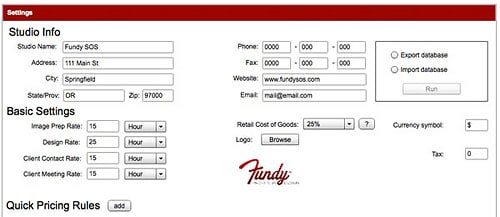
Here in our settings, we have our cost of goods set at 25%, a good COG for an established photographer. We've also estimated our hourly rate in our studio for the work we do.

Prosper Settings Window

Now, let's look at two scenarios. The first being a photographer who is selling art prints for a portrait sitting or of the bride and groom in a posed shot. This is a special order, the photographer is going to retouch the print, have it shipped to the studio and the bride or groom (probably the bride) are going to come in and pick it up.

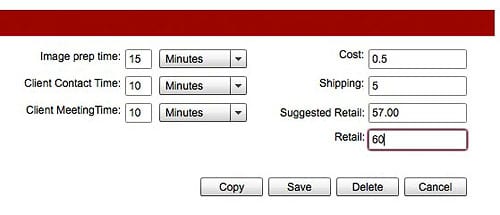
Print Pricing Scenario 1

As you can see we've calculated that we spend 15 min. finding, opening and retouching the image. We've set aside 10 minutes contact time with the client on the phone and 10 minutes time meeting the client in the studio to chat and $5 for shipping to our studio. Prosper™ has done the math for us, and calculated all of our costs and divided by 0.25. The total is $57. I'm going to just round that off to $60. So, you can see that with this business scenario, $60 for a 4×6 is the proper amount. And if the photographer educates the client about the quality of the print, it should sell.

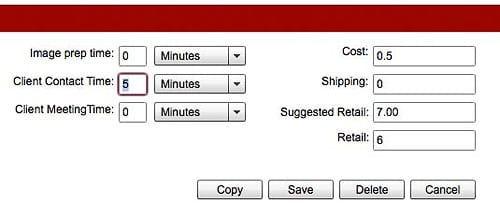
Print Pricing Scenario 2

As you can see, quite a bit has changed here. In this scenario, we've used numbers for an auto-fulfillment. This photographer shoots the wedding, does minimal batch retouching with an action and uploads the whole wedding for anyone to buy. After that, they are done. We've added the price of the print to the calculation and allotted 5 minutes for a quick call or email if the client asks about the delivery of the print. As you can see, Prosper™ has done the math for us and come out to $7 for a retail price on this print. I've rounded down to $6 for the purpose of this discussion.

So, as you can see, depending on how your run your business, $6 or $60 can be the right price for a 4×6 print. It all depends on how much work you are putting into the final product. The only mistake you can make is creating a fine art print and pricing it like an automated fulfillment print.

The simple matter of fact is, if you know your cost of goods then calculating your pricing is easy Junior High School math.

Prosper™ is a product of Fundy Software. You can find out more here about a free trial and the limited time pricing special happening right now.

Filed Under: Business, Photography Tagged With: andrew, Business, business costs, competition, Fundy, highest price, how to use, Marketing, photographer, photographic printing, price, price prints, Pricing, print, printing pricing, retail price, retailing

FABulous Program For Wedding & Portrait Photographers

April 27, 2010 by Seshu | Editor & Publisher

Ever wanted to custom design a wedding or portrait album but didn't know how to go about it using Photoshop?

Well, here comes Fundy's Album Builder to the rescue. It's fast, easy and intuitive. But best of all, you aren't stuck using templates that can “date” an album. Now, there isn't anything wrong at all about using the free templates or those you find online for a fee. But if you are looking to keep your album designs fresh and truly unique, you should consider Fundy's Album Builder.

In the video tutorial below, Andrew Funderburg (aka. The Fundy) shows us how he used some of my images from Veena and James' Wedding in Morristown, New Jersey, to build a few pages very quickly. Of course, with Fundy having designed and used this program multiple times, the buttons and the options all seem natural to him. That will come in good time for you as well and you'll be amazed at how instinctively you will approach your layouts.

As Fundy says at the beginning of the video, I have known him for some time. He is a dynamic, energetic and passionate entrepreneur who is very interested in helping photographers. As one himself, he and his business partner Kevin Focht have taken the industry by storm with their frequent webinars and YouTube tutorials like the one you see above. The products that Fundy has developed continues to evolve thanks to input from their users – i.e. people like you. So, don't feel shy about sending Fundy a note with your suggestions.

If you have any questions or comments, do post them below. If you have used FAB, tell us what your experience has been like or even drop a link to one of your album designs. We would love to take a look!

As regular subscribers to Tiffinbox or new visitors, I have a special offer from Fundy for you. Take 15% off the price of Fundy's Album Builder, when you use the following code: “Seshu”

Other programs you may be interested in as well are Album Proofer and Batch-o-licious, also from Fundy. If you want to save $125, you've gotta check out the Total Studio Pack, which includes a slew of other neat programs that Fundy has created for the photography community.

Filed Under: Album Design, Tutorials Tagged With: Album, Design, Fundy, Photographers, Portraits, Weddings

Subscribe To Tiffibox Treats!

Looking for a well-curated email newsletter that will leave you inspired and motivated about your photography business? Sign up below!

About Seshu

Seshu creates relaxed portraits of families and high school seniors in Avon, Connecticut. He also leads a successful headshot photography studio in Connecticut, helping professionals from a variety of disciplines project the very best versions of themselves. He created Tiffinbox as a way of inspiring photographers, to create better images and successful businesses. [Read More]

Email Templates For Headshot Photographers

Email Templates for Headshot Photographers

Recent Posts

  • How Capture One Changed My Event Photography
  • 10 Steps To Stay Positive In Times Of Great Stress
  • Why You Need To Read “Personal Branding For Photographers” Now
  • How To Master Your Website Content Step By Step?
  • Tony Taafe’s TNT Method For Headshot Photographers

Recent Comments

  • Stephen Davison on Are You A Business Owner Who Is Smart, But Stuck?
  • Ben A. on Don Giannatti Clinches The 8th Annual Tiffinbox Award
  • Dan on Don Giannatti Clinches The 8th Annual Tiffinbox Award
  • Donald Giannatti on Don Giannatti Clinches The 8th Annual Tiffinbox Award
  • Stephen Davison on G.E. Masana’s 6 Strategies For Wedding Photography Success
  • Naveen Kumar on Weddings In India Are More Than Being At The Right Place And At The Right Time
  • kartick on Weddings In India Are More Than Being At The Right Place And At The Right Time
  • Leonid Farbman on 6 Uncommon Trends To Grow Your Photography Business
  • Willow and Finch Wedding Photography on 11 Reception Tips To Help Your Wedding Photography
  • Web Designer Malaysia on How To Optimize Your Squarespace Website For Search Engines
  • Creastan on An Interview With Photojournalist G.M.B. Akash
  • Cindy Brown | Atlanta on An Open Letter To A Local Photographer

Become a Patron!

Copyright © 2026 · Tiffinbox · Site Design by Heather Mackan Creative · Built on Genesis