• Photography
  • Interviews
  • Business
  • Reviews

Tiffinbox

Inspiring Photographers

  • Home
  • About
  • Blog
  • Contact

Nope, Film Is Not Dead

March 18, 2011 by Seshu | Editor & Publisher

I've loved Utah-based Jonathan Canlas‘ wedding photography for quite some time. I must have come across his website quite randomly about four or five years ago. His images continue to inspire me. The moments are real and the processing is just right.

Little did I know back then that he was a wholly film-based photographer. Yes, film. Some of us may remember that medium. With digital being all the rage – I mean who isn't addicted to chimping, right? – why would a photographer eschew Photoshop actions (that can make your digital images look like they were shot on film) and other “bells and whistles.” The answer is simple. Because he can, he wants to be different and his clients love him for it.

So, take a moment to look at his work again.

Now that you are back, do you see anything different? Do the images just appear more tactile, or have more depth to them? Or, is it my imagination? I believe it is the former.

Whichever way your answer sways, if you are curious about how Jonathan Canlas photographs weddings or portrait sessions using film, you have three options to learn from him.

You see, in addition to being a successful photographer, Canlas is a wonderful teacher. For several years, Canlas has offered the Film Is Not Dead workshops for those photographers looking for a solid foundation in film photography.

Canlas has also very patiently answered questions via Formspring. You should follow him on Twitter where most of these responses show up.

The last option, is a resourceful guidebook called FIND (Film Is Not Dead). There is a dedicated website where you can order this truly comprehensive offering. Jonathan generously offered me a review copy and I just got done reading it. As a photographer who cut his teeth on Tri-X and TMAX 3200, a lot of what he had to say in the book was not new to me. As a mostly 35-mm film photographer, though, I learned a great deal about medium-format cameras. So much so that I am now actively looking for a used Yashica-Mat 124-G.

Here is a breakdown of the table of contents:
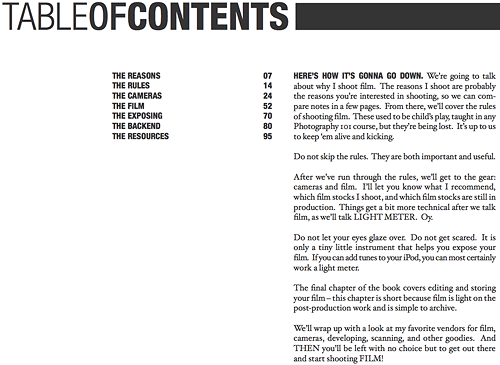
Jonathan Canlas' Film Is Not Dead PDF Table Of Contents

This is a 95-page e-book that is sprinkled with great wisdom and some jaw-dropping images. If you are clueless about working with film, because you simply never had the opportunity or were too intimidated, then you need to run out and get this hefty PDF. Unlike other PDFs that may discuss a particular type of digital technology that is sure to change over time, I feel what Jonathan Canlas has produced for us will be as timeless as his own work. Indeed, its his generous spirit that allows us to share his vast knowledge about a medium long thought of as “old,” or worse, “dead.”

Thanks to companies like Kodak and Ilford, who continue manufacturing film, Canlas feels strongly that he will be working in that medium for a very long time and now so can you.

Buy the Film Is Not Dead guidebook by using the code “SESHU” and receive $45 off the final price. All I ask in return is that you subscribe to the Tiffinbox newsletter. Goodies like this will only be available in the future for my newsletter subscribers so you may want to get a headstart.

Full disclosure – I received a review copy of this PDF, but I don't make a dime for mentioning it here on Tiffinbox. If you liked this review and bought the PDF, please come back here and post your comments. I'll try and have Jonathan swing by and answer any questions you may have.
Filed Under: Books, Film, Photography Tagged With: camera, dead, digital imaging, Film, film formats, film photography, jonathan, jonathan canlas, mass media, medium format, photographer, Photography, Portraits, resource guide, resource guides, used film, Wedding Photography, yashica

Why Should Photographers Write A Business Plan?

March 15, 2011 by Michelle Loretta

This is guest blog post by Michelle Loretta who loves to talk shop and discuss business strategy. So, in 2009 she started a blog: Sage Wedding Pros. This blog would evolve to cover all things business in the wedding and event industry. She has a background in finance, having armed herself with a BS in Accounting from University of Southern California and having spent her early career working for Deloitte LLP. She spent 5 years in the fashion industry as a sales manager for DDLA, and a visual merchandiser for Coach, Inc. In 2008, Michelle co-founded the wedding industry not-for-profit Get Hitched Give Hope.

Oh … the agony! Writing a business plan! It takes blood, sweat, tears… weeks turn into months turn into years. What a grueling process!

OR – that’s what people think.

Listen, I teach people how to write business plans daily. It doesn’t have to be this way. Let’s get some things straight here …

A Business Plan Is A Set Of Goals

Yep – that’s all it is. And, goal-setting challenges us to be better business owners. Goal-setting gives us a target to aim for. If you don’t have a target, how can you ever hit the bulls-eye?

Cover All Your Bases

The beauty of the business plan is that it forces you to look at four areas of your business: your company vision, your marketing, your operations, and your finances. So often we set goals with only a couple of these in mind. But a strong business needs to build on all four areas.

– What do you want your business to be known for?
– How are you going to sell that?
– How are you going to run your business to provide that?
– How are you going to make money doing it?

Make It Your Own

Unless you are seeking investors or financing, the business plan should be for you. If it’s 3 pages or 30 pages – just get some thing down on paper. It can be paragraphs or lists. Make it your own. And make it easy for you to write. Better yet: make it easy for you to USE.

Find a Buddy

Things are always more fun with friends. Find a coach, a friend, or a mentor to help you with this. Whether you meet monthly with an industry colleague to work ON your business plans – or whether you attend a workshop. This accountability makes it easier to get it done if you can have a little social interaction along the way.

USE IT!

What good is a plan if you don’t use it? (This is the real importance of making it your OWN.) Goals change and evolve over time. This plan isn’t set in stone. Refer to it daily. Make it a part of your business life. And, make the business plan a continuously evolving, living, breathing document.

About The Simple Plan

The Simple Plan is a no-sweat, no-fuss, piece-of-cake, easy-peasy approach to writing a business plan. We've taken out the dirty work and made this fun and collaborative. It is open to all wedding industry professionals: from start-ups just getting their feet wet to experienced pros who are looking to take their business to the next level.

Read all about The Simple Plan for event and wedding professionals

New York Workshop:
The Simple Plan – May 10-11, 2011 – 9:30am-4:30pm
At Jason Groupp Studio
Register now for the New York workshop!

Dallas Workshop:
The Simple Plan – March 22-23, 2011 – 9:30am-4:30pm
At Holiday Inn Express – Galleria
Register now for the Dallas workshop!

UPDATE: Michelle Loretta is offering Tiffinbox newsletter subscribers $50 off towards the NYC workshop. 1) Sign up for the Tiffinbox newsletter, 2) Send me an email to seshu at tiffinbox dot org so that I can confirm your email matches and 3) I'll email you back with the special code. Deal?

Filed Under: Business, Photography, Weddings

The New Wedding Guest

March 14, 2011 by Richard Esposito

This guest blog is by a good friend and fellow Connecticut wedding photographer, Richard Esposito. In addition to being a photographer, RE as he is known, is also called upon to teach efficient workflow systems to other photography studios. To some lucky ones, he plays mentor. His Emmy (yes, that EMMY) not withstanding, RE is starting to reconnect with his video side and bringing true fusion to discerning clients getting married all over the world.

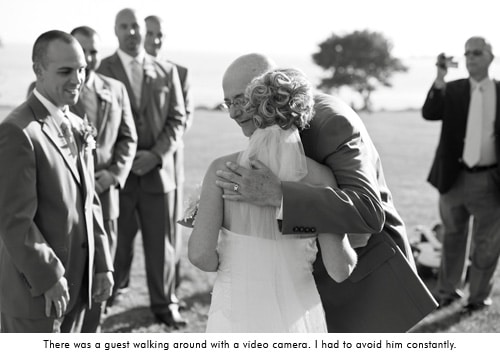
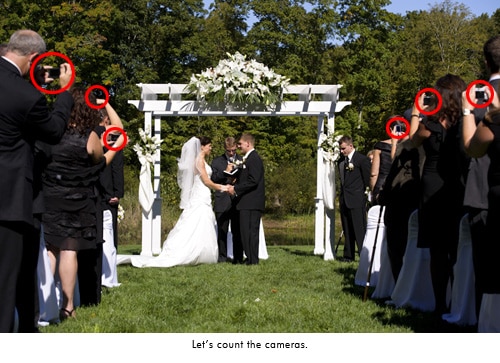
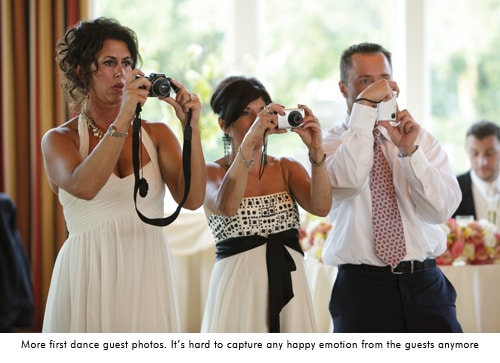
Needless to say, a lot has changed in the world of photography over the last 5 or so years. Remember film? Using the same camera for more than 3 years? Just about every professional photographer is using a digital camera that gets replaced with a newer, better, version after one year of use. It's become a rather expensive hobby for amateur's and a financial burden for some professionals. With technology getting better and especially cheaper, we've all seen a new type of photographer emerge. Call them what you will, uncle Bob, cousin Carl, or “I have a friend that took a photography class in college.” This is the new competition. And they are getting cheaper than the cost of the camera. I've heard of a number of professionals that have sold everything they had and closed their doors for good. We can't compete with free, or “I'll shoot your wedding and hand you a disc for $500. I know I seem to be getting off topic, but it's leading to our newest issue. You are not the only photographer at a wedding anymore.

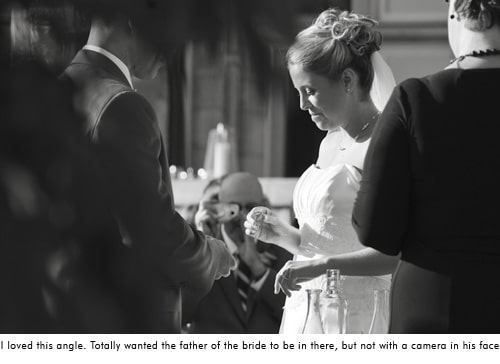
© Photographer RE

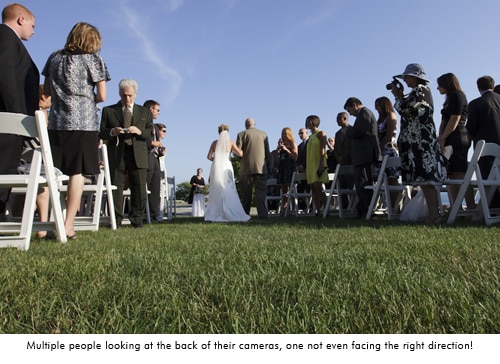
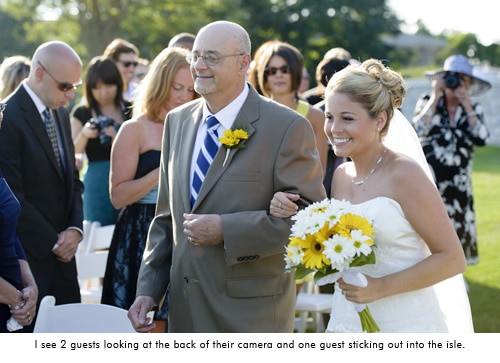
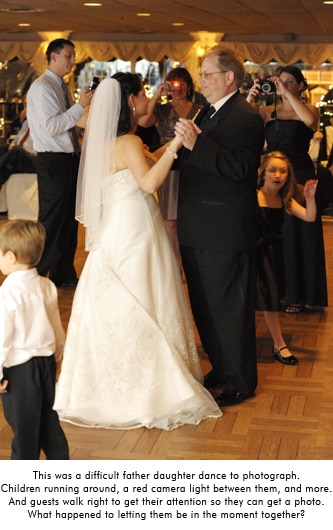
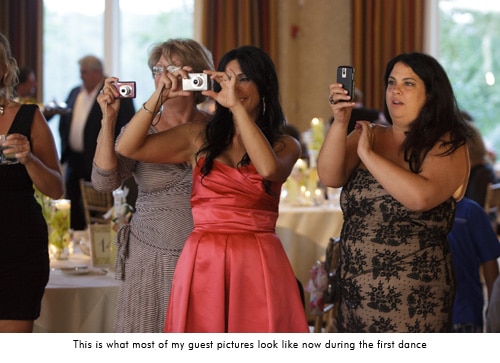
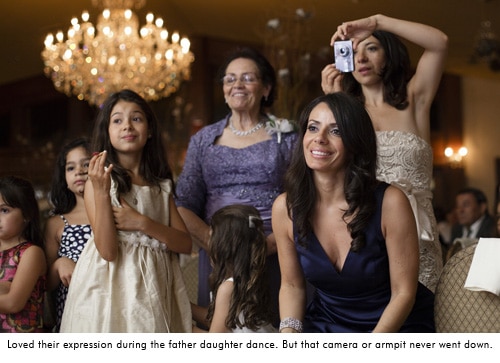
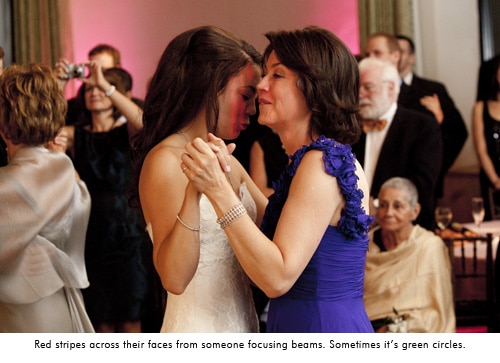
Gone are the days of capturing a sea of guests with genuine emotion on their faces. Now you have to give an elbow to Aunt Clair who's blocking the aisle with her Digital Rebel in hand as the bride makes her grand entrance. I used to love capturing guests emotion during the first dance, parent dance, even the toasts. But now my subjects are a handful of guests with point and shoots held up blocking their faces, or the tops of everyones head because they are looking down at the back of the camera to check the photo they just took. My favorite moment so far was a photo of the bride going down the aisle from behind. Everyone in front of the bride has their cameras up, everyone that the bride has past is still facing the back of the church with the heads down looking at the back of their camera. Very few people stopped to enjoy the moment of a father walking his daughter down the aisle on her wedding day. I did have a beautiful photo of a bride coming down the aisle with great emotion on her fathers face. However there were hues of red and green across them both thanks to all of the focusing beams from guests cameras. That's an instant black and white! The cake cutting has become my favorite time now that I have no room to move around thanks to the crowd of people and cameras. It's amateur suffocation.

You are not the only photographer at a wedding anymore.

Just when you feel good that you are getting the job done, you're in the zone, there's a tap tap tap on your shoulder. It's Aunt Clair again, Rebel in hand, suggesting “that’s a nice photo of the flower girl over there. Look she’s spinning around! Hey girls look over here!” Well Claire, if you didn't just interrupt me I would be photographing that, but now i missed it so you can talk to me about it. While trying to capture an emotional father daughter dance, someone will walk up close to them and say “Hey, over here!”, completely interrupting the moment just so they can get a photo with their faces smiling at their camera. They completely missed the point. Welcome to a world where lighting, composition, creativity, and emotion don't matter to a wedding guest. All you need is a persons face looking at the camera.

© Photographer RE

© Photographer RE

© Photographer RE

© Photographer RE

© Photographer RE

© Photographer RE

© Photographer RE

© Photographer RE

© Photographer RE

Many of us put out a little slideshow of images at the wedding reception. It's been a great way to show guests your work and generate some business, especially with the reception venue. It also satisfies the instant gratification generation of guests. I've gotten home from a wedding and checked a clients Facebook page to see that she has already been tagged in photos that Uncle Bob took at the wedding. I can't compete with that. I hand out event cards at the reception with the website and password to see the photos “approximately 8 weeks after the wedding.” One night, after seeing the slideshow at the reception, the grooms step father comes up to me with his iPhone and has my online viewing website loaded. He said he couldn't get the wedding. Hello! I'm still photographing it! Really?! Many times I have guests say “Great! I'll check them out tomorrow.” Tomorrow? Let me hand you a few thousand photos, have you review and edit them and see how fast you get them all up. Let’s factor in that it's the end of the wedding season and you've just done 2 weddings per weekend for the last 8 weeks.

It's no wonder that professional Photographers are having a hard time competing with amateurs. We get in their way, we don't know what we’re doing, it takes forever to get your images, and we really expensive! If you think it's expensive to hire a professional photographer for one day, the emotional cost of hiring an amateur lasts forever.

The Price We Pay

So how do we convince an engaged couple to spend $3-10k with a professional? According to Market Watch, wedding photographers are the most overpaid jobs in America, saying “Total work for each wedding is generally a sit-down consultation combined with a single day spent following the happy couple. While equipment costs and film development must be covered, thanks to digital technology such costs have been heavily reduced. Unfortunately for the consumer, photographers do not offer any reduction in price for missed photos, amateur shots, or other mediocre work product.”

So let’s talk briefly about what it costs to be a professional wedding photographer. My second photographer here was looking to buy his own equipment. Just to start off with the basics he was up to $8,000. Imagine the cost of what I carry. Oh, and I have to insure all of it. Then there’s vehicle expenses, commissions for running credit cards, equipment repairs, I spent $1200 on postage this year (postage!!!), continuing education, computer and software upgrades, hard drives, hard drives, hard drives, it costs to make albums, some of us pay staff… I really could go on. Oh wait! providing for my family? Putting food on our table and the discount outlet clothes on our back? A professional photographer doesn’t have a “real job” during the week so we have to pay our own health care for our family, save for retirement, and hope for a weeks vacation that comes out of our pocket. I did 25 weddings this year and my expenses were double the average 2 person family income in Connecticut (according to census.gov).

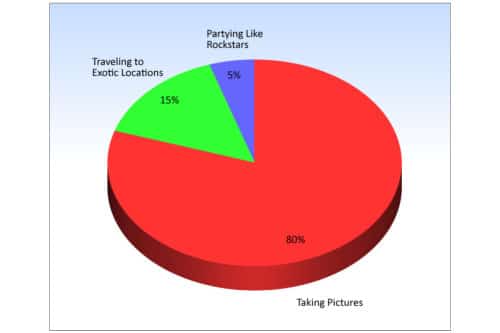
For the other side of the story, the International Society of Professional Wedding Photographers did an awesome survey of photographers recently. I know when I started my business, everyone I knew thought I just worked weekends and did nothing during the week. We have a great lifestyle of taking photos, traveling, and partying.

The Perception Of A Working Photographer

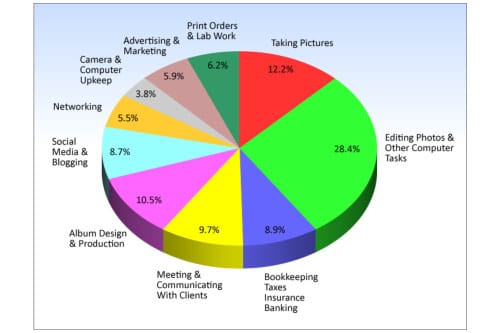
Here’s reality: 70 hours a week through our 6-7 month season and 40 hours a week off season. There is no mention in here regarding time with family, charity work, and taking any time off. Only 12.2% off our time during business hours is spent taking pictures.

The Reality Of  a Working Photographer

If I didn’t have the expenses that I have, or spend this much time getting everything done, I’d be out of business. I’d have to get a full time job and just do photography on the weekend. I’d be your Uncle Bob.

Update from Seshu: Since publishing this blog post above, there have been other similar posts out in the interwebs:

Filed Under: Business, Most Popular Posts, Photography, Weddings Tagged With: camera, competitive world, connecticut wedding photographer, cousin carl, Culture, digital rebel, discerning clients, esposito, first dance, genuine emotion, grand entrance, photographer, photographer richard, Photography, photography class, photography studios, professional photographer, professional wedding photographer, uncle bob, Wedding, wedding guest, wedding music, Wedding Photography, workflow systems

Creating a Tilt ‘n Shift Effect with Lightroom 3

March 1, 2011 by Stuart Little

Stuart Little, is a Photographer, Writer, Blogger and Photoshop Educator with over 18 years experience in the field. Stuart has been teaching both Amateur & Professional Photographers since 1998 and he is based in the Scottish Coastal Town of Ayr in the West of Scotland. Visit Stuart’s website http://www.alittlephotoshop.com. Read his first post about creating rounded corners in Lightroom 3.

Thanks once again to Seshu for inviting me to create another LIghtroom video tutorial for your viewing pleasure. Today I am going to show you how to fake a Tilt n Shift lens effect directly within LIghtroom 3. Now I am not going to bore you with the history of this very popular style of image processing but needless to say there are 3 ways you go do this effect.

1. In Camera
2. In Photoshop
3. In Lightroom – Which is the way we are going to do it today.

There are two main reasons for doing this effect in Lightroom and Photoshop. 1) Shallow Depth of Field and 2) If you have an image taken from a high vantage point, then you can make it look like a miniature model partly because of the shallow depth of field blur and partly because of the subject and angle of the image.

In this video tutorial I show you how to create the effect from a shallow depth of field point of view which is how I mainly use the technique in Lightroom. If you want to go down the faking a miniature model look, then in my view you are better doing it in Photoshop. I have that very video tutorial over at alittlephotoshop.com if thats of interest to you.

Learn more about Tilt Shift Photography.

If you have examples of tilt ‘n shift work, please share them as links in the comments section. We'd love to see how you have used Stuart Little's technique, or your own.

Filed Under: Photo Technology, Photography Tagged With: adobe photoshop, adobe photoshop lightroom, application software, computing, creating a, depth of field, effect, effects, graphics software, lightroom, perspective control lens, photographic lens, photoshop, photoshop educator, professional photographers, science of photography, shift, shift lens, stuart, stuart little, tilt, tilt shift photography, video tutorials

Creating Round Borders In Lightroom 3

February 15, 2011 by Stuart Little

Stuart Little, our next guest blogger, is a Photographer, Writer, Blogger and Photoshop Educator with over 18 years experience in the field. Stuart has been teaching both Amateur & Professional Photographers since 1998 and he is based in the Scottish Coastal Town of Ayr in the West of Scotland. Visit Stuart's website http://www.alittlephotoshop.com.

Thanks to Seshu for giving me the opportunity to share with you a really cool and utterly simple technique for creating a rounded border from within Lightroom 3.

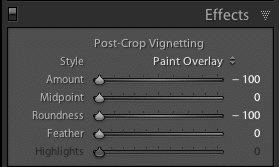
When Adobe brought out Lightroom 3 they added 2 new features to the post crop vignette that made creating vignettes even better than before. So much so that the older paint overlay style has kind of been forgotten until now.

Lightroom Effects Panel SettingsYou can watch the video for all the juicy know-how but for those of you who just want to get stuck in via your RSS reader then slide all the post-crop vignetting sliders to the left for a black rounded border, job done, nuff said. Yep! its that simple But here is the another cool thing. If you want a white border then just take the amount slider all the way to the right.

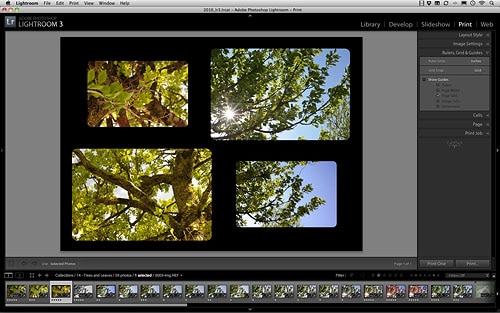
Rounded Corners In Lightroom 3

Best thing of all. You can save the whole lot as a simple preset so that one click will take care of it all in future. Fire up the print module and set the background colour to compliment the border colour. Make sure you are using custom layout and then you can drag n drop the round images directly onto a layout ready for printing. Although if you are going down the inkjet route I would go for a white border and save yourself some ink. Enjoy the video tutorial and dont forget to swing but alittlephotoshop.com for more Lightroom 3 training and free workflow actions for Photoshop.

Stuart has offered to send me another blog post, this time about creating a tilt-n-shift effect in Lightroom 3. Here's the deal, though, for that to happen I need to see at least 20 comments from you. Ask questions or suggest an alternative way of creating round corners. But I do need to hear from you. So, will you chime in? If you liked this post by Stuart, I think you will enjoy the next one too.

Filed Under: Photography, Tutorials, Web/Tech Tagged With: adobe photoshop, adobe photoshop lightroom, adobe systems, application software, blogger, bloggers, borders, computing, creating, graphics software, inkjet printer, lightroom, photoshop, photoshop educator, professional photographers, raster graphics editors, stuart little, Teaching, Video, video tutorials, vignetting

  • « Previous Page
  • 1
  • …
  • 85
  • 86
  • 87
  • 88
  • 89
  • …
  • 164
  • Next Page »

Subscribe To Tiffibox Treats!

Looking for a well-curated email newsletter that will leave you inspired and motivated about your photography business? Sign up below!

About Seshu

Seshu creates relaxed portraits of families and high school seniors in Avon, Connecticut. He also leads a successful headshot photography studio in Connecticut, helping professionals from a variety of disciplines project the very best versions of themselves. He created Tiffinbox as a way of inspiring photographers, to create better images and successful businesses. [Read More]

Email Templates For Headshot Photographers

Email Templates for Headshot Photographers

Recent Posts

  • How Capture One Changed My Event Photography
  • 10 Steps To Stay Positive In Times Of Great Stress
  • Why You Need To Read “Personal Branding For Photographers” Now
  • How To Master Your Website Content Step By Step?
  • Tony Taafe’s TNT Method For Headshot Photographers

Recent Comments

  • Stephen Davison on Are You A Business Owner Who Is Smart, But Stuck?
  • Ben A. on Don Giannatti Clinches The 8th Annual Tiffinbox Award
  • Dan on Don Giannatti Clinches The 8th Annual Tiffinbox Award
  • Donald Giannatti on Don Giannatti Clinches The 8th Annual Tiffinbox Award
  • Stephen Davison on G.E. Masana’s 6 Strategies For Wedding Photography Success
  • Naveen Kumar on Weddings In India Are More Than Being At The Right Place And At The Right Time
  • kartick on Weddings In India Are More Than Being At The Right Place And At The Right Time
  • Leonid Farbman on 6 Uncommon Trends To Grow Your Photography Business
  • Willow and Finch Wedding Photography on 11 Reception Tips To Help Your Wedding Photography
  • Web Designer Malaysia on How To Optimize Your Squarespace Website For Search Engines
  • Creastan on An Interview With Photojournalist G.M.B. Akash
  • Cindy Brown | Atlanta on An Open Letter To A Local Photographer

Become a Patron!

Copyright © 2026 · Tiffinbox · Site Design by Heather Mackan Creative · Built on Genesis