• Photography
  • Interviews
  • Business
  • Reviews

Tiffinbox

Inspiring Photographers

  • Home
  • About
  • Blog
  • Contact

Make More Money With Album Pre-Designs?

December 28, 2011 by Eric OConnor

This guest blog post is written by Eric O'Connor, a Chicago wedding photographer, owner of Allori Photography and mylife-pages. Follow Eric on Twitter.

2012 will soon be here.

January is the perfect time to take a hard look at how to maximize profits in the upcoming year. These are a few recommendations that have helped me, follow all three and I know they'll work for you too.

1. What's in it for me?
2. Stay in Touch
3. Share the Love

What's In It For Me?

Your clients want information. They want to know every detail about their purchase. Give it to them! You are the expert. Share your knowledge and process with them. Whatever you do please don't wait until after the wedding to inform your client about the pre-design process. If you do they will feel cheated.  After they book with you make sure to take time or create a wedding album FAQ to walk them through the album process. This doesn't have to be complicated. Just a simple step by step from the day you shoot the wedding to the day you deliver their album. Set expectations and then deliver on them. It is important they understand you will be telling the story of their wedding day and you'll use as many pages as it takes to get it right. I always like to mention it gives them a great starting point. They can then customize the album to exactly what they want. Your clients will love this idea. Anytime they can take ownership in the process, you win!
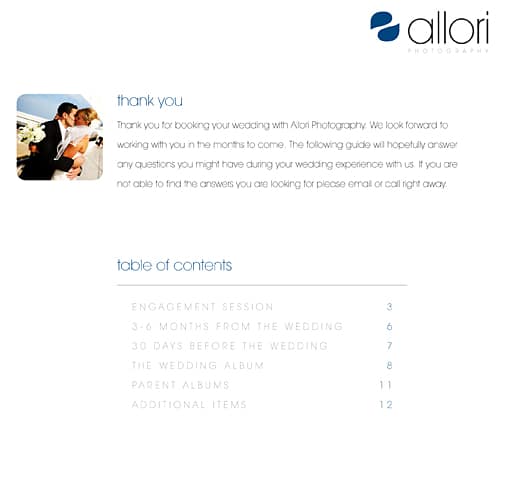
Allori Photography FAQ

Stay in Touch

Take a minute and think about the excitement leading up to the wedding. Your clients are excited about their wedding and then … BAM! … the wedding is over. It doesn't take long and they are back to real life. Catch your bride and groom in that first 30 days and their wedding day excitement will do the selling for you. You likely only have a 30 day window to take advantage of the wedding high. If 30 to 90 days go by and your bride hasn't seen pictures or a draft of her album it is much harder to add pages or sell additional albums. I make it a point to have everything to my brides 7 days after their wedding. I used to deliver images 30 days after the wedding and routinely life got in the way and the brides wouldn't even think about their album for a few more months. There were always a lot of album edits and very little pages added. Now, 7 days after their wedding they can view their Animoto slideshow, image gallery, and album pre-design right on their wedding website. I make sure to give my clients a deadline. We want to have the album completed and ready to print in 3 to 4 weeks. This helps give them a target to have their changes complete. Extra albums page sales have gone from a few or none to five, ten or more from every wedding.
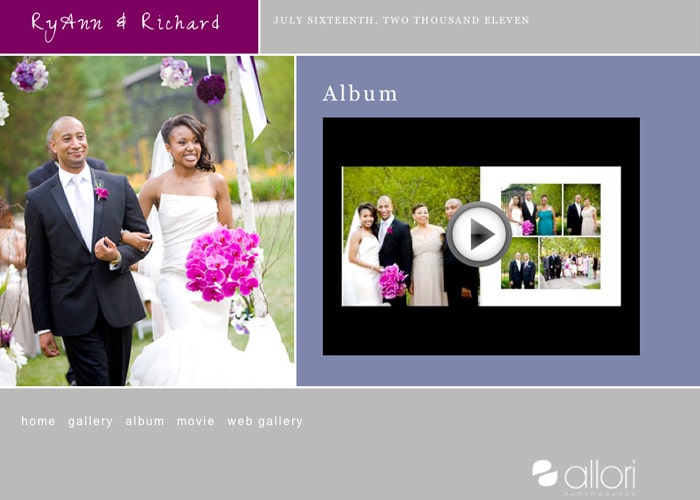
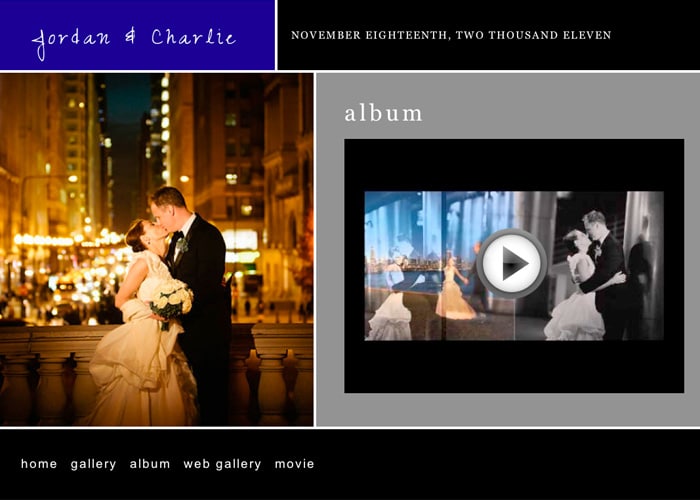
Allori Photography Album Site

Allori Photography Album Site

Share the Love

Quick turnaround time is essential but I find coupling that with excitement from friends has really helped additional album page sales. A few years ago I emailed PDFs to my brides and they would leave me comments for changes. This was pretty efficient but didn't help me much when it came to advertising or extra album pages. I don't pay for ads in magazines and only have one ad online that I tested out this year and will discontinue Jan 1.  Word of mouth, SEO, social media, and over the top customer service do the job for me. The next iteration of album sharing was a slideshow posted on YouTube. I found I was getting quite a few hits and at the same time album sales started to increase. Brides started telling me their friends loved watching their wedding album movies. This was one of those common sense moments when the light goes on in your head. Friends of the bride love the album and they start telling the bride about their favorite pages. This process makes it harder and harder for the bride to remove or change pages.
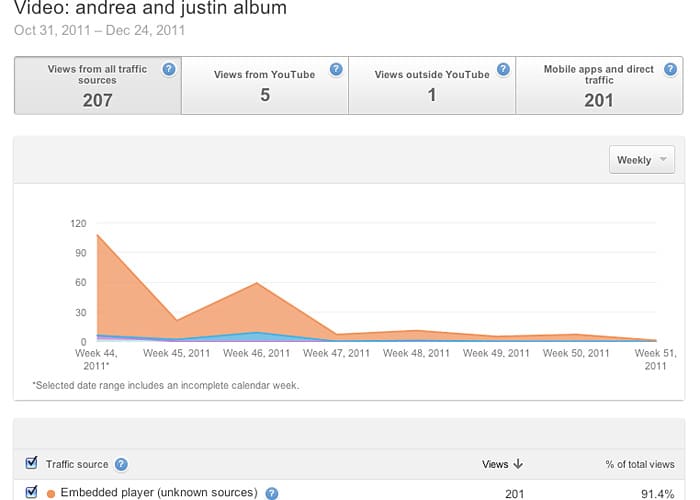
Album Views | Eric O'Connor

Finally I arrived at the perfect solution, Share the Love! Wedding album movies on a post wedding website are essential to higher album page sales. With a favorites gallery, Animoto slideshow, and movie of the album, my brides have a constant flow of compliments from their friends about how much they love the wedding images and album pages. As you can see in the graphic the album movie in this wedding was viewed over 200 times in 6 weeks. I have been completely removed from the album page sales process. Yes, I have to take images my clients love but my brides' friends do the rest of the work for me. I do not meet with my clients to sell or add pages. These days they all add pages without sitting down with me.
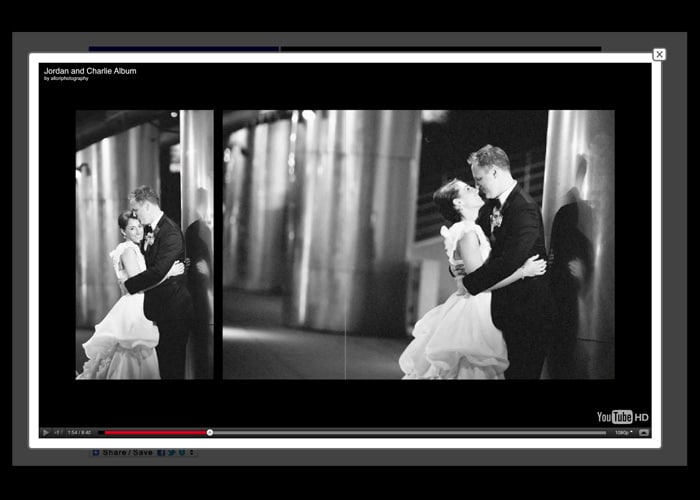
Album Views | Eric O'Connor | Allori Photography

Test out the three steps above. They are easy so don't cheat yourself and pick just one. Do all three. You will start to see a difference in sales. Click the image below to see how I display sample albums on post wedding websites.

Want to try a post wedding website? Your first site is FREE. Surprise one of your favorite clients with a wedding website with colors to match their wedding.
Filed Under: Marketing, Photography, Sales, Weddings Tagged With: Album, chicago wedding photographers, eric o'connor, Marketing, marriage, Photography, photography albums, pre designed, sales, Tips, Wedding, wedding album, wedding albums, wedding day, wedding industry in the united states, Wedding Photography, wedding website

4 Useful Tips For Designing Wedding Albums

November 17, 2011 by Kate Anderson

Today's guest post is by Kate Anderson of Plumeria Album Design. Kate works with professional photographers to design clean, classic albums that wow their clients while giving the photographer some much needed free time. She lives in Minneapolis, MN. Follow her on Twitter.

Imagine a scene with me for a moment. It's 25 years or so in the future (cue the Back to the Future music now); a woman is looking through boxes in her closet. She's a bit upset, her son's new fiance is looking on. Finally, the woman finds what she's looking for. It's an old iPad, an antique from 2011. The woman looks at it with a loving smile.

“These are my wedding photos from when we were married. I haven't looked at this in so many years.”

Then the smile fades. The woman realizes there is a problem. The battery is long drained from disuse, and the charging cable is no where to be found. They've moved several times since the wedding, and as usually happens, things got misplaced and lost. Amazingly, there is a dvd, with a beautiful photo of wedding rings on it. The backup copy of the photos. But with no dvd drive in her possession for a decade, the woman can't even look at those. Her wedding photos are locked away in a digital purgatory. She can't show her future daughter in law her own wedding.

If you don't offer albums to your couples, this is a very likely scenario in the future. They probably have all the best intentions to print an album, probably at Blurb or Snapfish. But for many, it will get pushed to the back burner and neglected. So it's up to you, their trusted wedding photographer, to make sure they get an album, before it's too late. Printed books never become obselete, technology does. You don't want your brides and grooms to live on their harddrive forever.

But many photographers don't offer albums, for many of the same reasons that their clients won't get around to printing one themselves after they receive their shoot and burn disk. Albums take time if they're to be done well. They have to be put together with a storyteller's eyes. The right photos have to be selected, from hundreds. However, album design doesn't always have to be a panic inducing moment. Here's a few design tips and my process, to help you out.

Don't cram the album with photos

Less is more. Remember that. I like to have only a few photos per page for most spreads, usually around 2-3 per page. This lets each photo have it's own voice. Too many photos crammed on one page gives you a sense of confusion. Your eye darts around the page quickly, rather than calmly resting on each photo for a moment and moving on to the next. Too many photos fighting for your attention all at the same time means none get the attention they deserve, and the message that the photos tell gets lost. Look at a National Geographic magazine, or fine art book; then look at a tabloid magazine. Which feels calmer to your eye? Ignore the content of the tabloid vs the National Geographic.

Designing Wedding Albums - Plumeria Album Design

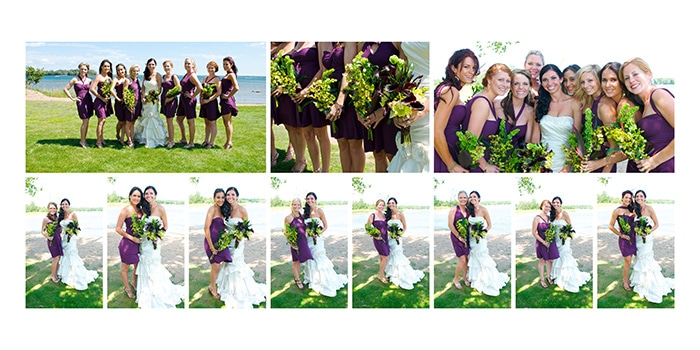
But with all guidelines, there are exceptions. Some spreads work better with a bit of a denser layout. Spreads of the family groupings and wedding party, or spreads of reception dancing are examples. With family groupings, having several photos per page gives the sense of family continuity. Everyone is together, and the photos are likely to be very similar in composition. That consistency is calming to the eye even when there's many of them. Reception and dancing spreads a bit of the opposite to me. I usually want those to give a sense of energy and excitement. Using a denser layout gives that feeling.

Designing Wedding Albums - Plumeria Album Design

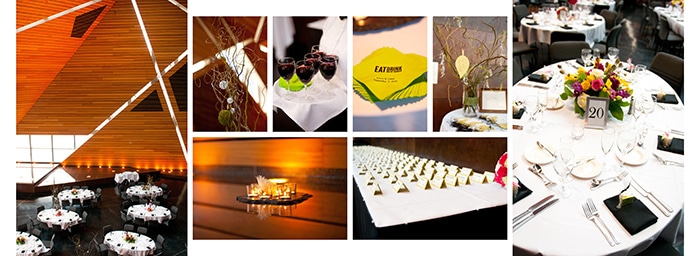
Spreads meant to show action also may get a few more photos per page; the story of the first look can't always be told in a few photos. Spreads that focus on a scene, such as the ceremony site, sometimes need a denser layout also, to show the whole scene in one spread, as if the viewer were there and could walk around to look at different things.

Designing Wedding Albums - Plumeria Album Design

Don't be afraid of the dark/white space

White space is a good thing. It focuses the eye on the photo and eliminates distractions. Think about iconic, high end brands, such as Chanel, Apple or Tiffany's. Their websites and print materials have one thing in common. White space, or negative space. Then think about lower end brands. Their websites and print materials have lots of stuff, everywhere. It's distracting and cheapens the feel.

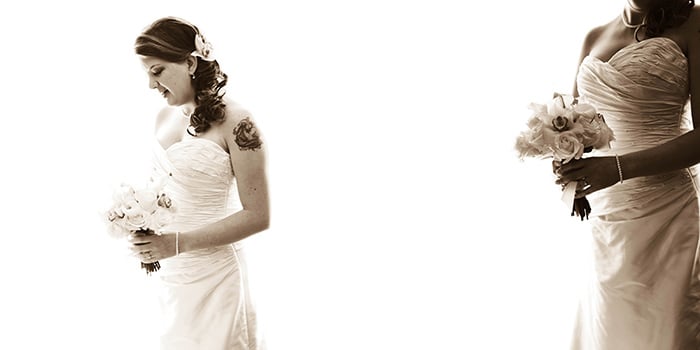
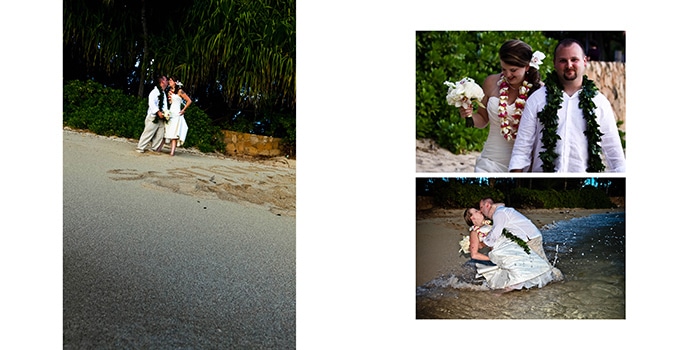
Also, it's a lot easier to design with white space than to try and fill the page with photos. It's like putting together a puzzle. If you're not afraid of the white space, you can use only the photos that are perfect for the spread, rather than having to add or subract photos to make everything fit. In this spread, having any other photos would have been distracting and taken away from the focus.

Designing Wedding Albums - Plumeria Album Design

Don't fluff up the album

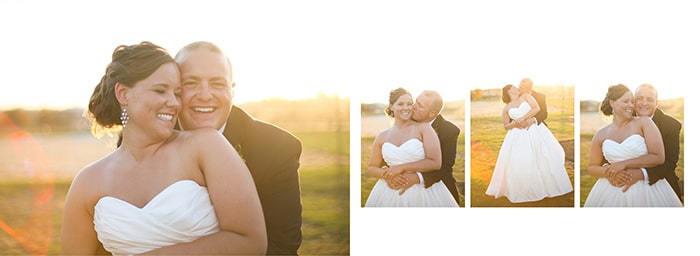
Remember that “less is more” bit? That applies to how long the album is. An album is perfect when nothing can be removed without losing part of the story, and nothing can be added without feeling repetitive. Each spread should have it's own theme, or portray one event. While there may be dozens of great photos of the couple after the wedding in a field, the album doesn't necessarily need all of those photos in several spreads. Pick the best 3 or 4 and create one spread that showcases the best parts of the session. This scene had lots of awesome shots, and I could have easily used several more, it was hard to choose only a few. But adding more would have taken away from the simplicity of the moment.

Designing Wedding Albums - Plumeria Album Design

Do keep it timeless

Wedding albums should be timeless. Simple and clean design is the only “trend” that stands the test of time. Think of the simple black dress, or the basic charcoal gray suit. Those work now, they worked 50 years ago, and they'll probably work 50 years from now. They are simple and clean clothing items. Your album should be the simple black dress. Extra graphics, photo layering, fading, and spot coloring may look cool now, but how are they going to look on the couple's 50th wedding anniversary to their grandkids? Don't give the kids anything more to snicker at besides the clothing and decor trends.

The 5-Step Design Process

Here's what works for me.

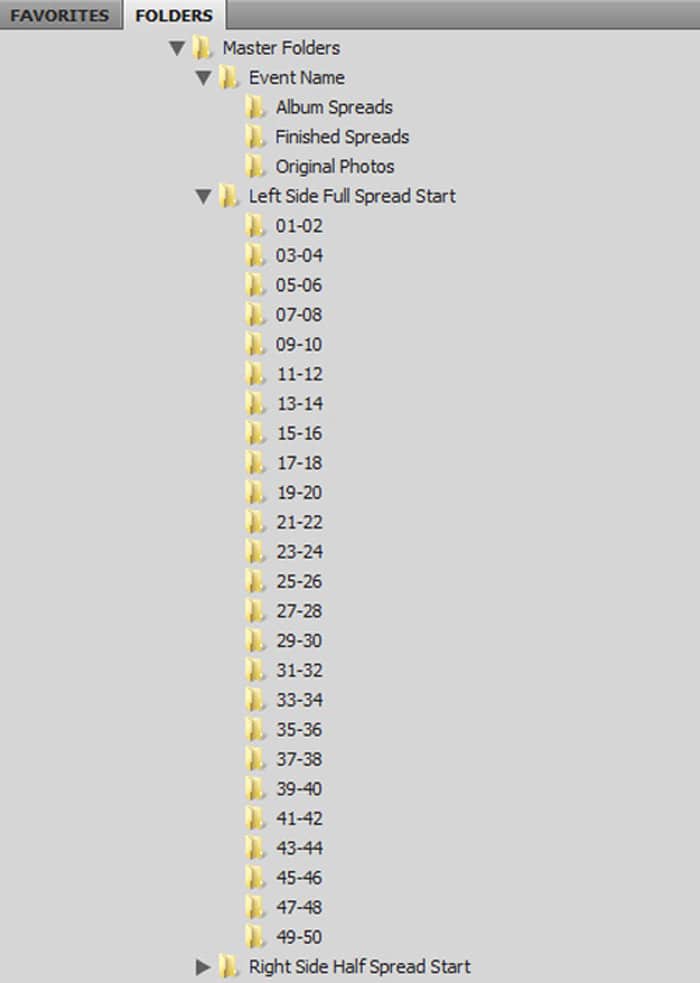
1) The first step for me is to download the photos and set up the folders for each album in a client's folder. Here's what my layout looks like:

Designing Wedding Albums - Plumeria Album Design

2) I sort through the photos and make copies of the album selections. Each spread gets it's own folder with a theme/title, and the copied album selections are dropped in. I tag selections in red in Bridge so I don't duplicate, and the main photos of each spread get a star rating.

3) I use InDesign with the AlbumFlow script to design albums. You can also use Photoshop, and I've heard only good things about Fundy's Album Builder [aff] to speed things up. The debate of InDesign vs Photoshop is for another discussion. It's similar to Ford vs Chevy, Canon vs Nikon; they all get the job done in the end, one way or another.

4) Now I go through the finished design to eliminate any problems. I make sure the bleeds and margins are correct, that full bleed photos will be just that, and that all other photos are within the safety zone. I make sure all the photos line up and spacing is consistent. I double check that no one's head or an important detail is going to get trimmed off.

5) Last, the finished design is exported as a PDF using guidelines from AlbumFlow, to create the highest quality print. I then use Photoshop to create JPEGs from the PDF using ImageBrander from FundySOS [aff]. It's a super helpful plugin for easily watermarking and creating multiple sizes and resolutions. I can make full size JPEGs for the album company and smaller ones for the blog, all in one shot.

This isn't the first time we have addressed album design on Tiffinbox. Justine Ungaro talked about it in this post. My question for you is this – are you still stressing out about your album designs? Or, are you blissfully adding images to your pages willy-nilly and hoping that your clients don't notice. Trust me, clients are getting savvier and do know good design from bad. So, what are you going to do? You can hone your skills (if you have time) or you can farm the task out. What would you do? Tell me/us down below. It's not an easy decision. I do know that.

Filed Under: Art & Design, Photography Tagged With: adobe creative suite, adobe indesign, adobe photoshop, Album, album designs, application software, Design, design elements, design tips, designing, graphic design, kate anderson, Photographers, portrait albums, Portraits, proprietary software, steps design process, Tips, Wedding, wedding album, wedding album design, wedding albums, wedding photo, wedding rings, Weddings, white space

Subscribe To Tiffibox Treats!

Looking for a well-curated email newsletter that will leave you inspired and motivated about your photography business? Sign up below!

About Seshu

Seshu creates relaxed portraits of families and high school seniors in Avon, Connecticut. He also leads a successful headshot photography studio in Connecticut, helping professionals from a variety of disciplines project the very best versions of themselves. He created Tiffinbox as a way of inspiring photographers, to create better images and successful businesses. [Read More]

Email Templates For Headshot Photographers

Email Templates for Headshot Photographers

Recent Posts

  • How Capture One Changed My Event Photography
  • 10 Steps To Stay Positive In Times Of Great Stress
  • Why You Need To Read “Personal Branding For Photographers” Now
  • How To Master Your Website Content Step By Step?
  • Tony Taafe’s TNT Method For Headshot Photographers

Recent Comments

  • Stephen Davison on Are You A Business Owner Who Is Smart, But Stuck?
  • Ben A. on Don Giannatti Clinches The 8th Annual Tiffinbox Award
  • Dan on Don Giannatti Clinches The 8th Annual Tiffinbox Award
  • Donald Giannatti on Don Giannatti Clinches The 8th Annual Tiffinbox Award
  • Stephen Davison on G.E. Masana’s 6 Strategies For Wedding Photography Success
  • Naveen Kumar on Weddings In India Are More Than Being At The Right Place And At The Right Time
  • kartick on Weddings In India Are More Than Being At The Right Place And At The Right Time
  • Leonid Farbman on 6 Uncommon Trends To Grow Your Photography Business
  • Willow and Finch Wedding Photography on 11 Reception Tips To Help Your Wedding Photography
  • Web Designer Malaysia on How To Optimize Your Squarespace Website For Search Engines
  • Creastan on An Interview With Photojournalist G.M.B. Akash
  • Cindy Brown | Atlanta on An Open Letter To A Local Photographer

Become a Patron!

Copyright © 2026 · Tiffinbox · Site Design by Heather Mackan Creative · Built on Genesis