• Photography
  • Interviews
  • Business
  • Reviews

Tiffinbox

Inspiring Photographers

  • Home
  • About
  • Blog
  • Contact

Discover How Mary & Justin Marantz Love Shooting In Tough Situations

May 22, 2015 by Seshu | Editor & Publisher

Justin & Mary Marantz Wedding Photographers

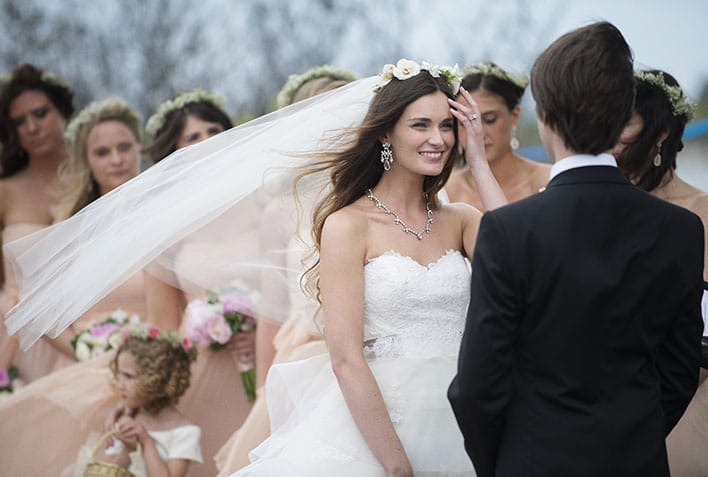
Mary & Justin Marantz are wedding photographers based in New Haven, Connecticut with clients who span the globe. They are also active educators and mentors to many photographers.

Skip Cohen loves to refer to their gorgeous website and work, so I am going to send you there to take a quick peek. When you come back, do me a favor and comment below, a word or two that best describes their website. I am curious to know what you came up with.

To say the Marantz are busy would be an understatement. I am not quite sure how they are able to do it all – photographing weddings, running a successful business, blogging on three separate websites, teach sold-out workshops and travel to some of the most amazing destinations.

The short answer to my own question: they've worked for it.

Curious to know where they blog? Here you go:

Well Groomed Groom
The Black Tie Bride
Justin & Mary Blog
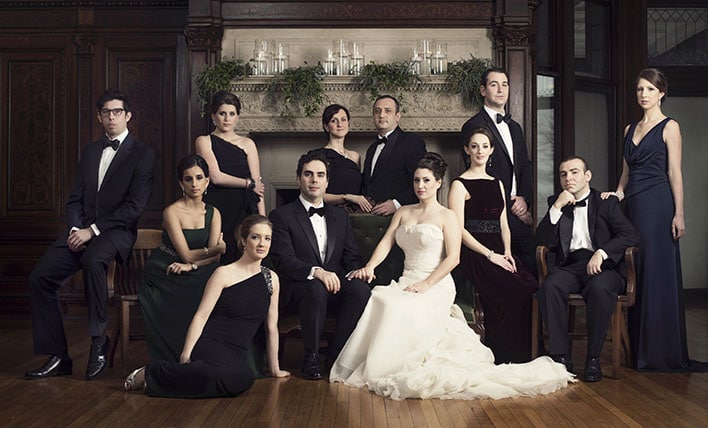
Justin & Mary Marantz Wedding Photographers

Thanks to ShootDotEdit, Justin and Mary Marantz will present a FREE webinar on May 27th on how photographers like you can create stand-out images in the toughest of situations just like them. Register for the webinar here.

Given that they are sort of neighbors (we live about an hour away from each other, so “neighbors” may be a bit of stretch), I invited them to chat about their business, how and why they love shooting in tough situations and what kinds of solutions they bring with them when they are photographing weddings across the country.

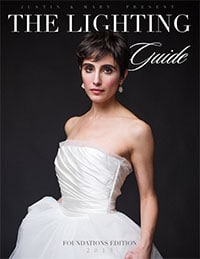
Justin & Mary Marantz: The Guide

The Lighting Guide by Justin & Mary MarantzCurious to know more about their business marketing guide and lighting guide? Visit their shop now.

I asked nicely and Mary & Justin gladly offered to give away their new Lighting Guide to one Tiffinbox fan. Will that be you? Do you want to win it? Go here for the Lighting Guide giveaway.

If you don't want to wait that long, and want to buy it, do so before the price bumps back up to $179! Right now you can download it for $129. [Not an affiliate link]
Filed Under: Home Middle Left, Interviews, Lighting, Photography Tagged With: connecticut, difficult situations, Lighting, New Haven, Photographers, Photography, Shootdotedit, Webinars, Weddings, Workshops

Zach & Jody Gray Will Teach You To Light It Up!

January 15, 2015 by Seshu | Editor & Publisher

Zach and Jody Gray have quickly become industry leaders. They are known for their wedding photography and their ability to teach photographers off-camera lighting and business strategies. In fact, when they were hopping from city to city teaching small groups of eager photographers, I attend one of their workshops. I noticed how particular they were to following a system, even if it was using a tool called the Expo Disc.

They are just as meticulous about using off-camera flash. When I started Connecticut Headshots, I turned to their DVDs to learn how to use a simple reflector. I eventually graduated to their other DVD, In Camera: Light, to learn more about their off-camera lighting system.

Thanks to ShootDotEdit.com, the Gray's are going to spend about an hour going over their simple 3-step system to using off-camera flash. The webinar is free, so why not register here.

I managed to convince Zach and Jody to meet with me early one morning a few days ago to talk about their background and what they were going to bring to this webinar.

Check out their instructional videos on how to use the Expo Disc I mentioned above:


So, those videos should give you an idea of how systematic the Gray's are. Want to learn more about lighting from them? They are giving away a free ebook to those who sign up for their awesome newsletter (lots of nuggets of craft/technique and business wisdom freely shared!). Click the graphic below and you will be all set.

Zach & Jody Gray - Lighting Book Cover

If you are interested, feel free to poke around the Gray's online store to check out these useful video workshops and other resources for your photography business:

Lighting SystemHarvestIn Camera: Natural LightPost Production System

Filed Under: Featured Post of the Day!, Lighting, Photography Tagged With: Jody Gray, Lighting It Up, natural lighting, Photographers, Wedding Photography, Zach Gray

How To Use Panlight To Remotely Redirect Your Off-Camera Flash

December 19, 2014 by Seshu | Editor & Publisher

If you are a photographer who use off-camera flashes to photograph weddings or portraits, you are my kind of people. You like to create punchy images that separates your subjects from their backgrounds and make them truly stand out. Am I right?

The Problem

But we all experience a well-known scenario.

There you are, ready to make some sweet images of a wedding couple dancing the night away at their reception.

Your assistant or VALS (voice-activated light stand) is away in the Bahamas. You need to move that off-camera light down and out by about 32 degrees because your clients are losing themselves to the music and have moved from where you thought they would be to this new spot, near Uncle Bob and Aunt Maddy.

But you are about 30 feet away from the couple and the off-camera light you set up with a PocketWizard or a RadioPopper is another 10 feet away from them, making it near impossible for you to move like Spiderman to adjust the light angle and or direction. You are SOL.

Frustrating, right? I know your pain. I have felt it. Often.

The Solution

Thankfully, there is a new solution coming and it's called Panlight. I spoke with Mike Garrard, its inventor a few weeks back. As a Kickstarter campaign, it has already surpassed the goal he set. With only about 18 hours to go before the end of the campaign, this is the time to jump in and order one of these units. I am doing it myself because this is a tool that will come in handy if you are a wedding or a portrait photographer.

Now imagine you impressing the heck out of your clients by being able to adjust that off-camera flash remotely, from where you are standing. Can you feel that pain melt away? Your assistant could be sipping drinks on a beach for all you care, but you will be making bank with all the great images you will be creating for your clients. Sorry, but VALS may indeed become dinosaurs if you begin to use the Panlight. Plus, you won't have to jump around and get in Uncle Bob or Aunt Maddy's grid, like you used to. And, if those two had cameras anyway, you can wish them the best of luck as you go from one amazing lighting scenario to the next. Who wins? You do.

The Win

Yes, it can be that simple. Skip on out of this blog and check out Panlight now on Kickstarter or on the Panlight website, to learn more. But remember, once the Kickstarter campaign ends, prices will go up.

A special thanks to Kate McElwee, a Boston-based wedding photographer who introduced me to Mike Garrard of Panlight. And yes, she is backing this campaign as well.

Filed Under: Featured Post of the Day!, Interviews, Lighting, Photography Tagged With: angle of light, camera, direction, Flash, Mike Garrard, off-camera flash, Panlight, portrait photography, Portraits, remote control, wedding receptions

Using Sexy Light On The Beach

July 14, 2014 by MP Singh

Behind The Scene Look: How I Got That Shot

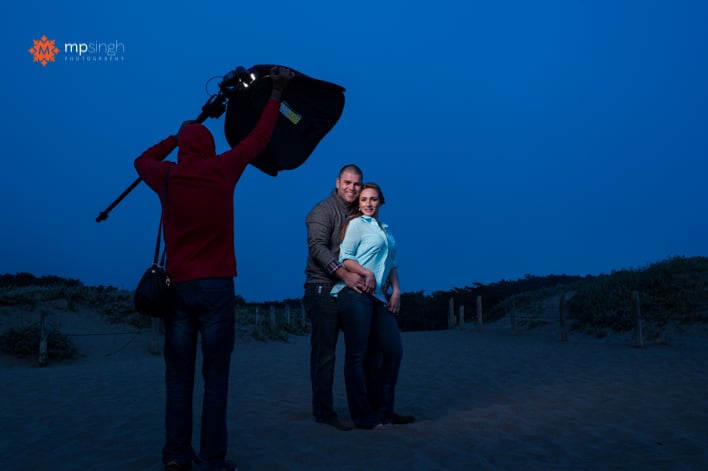
The image you see below was created as part of an engagement session. It was towards the end of shoot when we were at a beach and sun had already gone down. The park visiting hours were already over and there was a cop driving everyone out. And it was cold, the chill factor in the wind was sending shivers down our spines. We quickly grabbed couple of shots and drove out of the park.

MPSingh Photography - Couple On The Beach

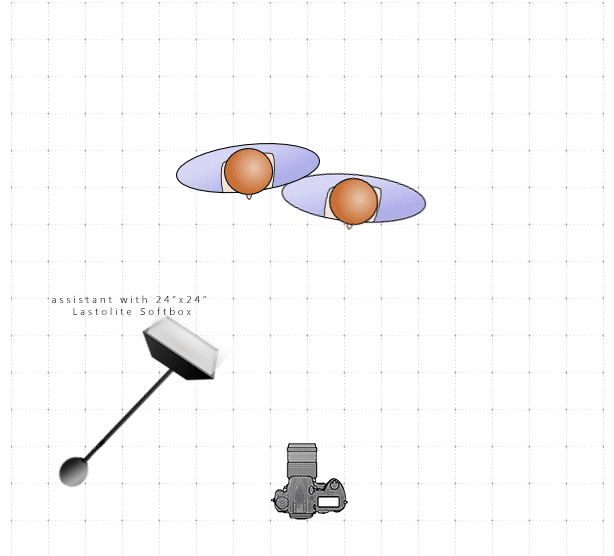
This shot was taken with the help of an off camera flash, Nikon SB900 inside a Lastolite 24″x24″ softbox, triggered with my trusted Pocket Wizards. The following is a lighting diagram showing the set up for this shoot.

MPSingh Photography - Couple On The Beach Lighting Diagram

The flash had a full cut CTO (color temperature orange) gel on it. I wanted to give the feel for the post dusk bluish night sky. So I turned my camera to tungsten white balance. This gives the blue tint to the whole image. To compensate the blue tone on the subjects and bring the skin color back to normal yellow/orange tones, the flash had the orange gel on it. The full cut CTO gel fully compensates for the tungsten white balance.

Another challenge was that we required the light to be very close to the couple and we wanted wide angle shot to include more of the background for context. So the assistant was in the picture.

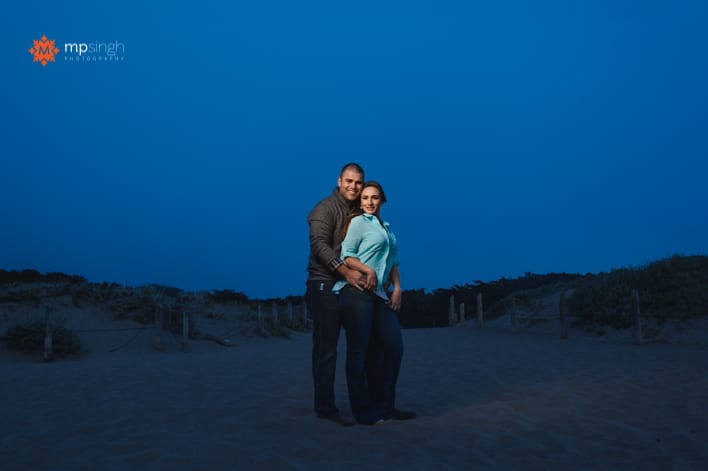
MPSingh Photography - Couple On The Beach

The Photoshop Work

To fix that we took two shots, one with assistant lighting the couple and in the shot. Before the second shot, the assistant ran out of frame and switched off the light. So the second shot was taken with the couple without any light. Once we take these two shots it is very easy to do a composite in Photoshop:

1. Open both the images in Photoshop as layers, with the image with assistant as the top layer.

2. Auto align layers (Edit –> Auto-Align). When we don't use a tripod there is always a slight movement of the camera and the frame changes. To compensate for that, we have to align the layers.

3. Once the layers are aligned, select the top layer and use layer mask to mask out the assistant. Now we are using everything else from this layer except area where assistant was. That area is picked up from the layer beneath.

4. Make other changes as required.

And, voilá, we have our final image. Do you have any questions? Feel free to ask below!

Filed Under: Home Middle Right, Lighting, Photography Tagged With: adobe photoshop, camera flash, Color Gel, digital photography, Flash, image processing, Layers, off-camera flash, Orange Gel, photographic lighting

OneLight 2.0, A Review Of Zack Arias’ New Off-Camera Lighting Tutorial For All Photographers

April 6, 2014 by Seshu | Editor & Publisher

Zack Arias is a name that is now synonymous with learning to use your off-camera studio strobe or speedlight, starting with just one light and one modifier, in manual mode.

Whether you attended one of his workshops (or like me, two of his workshops) in the past or sat and watched and rewatched his first video tutorial called, OneLight Workshop, I am going to bet that you have experienced one or two personal eureka moments about using your flash.

For some of us, his teaching liberated us from the confines of “natural light.” For others it was a financial boon, allowing us to seek out new clients who not just expected beautifully lit images, but demanded them every single time. A lucky few, got to do both really well. In any event, Zack's OneLight video and workshops were likely my number one recommendation for anyone who is shit scared about using artificial light because Zack has an incredible knack for easing you into your comfort zone with the technical stuff and jargon.

You see, I was one of you. I cringed at the idea of messing around with buttons and dials on the back of my speedlight. Even though I felt compelled to buy a flash, I resisted using it for a very long time. Can you relate to that? I lived in a constant state of fear of being called out or embarrassed. Heck, I was a photographer and not knowing how to use an essential tool of my trade meant only one thing – my training was far from complete and that I had to learn the fundamentals. Zack's video workshop was just the ticket for me back then.

OneLight 2.0 by Zack Arias

Zack's videos in this second version of his workshop is just as thorough as the first version. I am here to tell you that you will learn how to use your flash after watching this video. You will experience a sense of ease and comfort using your speedlight. Seriously, if I could learn it, I know you can.

Zack's delivery is as if he is talking to a new friend of his – cordial, patient and sometimes funny. He is very methodical and deliberate. The video and audio production is as good or even better than the first version and the editing is spot on. The first few videos are in black & white; a conscious decision, I am sure, on Zack's part to get us to watch and listen to him and not be distracted by anything else that you may see on his set.

OneLight 2.0 is over seven hours of video, across six distinct chapters. It's not something I watched in one-go. I had to pace myself and I suspect you will do the same.

He begins by discussing gear; the minimum you will need to use your flash off-camera. One thing Zack is consistent on from the older dvd to the newer videos is to remain committed to learning about light using one light & one modifier. It's sage advice especially when it is all too tempting to buy soft boxes, umbrellas, beauty dishes and grids. Zack also goes over what type of modifier he recommends and why. Pay close attention to this as it will likely save you from wasting oodles of money on lighting products you don't really need.

I'm halfway through it! It should come with every light sold, the world would be filled with greater photographs! It's brilliant! – Bill Gekas

Zack takes on exposure and what affects your image. Those are of course, shutter speed, aperture, iso, flash power and flash to subject distance. He goes over each factor, showing us examples using Carl, a stuffed squirrel. I urge you to watch this section multiple times so that it all soaks in.

Zack's new workshop is only available as a download for $75. I recall paying double that for the first version of this video tutorial. That said, Zack has kindly offered Tiffinbox newsletter subscribers a special and significant discount through May 31st. Yes, you have to subscribe to the newsletter (top right blue box is where you need to punch in your email address) to receive and use this code. If you miss the first newsletter with the special code, don't fret. Subsequent email blasts will carry this special code. This is the first of many exclusive offers that I will be bringing my subscribers. So, that's yet another reason to stay subscribed.

The next chapters, if you can call it that, are Zack actually showing you and walking you through three of his shoots. Were you ever curious to know why or how a photographer made one decision over another? This is your chance to eavesdrop. Seriously, this is pure gold!

Zack ends the videos with a review of some of the images he has captured. He talks about what he feels were successes and which images he would throw away. Ever hear another photographer acknowledge his or her shortcomings after a shoot? I found it refreshing to listen in on what worked for Zack and what did not.

All this for $75? Wow! (subscribe to my newsletter in the top right blue box to receive a special time-limited 25% discount code only for my subscribers).

He has done an outstanding job and he is selling it cheap, too cheap if you ask me, it’s a steal. – Armin Sarow

If there is one thing I would have liked to have seen but did not was a short slideshow with music at the very beginning of the video. I told him privately that I had wished these images were teased to us so that we could anticipate seeing them created throughout the video. I am not sure he will take me up on my request/suggestion. Also absent from this new version is a handy “field guide” which came with version 1.0. Looking at Zack's online store, I noticed that he is working on a new version of the field guide and it will be released for $10. Again, that's incredible value.

Some early testimonials about OneLight 2.0 from the Twitterverse:

“It's even better than the original. Definitely not the ‘difficult second album'.” – Sean McCormack

RJ Bradbury writes:

I purchased the One Light V1 and the book/mag. I get the technical but I still pre ordered One Light V2.0 … Why?

Well a few reasons really:

Zack & Meghan and those who's names I don't know have been a huge influence in my work. They all work hard either at camera, or behind the scenes to help others. Thank You.

You can always.. ALWAYS learn something. Know the basics? Ok good then read between the lines and listen & watch subject interaction, listen to the thought process.

Hell I thought I had done everything with my 60″ Umbrella (cover on, cover half on, cover off, Shoot through, Reflective, Poor mans Soft box, choked down the shaft, close / far, In Front, Behind, To the Side) Yet I have never thought about pointing the dam thing up in to the sky to keep light off the ground! That stuff will save you time in post and that's golden.

The money helps Zack and his family out & goes towards a source of much needed signal (#DEDPXL) in an ocean of bullshit and noise. Is this a family show?

It's a bargain even at full price. Good solid content that's well produced, but I can watch tutorials on YouTube for free … Yeah ok that's true with bikini models, bad exposures and all about the gear. Do yourself and your photography a favor buy it, watch it … then go shoot!

Wait it can't all be good? – Mostly. The Final Thought video is a different format but its an easy fix with a converter if needed.

Fred Glasser writes:

Zack’s done a tremendous job with OneLight 2.0. While I pre-ordered it & have only had for a few days, I’m already halfway through it. It’s that good. He’s super-articulate & incredibly thorough, and everything follows a very logical progression. It’s ideal for folks looking to get comfortable with off-camera flash & studio strobes. Even seasoned pros looking to hone their skills & take their game to the next level will benefit. As a full-time shooter who uses off camera lighting constantly, I can’t recommend enough. For the price, it’s an utter no-brainer.

I bought this new lighting workshop by Zack when he first launched DEDPXL, his new education website for photographers. When I first saw the price ($50), I thought he had made a mistake. Most follow-up resources that photographers usually pitch are higher in price, not lower!

Lots of people have asked me whether it makes any sense to buy this second version when they got so much out of the first one. It's a fair question, but an incomplete one in my opinion. If you are in this business for the long haul, you should be constantly learning. Yes, exposures, shutter speeds and ISO's haven't changed much between the two videos (no they haven't changed at all). You probably may skip that (I did not). But the three different shoots and the self-critique Zack offers is significantly different than the DVD version. As I mentioned above, how much would you be willing to pay to learn that from a working pro? I know I didn't think for more than a fraction of a second when I decided to invest in Zack's new video.

Zack also told me privately: “I'm building an “extras pack” of slides, sample images, and gear list based on requests since the release of OneLight V2.” Booyah! So, if you buy it now, you get ALL of the downloads, plus some goodies that he is working on for all of you.

Do you want to elevate your craft? Are you scared of f-stops and shutter-speeds and can't figure out what affects what? Are you confused and are you looking for some clarity? Well, let me tell you that you and your business will be better off by buying OneLight 2.0 from Zack today. (last pitch of the post: sign up now to receive my newsletter for a special discount code)

Lastly … shutter-speed controls ambient light, aperture controls the amount of light falling on your subject from the flash … there, Zack, I have got it … finally!

Filed Under: Lighting, Most Popular Posts, Photography, Tutorials, Video Tagged With: Artificial Light, Camera Light, Flash, Lighting Workshop, Studio Strobe, Zack Arias

  • « Previous Page
  • 1
  • 2
  • 3
  • 4
  • …
  • 6
  • Next Page »

Subscribe To Tiffibox Treats!

Looking for a well-curated email newsletter that will leave you inspired and motivated about your photography business? Sign up below!

About Seshu

Seshu creates relaxed portraits of families and high school seniors in Avon, Connecticut. He also leads a successful headshot photography studio in Connecticut, helping professionals from a variety of disciplines project the very best versions of themselves. He created Tiffinbox as a way of inspiring photographers, to create better images and successful businesses. [Read More]

Email Templates For Headshot Photographers

Email Templates for Headshot Photographers

Recent Posts

  • How Capture One Changed My Event Photography
  • 10 Steps To Stay Positive In Times Of Great Stress
  • Why You Need To Read “Personal Branding For Photographers” Now
  • How To Master Your Website Content Step By Step?
  • Tony Taafe’s TNT Method For Headshot Photographers

Recent Comments

  • Stephen Davison on Are You A Business Owner Who Is Smart, But Stuck?
  • Ben A. on Don Giannatti Clinches The 8th Annual Tiffinbox Award
  • Dan on Don Giannatti Clinches The 8th Annual Tiffinbox Award
  • Donald Giannatti on Don Giannatti Clinches The 8th Annual Tiffinbox Award
  • Stephen Davison on G.E. Masana’s 6 Strategies For Wedding Photography Success
  • Naveen Kumar on Weddings In India Are More Than Being At The Right Place And At The Right Time
  • kartick on Weddings In India Are More Than Being At The Right Place And At The Right Time
  • Leonid Farbman on 6 Uncommon Trends To Grow Your Photography Business
  • Willow and Finch Wedding Photography on 11 Reception Tips To Help Your Wedding Photography
  • Web Designer Malaysia on How To Optimize Your Squarespace Website For Search Engines
  • Creastan on An Interview With Photojournalist G.M.B. Akash
  • Cindy Brown | Atlanta on An Open Letter To A Local Photographer

Become a Patron!

Copyright © 2026 · Tiffinbox · Site Design by Heather Mackan Creative · Built on Genesis