• Photography
  • Interviews
  • Business
  • Reviews

Tiffinbox

Inspiring Photographers

  • Home
  • About
  • Blog
  • Contact

How To Optimize Your Squarespace Website For Search Engines

April 12, 2018 by Seshu | Editor & Publisher

The #1 Question Asked By Photographers

“How can potential clients find me online?”

Even in 2018, a lot of photographers believe that all one has to do is upload photographs to a website and their clients will miraculously find them.

Adding to that myth are these words, “oh, I have a website but I haven't updated it in eons.” Then they chuckle.

Imagine your business is a steam engine (remember those?). The content you add frequently and consistently is the fuel for your engine to go faster and farther.

Galen Mooney, SEO For PhotographersThese are both huge problems that Galen Mooney of PhotographySquares is committed to solving for photographers.

If you want to be found online, your website needs to be set up properly and you need to be posting online often, sending search engines like Google, Bing and Yahoo! (among many others) an alert that there is fresh content on your site.

Why Squarespace?

Right now I publish two other websites: Seshu Photography & Connecticut Headshots, both using the Squarespace platform.

While it was super easy to set them up initially, I kept hearing about how it was difficult to optimize Squarespace sites for search engines. Digging a little deeper, though, I found out that was not true at all.

Now, compared to WordPress websites that use plugins like Yoast SEO, there aren't any plugins or extensions for diving into SEO on the Squarespace platform. So, one has to set things up manually (but done once and checked often, you should be good to go).

I might have been poking around Google and Facebook when perhaps it was a targeted advertisement that presented Galen's 5-day SEO Challenge (going on right now, with tomorrow being day 5, so sign up now and you can watch the replays of days 1-4).

SEO For Photographers

This is Galen's promise:

SEO for Photographers is … “Made especially for Squarespace users! You'll learn how to optimize your image tags, how to tweak old pages and blog posts to get the results you want, and how to track your SEO success as you start seeing results.”

If you are considering a Squarespace website for your photography business or you already have a Squarespace site, you owe to yourself to at least check out Galen Mooney's 5-Day SEO Challenge first.

If you want to learn more, then sign up for her course, SEO for Photographers. She will be opening enrollment tomorrow with some special bonuses, after her one-hour special presentation in her Facebook group.

5-Day SEO Challenge

Go ahead and LIKE her page and you should see a notification for her 10 am presentation. Just as a teaser, here is Day 1 of her most recent SEO challenge:

Photography Squares Small Logo

Interviewing Galen

A few months back, I interviewed Galen. You'll learn in this short interview with why it's important for you to optimize your site and what she teaches in her course, SEO For Photographers:

Of the two websites that I own that are using the Squarespace platform, I have used what Galen Mooney has taught me through her course on Connecticut Headshots and have seen a great many more inquiries and bookings. These are subtle or drastic changes – something as simple as using a H1 tag on each page or using the right descriptions when uploading images.

While she doesn't say it, I will … it pays to sweat the details. And like I say in the interview above, you won't be breaking anything when making those changes. If you find yourself flustered, Galen's Facebook group is a wonderful place to visit and ask questions and compare notes.

If you have a Squarespace site, you would do well to start optimizing it using Galen's advice.

Filed Under: Featured Post of the Day!, Marketing, Photography Tagged With: clients finding the right photographer, content marketing, finding clients, learning seo, Marketing, Photographers, Photography Business, seo for photographers, seo optimization, setting up squarespace sites

Learn To Light It Up With Piet Van den Eynde

April 3, 2018 by Seshu | Editor & Publisher

Learning Flash Photography

I recall my first attempts to learn flash photography and I failed miserably. I had one of those speedlights that pointed only in one direction and so my photographs were, let's just say, interesting and not very flattering.

It wasn't until I encountered a Nikon SB900 that I realized that a) the head could swivel and b) it could be placed off of the camera. This was all pretty exciting, but the flash was set on manual and I didn't have any structure to take the first steps into this (for me) new genre of photography.

So, I languished for a while before thankfully being rescued by Zack Arias. His simple, no-nonsense One Light Workshop set me afloat in a new and exciting direction. It's a resource I still recommend beginners.

Light It Up!

Pien Van den Eynde Portrait by Mike SchnablIf you are going to go in all the way with flash photography, you might as well go all in. That's where the Belgian photographer Piet Van den Eynde comes in.

Piet (pronounced as ‘Pete') just released an updated and expanded second edition of his book, Light It Up! Techniques for Dramatic Off-Camera Flash [aff].

It's a 185-page behemoth of all kinds of great information about flash photography. He doesn't gloss over anything in the 12 chapters of this ebook.

You'll see below why I recommend Piet's book, Light It Up, as a must-have and must-read for photographers learning the new skill off-camera flash photography.

What's In The Ebook

In Piet's own words:

In the first two chapters, I cover some slightly boring yet incredibly important theory about light in general and flash light in particular. With all the hype regarding off-camera flash, you’d almost forget that there was a time when ashes were mainly used on-camera. That's why Chapter 3 is all about “on-camera ash,” where I show you some of the advantages and inconveniences before diving into the heart of this eBook: working with remote flashes.

Chapter 4 covers the basic techniques of working with one one off-camera flash. I start with a simple scenario of one flash and a couple of cheap accessories, such as an umbrella or a small soft box. In Chapter 5, I show you how to quickly set up a Nikon or Canon to wirelessly trigger an external flash. If like me, you’re working with another camera brand, the procedure is comparable. Chapter 6 provides a fail-safe walk-through on how to put the theory into practice.

Chapter 7 outlines some practical case studies, including images that were shot during a one-year bicycle trip where I only had access to limited gear. The photos show that with only one light, your creative options soar. Chapter 8 discusses the more advanced techniques of working with multiple ashes that can be bundled into a more powerful light source to compete with the sun, or set up in different parts of your scene to create a portable on-location studio.

Gear-wise, Chapter 9 continues where Chapter 4 left off with an introduction to some lighting accessories to complement the basic gear set up. Chapter 10 has more cases where I also show you how to work with portable studio flashes on location. This type of flash has become much more affordable in recent years, with the cheapest third-party portable studio flashes often costing less than the high-end brand name hot shoe flashes, all while offering 6 to 10 times more light output. Their higher output allows you to use them in situations where a single speedlight wouldn’t suffice.

Finally, Chapter 11 addresses flash photography and image editing. Like any other photo, flash photos often benefit from corrective or creative post-processing. In this final chapter, I walk you through a couple of examples.

Pretty comprehensive, right?


What You'll Learn In Light It Up!

• How light behaves the way it does and how you can use the physics of light to your advantage

• Why using flash is not always a matter of increasing the quantity of light but rather changing its quality

• Why the brighter the sun shines, the more you’re in need of a flash

• How to save money when shopping for a flash system: the advice in this eBook will save you its purchase price many times over. You really don’t need the most expensive flash or softbox. Most images in the book were made with gear that costs less than half of what the big flash brands charge

• How you can get started with off-camera flash by using the built-in flash of your camera as a commander for an external flash

• Why modifiers are more important than the actual lights you use

• Why you should plan ahead when you start buying into a flash system

• How you can create super rich light on a budget by combining lighting techniques with some basic Photoshop skills

Early Bird Offer + Bonuses!

Piet just let me know that if you buy Light It Up now using this link, you’ll receive a 10% discount (use code: seshu10), on the Standard Edition (ebook only, $24.95) or the Deluxe Edition ($34.95, for the ebok, 3 videos and 5 Lightroom presets).

What Are In The Videos?

Piet explains even more about his flash workflow in the set of three bonus videos totaling 45 minutes. In the first video, ‘For The Birds’ you see him creating an iconic image of an Indian Sadhu on the Ganges, from capture to final edit in Photoshop. In the second video, ‘Layering Lights’, he builds upon the concepts that he explains in the post-processing chapter of the eBook. Finally, in the last bonus video, ‘Creating Light’, he takes you through a number of his images and explains his reasoning and lighting setup.

Buy Light It Up! today.

A Quick Review

My favorite saying and I act on it is this: The learning never stops! And to that end, finding credible teachers who happen to be active photographers is one of my missions, for your sake and mine. I've followed Piet's work for a number of years through and have been impressed with his energy and enthusiasm for traveling in what I would consider challenging parts of the world.

Add flash photography to his travel agenda and you have the makings of a teacher (pardon the pun) going the distance to show you what you are capable of doing with the right information and acquired skills. His ebooks (and I have several of them through Craft & Vision) are thorough, with the right examples, and more importantly, the right explanations. Too often, ebooks are nothing more than portfolio pieces. But Piet's ebooks double as that and as resources you will dive into whenever you have a question about flash photography.

One other thing really attracts me to Piet's work and it's his transition to Fujifilm mirrorless cameras. Like him, I am moving away from my Nikon DSLR's for the day-to-day work of family portraits, business portraits or events. Just yesterday, I photographed at a local dental clinic in Avon, Connecticut, photographing eight employees for their new website. I used Piet's advice from the book to set up my speedlights; one through a softbox and one hair-light modified by a MagMod diffuser.

Light It Up is a resource you will return to again and again in the future. I guarantee it!

Filed Under: Books, Featured Post of the Day!, Lighting, Photography Tagged With: ebook, flash photography, learning photography, learning to light, off-camera lighting, Piet Van den Eynde, resources for photographers, updated ebook

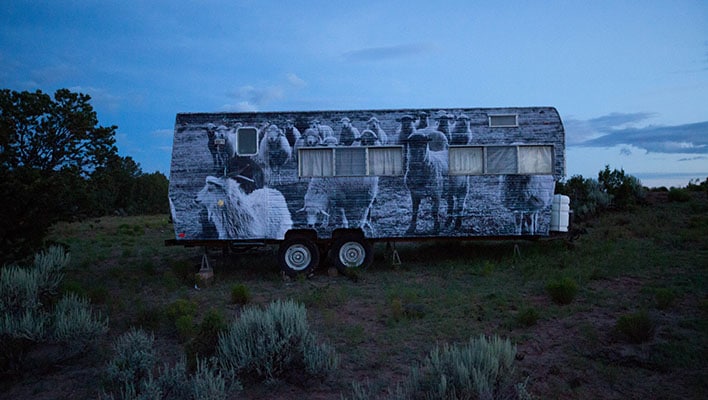
Public Artist Projects Navajo Life In A Dignified Way

March 30, 2018 by Seshu | Editor & Publisher

Who Is ‘jetsonorama'?

Jetsonorama is Chip Thomas' public artist name. In addition to being a photographer, public artist and activist, he spends most of the time on the Navajo reservation in Arizona as a physician.

Today, as I scrolled through Facebook, I noticed a short documentary produced by KQUED Arts (see below) and I couldn't resist thinking about a few things.

Public Artist At Work, Navajo Nation

The Commitment For Public Art

It is easy to be in awe of Chip Thomas' commitment when you take a look at Dr. Thomas' dual role of not only being a physician, but also a documentary photographer. What's our excuse for not finding a local cause, charity or organization where we too can give back to our community in our own special way: making art for them?

These murals aim to reflect love and appreciation of the rich history shared by the Navajo people back to Navajo people.

The Documentary

You Can Make It Happen

Dr. Chip Thomas is part of the Justseeds artists cooperative and manages The Painted Desert project. His GoFundMe page is very close to reaching its goal of raising $6000 to fund mural opportunities and youth arts education on the Navajo Nation.

Please donate liberally to make it possible for public artists like Chip Thomas and others to continue pursuing their life's mission.

What's Our Role As Photographers?

Assuming we aren't always in it for the money, do we use our skills in a way that makes a direct impact on other people? As a family portrait photographer in Connecticut, I would like to think that I am transforming the lives of children and their parents. But does what we do get measured and if so by whose standards?

Sound-off below in the comments. I am curious to hear your take on this subject. And, if you are working on a personal project, please do not hesitate to contact me. Ok?

Filed Under: Art, Home Middle Left, Photography

Enrollment For “No Stress WordPress” Course Opens

February 27, 2018 by Seshu | Editor & Publisher

Why The Stress?

Let me assure you that you aren't the only photographer to have issues launching your website. Go to any photography conference or even a local gathering, and you'll hear a common refrain: “I'm working on my website.”

That's code for: “I am still trying to figure it all out.” And there is absolutely no judgment, ok? I am in the same boat as you.

Let me break it to you gently – a lot of photographers like you and I are finding it challenging to establish a presence online. Yes, WordPress is a ubiquitous platform and you may have heard that one can easily optimize WordPress websites for search engines. All true, but designing one from scratch isn't always easy or fun. And you can only watch so many YouTube videos to chase down the exact solution you are looking for.

I have to admit that WordPress templates are wonderful and they are a great way to start one's web design. But they can be limiting, if you don't know the in's and out's of WordPress. So, if you are a photographer who needs to gain back control of your domain, pay close attention to what I am about to say.

No Stress WordPress: Dave Foy's Course For Non-Coders

No Stress WordPress

Dave Foy of Design Web Build just reopened enrollment for his course, No Stress WordPress. It's open for a very limited time, until Friday of this week.

If you are even remotely interested in understanding how WordPress works but think you will need to be neck-deep in code, think again. Dave Foy has worked as a web developer for 14 years. Before that, he was a primary school teacher in the United Kingdom.

In his course, No Stress WordPress, he will teach you to design your website using WordPress and a plugin called Elementor. The instruction is comprehensive without it being overly challenging. He walks you through a “starter site” that you can then reuse again and again. He walks you through the jargon, truly making the experience stress-free. And I personally like the way he teaches. The course is very well structured and moves at a pace that is just right. While I may have used WordPress for a number of years, I discovered a lot of new and useful information. In fact, Tiffinbox (this website) will be redesigned using the steps he has outlined in his course!

Interview With Dave Foy

I spoke with Dave Foy at length about “No Stress WordPress” today:

If you have considered designing a website for your photography business, but you found yourself stuck in the process, this post provides you with a solution that you simply cannot ignore. Sign up now for No Stress WordPress. If you wish to split your payments, there is that option. However, if you are ready to make changes now, you can receive some fast-action bonuses if you commit to this course before March 1 at 5 pm EST.

On The Fence?

Still on the fence about “No Stress WordPress“? I understand the trepidation. However, do know that it is a one-time purchase and Dave Foy routinely updates the course when changes are required. Plus he is incredibly responsive to your questions in his private Facebook group. Lastly, to just get a taste of his teaching style, I implore you to check out his free mini-course. Just watch one of the four videos and then decide if his teaching style and the content is what you need to finally finish your WordPress-based website.

Full Disclosure

Yes, the links for the course, No Stress WordPress, are affiliate links. As you know I only promote the very best resources to you after diving into it myself. And in this case, I paid the full price of this course when Dave launched it back in November. I believe wholeheartedly that when you sign up and do the work, you will easily experience a five to 10 fold return on your investment. Plus, with the course being updated all the time, you don't need to worry that you have bought yet another course that has gone stale. Dave is committed to teaching and staying current with the latest advances in WordPress and the Elementor plugin.

Filed Under: Design & Illustration, Featured Post of the Day!, Marketing, Photography, Web/Tech

Best Time To Clean And Calibrate Your Cameras And Lenses

February 1, 2018 by Seshu | Editor & Publisher

Clean and Calibrate Your Gear

Some six years ago, Wes Kauffman, president of Perfect Image, penned a post called, “Why Calibrating Your Camera’s Lenses Is A Must For All Photographers“.

One brave man commented: “This is one giant advert telling you to contact them to have you pay for the service.” That may well be the reaction of a photographer who knows his way around the AF Calibration feature on his or her camera, but for mere mortals like you and me, I would still want a professional to take care of my gear.

In fact, Wes clearly mentions this in his original article: “Calibrating your camera is something you can do yourself, some of my customers do, and some of my customers try. The truth is a qualified repair tech can do it faster, and probably more accurately. They will have the correct tools and more importantly the experience.”

Take Care Of Your Camera Equipment

So, I don't know about you, but when I hit a bit of a dip and experience the “slow season,” I don't sit there twiddling my thumbs and wonder if my gear is in tip top shape, I send my cameras and lenses to Perfect Image and get it cleaned and calibrated. I've used their services three or four times and I am a fan.

I must have said so at one of the last meetings and Wes pressed a short stack of postcards in my hand. These cards which I gladly distribute at photographer gatherings is a simple code that will save you $10 (and yes, make me $10 in the process).

Send Your Gear In February

Follow these steps to clean and calibrate your equipment and save $10:

1) Visit Perfect Image here
2) Use the code is: NEWFRIEND and my customer code which you must also use is: SB48677.

Now through February 28th, Perfect Image is hosting its annual “Cleaning & Calibration Special” where instead of paying $149, you pay $99, but with the code above for new customers of theirs, you get to save an additional $10.

Get Your Gear Back In Time

Listen, I get it, it's the “slow season” and every penny counts, right? So, jump on this opportunity to get your cameras and lenses cleaned and calibrated. You get to send in one body and two lenses of your choice but you can also send in additional camera bodies and lenses for a modest extra charge.

Wouldn't you want to start your season assured that your gear isn't going to let you down? I know I would.

For those of you who feel this post is a little too promotional in tone, rest assured I'm abiding by FTC guidelines by telling you that the codes mentioned above provides me with a small commission that helps me maintain this website for the greater good of all photographers. Ultimately, you make the decision to either use or accept the carefully curated offers mentioned here.

Filed Under: Special Offers Tagged With: calibrating lenses, camera cleaning, cameras, dirt spots on sensor, focusing issues, lenses, Photographers, sharp focus issues

  • « Previous Page
  • 1
  • …
  • 5
  • 6
  • 7
  • 8
  • 9
  • …
  • 347
  • Next Page »

Subscribe To Tiffibox Treats!

Looking for a well-curated email newsletter that will leave you inspired and motivated about your photography business? Sign up below!

About Seshu

Seshu creates relaxed portraits of families and high school seniors in Avon, Connecticut. He also leads a successful headshot photography studio in Connecticut, helping professionals from a variety of disciplines project the very best versions of themselves. He created Tiffinbox as a way of inspiring photographers, to create better images and successful businesses. [Read More]

Email Templates For Headshot Photographers

Email Templates for Headshot Photographers

Recent Posts

  • How Capture One Changed My Event Photography
  • 10 Steps To Stay Positive In Times Of Great Stress
  • Why You Need To Read “Personal Branding For Photographers” Now
  • How To Master Your Website Content Step By Step?
  • Tony Taafe’s TNT Method For Headshot Photographers

Recent Comments

  • Stephen Davison on Are You A Business Owner Who Is Smart, But Stuck?
  • Ben A. on Don Giannatti Clinches The 8th Annual Tiffinbox Award
  • Dan on Don Giannatti Clinches The 8th Annual Tiffinbox Award
  • Donald Giannatti on Don Giannatti Clinches The 8th Annual Tiffinbox Award
  • Stephen Davison on G.E. Masana’s 6 Strategies For Wedding Photography Success
  • Naveen Kumar on Weddings In India Are More Than Being At The Right Place And At The Right Time
  • kartick on Weddings In India Are More Than Being At The Right Place And At The Right Time
  • Leonid Farbman on 6 Uncommon Trends To Grow Your Photography Business
  • Willow and Finch Wedding Photography on 11 Reception Tips To Help Your Wedding Photography
  • Web Designer Malaysia on How To Optimize Your Squarespace Website For Search Engines
  • Creastan on An Interview With Photojournalist G.M.B. Akash
  • Cindy Brown | Atlanta on An Open Letter To A Local Photographer

Become a Patron!

Copyright © 2026 · Tiffinbox · Site Design by Heather Mackan Creative · Built on Genesis