• Photography
  • Interviews
  • Business
  • Reviews

Tiffinbox

Inspiring Photographers

  • Home
  • About
  • Blog
  • Contact

New SEO Cookbook & Course Launches Today! Which Recipes Will You Use?

May 11, 2015 by Seshu | Editor & Publisher

A few days back, I sat through a webinar. Yes, a webinar on SEO (Search Engine Optimization), that inevitably led the presenter to pitch me a SEO course for $497.

The Situation

It was a wonderful presentation except for one problem: the presenter didn't really speak to me and my business directly. She had no knowledge of the photography world and what I need as a photographer. I naturally began to tune out. Now, if she had addressed my concerns head on, I would have likely dropped my credit card and bought the full-blown course.

Don't get me wrong. She is extremely good at what she does. She is an industry leader, but she failed to make it about me. And that's really the situation in most cases isn't it?

When we are eager to make things better for our business, including attracting the right clients to our website, we often don't consider if the advice that's available to us is really meant for us. In my experience, I come away with the right solution when I am referring to the right resource. If the resources aren't a good fit, then they are both a waste of time and waste of money.

Agreed?

The Solution

As your curator, I'm happy to introduce Zach Prez. He is the founder of PhotographySpark. In the last few years, he has created some incredible resources for photographers. Take for example the Business Planning Cookbook he co-authored with Angela Pointon. Or, The Pinterest Marketing Guide for Photographers he produced with Design Aglow. Both runaway best sellers among photographers. They both are packed with actionable steps and worksheets so you aren't just given the information and left to figure it out on your own.

Today, he is relaunching another popular book called “Recipes to Rank Cookbook” as SEO Cookbook (3rd Edition). Zach is also introducing us to his new SEO Cookbook Course this week.

If you are a photographer and you are confused by what to do when it comes to SEO, you can't go wrong with Zach's advice. His recipes, and that's what they are so you can take a few at a time to deploy on your site to see how they work out for you, are simple and easy to follow.

I insisted that I speak with Zach because what he has done is revamp his earlier versions of the book. But he has gone a step further in the right direction by also launching the SEO Cookbook Course. I wanted to know what the two options were about. The launch price is $249 (regular price is $299) and you can't go wrong by signing up now for the SEO course.

SEO Course For Photographers

When you sign up for the SEO course, you'll receive the following:

– 60-page SEO Cookbook PDF
– Video Course with 30+ videos
– Bonus Worksheets
– Support area to ask Zach questions
– Exclusive webinars with Zach 4 times per year

If you watched the video interview above, you'll know what the differences and advantages are of signing up for the SEO course. Yes, you do receive the ebook as well when you sign up for the course, but it is the video clips (screen sharing) of the recipes that are pure GOLD. Know of anyone else who will patiently show you how to set up your website's SEO?

The Course is your best option for understanding the critical success factors in search, and get answers to the difficult questions about your personal SEO goals.

If you have listened or read or watched all the wrong people on the Internet to learn about SEO, isn't it time you listened, read and watched the right people? Learn more about the book and the course here or click the big graphic below. If you do decide to buy the course, please come back here and let us know how things have changed for you and your business.


SEO Cookbook & Course by Zach Prez

Filed Under: Business, Home Middle Right, Photography, Web/Tech Tagged With: Cookbook, Seo Course

Andrew Funderburg, Inspire Interviews: Episode 17 & 18

February 2, 2015 by Seshu | Editor & Publisher

Fundy Software LogoIn 2008, Andrew Funderburg founded Fundy Software in Beaverton, Oregon. The company was quickly recognized for its many innovations like Album Builder, Image Brander + Blog Collage, Album Proofer and Image Finder. This year, the company will be launching Fundy Direct, making it possible for photographers to send all their album designs directly to any of album manufacturing companies that are integrated with the system.

Fundy Software will be at Inspire Photo Retreats starting on February 9, running through the 11th. I had the pleasure of speaking with Fundy and then the company's Marketing Assistant, Kate Kauffman who will be present at the conference in Portland, Maine. Give both conversations a listen and come up and say hello to Kate when you see her at Inspire!

Inspire Photo Retreats - February 9-11, 2015, Portland, Maine

Fundy tells us why he has decided to support intimate photography conferences like Inspire Photo Retreats:

Learn more about Fundy Direct by listening to my conversation with Kate Kauffman, below:

Inspire Photo Retreats - February 9-11, 2015, Portland, Maine

Are you coming to Inspire? If so, say so … below!

Fundy Software: Fundy Direct

Filed Under: Conferences, Interviews, Photography, Web/Tech Tagged With: Andrew Funderburg, Fundy Software, Kate Kauffman, photography album design software, technology

How To Swiftly Create Wall Art For Your Photography Clients

November 24, 2014 by Seshu | Editor & Publisher

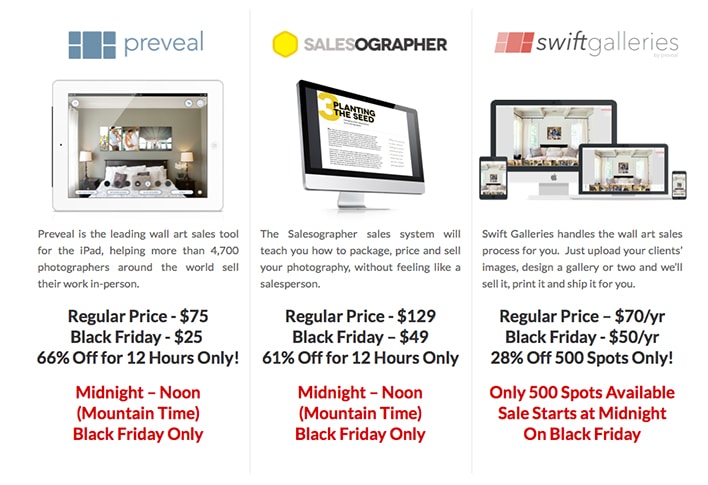
Chris Scott launched Preveal a few years ago as an iPad-only application that helps photographers create wall art for their photography clients. But Chris isn't one to sit still. He felt the iPad application was a good start but it left so many who didn't own the device out in the cold. Well, Chris worked with a developer to create SwiftGalleries.

Chris and I got together to chat about what SwiftGalleries is all about and why photographers should consider this sales tool for their photography business.

Check out this video as well, explaining how SwiftGalleries works:

See Swift Galleries in Action from Preveal on Vimeo.

So, let me ask you … based on what Chris said and the video below it, would you invest in SwiftGalleries for your photography business? It's a whopping $7 per month, according to Scott. Really, to me, that's a no-brainer. But I want to hear from you. Sound-off below to tell me what you think.

And, if you are reading this post before Black Friday or Cyber Monday, do keep your eyes peeled for special offers from Chris here.

Preveal Black Friday & Cyber Monday Specials

Filed Under: Interviews, Photography, Sales, Web/Tech Tagged With: Chris Scott, Creating Wall Art, Photography, Photography Businesses, Sale Tools, Wall Art

Working With Your Designer & Life After the Launch

July 9, 2014 by William Bay

This is the third guest post by William Bay, in a short series about customizing your website. Here are part 1 and part 2 of the series. You might want to read those first before jumping into this last part of the series. Thank you!

Even though developers and photographers get paid to do something artistic and technical, there can be communication pitfalls along the way. You can learn all about it in my new book entitled: Photographers are from Venus and Developers are from Mars. Just kidding. But in all seriousness, language-wise, photographers tend to be more on the artistic side of the spectrum, and developers tend to be on the technical end of things.

Photo by: Cory M. Grenier

Photo by: Cory M. Grenier

Another important aspect is that most designers and developers just want be in front of their computer coding, and not dealing with clients and business issues.

Does that sound familiar, photographers? Yep, you just want to do what makes you happy: photograph, and not deal with clients either.

The reason I’m telling you this is so you can remember these pointers when you feel some level of frustration coming on. All you need to remember is that you’re talking two different languages. The best way to communicate is to use a common language. So, be clear in your speaking and writing. Think before you send a set of instructions. A good thing to ask is “would a 10-year-old understand what I’m asking?” Use diagrams or screenshots if necessary.

Remember, this is your future website. It’s your responsibility to ensure that it turns out the way you want it to. A web developer is your facilitator to help make your dreams come into being, not your punching bag when you can’t understand each other. You’re on the same team.

Whatever you do, don’t “try” to speak the developer’s language. Mistakes will be made, and you’ll look silly. You know when Uncle Bob comes up to you at a wedding and tries to get into a technical conversation with you? Yeah, it’s kinda like that.

The Process

There are different phases to building your custom website. Below is a list of the phases that work for Flaunt Your Site. These are not hard-and-fast rules, and not every developer will go through all these steps. But I’ve found that, for me, utilizing these steps encourages more communication along the way, and minimizes the amount of errors that pop up.

* Wireframe: This is a very simple line drawing of the layout: what content will be on the page, and where it will go i.e. slideshows, content, videos, etc.

* Design Comp or Mock-up: An JPG or PNG image file of what the site will look like. This is usually done in Fireworks or Photoshop, so you can see what the site will look like before the building process starts.

* Scope: The mock up is then looked at very carefully and each element is examined to see if there is a function that it's supposed to perform, like what element links where, are pictures static or part of a slideshow, what things have rollover behaviors, etc.

* Development Site (the Building Process): Usually performed on the developer’s computer, offline. This is where the design comp is turned into an actual website. It’s best to build this offline so clients don’t see “how the sausage is made.” It’s not as disturbing as a slaughterhouse, but you don’t need to see the build process. It’s actually boring and slow.

* Staging Site: When the site is finished and you can actually see it up and running, we put it on a staging server. Many developers have their own server that they’ll use (e.g. client1.flauntyoursite.com). It’s online, so the owner can see the actual site in use. Final changes and bugs are found and fixed. This is also a good opportunity to import any existing content that you have on your site or blog.

* Soft Launch: I like to include what’s called a soft launch phase (not everyone does this, though). This is when the site is pushed onto your server in place of your old site. I know you’re really excited to have everyone come look at your new site, but before you invite the masses, it’s good to test everything in its final live environment. It’s a good practice to have just a couple friends with keen eyes look for mistakes, typos, and any final web gremlins that need to get squashed.

* Hard Launch: The pièce de résistance! All the hard work and months of waiting come to this point where you can blast the whole world, Facebook, and your email list that your new website is open for business. This is when you pop the bubbly.

A Word On When Design Happens, And When Design Changes

Design happens during the design phase. To drive the point home: Design does not happen during the build process or after the Soft Launch.

If you want to change the design that you’ve approved, we will charge you for going back and changing it (frequently called a Change Order). A small tweak might not be a problem, but don’t be surprised if we tell you that you’ll be billed for the change, or that you have to wait till after the site is completed and initiate a Phase 2 on the site. So if you’re on the fence about something in the design, get it resolved right away during the design phase. You can even ask for an extra week to sit with the design to see if you’re 100% happy with the design, or if additional tweaks need to be made.

Again, I’ll remind you that it’s your responsibility for the project turning out the way you want it. But if you’re looking for a quick way to make a developer go from an overweight nerd into a full-on, enormous green rage monster, just tell them that you’d like a design change while they’re in the middle of actually building the site.

Payments

What I’ve found that really works for my clients and myself is to base the payment structure on certain phases from the above list. This is how I typically work (again, all developers are different):

* Initial 1/3 payment: Upon signing contract. (This pays for my time to design a concept).

* Second 1/3 payment: Upon client approval of Design Comp. (This mean that the client likes what they see and they’re committing to building the site).

* Final 1/3 payment: Upon completion of website and prior to Soft-Launch. (This indicates that the developer has done his job and it’s ready to go live).

I do ask for final payment before launch. It’s just the preferred method of ensuring final payment for many developers. It’s our version of “delivery on payment.”

When Problems Arise

Yes, there will be problems. We’re not launching a rocket, but there are still a lot of things to juggle in launching a website. Web developers are people, and occasionally, we make mistakes, so try to be understanding. We’re on your side, and mistakes are just that: mistakes. We’re not intentionally trying to screw up your day.

If multiple mistakes are happening, and it becomes a competency issue, the developer isn’t willing to be open about the cause, or you’re just getting excuse after excuse, then you do have cause for concern. If you’re not sure what you’re dealing with, please feel free to call me. I have no problem helping disputes so feelings don’t get hurt, or people have to revert to legal actions (which is the absolute worst for both parties involved).

Photo by: Randy Merrill

Photo by: Randy Merrill

Life After Launch

This is not the time to make design changes! Okay, just checking to see if you were paying attention.

I say that tongue-in-cheek, but there is the occasional client that waits until after the launch to raise design issues or concerns they’ve had. And while it’s a rather frustrating phenomenon for developers, it’s really just going to end up being costly to you – not to mention, you’ll probably end up at the back of the line of the developer’s client list, since they have promises to other clients. So, again, get your design done during the design phase.

Once you’ve launched, your focus should be on the content – this usually means blog posts and/or photo galleries. If you have existing posts, you may think about going back and figuring out what the best keywords for each post are, and re-optimizing them for search engines. If you have questions on that, Flaunt Your Site offers one-on-one SEO training and we can teach you.

For new content, I would suggest a regular schedule. Every week or every other week depending on how much you shoot. Again, you’ll want to focus on the right keywords for your blog posts (And I guarantee you, it’s not “Your City Wedding Photographer”).

Here Are Some More Tips On How To Take Care Of Your Site:

* Keep WordPress and your plugins updated! Part of the reason WordPress releases updates is because they increase the security measures constantly. Don’t lose all that hard work because you’re running an old version of WordPress.

* Keep the plugins to a minimum. Plugins are really great, but too many will bog down your site. And the wrong ones will open up your site for vulnerabilities.

* Use Google Analytics to track the effectiveness of your site. This includes things like:

o How many visitors do you get?
o What content is the most popular?
o What is your bounce rate for important pages?
o Where are most of your visitors coming from?

* Use the information from Google Analytics to make decisions about the content on your site.

* Visit Google Webmaster Tools every two to three months to ensure that your website is in good standing, and that the Sitemaps are being submitted properly.

* If you have questions about the usage of your site, ask your developer. It’s a good practice to stay in communication about things. I can’t speak for others, but I’m fairly available to my clients afterwards.

Above all else, be proud that you have something custom and unique. You totally deserve to give yourself a high five when you get compliments on how easy to use, or how beautiful your new website is.

Filed Under: Home Middle Right, Photography, Web/Tech Tagged With: Custom Websites, Soft Launch, Web Designer, Web Developer, William Bay

What To Look For When Getting a Custom Website

June 15, 2014 by William Bay

The Web has become an infinitely complex place to bring your business to. A few years back, the WWW could have stood for Wild Wild West instead of World Wide Web. People easily put up Flash-based websites that did cool “things,” proper HTML was forsaken in the attempt to make sites pretty, but these attempts were workarounds and left the realm of solid web development.

Thankfully, albeit gradually, order came in form of thing like: Web Standards, CSS, Search Engine Optimization and Google Best Practices. And of course we can praise Steve Jobs for driving the last nail into Flash’s coffin with the creation of the iPhone and iPad.

Confusing Array Of Options For Photographers

While many of the standards and practices above have made life easier for web users, the implementation of those standards can vex common business owners that just need to get their site up. It can be analogous to herding cats, and requires a broad range of skills to manage. Because of that, I highly recommend that when you do look for someone to build a custom site, you find a Web Developer instead of just a web designer. They will be skilled in the various areas (or have a team of people skilled in those areas). Here are a number of the skills required to put together a solid, custom website:

* General hosting server operations. The knowledge to move sites, and be able to handle Redirects, 404 errors, etc. is absolutely critical.
* PHP, HTML and CSS experience. These coding languages are the building blocks of the Web.
* SEO (Search Engine Optimization). Google's algorithms are constantly changing, and then every 9 months to a year there comes a big change that turns the SEO industry on its head. A good developer will keep up with this or have a person that they work with directly to stay up to date on these changes.
*  WordPress expertise. This is of course assuming you're using the best CMS out there. A developer knows how to use template files, Custom Post Types, and advanced plugins that enhance your custom website.
* Security. Having a secure website is a big deal. There have been a number of brute force attacks on sites that have rendered them completely useless. GoDaddy's entire infrastructure was down for a full day! A developer will know where you should host and what you should do to prevent these types of attacks.
* Mobile. Responsive website design “responds” to the size of the device you're on whether that's desktop, laptop, tablet, or phone (small device). There are very important things to consider when developing and designing for the various sizes. You definitely want someone well versed in that world.
* UX/UI. User Experience / User Interface. Your website is a tool to make sales for you. How efficient it is at doing that will depend on how well your Developer understands the process that people go through when entering a site. A good developer will suggest strong CTAs (Call To Actions) on home page, and wherever else a potential customer could be enticed into reaching out to you.
* Design. Of course, you want this thing to look pretty, right?!

Who To Hire?

Different developers have different strengths. Personally, I'm rock solid when it comes to SEO, HTML, CSS, UX/UI and WordPress, fairly strong when it comes to PHP, server functions, and security. I'm OK with design, but I still want my clients to have great designs. So I hire a great designer for our custom website builds.

Finding a developer that has these areas under control, either by himself or with a team, is a must in order to get the absolute best product. I've heard a lot of stories of people not getting what they expected. I even know a photographer that had a custom site performed, but was told to never update WordPress! This is a very critical step in preventing security problems, and an example of someone not familiar enough with WordPress to make the site work properly.

I also see beautifully designed sites that will never see the light of day if searched on Google because they failed to structure the site properly, and the SEO is poor. Do yourself a favor and interview the developers you have in mind and find out what their knowledge is in each area. Thoroughly test out the sites in their portfolio. Ask yourself if they have good designs (beware of the “I don’t like the paint on the walls” thing that people say on those HGTV shows). Pay attention to the level of design. Do elements on the page stick out, do they do a good job of balancing the needs of a website with the design, do the sites look like they were designed in the 90’s, does it appear that the designs get better with each and every website?

I'm happy to help you find the right person too. Even if Flaunt Your Site isn’t the right fit, I often help people figure out what the best path is for them. And we’re not always the answer. (I'll even pose as your web developer brother that works for Qualcomm and can't work on your project, if it helps you).

Weird Options For Photographers

Who Not To Hire

* First and foremost, avoid anyone that mentions the word Flash. That should elicit the response of you hanging up the phone, or pretending you don’t speak English. Even if they say it’s mobile friendly, you should still print their email out, and then light it on fire. (Cackling like a witch is totally optional.)
* Anyone spouting anything about HTML5 or CSS3 or other technical mumbo jumbo to influence you into working with them. First, websites are about people and their businesses. The developer’s job is to use the technology to accomplish your goals, not to use buzzwords as leverage to get you to hire them. (I’ll also add that HTML5 doesn’t mean what most people think it means).
* Someone without a portfolio, or a list of previous clients and links to their site. You really want to look at the websites they’ve worked on before.
* The guy that will do an “amazing full custom website” for $500…

Do you remember the last time a $500 wedding turned out “amazing?”  … Yeah, neither do I.

What Developers Cost

Cost is, of course, a huge factor to consider. Custom websites can vary from developer to developer. It will also vary depending on what functionality you want for your site. To give you a range, Flaunt Your Site does full custom sites from $3,000 to $5,000. We can do sites beyond that price point as well, but that tends to be the averages when it comes to our clients.

You will find developers that charge less than that, and you’ll find developers that charge more than that. My suggestion would be to interview more than one person for your project. Just as your clients have no doubt interviewed more than just you to find out who the right photographer.

Whether you hire someone for $1,000 or $10,000, your aim should be to have your new website be the type of investment that actually makes you money. If this isn’t on yours or your developer’s radar, you need to make it a priority quickly. If you’re doing it just to have a pretty site, then that is narcissism or “keeping up with the Joneses” getting in the way of running your business.

The only reason to spend money on a custom site is to increase your bottom line.

I have a personal goal that each website Flaunt Your Site does is directly responsible for our clients gaining 5-10 new clients in that first year.

Be sure to read William Bay's first article in this series.

Filed Under: Home Middle Left, Photography, Web/Tech Tagged With: blog software, content management systems, custom, Custom Designs, Custom Web Design, Custom Websites, Design, Design Website, Flash Based Websites, google, Html, Markup Languages, Photographers, Photography Businesses, php programming language, Pretty Websites, Responsive Website, search engine optimization, Secure Website, Web Development, web display, Website, Website Building, Website Design, Website Launch, websites, Websites Security, William Bay, wordpress

  • « Previous Page
  • 1
  • 2
  • 3
  • 4
  • 5
  • …
  • 20
  • Next Page »

Subscribe To Tiffibox Treats!

Looking for a well-curated email newsletter that will leave you inspired and motivated about your photography business? Sign up below!

About Seshu

Seshu creates relaxed portraits of families and high school seniors in Avon, Connecticut. He also leads a successful headshot photography studio in Connecticut, helping professionals from a variety of disciplines project the very best versions of themselves. He created Tiffinbox as a way of inspiring photographers, to create better images and successful businesses. [Read More]

Email Templates For Headshot Photographers

Email Templates for Headshot Photographers

Recent Posts

  • How Capture One Changed My Event Photography
  • 10 Steps To Stay Positive In Times Of Great Stress
  • Why You Need To Read “Personal Branding For Photographers” Now
  • How To Master Your Website Content Step By Step?
  • Tony Taafe’s TNT Method For Headshot Photographers

Recent Comments

  • Stephen Davison on Are You A Business Owner Who Is Smart, But Stuck?
  • Ben A. on Don Giannatti Clinches The 8th Annual Tiffinbox Award
  • Dan on Don Giannatti Clinches The 8th Annual Tiffinbox Award
  • Donald Giannatti on Don Giannatti Clinches The 8th Annual Tiffinbox Award
  • Stephen Davison on G.E. Masana’s 6 Strategies For Wedding Photography Success
  • Naveen Kumar on Weddings In India Are More Than Being At The Right Place And At The Right Time
  • kartick on Weddings In India Are More Than Being At The Right Place And At The Right Time
  • Leonid Farbman on 6 Uncommon Trends To Grow Your Photography Business
  • Willow and Finch Wedding Photography on 11 Reception Tips To Help Your Wedding Photography
  • Web Designer Malaysia on How To Optimize Your Squarespace Website For Search Engines
  • Creastan on An Interview With Photojournalist G.M.B. Akash
  • Cindy Brown | Atlanta on An Open Letter To A Local Photographer

Become a Patron!

Copyright © 2026 · Tiffinbox · Site Design by Heather Mackan Creative · Built on Genesis